Folasaga
This manual provides detailed instructions for the NUX Mighty 60 MKII 60-Watt Guitar Modeling Amplifier. Please read this manual thoroughly to ensure proper operation and to maximize the performance of your amplifier. Retain this manual for future reference.
Vaega Autu
- 60 Watts Fa'ata'ita'iga Ampola: Features adjustable wattage settings (0.5W/5W/60W) for versatile use.
- TS/AC-2K (Pusa Pa'epa'e) Amp Modeling: Advanced algorithm provides realistic playability and feedback.
- Pedal-Friendly Design: Optimized to integrate seamlessly with external pedals.
- 7 Presets with ACTIVATION: Includes 3 Pro Scenes per preset for quick sound recall.
- 43 Available Effects: GATE, COMP, EFX, AMP, EQ, MOD, DLY, RVB effect blocks with free, fully routable order.
- 30-Second Phrase Loop: Equipped with an auto tempo detection drum machine.
- Patch Level Function: Individual level control for each preset.
Ua Umaview

Ata 1: Luma view of the NUX Mighty 60 MKII 60-Watt Guitar Modeling Amplifier. O lenei ata o loʻo faʻaalia ai le amplifier's speaker grille and the NUX logo, indicating its primary aesthetic design.
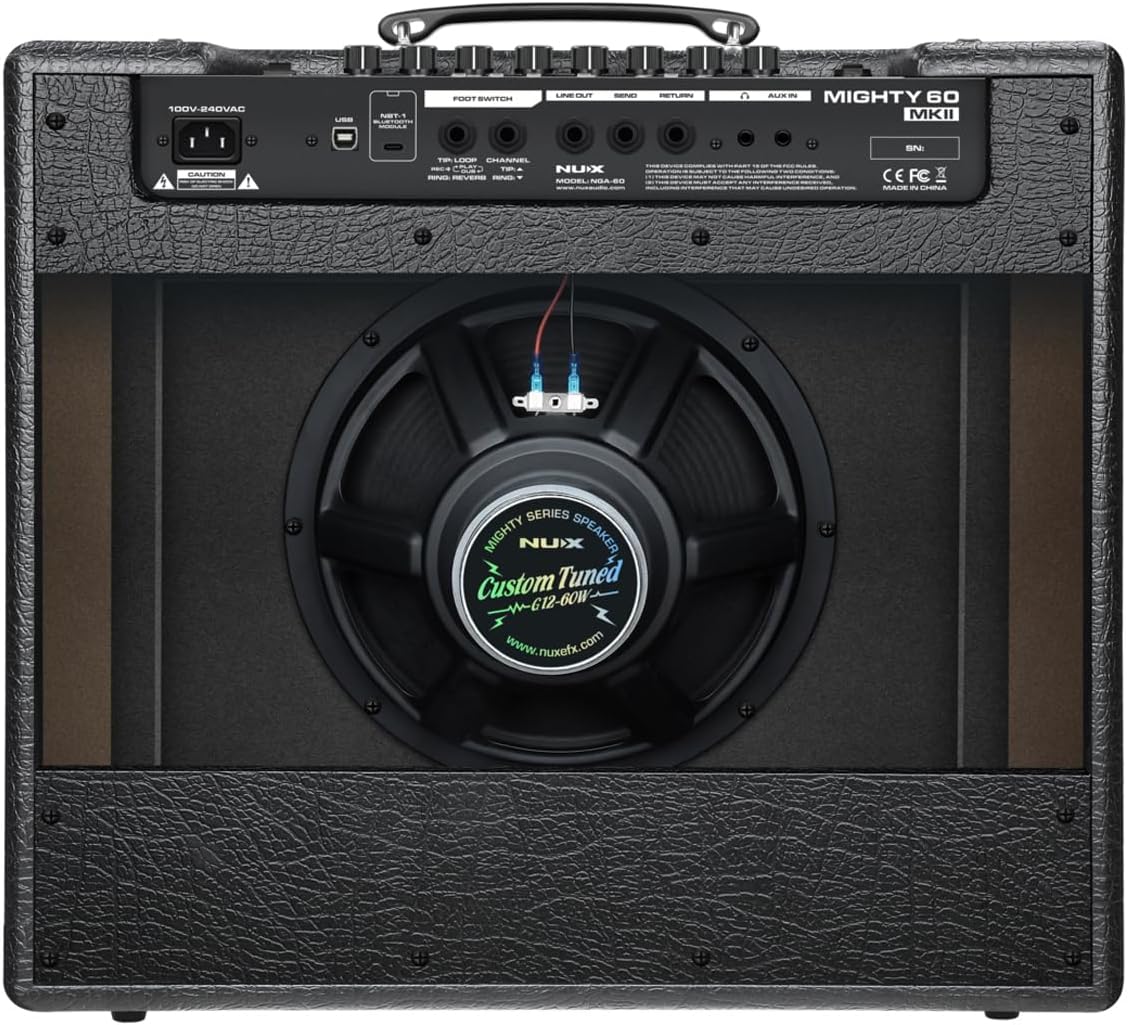
Ata 2: Tua view of the NUX Mighty 60 MKII 60-Watt Guitar Modeling Amplifier. This image highlights the various input/output jacks, power connection, USB port, footswitch input, and the custom-tuned speaker (Model: NGA-60, WV-G12-60W).
Seti
- So'oga Malosi: Fa'afeso'ota'i le uaea eletise tu'u atu i le amplifier's power input (100V-240VAC) and then to a suitable power outlet.
- Instrument Input: Plug your guitar into the "INPUT" jack on the front panel.
- Footswitch (Optional): If using an external footswitch, connect it to the "FOOT SWITCH" jack on the rear panel.
- AUX Input (Optional): For connecting external audio devices (e.g., MP3 player), use the "AUX IN" jack.
- Feso'ota'iga USB (Filifili): Connect a USB cable to the "USB" port for firmware updates or computer-based editing.
- Line Out/Send/Return (Optional): Utilize the "LINE OUT," "SEND," and "RETURN" jacks for connecting to external effects loops, mixers, or audio interfaces.
Ia mautinoa o lo'o malupuipuia uma so'oga a'o le'i fa'aola le ampola
Fa'atonuga o Galuega
Malosiaga Ki/Pepe
- To power on, ensure all connections are made, then flip the power switch located on the rear panel.
- Ina ia tape le eletise, fuli le ki o le eletise i le tulaga OFF.
Pulea Autu
The front panel features controls for Gain, Volume, Tone, and Master Volume. Adjust these to achieve your desired sound. Refer to the amplifier's display for current settings and selected presets.
Fa'atonu Filifiliga
The Mighty 60 MKII offers 7 main presets, each with 3 Pro Scenes. Use the dedicated controls or an optional footswitch to navigate and select presets. Each preset's level can be adjusted independently using the Patch Level function.
Fa'atonu Wattage
O le amplifier features adjustable wattage settings (0.5W, 5W, 60W). This allows for optimal performance in various environments, from quiet practice to live stage use. Select the appropriate wattage ala i le amppulega a le lifier.
Effects and Loop Function
Aafiaga Fausia
O le amplifier includes 43 effects categorized into GATE, COMP, EFX, AMP, EQ, MOD, DLY, and RVB blocks. These effects can be freely routed and customized to create a wide range of tones. Consult the full software manual (available online) for detailed effect parameters and routing options.
30-Second Phrase Loop
Engage the phrase loop function to record and playback up to 30 seconds of audio. The integrated auto tempo detection drum machine provides rhythmic accompaniment, making it suitable for practice and songwriting. Follow the on-screen prompts or refer to the detailed operational guide for recording, overdubbing, and playback procedures.
Tausiga
- Fa'amamaina: Fa'aaogā se ie mālū ma mago e fa'amama ai le amplifier's exterior. Avoid abrasive cleaners or solvents.
- Teuina: Teu le amplifier in a dry, cool environment away from direct sunlight and extreme temperatures.
- Savili: Ia mautinoa lelei le ea savili faataamilo i le amplifier to prevent overheating. Do not block air vents.
- Felauaiga: When transporting, ensure the amplifier is securely packed to prevent physical damage.
Fa'afitauli
- Leai se leo:
- Check power connection and ensure the ampua ki le liifier.
- Verify instrument cable connection and ensure the guitar's volume is up.
- Siaki amplifier's master volume and channel volume settings.
- Test with a different instrument cable or guitar.
- Leo fa'asese:
- Reduce the Gain or Volume settings.
- Ensure the speaker is not damaged.
- Check for proper impedance matching if using an external speaker cabinet (not applicable for this combo amp unless using line out).
- A'afiaga e Le Galue:
- Ensure effects are enabled within the selected preset.
- Check effect parameters and mix levels.
- Consult the software manual for detailed effect configuration.
- Footswitch Issues:
- Ensure the footswitch is correctly connected to the "FOOT SWITCH" jack.
- Verify footswitch compatibility with the Mighty 60 MKII.
If issues persist, contact NUX customer support or a qualified service technician.
Fa'amatalaga
| Fa'aaliga | Fa'amatalaga |
|---|---|
| Fa'ailoga | NUX |
| Igoa Fa'ata'ita'iga | Malosi 60 MKII |
| Tuuina atu Wattage | 60 Watts (Adjustable: 0.5W/5W/60W) |
| Fua o Mea | 11.4"D x 18.9"W x 21.9"L |
| Mea mamafa | 12 pauna |
| Fofoga Fetalai | Custom Tuned WV-G12-60W (Model NGA-60) |
| Aafiaga | 43 (GATE, COMP, EFX, AMP, EQ, MOD, DLY, RVB) |
| Fa'atonu | 7 with 3 Pro Scenes each |
| Looper | 30 seconds with auto tempo drum machine |
Fa'amaonia ma Lagolago
For warranty information and technical support, please refer to the official NUX website or contact your local NUX dealer. Keep your proof of purchase for warranty claims.
NUX Official Webnofoaga: www.nuxefx.com


