1. Folasaga
Thank you for choosing the Novodesk AZ5130 6-in-1 Automatic Vacuum Sealer Machine. This manual provides essential information for the safe and efficient operation, maintenance, and troubleshooting of your new appliance. Please read these instructions thoroughly before first use and retain them for future reference.

Image 1.1: The Novodesk AZ5130 Vacuum Sealer in operation, sealing food for preservation.
2. Fa'atonuga Taua mo le Saogalemu
Pe a fa'aogaina mea tau eletise, e tatau lava ona mulimulita'i puipuiga fa'avae mo le saogalemu e fa'aitiitia ai le lamatiaga o le mu, fa'ate'i eletise, ma manu'a i tagata, e aofia ai mea nei:
- Faitau fa'atonuga uma a'o le'i fa'aogaina lenei masini.
- Do not operate the appliance with a damaged power cord or plug. If the cord or plug is damaged, contact customer support for assistance.
- Aua le faatofuina le masini, uaea eletise, po'o le palaka i vai po'o isi vai.
- O lenei masini e le o faamoemoe mo le faʻaaogaina e tagata (e aofia ai tamaiti) e faʻaitiitia le malosi o le tino, lagona, poʻo le mafaufau, poʻo le leai o se poto masani ma le malamalama, seivagana ua tuʻuina atu ia i latou le vaavaaiga poʻo le faʻatonuga e uiga i le faʻaaogaina o le masini e se tagata e nafa ma lo latou saogalemu. .
- E mana'omia le va'ava'ai toto'a pe a fa'aogaina so'o se masini e pe latalata i tamaiti.
- Aveese mai fafo pe a le faʻaaogaina ma aʻo leʻi faʻamamaina. Fa'ataga e mālūlū a'o le'i fa'aofu pe to'ese vaega, ma a'o le'i fa'amama le masini.
- Aua ne'i fa'aogaina mea fa'apipi'i e le'i fautuaina e le kamupani gaosi mea.
- Aua le fa'aoga i fafo.
- Aua ne'i tu'u i luga pe latalata i se kesi vevela po'o se afi afi, po'o totonu o se ogaumu fa'avela.
- Always ensure the lid is properly latched before operating.
- Use only vacuum sealer bags designed for vacuum sealing.
3. Mea i totonu o le afifi
Carefully unpack your Novodesk AZ5130 Vacuum Sealer and check that all items are present and in good condition. If any items are missing or damaged, please contact customer support.
- 1 x Novodesk AZ5130 Vacuum Sealer Machine
- 1 x Maea Mana
- 1 x Vacuum Hose (for external vacuuming)
- 2 x Sealing Foam Gaskets (replacement)
- 6 x Pre-cut Vacuum Bags (3.9" x 7.8")
- 6 x Pre-cut Vacuum Bags (7.8" x 11.8")

Image 3.1: All components included in the Novodesk AZ5130 Vacuum Sealer package.
4. Oloa Ua Ovaview
Familiarize yourself with the various parts and functions of your vacuum sealer.

Image 4.1: Control panel and function buttons of the vacuum sealer.
Galuega Fa'atonu:
- Process Indicator Light: Illuminates to show operating status.
- Faiga matutu: For vacuum sealing dry foods like nuts and grains.
- Moist Mode: For vacuum sealing foods with a small amount of liquid.
- Gaioiina o fatu: Allows manual control of the vacuum process, ideal for fragile foods.
- Seal Function: Seals bags without vacuuming.
- Taofi Faamau: Taofi le gaioiga o loʻo iai nei.
Image 4.2: Internal components of the vacuum sealer.
Vaega Autu:
- Potu gaogao: Area where air is removed from the bag.
- Silicone Strip: Helps create a tight seal.
- Fa'amauga Fa'amau: Heats to create the bag seal (4mm wide).
- Foam Seal Ring: Ensures proper vacuum.
- Cover Slaps: Prevents the vacuum bag from coming out of the vacuum chamber.
- External Sliding Cutter: Integrated cutter for custom bag sizes.
- External VAC Port: For connecting the vacuum hose to jars and containers.
5. Seti
Before first use, ensure the appliance is clean and dry. Place the vacuum sealer on a flat, stable surface.
Laasaga Muamua o le Seti:
- Connect the power cord to the appliance and then to a suitable electrical outlet.
- Prepare your vacuum bag with food, ensuring the open end is clean and dry. Leave at least 2-3 inches of space between the food and the top of the bag.
6. Fa'atonuga o Galuega
6.1. Basic Vacuum Sealing (Dry & Moist Modes)
Follow these steps for standard vacuum sealing of food bags:
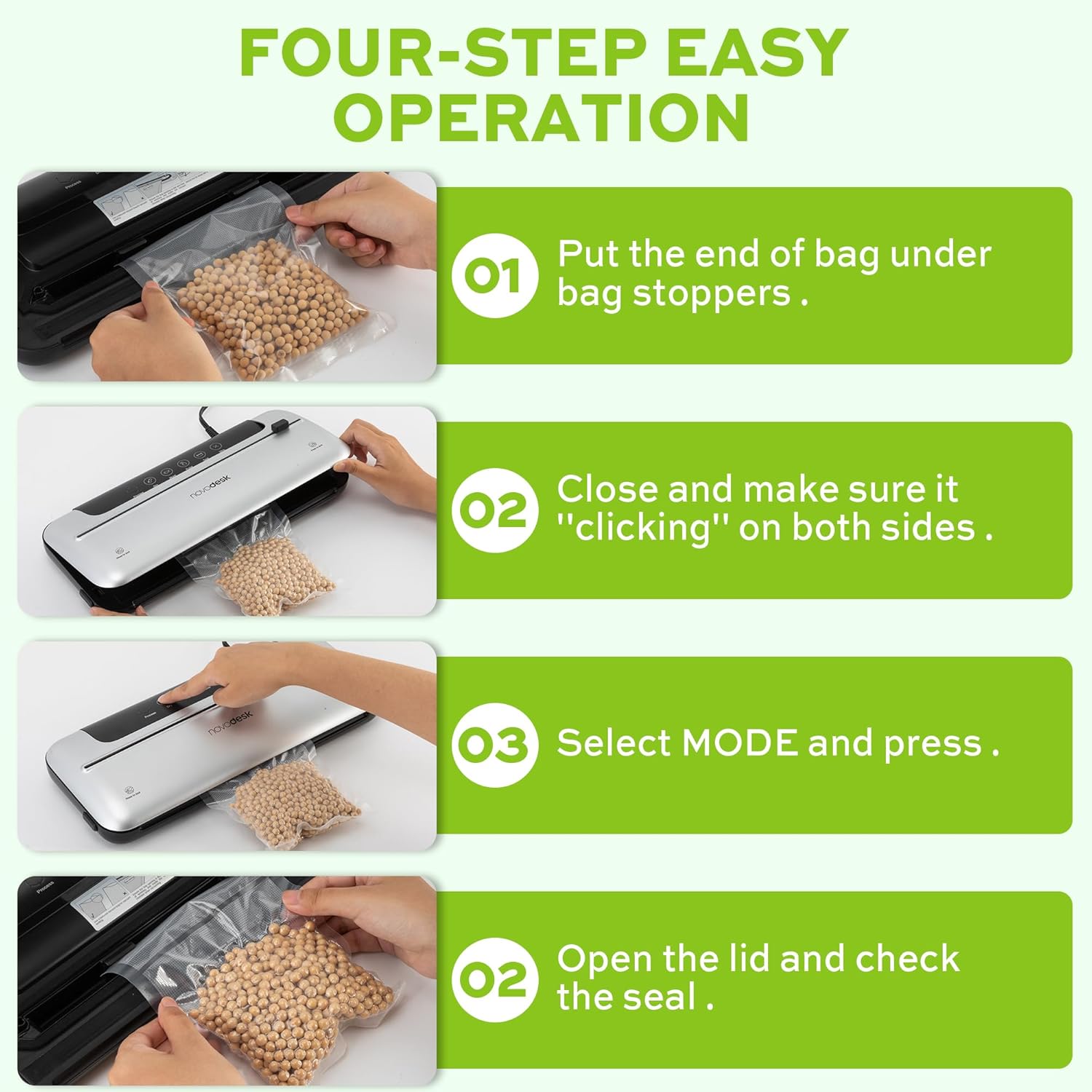
Image 6.1: Four-step easy operation for vacuum sealing.
- Saunia le ato: Place the open end of the vacuum bag under the bag stoppers, ensuring it is flat and centered within the vacuum chamber.
- Tapuni le Ufi: Firmly close the lid of the vacuum sealer. Press down on both sides until you hear a "clicking" sound, indicating that the lid is securely latched.
- Filifili Faiga: Choose the appropriate mode for your food:
- Oomi le mago button for dry foods.
- Oomi le Susū button for moist foods.
- Siaki le Faamaufaailoga: Once the process is complete and the indicator light turns off, open the lid and remove the sealed bag. Inspect the seal to ensure it is airtight.
6.2. Pulse Function
The Pulse function provides manual control over the vacuum process, which is ideal for delicate or fragile foods that could be crushed by full vacuum pressure.
- Follow steps 1 and 2 from "6.1. Basic Vacuum Sealing".
- Oomi ma uu le Pusa button. The machine will begin to vacuum.
- Fa'asa'oloto le Pusa button when the desired vacuum level is reached.
- Oomi le Faamaufaailoga faamau e faamau ai le taga.
- Open the lid and remove the sealed bag.
6.3. Galuega Fa'amaufa'ailoga
Use the Seal function to create a seal without vacuuming, useful for making custom-sized bags from a roll or resealing snack bags.
- Tuu le pito tatala o le taga i luga o le fasipepa faamau.
- Tapuni mau le tapuni se'ia kiliki.
- Oomi le Faamaufaailoga faamau. O le a fa'avevela ma fa'amaufa'ailoga e le masini le taga.
- Once the sealing process is complete, open the lid and remove the sealed bag.
6.4. External Vacuum Function (for Jars/Containers)
Your vacuum sealer includes an external vacuum hose for use with compatible vacuum-sealable jars, containers, and wine stoppers.

Image 6.2: Using the external vacuum system with various containers.
- Prepare your vacuum-sealable jar or container with food. Ensure the lid is properly placed.
- Insert one end of the vacuum hose into the external VAC port on the vacuum sealer.
- Insert the other end of the vacuum hose into the port on your vacuum-sealable jar or container.
- Close the lid of the vacuum sealer (no bag needed inside).
- Oomi le External VAC button (if available, otherwise use Dry/Moist mode to activate vacuum pump). The machine will begin to remove air from the container.
- Once the vacuum process is complete, remove the hose. The container should now be sealed.
6.5. Using the External Sliding Cutter
The integrated sliding cutter allows you to create custom-sized bags from a roll of vacuum sealer material.
- Place the vacuum bag roll across the cutting area.
- Slide the cutter blade across the bag material to achieve the desired length.
7. Tausiga ma Fa'amamā
Regular cleaning and maintenance will ensure the longevity and optimal performance of your vacuum sealer.
Fa'atonuga Fa'amamā:
- Aveese i taimi uma le masini a'o le'i fa'amamā.
- Solo le pito i fafo o le masini i se mea vaivai, oamp ie. Aua ne'i fa'aogaina ni mea fa'amama fa'afefete po'o ni solu.
- Clean the vacuum chamber and sealing strip area with a damp cloth. Ensure no food particles or liquids remain.
- The foam seal rings can be removed for cleaning if necessary. Wash with mild soap and water, rinse thoroughly, and allow to air dry completely before reinserting.
- Ensure all parts are completely dry before storing or using the appliance again.
Teuina:
Store the vacuum sealer in a clean, dry place. For best results, store with the lid unlatched to prevent compression of the foam seal rings, which can affect sealing performance over time.
8. Faʻafitauli
If you encounter issues with your vacuum sealer, refer to the following common problems and solutions:
| Fa'afitauli | Mafuaaga e ono tupu | Fofo |
|---|---|---|
| E le ola le masini. | Leai se eletise. | Siaki pe fa'amau lelei le uaea eletise i le so'o ma le masini. Fa'ata'ita'i le pusa i se isi masini. |
| E mafai e le masini ona fa'amamā ae e le fa'amaufa'ailogaina. | Sealing strip or foam gasket is dirty/damaged. Bag is not positioned correctly. | Clean the sealing strip and foam gaskets. Ensure the bag is flat and centered over the sealing strip. Replace gaskets if damaged. |
| E fa'amaufa'ailoga e le masini ae e lē fa'amamāina. | Lid not properly latched. Foam gaskets are dirty or worn. Bag has holes or is not suitable. | Ensure the lid is firmly closed and latched on both sides. Clean or replace foam gaskets. Use proper vacuum sealer bags and check for damage. |
| Vacuum is weak or inconsistent. | Foam gaskets are dirty or worn. Too much liquid in the bag (for Dry mode). | Clean or replace foam gaskets. Use Moist mode for foods with liquid, or pre-freeze liquids. |
| Bag melts during sealing. | Sealing time too long (unlikely for automatic models). | Ensure you are using appropriate vacuum sealer bags. If issue persists, contact customer support. |
If the problem persists after attempting these solutions, please contact Novodesk customer support for further assistance.
9. Fa'amatalaga
| Fa'ailoga | Novodesk |
| Numera Fa'ata'ita'i | AZ5130 |
| Malosiaga / Wattage | 120 watts |
| Voltage | 120V |
| Mea | Acrylonitrile Butadiene Styrene (ABS) |
| Mea mamafa | 980 g (2.16 pauna) |
| Lanu | siliva |
| Faiga Fa'agaioiga | Otometi |
| Malosi o le Suction | 75KPa |
| Lautele o Faamauga | 4mm |
10. Fa'amaonia ma Lagolago
Novodesk products are manufactured to high-quality standards. For information regarding warranty coverage, product support, or to purchase replacement parts, please refer to the warranty card included with your product or visit the official Novodesk website. If you have any questions or require assistance, please contact Novodesk customer service.

