Folasaga
This manual provides comprehensive instructions for the setup, operation, and maintenance of your ZEISS Secacam 7 Classic Trail Camera. Designed for observing wildlife, this camera captures high-quality photos and videos day and night. Please read this manual carefully before using the device to ensure optimal performance and longevity.
Ua Umaview
The ZEISS Secacam 7 Classic is a robust trail camera featuring a wireless connection, a 32 GB SD card, and a color LCD display. It is equipped with an infrared flash and a light-sensitive photo sensor for clear recordings in various lighting conditions.

Ata 1: Luma View of ZEISS Secacam 7 Classic. This image shows the front of the trail camera, featuring its camouflage casing, lens, and infrared sensor.
Vaega Autu:
- Mata tioata: Pu'e ata ma vitiō.
- Infrared Sensor: Detects motion and triggers recording.
- Status Indicator & Light Sensor: Provides operational feedback and adjusts settings based on ambient light.
- LED Field (60 LEDs): Provides infrared illumination for night vision.
- Loka kilipi: Secures the camera housing.
- Eylet for Attaching Locks: Allows for securing the camera against theft.
- 2.4" TFT-LCD Color Display: For menu navigation and viewi le pueina.
- Pule Fa'amau: ON/SETUP/OFF switch, OK, MENU, PLAY, and directional arrows for navigation.
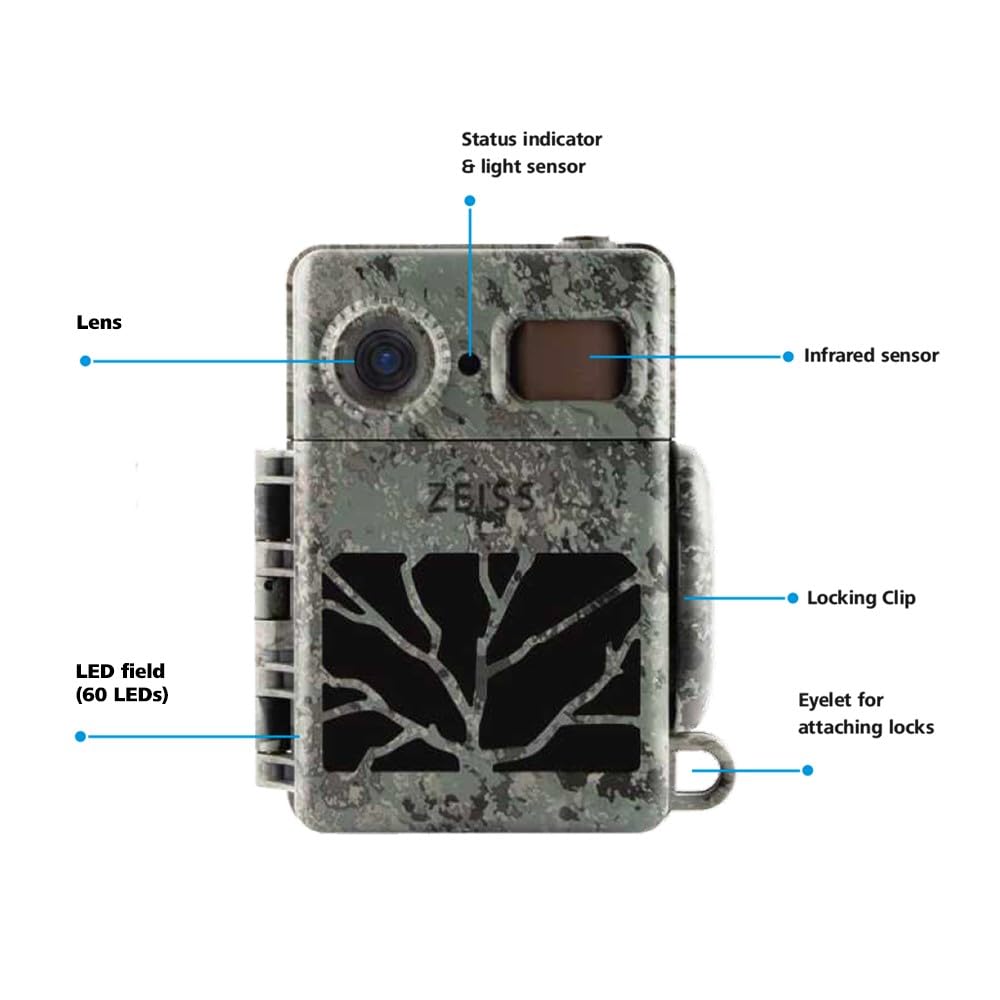
Figure 2: Internal Display and Controls. This image displays the camera with its front cover open, revealing the 2.4-inch color LCD display and the control buttons for operation.
Seti
1. Fa'apipi'i ma'a
The ZEISS Secacam 7 Classic requires 8 AA batteries for operation. Ensure to use high-quality alkaline or rechargeable batteries.
- Open the camera's housing by releasing the locking clips.
- Su'e le vaega o le maa.
- Insert 8 AA batteries, paying close attention to the correct polarity (+/-) indicated inside the compartment.
- Tapuni lelei le vaega o le maa.

Figure 3: Battery Installation. This image illustrates the process of inserting AA batteries into the camera's designated compartment.
2. Fa'apipi'i SD Card
A 32 GB SD card is included with your camera. This card is essential for storing photos and videos.
- With the camera housing open, locate the SD card slot, typically near the display.
- Insert the 32 GB SD card into the slot until it clicks into place. Ensure the card is inserted in the correct orientation.
- Ina ia aveese, tulei mālie le kata i totonu se'ia o'o ina puna i fafo.
3. Fa'amauina le Meapueata
The camera can be mounted using the included mounting girdle.
- Select a suitable location, such as a tree or post, ensuring a clear view o le eria mata'ituina e mana'omia.
- Thread the mounting girdle through the designated slots on the back of the camera.
- Securely fasten the girdle around the mounting surface.
- Open the camera's front flap to access the display. The lens is fixed to the front, allowing you to check the coverage area on the display and adjust the camera's angle for optimal positioning.
- Once positioned, close the front flap and secure the locking clips.

Figure 4: Camera Mounted (Closed). This image shows the camera securely attached to a tree, ready for operation.
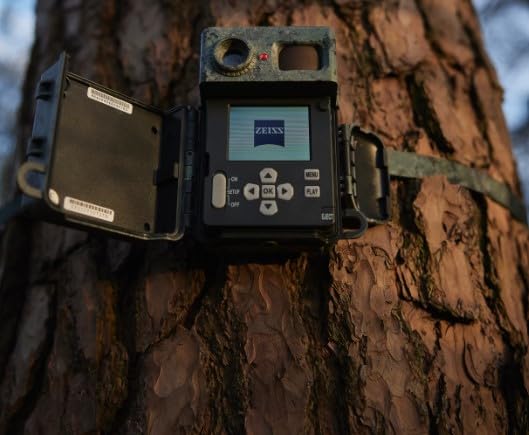
Figure 5: Camera Mounted (Open for Alignment). This image demonstrates the camera mounted on a tree with its front cover open, allowing for precise alignment using the internal display.
Fa'atonuga o Galuega
Powering On/Off and Setup Mode
- To power on the camera and enter setup mode, slide the ON/SETUP/OFF switch to the "SETUP" position. The display will activate.
- To power off the camera, slide the switch to the "OFF" position.
- To activate the camera for monitoring, slide the switch to the "ON" position after completing setup. The status indicator will blink, and the camera will enter monitoring mode.
Lolomi Faʻamatalaga
Use the directional arrow buttons (Luga, Lalo, Agavale, Taumatau) to navigate through menu options. Press the OK faamau e faamaonia ai filifiliga. Oomi le MENU button to access the main menu or go back to the previous screen.
Fa'atonu Fa'atonu
In "SETUP" mode, press the MENU button to access various settings, including:
- Faiga: Select between Photo, Video, or Photo+Video.
- I'uga: Set image and video quality.
- PIR nofouta: Adjust the motion sensor's sensitivity.
- Trigger Interval: Define the delay between consecutive recordings.
- Taimi & Aso: Seti le taimi ma le aso.
- Faatulaga SD Card: Erase all data on the SD card. (Caution: This will delete all stored files.)
Viewi Faʻamaumauga
In "SETUP" mode, press the TALI button to enter playback mode. Use the directional arrows to browse through captured photos and videos. Press OK ia view se mea ua filifilia.
Tausiga
Fa'amamaina
- Solo le pito i fafo o le meapueata i se vai vaivai.amp ie.
- For the lens and display, use a specialized lens cleaning cloth and solution to avoid scratches.
- Ensure all ports and seals are free of dirt and debris to maintain water resistance.
Suiga maa
Replace batteries when the low battery indicator appears on the display or when performance degrades. Always replace all 8 batteries simultaneously with new ones.
Teuga
When not in use for extended periods, remove the batteries to prevent leakage and store the camera in a cool, dry place.
Fa'afitauli
| Fa'afitauli | Mafuaaga e ono tupu | Fofo |
|---|---|---|
| E le o ola le meapueata. | Pepe pe sese le faaofiina o maa. | Check battery polarity, replace with fresh batteries. |
| No photos/videos captured. | SD card full, incorrectly inserted, or corrupted; PIR sensitivity too low; camera in OFF mode. | Format or replace SD card; adjust PIR sensitivity; ensure camera is in ON mode. |
| Le lelei le tulaga o ata i le pō. | Ua poloka LED infrared; ua maualalo le malosi o le maa. | Clear any obstructions from LEDs; replace batteries. |
| Fa'aaliga e le o galue. | Camera not in SETUP mode; display settings. | Ensure switch is in SETUP position; check display brightness settings in menu. |
Fa'amatalaga
| Fa'aaliga | Fa'amatalaga |
|---|---|
| Numera Fa'ata'ita'i | ZEISS SECACAM 7 Classic |
| Fa'aaliga | 2.4" TFT-LCD Color Display |
| Sensori | Infrared Sensor, Light Sensor |
| Vaaiga i le Po | 60 Black LEDs (Infrared Flash) |
| Included Memory | 32 GB SD Card |
| Feso'ota'i | Wireless, Matter Protocol |
| Punavai Malosi | Battery Powered (8x AA) |
| Galulue Vevela | -20 °C ~ 55 °C |
| Fua (LxWxH) | 14.3 x 12 x 7.5 Sinimita |
| mamafa | 440 g |
| I'uga o Pu'e Vitio | 1080p |
| Ituaiga Fa'amau | Mauga Laau |
| Fa'aoga i totonu/I fafo | I fafo |
Fa'amaonia ma Lagolago
Your ZEISS Secacam 7 Classic Trail Camera comes with a standard manufacturer's warranty. An optional 1-year extended warranty may be available for purchase.
For technical support, service, or warranty claims, please contact ZEISS customer service.
- Tufuga: ZEISS, Carl-Zeiss-Strasse 22, 73447 Oberkochen, Germany
- Fa'aulufale mai (Initia): Carl Zeiss India (Bangalore) Pvt Ltd., Plot No. 3, Jigan Link Road, Bommasandra Industrial Area Bangalore 560099 India
- Aso Muamua Maua: 3 Iuni 2024
Fa'amolemole taofi lau fa'amaoniga o le fa'atau mo fa'amoemoega fa'amaonia.


