1. Folasaga ma le Fa'asoloview
The KickAss Flexicharge 32A Smart 12V Battery Charger is an advanced, microprocessor-controlled charging unit designed for optimal battery health and longevity. It features a 9-stage smart charging process, adjustable output, and compatibility with various battery chemistries, including Lead Acid, AGM, Gel, Lithium, and LiFePO4. This manual provides essential information for safe and effective operation of your charger.

Image 1: The KickAss Flexicharge 32A Smart 12V Battery Charger with its power cable, Anderson connector, and alligator clamps.
2. Vaega Autu
- Otometi 9-Stage Smart Charging: Utilizes a high-tech microprocessor to manage the charging process in nine distinct stages, ensuring optimal current and voltage delivery for maximum efficiency and battery longevity.
- Fast Charge with 32A Peak Output: Delivers a peak output of 32A per hour, significantly reducing charging time while optimizing the charging process through advanced smart charging technology.
- Adjustable Output for Various Battery Sizes: Offers adjustable amperage outputs of 8A, 16A, and 32A, providing versatility for different battery capacities and charging needs.
- Compatibility with Multiple Battery Chemistries: Supports a wide range of battery types including AGM, Gel, Lithium, LiFePO4, and Lead Acid, with adjustable amperage to suit specific battery requirements.
- Lithium Activation Mode: Capable of reviving lithium batteries that have fallen below their Battery Management System (BMS) safety voltage parameters, charging them until the cut-in voltage is reached for normal charging to resume.
- AGM Recondition Mode: Designed to restore the capacity and performance of AGM batteries by breaking down lead sulphate deposits, particularly useful for deeply discharged or long-unused batteries.
- Multiple Protection Features: Includes short circuit protection, overheating protection, and other safeguards to protect your valuable battery and the charger itself.
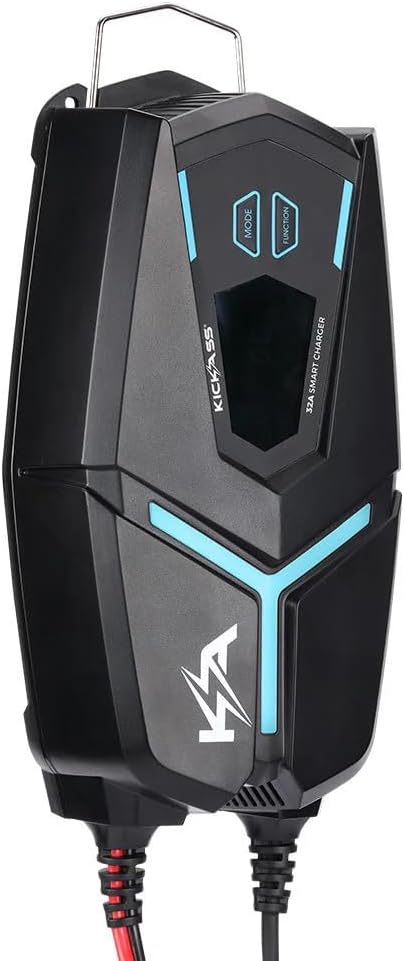
Image 2: Close-up of the charger's display and control buttons (MODE, FUNCTION).
3. Seti ma So'oga
Before operating the charger, ensure all connections are secure and correct. The charger comes with both Anderson connectors and alligator clamps for versatile connection options.
3.1 Connecting to a Battery
- Ensure the charger is disconnected from any power source.
- Connect the desired battery connection accessory (Anderson connector or alligator clamps) to the charger's output port.
- Mo alligator clamps, connect the red positive (+) clamp i le pito i tua lelei o le maa ma le pito uliuli leaga (-)amp i le pito i tua o le maa. Ia mautinoa o loʻo saogalemu le fesoʻotaʻiga.
- For Anderson connectors, ensure the battery is equipped with a compatible Anderson plug and connect it securely to the charger's output.
- Once connected to the battery, you can then connect the charger to a 240V AC power outlet.

Image 3: Alligator clamps and Anderson connector for connecting the charger to a battery.
4. Fa'atonuga o Galuega
The Flexicharge 32A Smart Charger offers various modes for charging and testing your battery and vehicle's electrical system.
4.1 Battery Health Check (Battery Test Mode)
This mode allows you to quickly assess the health of your battery, cranking system, and alternator. The charger provides visual feedback (blue for good, yellow for fair, red for bad) on the display.
- Connect the charger to your vehicle's battery using the alligator clamps as described in Section 3.1.
- The charger will automatically begin its first test, displaying the battery's measurement.
- To check the cranking health, press the GALUEGA button. The charger will display the cranking power.
- To check the alternator health, press the GALUEGA button again. The charger will display the alternator's performance.
Video 1: Demonstrates how to use the KickAss Flexicharge 32A Smart Charger to check battery, cranking, and alternator health. The video shows connecting the clamps, interpreting the blue (good), yellow (fair), and red (bad) LED indicators for each test.
4.2 Faiga Fa'atonu
The charger automatically detects the battery type and selects the appropriate charging mode. You can also manually select specific modes or adjust ampmatua.
- Totogiina otometi: Once connected to a battery and power, the charger will automatically begin the 9-stagu fa'agasologa o le totogiina.
- Fetuunaiga Ampvaitausaga: Fa'aaoga le TULAGA button to cycle through available amperage settings (8A, 16A, 32A) to match your battery's capacity and charging requirements.
- Lithium Activation Mode: If a lithium battery is deeply discharged, this mode will attempt to bring it back to a voltage where normal charging can commence.
- AGM Recondition Mode: For AGM batteries that have suffered from sulfation, this mode helps to restore their capacity. Consult the charger's display for activation instructions if needed.
5. Tausia ma Tausiga
- Ia tausia le masini fa'atumu ia mama ma ia 'aua ne'i i ai le pefu ma otaota. Faaaoga se ie vaivai ma mago mo le fa'amamāina.
- Teu le uta i se nofoaga malulu ma mago pe a le faʻaaogaina.
- Regularly inspect cables and connectors for any signs of damage or wear. Replace if necessary.
- Do not expose the charger to extreme temperatures or direct sunlight for prolonged periods.
6. Faʻafitauli
| Fa'afitauli | Mafuaaga e ono tupu | Fofo |
|---|---|---|
| E le o ki le charger. | No power from AC outlet; loose connection. | Check AC power source; ensure power cable is securely plugged in. |
| Charger not detecting battery. | Le sa'o feso'ota'iga ma'a; maa voltagu maualalo tele. | Verify positive and negative connections; try Lithium Activation Mode for deeply discharged lithium batteries. |
| Charger shows "Bad" (Red LED) during test. | Battery, cranking system, or alternator issue. | Consult a professional for further diagnosis and potential replacement of the component. |
| Ua fa'agaoioi le puipuiga o le vevela tele. | Poor ventilation; excessive ambient temperature. | Ensure adequate airflow around the charger; move to a cooler environment if possible. |
7. Fa'amatalaga
- Fa'ata'ita'iga: KACHG1232
- Fa'ailoga: KIKI LE MULI
- Sao Voltage: 240V AC (typical)
- Galuega Faatino Voltage: 12V DC
- Avanoa aupito maualuga i le taimi nei: 32A
- Ua molia Stage: 9-Stagu Fa'atonuga atamai
- Ituaiga maa talafeagai: Lead Acid, AGM, Gel, Lithium, LiFePO4
- Fa'atonu Ampvaitausaga: 8A, 16A, 32A
- itu: 29.8 x 15.2 x 8.7 cm
- mamafa: 2.7 kilokalama
- ASIN: B0D21MSFT7

Image 4: The KickAss Flexicharge 32A Smart 12V Battery Charger shown with its retail packaging, highlighting key features.
8. Fa'amaonia ma Lagolago
For warranty information, technical support, or service inquiries, please refer to the official KICKASS webnofoaga po'o fa'afeso'ota'i sa'o a latou 'au'aunaga fa'atau. Taofi lau fa'amaoniga o le fa'atau mo tagi fa'amaonia.
Vitio 2: Ua umaview of KickAss Products, showcasing their range of off-grid adventure gear, including power solutions like the Flexicharge charger, and emphasizing their Australian ownership and direct shipping.


