1. Oloa Ua Ovaview
The Motorola Solutions T802 Talkabout FRS Two-Way Radios are designed for reliable communication in various outdoor and off-grid environments. These radios offer advanced features including Bluetooth connectivity for app integration, NOAA weather alerts, and a durable, weather-resistant design. They are ideal for staying connected with travel companions when cell service is unavailable.

Ata: Luma view of two Motorola T802 radios, highlighting their compact design and digital display.
2. Mea i totonu o le afifi
Your Motorola Solutions T802 package includes the following items:
- 2 Leitio
- 2 USB-C to USB-A cables
- 2 Battery Packs (rechargeable)
- 2 Kipi fusi
- 16 Fa'ailoga Fa'apitoa
3. Vaega Autu
- 22 Alaata & 121 Tulafono Faalilolilo: Offers 2,662 combinations for finding available channels.
- Feso'ota'iga Bluetooth: Connects to the TALKABOUT app and compatible audio accessories.
- Weather Proof (IP54): Designed to withstand splashes and light rain.
- Malosi Lua: Operates with rechargeable NiMH battery packs (included) or 3 AA alkaline batteries (not included).
- Leitio ma Fa'ailoilo o le Tau a le NOAA: Provides real-time weather updates and alerts.
- Off-Grid Group Messaging/Broadcast: Utilize the TALKABOUT app for communication without cell service.
- moliuila tu'ufa'atasi: Built-in LED flashlight for convenience in low-light conditions.
- Valaau Valaau: Notifies you of incoming transmissions.
- Lapata'i Vibration: Provides discreet notification of incoming calls.
4. Amataina
4.1 Fa'apipi'i maa ma Totogi
- Ia mautinoa ua tape le leitio.
- Tatala le ufiufi o le maa i tua o le leitio.
- Insert the provided rechargeable NiMH battery pack, ensuring correct polarity. Alternatively, insert 3 AA alkaline batteries.
- Tapuni lelei le ufiufi o le vaega o maa.
- To charge, connect one of the provided USB-C to USB-A cables to the USB-C port on the radio and the other end to a compatible USB power source. Both radios can be charged simultaneously using the two cables.
4.2 Fa'aola i luga/Pepe
Rotate the On/Off/Volume knob clockwise to power on the radio. Rotate it counter-clockwise until a 'click' is heard to power off.
4.3 Attaching Belt Clip
Align the belt clip with the slots on the back of the radio and slide it down until it clicks into place. To remove, lift the tab on the belt clip and slide it upwards.
5. Galuega Fa'avae
5.1 Filifiliga o le Ala ma le Tulafono Faalilolilo
Use the Up/Down buttons to select one of the 22 available channels. To set a privacy code, enter the menu and navigate to the privacy code setting, then use the Up/Down buttons to select one of the 121 codes. Ensure all radios in your group are on the same channel and privacy code for communication.
5.2 Push-to-Talk (PTT)
Press and hold the large PTT button on the side of the radio to transmit your voice. Release the button to listen for incoming transmissions.
5.3 Vala'au Valaau
Press the Call button to send an audible alert tone to other radios on the same channel and privacy code.
5.4 Integrated Flashlight

Image: The integrated flashlight on top of the Motorola T802 radio.
To activate the integrated flashlight, press the dedicated flashlight button (refer to your radio's button layout for exact location). Press again to turn off.
6. Avatu Fa'apitoa
6.1 NOAA Weather Radio & Alerts
The T802 radios include NOAA Weather Radio and Alert functionality. This feature allows you to receive real-time weather broadcasts and emergency alerts, keeping you informed of changing conditions, especially useful in remote areas.
6.2 Bluetooth Connectivity & TALKABOUT App

Image: User interacting with the TALKABOUT app on a smartphone, connected to the radio via Bluetooth.
The TALKABOUT T802 radios can connect to your smartphone via Bluetooth. Download the TALKABOUT app to access advanced off-grid features:
- Su'ega nofoaga: Locate friends' campsites, share your location, and track routes.
- Off-Grid Messaging: Send messages to other app users even without cell service.
- Pulea Leitio: Adjust radio settings directly from the app.
- What3words Addresses: Communicate exact locations to other FRS users without the app.
7. Range Information
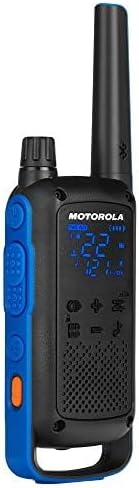
Image: Visual representation of radio range in various environments.
The communication range of the T802 radios is quoted as up to 35 miles. Actual range can vary significantly depending on terrain, weather conditions, electromagnetic interference, and obstructions. Optimal range is achieved in open, unobstructed areas. Typical ranges are:
- Mountain to Valley: E oo atu i le 35 maila
- Open Water: E oo atu i le 6 maila
- Neighborhood/Urban: E oo atu i le 2 maila
8. Tausiga ma Tausiga
8.1 Fa'amamāina
Fa'amama le leitio i se mea malu, oamp cloth. Do not use abrasive cleaners or solvents. Ensure all port covers are securely closed before cleaning.
8.2 Suavai Tetee
The T802 radios are rated IP54 weather-proof, meaning they are protected against dust and splashing water from any direction. They are not designed to be submerged in water. Always ensure the USB-C port cover and battery compartment are securely sealed to maintain water resistance.
8.3 Tausiga maa
To maximize battery life, fully charge the NiMH battery packs before initial use and after extended storage. Store batteries in a cool, dry place. If using AA alkaline batteries, replace them when power is low.
9. Faʻafitauli
- Leai se Malosi: Check if the battery pack is correctly installed and charged. If using AA batteries, ensure they are fresh and correctly inserted.
- E le mafai ona lafoina/maua: Verify that both radios are on the same channel and privacy code. Check battery levels. Ensure you are within range.
- Le lelei le leo: Move closer to the other radio. Check for obstructions. Ensure the volume is adjusted appropriately.
- Fa'afitauli Feso'ota'i Bluetooth: Ensure Bluetooth is enabled on both the radio and your smartphone. Try restarting both devices.
10. Fa'amatalaga Fa'apitoa
- Numera Fa'ata'ita'i: T802
- Fua o Mea: 1.28 x 2.2 x 7.52 inisi
- Mea mamafa: 7.2 aunese
- Numera o Auala: 22
- Tulafono Fa'alilolilo: 121
- Va'aiga Fa'atele: 400-470 MHz
- Ole maualuga ole tautalaga: 35 Miles (terrain dependent)
- Suavai Tetee Level: IP54 Tetee Tau
- Punavai Malosi: Rechargeable NiMH Battery Pack (included) or 3 AA batteries (not included)
- Totogi: USB-C
- Mea Fa'apitoa: Call Alert, Integrated Flashlight, Rechargeable, Weather Alert, Bluetooth Connectivity
11. Fa'amaonia ma Lagolago
Motorola Solutions typically offers a 2-year warranty on their two-way radios. For detailed warranty information, technical support, or service inquiries, please refer to the official Motorola Solutions webnofoaga po'o fa'afeso'ota'i sa'o a latou 'au'aunaga fa'atau. Taofi lau fa'amaoniga o le fa'atau mo tagi fa'amaonia.


