1. Fa'atonuga Taua mo le Saogalemu
Pe a fa'aogaina mea tau eletise, e tatau ona mulimulita'i puipuiga fa'avae, e aofia ai mea nei:
- Faitau fa'atonuga uma a'o le'i fa'aogaina le masini.
- Aua ne'i taumafai e fa'agaioi le ogaumu lenei ma tatala le faitoto'a ona e mafai ona i'u ai i le afaina i le microwave.
- Aua nei tu'u so'o se mea i le va o le ogaumu pito i luma fa'asaga ma le faitoto'a pe fa'ataga fo'i le palapala po'o mea mama e fa'aputu i luga o fa'amaufa'ailoga.
- Aua le fa'againa le ogaumu pe a leaga. E taua tele le tapuni lelei o le faitotoa o le ogaumu ma ia leai se mea e faaleagaina ai le: (1) faitotoʻa (piʻo), (2) faʻamau ma faamau (taʻe pe matala), (3) faʻamaufaʻailoga faitotoa ma faʻamaufaʻailoga.
- O le ogaumu e le tatau ona fetuutuunai pe toe faaleleia e se tasi sei vagana ai tagata faigaluega agavaa lelei.
- Ia mautinoa i taimi uma le ea sa'o ile microwave.
- Aua ne'i fa'avevela vai po'o isi mea'ai i totonu o pusa fa'amaufa'ailoga aua e ono pa.
- O lenei meafaigaluega ua fa'amoemoe mo na'o le fa'aoga ile aiga.
2. Oloa Ua Ovaview
The SHARP SMC0761KS is a compact 0.7 cubic feet countertop microwave oven, featuring 700 watts of cooking power and a removable 10-inch carousel turntable. Its stainless steel finish and child lock function provide both style and safety for your kitchen.

Luma view of the SHARP SMC0761KS Compact Countertop Microwave Oven in stainless steel.
Vaega Autu:
- Fuafuaga Ma'oti: 0.7 cu. ft. capacity, ideal for small spaces.
- 700 Watts Malosiaga: Efficient heating for various foods.
- 10" Carousel Turntable: Faamautinoa e oo lava i'uga kuka.
- Loka Tamaiti: Fa'aleleia le saogalemu e ala i le puipuia o se fa'agaioiga e le'i fa'amoemoeina.
- Kuki Express: Quick start cooking with single press up to 6 minutes.
- Mea'ai Kuka Auto: Pre-programmed settings for popular items like potato, popcorn, and beverages.
- Time/Weight Defrost: Flexible defrosting options.
- Fa'aaliga LED Pa'epa'e: Clear and modern display.
- moli totonu ole LED: Provides visibility inside the oven.

totonu view of the microwave showing the removable glass carousel turntable.

Close-up of the control panel with digital display and function buttons.
3. Seti ma Fa'apipi'i
Tatalaina ma Fa'anofo:
- Aveese uma mea e teu ai mea mai totonu o le ogaumu ma le faitotoa o le ogaumu.
- Siaki le ogaumu mo so'o se mea ua fa'aleagaina, e pei o ni po'o po'o se faitoto'a sese. Aua le fa'againa le ogaumu pe a leaga.
- Tuu le maikoloveve i luga o se mea mafolafola ma mautu e mafai ona lagolagoina lona mamafa ma le meaʻai e sili ona mamafa e ono tao ai.
- Ensure adequate ventilation: Leave a minimum of 4 inches (10 cm) of space on the top, back, and sides for proper airflow. Do not block any ventilation openings.
- Keep the microwave away from heat sources and strong magnetic fields.
Aoao Faitulafono Turn turn:
- Tuu le mama liliu i totonu o le oga o le ogaumu.
- Position the glass turntable plate securely on top of the turntable ring, ensuring it sits properly on the center hub.
So'oga eletise:
Plug the microwave into a properly grounded 3-prong outlet. Ensure the voltage and frequency match the specifications of the appliance (120V, 60Hz).
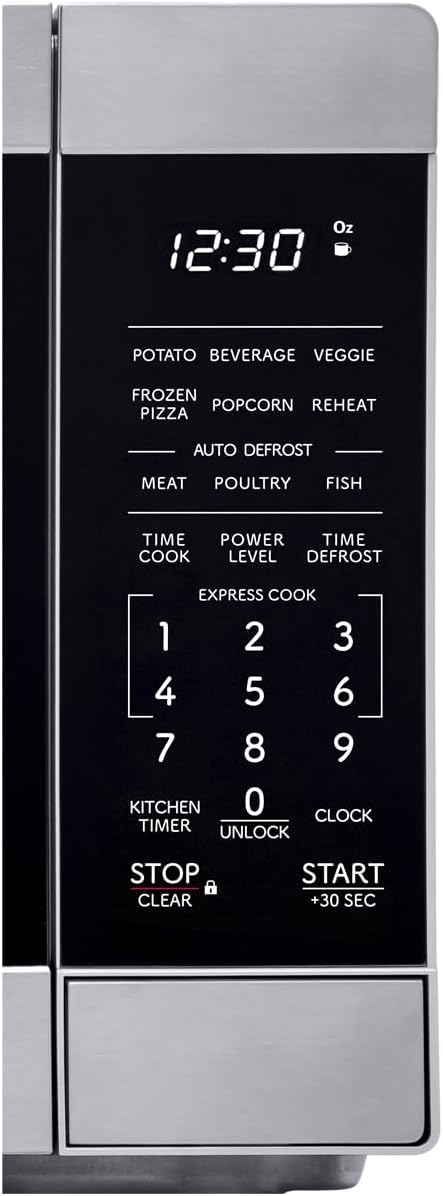
Diagram illustrating the dimensions of the SHARP SMC0761KS microwave oven.
4. Fa'atonuga o Galuega
Seti le Uati:
- Oomi le Uati faamau tasi.
- Fa'aaoga le pepa numera e ulufale ai i le taimi nei (fa'ata'ita'iga, 1-2-3-0 mo le 12:30).
- Oomi le Uati toe faamau e faamaonia.
Kuka Microwave Autu:
- Tuu mea'ai i totonu o se koneteina saogalemu i le microwave i luga o le laulau.
- Tapuni le faitotoa o le ogaumu.
- Oomi le TAIMI kuka faamau.
- Enter the desired cooking time using the number pad (e.g., 1-0-0 for 1 minute).
- To adjust power level (default is 100%): Press TULAGA MANA, then enter a number from 1 to 10 (10 for 100%, 1 for 10%).
- Tusitala AMATA/+30 SEC e amata ai ona kuka.
Using the +30 SEC Button:
For instant start at 100% power, simply press the AMATA/+30 SEC button. Each press adds 30 seconds to the cooking time. This can also be used to add 30 seconds during an ongoing cooking cycle.
Galuega Loka Tamaiti:
- Faʻaola: Oomi ma uu le TOTO/MALI faamau mo le 3 sekone. O le a aliali mai se fa'ailoga loka ile fa'aaliga.
- E Ta'atia: Oomi ma uu le TOTO/MALI button for 3 seconds again. The lock indicator will disappear.
5. Galuega Fa'avela
Mea'ai Kuka Auto:
The microwave features pre-programmed settings for common food items. Simply press the desired auto cook button and follow the prompts.
- PATEKA: Mo le taoina o pateta.
- BEVERAGE: Mo le fa'avevela o meainu.
- VEGGIE: For cooking vegetables.
- PIZZA A'ISA: For reheating frozen pizza.
- POPCORN: For popping popcorn.
- FAʻAMATALAGA: Mo le toe fa'avevelaina o ipu eseese.
Faʻapaʻuina i lalo:
The microwave offers two defrosting methods:
- TAIMI FA'ATELE: Tusitala TAIMI DEFROST, enter the desired defrosting time, then press AMATA/+30 SEC.
- MAMAFA FA'A'ALA: Tusitala MAMAFA FA'ASAA, enter the weight of the food in ounces or grams, then press AMATA/+30 SEC.
Kuki Express:
For quick cooking, press any number button (1-6) to start cooking immediately for that many minutes at 100% power. For example, pressing '1' will cook for 1 minute.
Lua-Stagu kuka:
This feature allows you to program two different cooking stages (e.g., defrost then cook). Program the first stage (e.g., defrost time/weight), then program the second stage (e.g., cook time and power level), and finally press AMATA/+30 SEC.
6. Tausiga ma Tausiga
Fa'amama le Oga:
- totonu: Solo le totonu ole ogaumu ile fa'asalalaugaamp cloth after each use. For stubborn stains, use a mild detergent or microwave-safe cleaner. Do not use abrasive cleaners or scouring pads.
- fafo: Fa'amama le pito i fafo i se mea malu, oamp ie. Aloese mai le tu'u vai i totonu o avanoa ea ea.
- Faamaufaailoga Faitotoa: Keep the door seals and adjacent parts clean. Wipe with a damp ie e aveese ai so'o se masa'a po'o ni masima.
- Roteri: The glass turntable and turntable ring can be washed in warm, soapy water or in the dishwasher. Ensure they are completely dry before placing them back in the oven.
Fautuaga Lautele:
- Aveese i taimi uma le microwave a'o le'i fa'amamā.
- Do not use harsh chemicals or steam cleaners.
- Regular cleaning helps maintain performance and extends the life of the appliance.
7. Faʻafitauli
If you encounter issues with your microwave, refer to the following common problems and solutions:
| Fa'afitauli | Mafuaaga e ono tupu | Fofo |
|---|---|---|
| O le a le amataina le ogaumu | Door not closed properly; Power cord unplugged; Fuse blown or circuit breaker tripped; Child lock activated. | Ensure door is firmly closed; Check power cord connection; Reset circuit breaker; Deactivate child lock. |
| Mea'ai e le fa'amafanafanaina | Incorrect cooking time/power level set; Microwave-safe dish not used. | Adjust cooking time and power level; Use appropriate microwave-safe cookware. |
| Turntable le faʻasolo | Turntable not correctly placed; Obstruction under turntable ring; Motor malfunction. | Ensure turntable and ring are correctly seated; Remove any obstructions; Contact service if issue persists. |
| Fa'aaliga fa'aalia fa'ailoga sese | Fa'aletonu totonu. | Unplug the oven for 1 minute, then plug it back in. If the error persists, contact customer support. |
For more detailed troubleshooting or issues not listed here, please refer to the complete user manual PDF or contact Sharp customer support.
8. Fa'amatalaga
| Fa'aaliga | Fa'amatalaga |
|---|---|
| Numera Fa'ata'ita'i | SMC0761KS |
| Malosiaga | 0.7 Kupita Fue |
| Uatage | 700 watts |
| Voltage | 120 Volts |
| Fua o Mea (D x W x H) | 12.8" x 17.3" x 10.2" |
| Mea mamafa | 24.2 pauna |
| Lanu | Apa siliva |
| Fa'apitoa Fa'apitoa | Loka Saogalemu Tamaiti |
| Ituaiga Fa'apipi'i | Laupefa |
| Fa'aaofia Vaega | Lisi Lisi |
9. Fa'amaonia ma Lagolago
Fa'amatalaga Fa'amaonia:
This SHARP microwave oven comes with a limited manufacturer's warranty. Please refer to the warranty card included with your product or visit the official Sharp web'upega tafaʻilagi mo faʻamatalaga auiliili ma aiaiga e uiga i le inisiua, umi, ma taualumaga o auaunaga.
Lagolago tagata fa'atau:
For technical assistance, service inquiries, or to order replacement parts, please contact Sharp customer support. You can typically find contact information on the Sharp official website or in the product's packaging.
For a comprehensive guide, you can download the official user manual in PDF format: La'u i lalo le Tusi Fa'aoga (PDF)


