1. Folasaga
This manual provides essential information for the proper setup, operation, and maintenance of your Roland V-Drums TD-07DMK Electronic Drum Set. Please read this manual thoroughly before using your new drum set to ensure optimal performance and longevity.
The Roland TD-07DMK is an electronic drum kit designed to deliver an authentic drumming experience with advanced sound technology and quiet operation, ideal for home practice. It features a powerful TD-07 sound module, mesh heads for reduced noise, and a compact design.

Figure 1.1: Roland TD-07DMK Electronic Drum Set overview, highlighting its compact design and key components.
2. Fa'amatalaga Saogalemu
To prevent injury, electrical shock, or damage to the product, always observe the following basic precautions:
- Aua le talepe pe suia le iunite.
- Aua ne'i fa'aalia le iunite i le vevela tele, susulu sa'o o le la, po'o le susū tele.
- Taofi le masini mamao mai le vai po'o isi mea fa'asuavai.
- Faaaoga na'o le adapter eletise ua fa'amaoti mai.
- Taofi ni vaega laiti mai le aapa atu i ai tamaiti.
3. Mea i totonu o le afifi
Before assembly, please verify that all items listed below are included in your package:
- TD-07 Sound Module
- Drum Rack (various bars and clamps)
- 10-inch Snare Pad (PDX-8)
- 3x 8-inch Tom Pads (PDX-6A)
- Hi-Hat Cymbal (CY-5)
- Crash Cymbal (CY-5)
- Ride Cymbal (CY-5)
- Kick Pad (KD-2)
- Pedal Pulea Hi-Hat
- Drumsticks (3 pairs)
- Drumstick Bag
- 3.5mm uaea leo
- Austin Bazaar Polishing Cloth
- Fetuunaiga Malosi
- Galueaiina Wiring
- Ki Ta'u
- Setup Guide & Owner's Manual

Figure 3.1: Visual representation of the TD-07DMK kit configuration and included accessories.
4. Seti
4.1 Drum Rack Assembly
Begin by laying out all the drum rack components. The rack forms the skeleton of your drum set. Connect the main horizontal bars to the vertical legs using the provided clamps. Ensure all connections are secure but allow for minor adjustments until all components are in place.
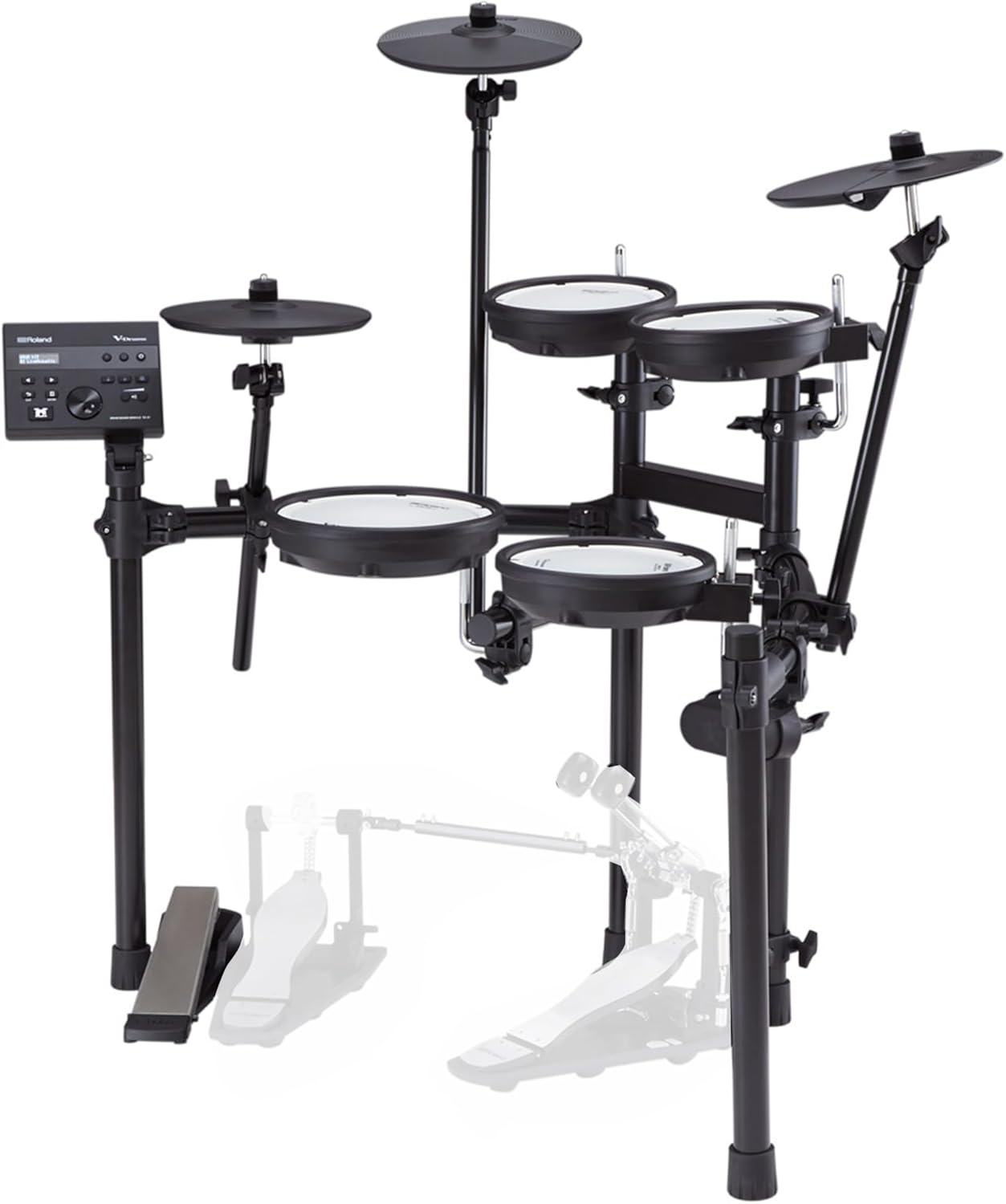
Figure 4.1: The drum rack structure before pads and cymbals are mounted.
4.2 Drum Pad Installation
Attach the snare and tom pads to the drum rack using the L-rods and clamps. The 10-inch snare pad typically mounts on a dedicated lower bar, while the three 8-inch tom pads mount on the upper curved bars. Adjust the height and angle of each pad for comfortable playing, then tighten all clamps firmly with the drum key.

Ata 4.2: Fa'alatalata view of the Roland TD-07DMK drum pads.
4.3 Cymbal Installation
Mount the hi-hat, crash, and ride cymbals onto their respective cymbal arms. Ensure the cymbals are positioned at a comfortable height and angle. The hi-hat cymbal should be placed on the hi-hat stand, allowing for open/closed detection via the control pedal.
4.4 Kick Pad and Pedals
Position the KD-2 Kick Pad centrally under the main drum rack. Attach the kick pedal to the kick pad, ensuring it is stable and the beater strikes the center of the pad. Connect the hi-hat control pedal to the hi-hat stand.
4.5 Sound Module Placement
Mount the TD-07 Sound Module to the designated clamp on the drum rack, typically on the far left side. Adjust its position so that the display and controls are easily accessible and visible from your playing position.

Ata 4.3: Luma view of the TD-07 Sound Module with controls and display.
4.6 Uaea
Connect all drum pads, cymbals, and pedals to the TD-07 Sound Module using the provided wiring harness. Each cable is clearly labeled and color-coded to match the corresponding input on the module. Secure the main harness connector to the module's back panel using the included screws. Organize cables neatly using Velcro ties to prevent tangling.

Figure 4.4: Back panel of the TD-07 Sound Module showing input ports.
5. Fa'atonuga o Galuega
5.1 Malosi / Malosi
Connect the power adapter to the TD-07 module and a power outlet. Press the power button on the module to turn the unit on or off.
5.2 Vaega o le Leo ua Fa'atumuinaview
The TD-07 module is the brain of your electronic drum set. It features a wide selection of acoustic and electronic drum sounds, along with percussion instruments. Use the navigation buttons and dial to select drum kits, adjust parameters, and access various functions.
5.3 Playing the Kit
Once powered on, select your desired drum kit from the module. Strike the mesh pads and cymbals with your drumsticks, and use the pedals to trigger the kick drum and control the hi-hat. The precision sensors in the pads accurately respond to your playing dynamics.
5.4 Feso'ota'iga Bluetooth
The TD-07 module supports Bluetooth connectivity. Activate Bluetooth on the module and pair it with your smartphone, tablet, or computer. This allows you to stream audio from your device directly through the module, enabling you to play along with your favorite tracks or practice with backing music.
6. Tausiga
Regular maintenance ensures the longevity and optimal performance of your Roland V-Drums TD-07DMK.
- Fa'amamaina: Use a soft, dry cloth to wipe down the module, pads, and cymbals. For stubborn dirt, slightly dampen the cloth with water and mild soap, then wipe dry. Avoid abrasive cleaners or solvents.
- Mesh Heads: The mesh heads are durable but can be gently cleaned with a soft, dry cloth. Avoid excessive force or sharp objects.
- Pulega o uaea: Periodically check all cables for wear and tear. Ensure they are securely connected and neatly organized to prevent damage.
- Teuina: When not in use for extended periods, store the drum set in a clean, dry place away from direct sunlight and extreme temperatures.
7. Faʻafitauli
If you encounter any issues with your drum set, refer to the following common troubleshooting tips:
- Leai se leo: Check all cable connections to the module and ensure the power is on. Verify the volume levels on the module and any connected headphones/speakers.
- E lē tali mai Pads: Ensure the pad cables are securely connected. Check the sensitivity settings for the pads in the module's menu.
- Fa'afitauli Feso'ota'i Bluetooth: Ensure Bluetooth is enabled on both the module and your external device. Try unpairing and re-pairing the devices.
- Pio lē mana'omia: Check for loose connections on the drum rack or pads. Ensure the drum set is placed on a stable surface.
For more detailed troubleshooting, please refer to the full owner's manual or the Roland support webnofoaga.
8. Fa'amatalaga
| Mea mamafa | 39.7 pauna |
| Fua o Mea | 43.31 x 47.24 x 47.24 inisi |
| Mea Tino | palasitika |
| Fa'aaofia Vaega | Cymbal, Drumsticks |
| Tufuga | Roland |
| UPC | 840262234238 |
| Igoa Fa'ata'ita'iga | Roland Electronic Drum Set |
| Numera Fa'ata'ita'i Mea | AUS-TD-07DMK-COMBO-DLX |
| Ituaiga Feso'ota'i | Ausilali |
| Ituaiga Mea | Nylon, Silicone, Metal |
| Tulaga Agalelei | O mea uma |
9. Tuutuuga & Lagolago
Mo fa'amatalaga e uiga i le tusi saisai ma le lagolago a tagata fa'atau, fa'amolemole taga'i i le ofisa aloaia a Roland. website or contact your authorized Roland dealer. Keep your purchase receipt as proof of purchase for warranty claims.


