Folasaga
Fa'afetai mo le fa'atauasing the Panasonic TX-55MZ1500E 55-inch 4K OLED TV. This television combines advanced OLED display technology with smart features and high-performance processing to deliver an exceptional viewing and gaming experience. This manual provides essential information for setting up, operating, and maintaining your new television. Please read it thoroughly before use and retain it for future reference.

Ata 1: Luma view of the Panasonic TX-55MZ1500E 55-inch 4K OLED TV, showcasing its display quality with a night city scene.
Fa'amatalaga Taua mo le Saogalemu
Ina ia mautinoa le fa'agaioiga saogalemu ma puipuia le fa'aleagaina, fa'amolemole ia mata'ituina tulaga nei mo le saogalemu:
- Paoa sapalai: Connect the TV only to an AC power source as indicated on the rating label.
- Savili: Aua le poloka avanoa e savili ai. Ia mautinoa ia lava le avanoa i tafatafa o le TV mo le tafe lelei o le ea.
- Suavai ma Susū: Aua le tu'u le TV ile timu po'o le susu. Aua ne'i tuu mea e tumu i vai, e pei o fagu, i luga o le TV.
- Fa'amamaina: Unplug the TV before cleaning. Use a soft, dry cloth. Avoid liquid cleaners or aerosol sprays.
- Tu'uga: Tuu le TV i luga o se fale mautu, laugatasi. Aloese mai le tu'u sa'o i le la po'o latalata i puna vevela.
- Tamaiti: Vaavaai tamaiti e taofia i latou mai le feaei i luga o le TV po o le tutu.
- Au'aunaga: Aua le taumafai e tautuaina oe lava ia oloa. Faʻasino uma auaunaga i tagata agavaʻa tautua.
O mea o lo'o i totonu
A'o le'i fa'aauauina le setiina, fa'amolemole ia fa'amautinoa ua aofia uma mea o lo'o lisiina i lalo i lau afifi:
- Panasonic TX-55MZ1500E 55-inch 4K OLED TV
- Remote Control (requires 1 AA battery, not always included)
- Uaea Malosi
- TV Stand (if applicable, assembly required)
- Taiala vave amata
- Pepa Fa'amatalaga mo le Saogalemu
Fa'aaliga: The remote control requires one AA battery. Ensure you have this battery available for initial setup.
Seti Taiala
1. Ta'ese'ese ma Tu'u
- Carefully remove the TV from its packaging. It is recommended to have two people for this process due to the size and weight.
- Place the TV on a flat, stable surface or prepare for wall mounting (wall mount sold separately).
- Ensure there is adequate space around the TV for ventilation (at least 10 cm on all sides).
2. Fa'apipi'i Tu'u (pe a talafeagai)
If you are using the included TV stand, follow these steps:
- Tuu le lau o le TV i lalo i luga o se ie vaivai ma mama e puipuia ai le maosi.
- Attach the stand base to the TV using the provided screws, ensuring it is securely fastened. Refer to the Quick Start Guide for specific screw locations and types.
- Carefully lift the TV with the stand and place it in your desired viewnofoaga.
3. Faʻafesoʻotaʻi masini
The TX-55MZ1500E offers various connectivity options. Refer to the side view ata mo nofoaga o le uafu.

Ata 2: Itu profile of the Panasonic TX-55MZ1500E, highlighting the slim design and accessible input ports.
- HDMI: Connect your Blu-ray player, game console, or set-top box to the HDMI ports. This model supports HDMI 2.1 for high-refresh-rate gaming and advanced features.
- USB: Connect USB storage devices for media playback or software updates. The TV has 1 USB port.
- Antenna/Uaea: Fa'afeso'ota'i lau antenna po'o le cable TV fafaga mo ala fa'asalalauga.
- Ethernet (LAN): Mo se feso'ota'iga initaneti uaea mautu.
- Fa'alogo fa'atekinolosi mata'i fafo: Mo le fa'afeso'ota'i i se fa'alogo leo i fafo.
4. Feso'ota'iga Malosi ma le Fa'atonu Muamua
- Fa'afeso'ota'i le uaea eletise i le TV ona soso'o ai lea i se pa puipui.
- Insert the AA battery into the remote control.
- Oomi le faamau Malosi i luga o le pule mamao e ki ai le TV.
- Follow the on-screen instructions to complete the initial setup, which typically includes:
- Filifiliga gagana
- Country/Region selection
- So'oga feso'ota'iga (Wi-Fi po'o Ethernet uaea)
- Su'e ala (mo antenna/cable)
- Fa'atonu sone taimi
Fa'agaoioi lau TV
Galuega Autu
- Malosi/Pepe: Oomi le Malosiaga faamau i le pule mamao.
- Pulea le Volume: Fa'aaoga le Volume i luga/lalo faamau.
- Filifiliga Auala: Fa'aaoga le Auala i luga/I lalo buttons or enter channel numbers directly.
- Filifiliga mea e fai: Oomi le Ulufale button to switch between connected devices (HDMI 1, HDMI 2, etc.).
- Fa'asagaga o le lisi: Fa'aaogā ki aū ma OK button to navigate on-screen menus.
Smart TV Features (Smart TV OS)
Your Panasonic TX-55MZ1500E runs on a Smart TV OS, providing access to a wide range of online content and applications.
- Avanoa Apps: From the home screen, select your desired application, such as Netflix or YouTube.
- Su'esu'e ile Initaneti: Fa'aaoga le mea ua fausia i totonu web browser e maua webnofoaga.
- Fa'asalalau uaealesi: Utilize features like Mirroring, Swipe & Share, and DLNA to stream content from compatible devices.
Fa'atonu Ata ma Leo
The TV features the HCX Pro AI processor for advanced image processing and supports various HDR formats.
- Faiga Ata: Select from various preset picture modes (e.g., Standard, Cinema, Game, Custom) to optimize viewing for different content.
- HDR Lagolago: The TV supports HDR10+, HDR10, HLG, and Dolby Vision, automatically adjusting for optimal contrast and color with compatible content.
- Faiga leo: Adjust audio settings for different content types (e.g., Standard, Music, Speech).
Taaloga Taaloga
Designed for a high-level gaming experience, this TV includes:
- Fa'aletonu le Fa'aulu: Minimizes delay between controller input and on-screen action.
- HDMI2.1: Supports advanced gaming features like Variable Refresh Rate (VRR) and Auto Low Latency Mode (ALLM) on compatible devices.
- Game Control Board: Access specific gaming settings and information quickly.
Tausia ma Tausiga
O le tausiga lelei o le a fa'alautele ai le ola o lau televise.
- Fa'amama lau: Solo lemu le lau i se ie mamago microfiber. Mo fa'ailoga ma'a'a, fai sina oampi le ie i le vai po'o se fa'amama fa'apitoa fa'amama (fa'aoga i le ie, ae le sa'o i le lau). Aua le fa'aogaina le ava malosi, benzene, po'o ni mea e fa'amama ai.
- Fa'amamaina o le Kapeneta: Solo le kapoti TV i se ie vaivai ma mago.
- Pefu: Ia pefu i taimi uma avanoa o le ea e puipuia ai le soona vevela.
- Tapē le eletise: Aveese i taimi uma le TV mai le paoa a'o le'i faamamaina.
Fa'afitauli
Afai e te feagai ma faʻafitauli i lau TV, vaʻai i faʻafitauli masani nei ma fofo:
| Fa'afitauli | Mafua'aga Mafai / Fofo |
|---|---|
| Leai se mana |
|
| Leai se ata, ae o lo'o iai le leo |
|
| Leai se leo, ae o loʻo iai le ata |
|
| Le mafai ona feso'ota'i ile Wi-Fi |
|
| E le o galue le pule mamao |
|
Fa'amatalaga
Key technical specifications for the Panasonic TX-55MZ1500E:
| Fa'aaliga | Fa'amatalaga |
|---|---|
| Igoa Fa'ata'ita'iga | TX-55MZ1500E |
| Fa'ailoga | Panasonic |
| Tele lau | 55 inisi (139 cm) |
| Fa'aaliga Tekonolosi | OLED |
| I'ugafono | 4K Ultra HD (3840 x 2160) |
| Fua Fa'afouina | 100 Hz |
| Processor | HCX Pro AI |
| HDR Lagolago | HDR10+, HDR10, HLG, Dolby Vision |
| Faiga Fa'atonu | Smart TV OS |
| Au'aunaga Initaneti | Netflix, YouTube, and more |
| Feso'ota'i | HDMI (HDMI 2.1 compatible), Wi-Fi, USB (1 port) |
| Ituaiga Fa'atatau | 16:9 |
| Fa'aaofia Vaega | Pulea Mamao |
| Fa'aaogāina Malosi (SDR) | 84 kWh/1000h |
| Fa'aaogāina Malosi (HDR) | 120 kWh/1000h |
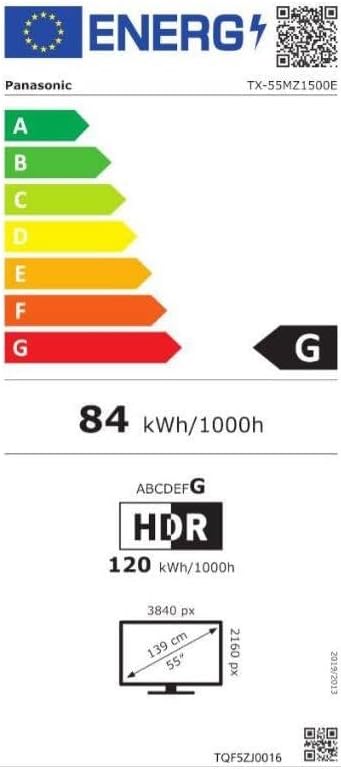
Image 3: Energy efficiency label for the Panasonic TX-55MZ1500E, detailing power consumption and display resolution.
Fa'amaonia ma Lagolago
Panasonic products are manufactured to high-quality standards. For information regarding your product's warranty, please refer to the warranty card included in your package or visit the official Panasonic webnofoaga mo lau itulagi.
For technical support, troubleshooting assistance beyond this manual, or service inquiries, please contact Panasonic customer support. Contact details can typically be found on the Panasonic webnofoaga po'o lau fa'amaumauga o oloa.


