1. Folasaga
Fa'afetai mo le fa'atauasing the CANYON BSP-8 Bluetooth Speaker. This manual provides essential information for the safe and efficient use of your device. Please read it thoroughly before operation and retain it for future reference.
Vaega Autu:
- 10W Fa'alogo leo: Tuuina atu leo manino ma mamana.
- Bluetooth 5.2: For stable and energy-efficient wireless connection up to 10 meters.
- Moli tua RGB: Integrated lighting for enhanced ambiance.
- Moni Uaealesi Stereo (TWS): Connect two BSP-8 speakers for a full stereo sound experience.
- Filifiliga Toe Ta'alo Tele: Supports Bluetooth, AUX, USB, and MicroSD card inputs.
- Fuafuaga feaveai: Compact size with a convenient hanger for easy transport.
- Umi le ola maa: E oo atu ile 3 itula ole ta'aloga ile totogi e tasi.
2. Fa'amatalaga Saogalemu
- Aua le fa'aalia le failauga i le vevela tele, sa'o o le la, po'o le maualuga o le susū.
- Aloese mai le pa'u pe tu'u le failauga i ni aafiaga malolosi.
- Do not disassemble or attempt to repair the speaker yourself. Contact qualified service personnel.
- Taofi le sipika mai vai ma isi vai. E le susu.
- Faaaoga na'o le uaea fa'atumu ua tu'uina atu pe se uaea Type-C ua fa'amaonia mo le fa'atumuina.
- Lafoa'i le maa ma le sipika e tusa ai ma tulafono a le lotoifale.
3. Mea i totonu o le afifi
- CANYON BSP-8 Bluetooth Speaker
- USB Cable Totogi-C
- Tusi Taiala
4. Oloa Ua Ovaview
Fa'amasani oe i vaega ma ta'iala a le failauga.
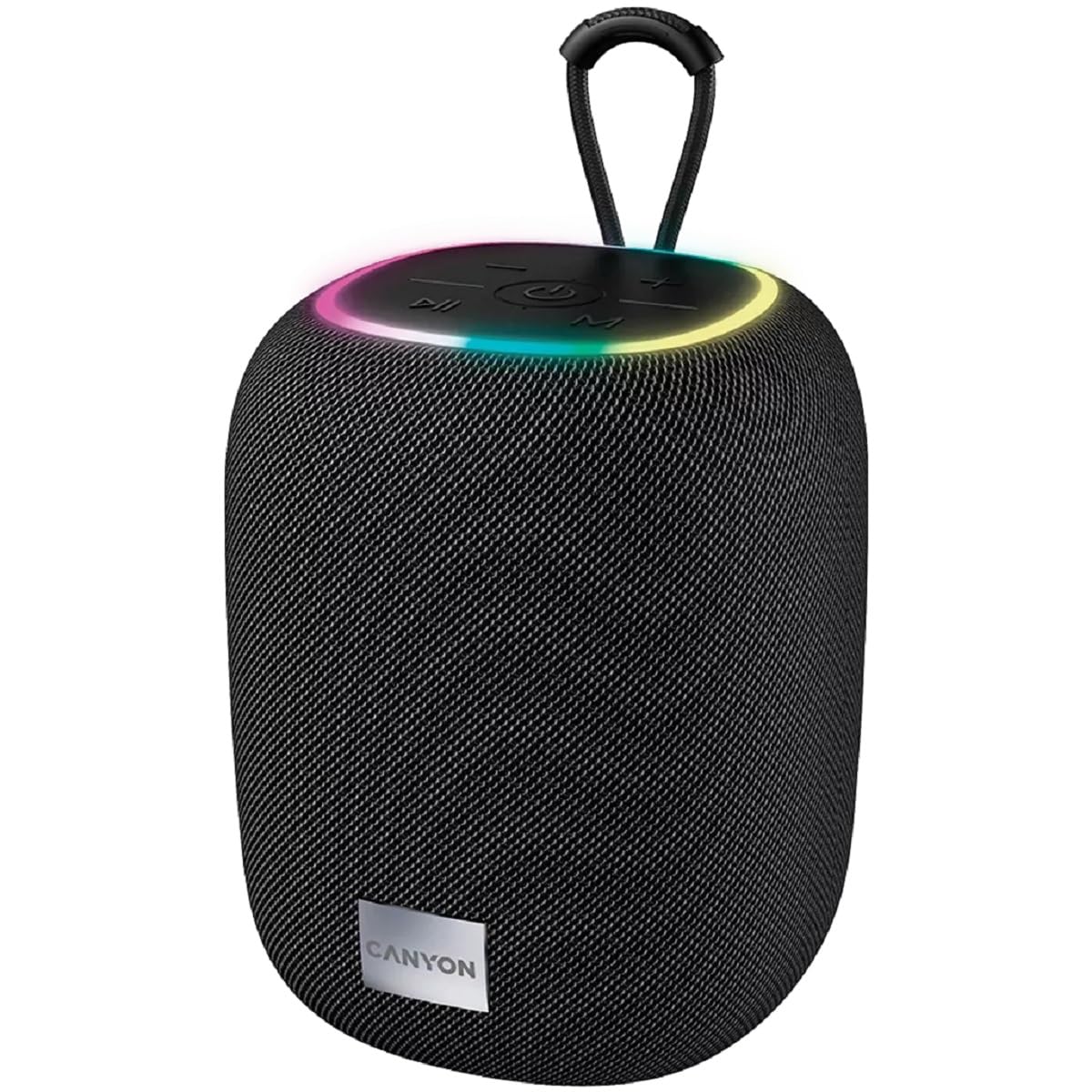
Ata 1: Luga view of the CANYON BSP-8 speaker, showing the control buttons, RGB backlight, and integrated hanger.
Control Buttons (Top Panel):
- Ki Malosi: Press and hold to turn on/off. Short press to play/pause.
- Volume i lalo / Ki o le Su'ega muamua: Oomi puupuu mo le leo i lalo. Oomi umi mo le ala muamua.
- Volume i luga / Kisi Su'e Su'e: Oomi puupuu mo le leo i luga. Oomi umi mo le isi ala.
- Fa'amau (M): Short press to switch between Bluetooth, AUX, USB, and MicroSD modes.

Ata 2: Tua view of the CANYON BSP-8 speaker, illustrating the various input ports including AUX, USB, TF (MicroSD) card slot, and DC5V Type-C charging port.
Input Ports (Rear Panel):
- Taulaga AUX: Mo le fa'afeso'ota'i masini fa'alogo i fafo e ala i le uaea leo 3.5mm.
- Taulaga USB: Mo le taina o leo mai se USB flash drive.
- TF Card Slot (MicroSD): For playing audio from a MicroSD card.
- DC5V (Type-C) Port: Mo le molia o le sipika.
5. Seti
5.1 Tuuina atu o le Fofoga Fetalai
- Connect the provided USB Type-C cable to the DC5V port on the speaker.
- Connect the other end of the cable to a USB power adapter (5V/1A recommended) or a computer's USB port.
- O le a moli le moli fa'ailoga o le fa'atumuina. O le a tape pe suia le lanu pe a uma ona fa'atumuina.
Note: For optimal battery life, fully charge the speaker before first use.

Image 3: Illustration showing the 1800 mAh battery capacity and up to 3 hours of playtime for the CANYON BSP-8 speaker.
5.2 Fa'aola i luga/Pepe
- I le Malosiaga: Press and hold the Power button for approximately 3 seconds. You will hear an audible prompt.
- Tape le Malosi: Press and hold the Power button for approximately 3 seconds. You will hear an audible prompt.
5.3 Fa'atasiga Bluetooth
- Ki le sipika. O le a otometi lava ona ulufale i le Bluetooth pairing mode, faʻaalia i se moli moli moli.
- Enable Bluetooth on your mobile device (smartphone, tablet, computer).
- Saili mo available Bluetooth devices and select "CANYON BSP-8" from the list.
- Once paired, the LED light will stop flashing, and you will hear a confirmation sound.
Note: The speaker will automatically reconnect to the last paired device if it is within range and Bluetooth is enabled.

Image 4: Illustration highlighting the stable and energy-efficient Bluetooth 5.2 connection with an operating range of up to 10 meters.
5.4 Fa'apipi'iina o le True Wireless Stereo (TWS)
To connect two CANYON BSP-8 speakers for a stereo sound experience:
- Ensure both BSP-8 speakers are powered on and not connected to any Bluetooth device.
- On one speaker (this will be the primary speaker), double-press the Power button. It will enter TWS pairing mode.
- The two speakers will automatically search for and connect to each other. You will hear a confirmation sound once connected.
- Once TWS is established, connect your mobile device to the primary speaker via Bluetooth as described in section 5.3.
Note: TWS mode only works with two identical CANYON BSP-8 speakers.
6. Fa'atonuga o Galuega
6.1 Ta'alo leo
- Faiga Bluetooth: After successful pairing, audio from your connected device will play through the speaker.
- Faiga AUX: Connect a 3.5mm audio cable from your external audio device to the AUX port on the speaker. Press the 'M' button to switch to AUX mode.
- Faiga USB: Insert a USB flash drive into the USB port. The speaker will automatically switch to USB mode and begin playing audio files. If not, press the 'M' button.
- Faiga Card MicroSD: Insert a MicroSD card into the TF card slot. The speaker will automatically switch to MicroSD mode and begin playing audio files. If not, press the 'M' button.
6.2 Puleaina o Ta'aloga
- Ta'alo/Taofi: Oomi puupuu le faamau Malosi.
- I luga le Volume: Oomi puupuu le Volume Up (+) button.
- Volume Lalo: Oomi puupuu le Volume Down (-) faamau.
- Su'ega Sosoo: Oomi umi le faamau Fa'aopoopo le Volume (+).
- Ala na muamua atu: Oomi umi le faamau e fa'aitiitia ai le leo (-).
6.3 RGB Backlight
The speaker features an integrated RGB backlight on the top panel. The backlight activates automatically when the speaker is powered on. There are no specific controls for changing the RGB pattern or turning it off/on independently of the speaker's power state.


