1. Folasaga
This manual provides essential instructions for the safe and efficient operation of your Motorola Six-Pocket Multi-Unit Charger. This charger is designed to simultaneously charge up to six compatible Motorola radios or batteries, ensuring your communication devices are always ready for use. Please read this manual thoroughly before using the charger.
2. Fa'amatalaga Saogalemu
Always observe the following safety precautions to prevent injury or damage to the charger or connected devices:
- Use only the power supply provided with the charger.
- Aua le tu'u le uta i le timu po'o le susu.
- Aua ne'i fa'agaoioi le uta pe afai ua leaga i so'o se auala.
- Ia mautinoa le sa'o o le ea i luga o le uta i le taimi o le taotoga.
- Aua le taumafai e fa'a'ese'ese pe sui le uta.
- Taofi ese mai tamaiti.
3. Mea i totonu o le afifi
Fa'amaonia o lau afifi o lo'o i ai mea nei:
- Motorola Six-Pocket Multi-Unit Charger (PMLN7101A / PMLN7101 / PMLN8569)
- US/NA Power Supply
4. Seti
- Place the multi-unit charger on a flat, stable surface in a well-ventilated area.
- Connect the provided US/NA power supply to the charger's power input port.
- Plug the power supply into a standard electrical outlet. The charger is now ready for use.
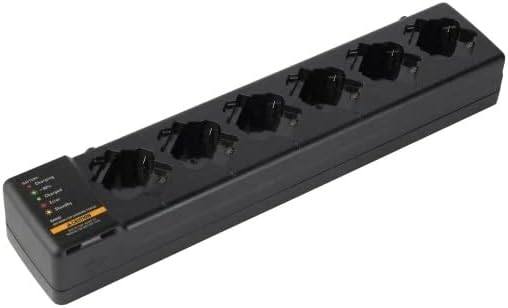
Ata 4.1: O se i luga view of the Motorola Six-Pocket Multi-Unit Charger, showing six charging pockets and an indicator panel on the left side.
5. Fa'atonuga o Galuega
The charger is designed for use with compatible Motorola radios and batteries, including models SL300, TLK100, SL500, SL500E, and SLN1000.
5.1 Charging Radios or Batteries
- Ia mautinoa ua ola le tau.
- Insert a compatible radio or battery into one of the six charging pockets. Ensure it is seated correctly.
- Observe the LED indicator for the corresponding pocket to determine the charging status.
5.2 Tulaga Fa'ailoga LED
Each charging pocket features an LED indicator to provide real-time status:
- Mumu (Malo): O lo'o tau le ma'a.
- lanumeamata (malosi): Ua uma le ma'a.
- Amber (Malō): Battery is charging to 90% capacity.
- Mumu (Emo): Error condition (e.g., battery fault, temperature issue). Remove the battery and reinsert. If the error persists, refer to the Troubleshooting section.
- Leai se Malamalama: Standby mode or no battery/radio inserted.
The indicator panel on the left side of the charger provides a legend for these LED statuses.
6. Tausiga
To ensure optimal performance and longevity of your charger:
- Ia tausia le masini fa'atumu ia mama ma ia 'aua ne'i i ai le pefu ma otaota. Faaaoga se ie vaivai ma mago mo le fa'amamāina.
- Aua le faʻaaogaina ni vailaʻau malo poʻo ni vailaʻau manogi leaga.
- Teu le uta i se nofoaga malulu ma mago pe a le faʻaaogaina.
- Su'esu'e e le aunoa le uaea eletise mo so'o se fa'ailoga o le fa'aleagaina.
7. Faʻafitauli
| Fa'afitauli | Mafuaaga e ono tupu | Fofo |
|---|---|---|
| E le o ola le charger. | No power to the outlet; power supply not connected; faulty power supply. | Check outlet with another device; ensure power supply is securely connected; try a different power supply if available. |
| LED indicator flashing red. | Battery fault; incorrect battery type; temperature outside operating range. | Remove and reinsert the battery; ensure battery is compatible; move charger to a room temperature environment. |
| Le ma'a e le'o fa'atauina. | Battery not properly seated; dirty contacts; faulty battery. | Ensure battery is fully inserted; clean battery and charger contacts; try a different battery. |
8. Fa'amatalaga
| Fa'aaliga | Fa'amatalaga |
|---|---|
| Numera Fa'ata'ita'i | PMLN7101A, PMLN7101, PMLN8569 |
| Fa'ailoga | Motorola Solutions |
| Fua o Mea | 3 x 4 x 15 inisi (7.62 x 10.16 x 38.1 cm) |
| Mea mamafa | 3.29 pauna (1.49 kilokalama) |
| Lanu | Lanu uliuli |
| Sao Voltage | 240 Volts |
| Galuega Faatino Voltage | 7.4 Volts |
| Leitio fetaui | SL300, TLK100, SL500, SL500E, SLN1000 |
9. Fa'amaonia ma Lagolago
Specific warranty information for this product was not provided in the available data. For detailed warranty terms and conditions, please refer to the documentation included with your purchase or visit the official Motorola Solutions website. For technical support or service inquiries, please contact Motorola Solutions customer service.


