Folasaga
This manual provides essential instructions for the safe operation, maintenance, and troubleshooting of your Hisense RVCG144AB Robot Vacuum Mop. Please read this manual thoroughly before using the product and retain it for future reference.
Faatonuga Saogalemu
Ina ia faʻaitiitia le lamatiaga o manuʻa poʻo le faʻaleagaina, mataʻituina mea nei:
- Ia mautinoa o loʻo faʻatumu atoa le robot aʻo leʻi faʻaaogaina muamua.
- Aua ne'i fa'agaoioi le robot i tafatafa o le afi matala po'o mea e mu.
- Taofi lauulu, ofu talatala, tamatamailima, ma vaega uma o le tino mai avanoa ma vaega fegaioi.
- Do not allow children to operate the robot. Supervise children and pets when the robot is in operation.
- Use only the original charging adapter and dock provided by Hisense.
- Remove power cords, small objects, and fragile items from the floor before cleaning to prevent entanglement or damage.
- Do not use the robot to pick up large debris, liquids, or burning objects.
- Fa'amama i taimi uma pulumu ma filiga ina ia fa'atumauina lelei le fa'atinoga.
Ua Umaview
The Hisense RVCG144AB is a versatile robot vacuum mop designed for efficient floor cleaning. It features gyroscopic mapping for systematic navigation, adjustable power and water levels, and convenient control via a mobile application.
O mea o lo'o i totonu
A uma ona tatala, faʻamautinoa o loʻo iai vaega uma:
- Hisense RVCG144AB Robot Vacuum Mop
- Totogi Fale
- Uaea Totogi
- Pulea Mamao
- HEPA Filter (1 piece)
- Cleaning Pad (Mop Cloth)
- Side Brushes (2 pieces)
- Fa'atonuga Taiala (lenei tusi lesona)
Vaega Robot
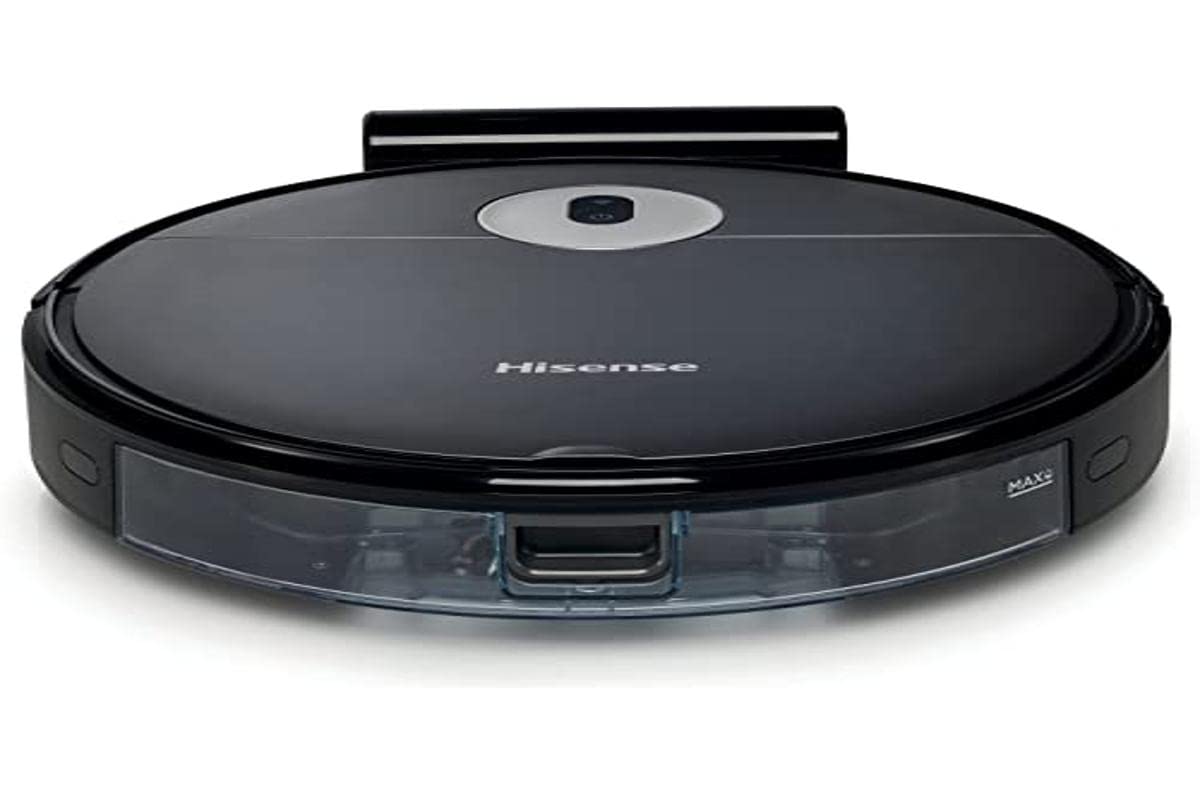
Image: The Hisense RVCG144AB Robot Vacuum Mop, showcasing lona mamanu lanu uliuli matagofie ma foliga faakomepiuta.
The robot includes a floating roller brush for adapting to different floor conditions and dual-sided brushes for edge cleaning and preventing hair entanglement.
Seti
1. Fa'atūina o le Nofoaga Fa'atonu
Place the charging station against a wall in an open area, ensuring there are no obstacles within 1 meter (3 feet) to the sides and 2 meters (6 feet) in front of the station. Connect the charging cable to the station and plug it into a power outlet.

Image: Illustration of the charging station, showing its power connection and recommended clear space around it.
2. Totogi Muamua
Place the robot onto the charging station. Ensure the charging contacts on the robot align with those on the station. The robot will begin charging automatically. For first use, allow the robot to charge completely, which typically takes several hours.
3. Fa'apipi'i Sisi Brushes
Oomi pulumu i autafa i luga o pou i le pito i lalo o le robot se'ia kiliki i o latou nofoaga tonu.
4. App Connection (Wi-Fi)
- Download the Hisense ConnectLife app from your smartphone's app store.
- Resitala se teugatupe ma saini i totonu.
- Follow the in-app instructions to add your RVCG144AB robot vacuum. This typically involves connecting the robot to your home Wi-Fi network.
- Ensure your Wi-Fi network is 2.4GHz for optimal connectivity.
Fa'atonuga o Galuega
1. Amata ma Taofi le Faamamaina
- Amata Tusia: Press the power button on the robot once to start cleaning. Press again to pause.
- Fa'atonuga: Use the Hisense ConnectLife app to start, pause, or stop cleaning from anywhere.
- Pulea Mamao: Use the provided remote control to initiate or stop cleaning.
2. Fa'amama Faiga
Ole robot e ofoina atu auala faʻamama eseese e fetaui ma manaʻoga eseese:
- Fa'amamā Ta'avale: O le robot e faʻatautaia ma faʻamama ma faʻamama le vaega atoa e mafai ona maua.
- Selective Room/Zone Cleaning: Use the app to define specific rooms or areas for cleaning.
- Fa'amama loloto: For thorough cleaning of a specific area.
- Zigzag Cleaning: A systematic cleaning pattern to cover large areas efficiently.
- Fa'amamaina pito: O le robot e faʻamama i luga o puipui ma pito meafale.
3. Adjusting Suction Power and Water Flow
The robot features 3 levels of suction power and water flow. These can be adjusted via the mobile app to match your cleaning requirements and floor type.
4. Scheduling Cleanings
Set up cleaning schedules through the Hisense ConnectLife app. This allows the robot to automatically clean at preferred times and days.
Tausiga
Regular maintenance ensures optimal performance and extends the lifespan of your robot vacuum mop.
1. Tu'u ese le Talone
Open the top cover of the robot and remove the dustbin. Empty its contents into a trash bin. It is recommended to empty the dustbin after each cleaning cycle.

Ata: Se va'aiga view of the robot's dustbin being removed for emptying, highlighting its capacity.
2. Fa'amama le HEPA Filter
Remove the HEPA filter from the dustbin. Tap it gently to remove dust. Do not wash the HEPA filter with water; replace it every 3-6 months depending on usage.
3. Fa'amamāina o le Pulu Autu
Remove the main brush cover and then the main brush. Use the cleaning tool to remove hair and debris tangled around the brush. Reinstall the brush and cover.
4. Fa'amama Paulu Itu
Periodically check the side brushes for tangled hair or debris. Remove them by pulling gently and clean as needed. Replace if damaged.
5. Fa'amamaina o le Tane Vai ma le Mop Pad
Detach the water tank and empty any remaining water. Clean the mop pad by hand or machine wash. Allow all components to dry completely before reassembly.

Image: The water tank and mop pad assembly, illustrating how to detach and clean them.
6. Fa'amama fa'amama ma fa'afeso'ota'i
Wipe the cliff sensors, wall sensors, and charging contacts on both the robot and the charging station with a clean, dry cloth to ensure proper function.
Fa'afitauli
Va'ai i lenei vaega mo fa'afitauli masani ma a latou fofo.
| Fa'afitauli | Mafuaaga e ono tupu | Fofo |
|---|---|---|
| Robot e le ki pe totogi. | Battery depleted; charging contacts dirty; charging station not powered. | Ensure robot is on charging station; clean charging contacts; check power to charging station. |
| E pipii soo le robot. | Obstacles on floor; robot caught on wires or rugs. | Clear floor of obstacles, wires, and thick rugs before cleaning. |
| Le lelei le fa'amamāina. | Tu'u lapisi; pulumu lavelave; faamama ua poloka. | Empty dustbin; clean main and side brushes; clean or replace HEPA filter. |
| App cannot connect to robot. | Incorrect Wi-Fi password; robot out of Wi-Fi range; 5GHz Wi-Fi network. | Verify Wi-Fi password; move robot closer to router; ensure 2.4GHz Wi-Fi is used. |
Fa'amatalaga
Technical specifications for the Hisense RVCG144AB Robot Vacuum Mop:
| Fa'aaliga | Fa'amatalaga |
|---|---|
| Fa'ailoga | Hisense |
| Numera Fa'ata'ita'i | RVCG144AB |
| Lanu | Lanu uliuli |
| Malosiaga | 55 Watts |
| Malosi Suction | 4000 Pa |
| Number of Speeds/Levels | 3 (Power and Wash) |
| Ituaiga maa | Lithium-ion |
| Malosiaga ma'a | 2600mAh |
| Taimi ta'avale | E oʻo ile 90 minute |
| Pefu Pefu | 500 ml |
| Avanoa Tane Suavai | 250 ml |
| Ituaiga Filter | HEPA |
| Tautai | Gyroscopic Mapping |
| Ituaiga Pulea | App Control (Wi-Fi), Remote Control |
| Fua o Mea | 35L x 35W x 4H cm |
| Mea mamafa | 5.4 kilokalama |
| Laupapa Fautuaina | Marble, laminate, linoleum, carpet, wood |
Fa'amaonia ma Lagolago
For warranty information, please refer to the warranty card included with your product packaging or visit the official Hisense website. For technical support or service inquiries, please contact Hisense customer service through their official channels.
E mafai ona e mauaina nisi fa'amatalaga ma punaoa lagolago ile Hisense official webnofoaga.


