1. Folasaga
This manual provides essential information for the safe and effective use of your Panasonic HC-X2000 UHD 4K Pro Camcorder. Please read this manual thoroughly before using the product and retain it for future reference. Understanding the features and operations will ensure optimal performance and longevity of your camcorder.
2. Oloa Ua Ovaview
2.1 Vaega Autu
- UHD 4K Video Recording: Captures high-resolution 4K video at broadcast-compatible frame rates.
- 24x Mata Matamata Matamata: Features a 25mm wide-angle to 600mm telephoto range.
- 5-Axis Hybrid Image Stabilization: Combines optical and electronic stabilization for smooth footage.
- Wi-Fi ua tu'ufa'atasia: Enables wireless control from a tablet or smartphone via the HC ROP app.
- Professional Audio Inputs: Supports 24-bit PCM audio recording with XLR inputs.
- 3G-SDI and HDMI Outputs: Provides versatile connectivity for professional workflows.
- Fuafuaga la'ititi ma mama: Engineered for mobility and ease of use in various shooting environments.
2.2 Fa'aaofia Vaega
The following items are typically included with your Panasonic HC-X2000 Camcorder:
- Panasonic HC-X2000 UHD 4K 3G-SDI/HDMI Pro Camcorder
- Vaega U'u Ta'esea
- Lithium-Ion Battery
- AC Fetuuna'i/Ta'avale
- Taliga mata
- Ufu tioata
- Uu masini faaleotele leo

Figure 2.2.1: The Panasonic HC-X2000 Camcorder shown with its detachable handle unit, battery, and other accessories.
3. Seti
3.1 Fa'atumuina ma le Fa'apipi'iina o le Maa
- Connect the AC adapter to the battery charger and a power outlet.
- Insert the battery into the charger. The charging indicator will illuminate.
- A uma ona fa'atumu, aveese le maa mai le charger.
- Align the charged battery with the battery slot on the rear of the camcorder and slide it in until it clicks securely into place.
3.2 Fa'aofiina o se Kata SD
- Open the SD card slot cover on the side of the camcorder.
- Insert the SD card (UHS-I compatible recommended for 4K recording) into the slot with the label facing the correct direction until it clicks.
- Tapuni le ufiufi o le slot SD card.
3.3 Attaching the Handle Unit
- Align the handle unit with the accessory shoe on top of the camcorder.
- Slide the handle unit forward until it locks into position.
- Secure the handle unit using the locking screw.

Figure 3.3.1: The Panasonic HC-X2000 Camcorder with the detachable handle unit and an external light attached.
4. Fa'atonuga o Galuega
4.1 Fa'aola i luga/Pepe
- To power on, slide the POWER switch to the ON position.
- To power off, slide the POWER switch to the OFF position.
4.2 Fa'amaumauga Fa'amau
- Open the LCD monitor or extend the viewtagata suʻe.
- Press the REC START/STOP button to begin recording. The REC indicator will illuminate.
- Press the REC START/STOP button again to stop recording.
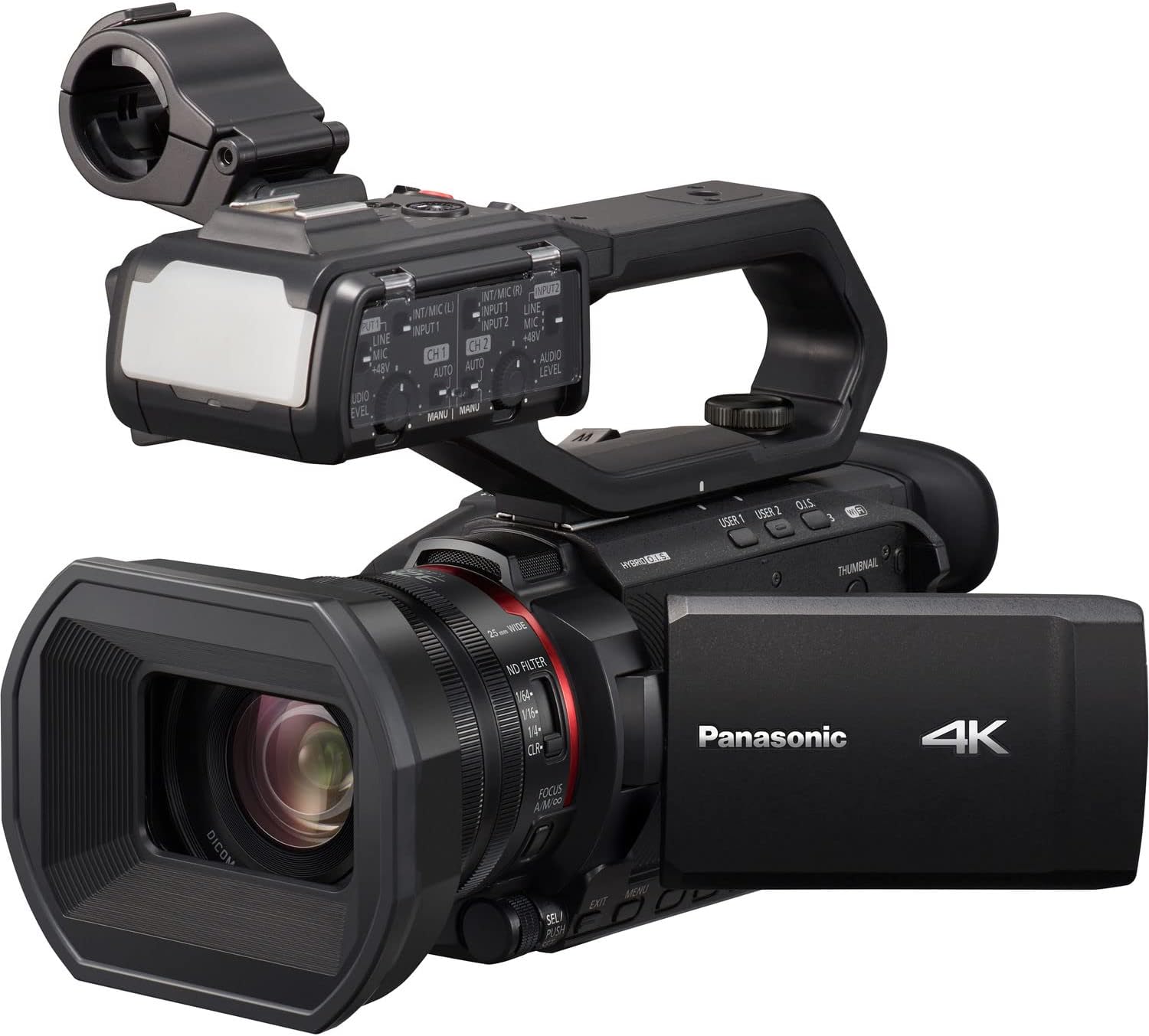
Figure 4.2.1: The Panasonic HC-X2000 Camcorder with its LCD monitor open, displaying the recording interface.
4.3 Zoom Operation
Use the zoom lever located on the handle or the lens barrel to adjust the zoom. Push the lever towards 'T' for telephoto (zoom in) and 'W' for wide-angle (zoom out).
4.4 Fetuunaiga Taulai
The camcorder supports both auto-focus (AF) and manual focus (MF). Switch between modes using the AF/MF switch on the lens barrel. In MF mode, rotate the focus ring to adjust focus manually.
4.5 Fa'amautu Ata
The 5-Axis Hybrid O.I.S. (Optical Image Stabilizer) is typically active by default. Ensure it is enabled in the menu settings for stable handheld footage.
4.6 Wi-Fi Control
To use Wi-Fi control, enable Wi-Fi in the camcorder's menu and connect your smartphone or tablet to the camcorder's Wi-Fi network. Use the Panasonic HC ROP app for remote camera settings and lens control.
5. Tausiga
5.1 Fa'amama le Camcorder
- Mata tioata: Use a soft, lint-free cloth specifically designed for optical lenses. For stubborn smudges, use a lens cleaning solution sparingly.
- Tino: Wipe the camcorder body with a soft, dry cloth. Avoid using strong detergents or solvents.
- Mataitu LCD: Gently wipe with a soft, dry cloth.
5.2 Tausiga maa
- Totogi atoa le maʻa aʻo leʻi muamua faʻaaogaina.
- Teu maa i se nofoaga malulu ma mago pe a le fa'aaogaina.
- Aloese mai le sasaa atoa o le maa e faaumiumi ai lona ola.
5.3 Teuina
When storing the camcorder for extended periods, remove the battery and store the unit in a dry, dust-free environment, preferably in a protective case.
6. Faʻafitauli
| Fa'afitauli | Mafuaaga e ono tupu | Fofo |
|---|---|---|
| E le ola le Camcorder. | E le'o totogia le ma'a pe le fa'aofiina sa'o. | Charge the battery and ensure it is securely inserted. |
| Le mafai ona pu'eina le vitio. | No SD card, SD card full, or write-protected. | Insert an SD card, delete unnecessary files, or unlock the write-protection switch on the card. |
| E faanenefu ata. | Incorrect focus, dirty lens, or image stabilization off. | Adjust focus, clean the lens, or enable image stabilization. |
| Leai se leo na pu'eina. | Microphone not connected, audio levels too low, or input settings incorrect. | Check microphone connection, adjust audio input levels, and verify audio settings in the menu. |
7. Fa'amatalaga
| Fa'aaliga | Fa'amatalaga |
|---|---|
| Numera Fa'ata'ita'i | HC-X2000 |
| Sensori | 1/2.5" 8.29M MOS Sensor |
| I'uga Vitio | UHD 4K (3840 x 2160), Full HD (1920 x 1080) |
| Fa'asa'o mata | 24x |
| Manulauti umi | 25mm - 600mm (35mm equivalent) |
| Fa'amautu Ata | 5-Axis Hybrid O.I.S. |
| Feso'ota'i | 3G-SDI, HDMI, USB, Wi-Fi |
| Fa'alogo leo | 24-bit PCM |
| Fa'asalalau Fa'asalalau | SD/SDHC/SDXC Card |
| Fua (W x H x D) | 10.12 x 6.26 x 5.08 inisi (pe tusa) |
| mamafa | 16.88 pauna (pe tusa) |
8. Fa'amaonia ma Lagolago
Mo faʻamatalaga faʻamaonia ma lagolago faʻapitoa, faʻamolemole faʻafesoʻotaʻi le Panasonic aloaia website or contact your authorized Panasonic dealer. Keep your proof of purchase for warranty claims.
Punaoa i luga ole laiga: For the latest drivers, firmware updates, and detailed FAQs, visit the official Panasonic support page for the HC-X2000 model.


