Folasaga
Thank you for choosing the Genai True Wireless Earphones. This manual provides detailed instructions on how to set up, operate, maintain, and troubleshoot your new earphones. Please read this manual carefully before use to ensure optimal performance and longevity of your device.
Ua Umaview
The Genai True Wireless Earphones feature a digital intelligence LED display on the charging case, tap control for easy operation, and Bluetooth 5.0 for stable connectivity. They are designed for comfortable in-ear wear and deliver clear stereo sound.
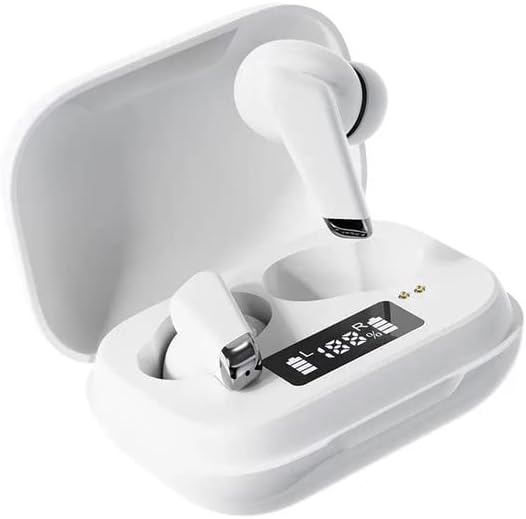
Image: Genai True Wireless Earphones in their charging case, showcasing the digital LED display indicating battery levels.
Vaega Autu:
- Moni Uaealesi Stereo (TWS): Seamless audio experience without cables.
- Tap Pule: Intuitive touch-sensitive controls for music and calls.
- Digital Intelligence LED Display: Shows real-time battery status of earbuds and charging case.
- Bluetooth 5.0: Ensures stable and efficient wireless connection.
- Ergonomic In-Ear Design: Comfortable and secure fit.
Seti Taiala
1. Fa'atumuina o Earphones ma le Pusa
- Totogi Muamua: Before first use, fully charge the charging case and earbuds. Place the earbuds into the charging case.
- Feso'ota'i le Charger: Connect the charging case to a power source using a compatible USB cable.
- Mata'ituina Fa'aaliga LED: The digital LED display on the case will show the charging status and battery percentage. Ensure both earbuds and the case are fully charged before proceeding.

Image: The charging case with its digital LED display, indicating the charge level of both the case and the individual earbuds.
2. Fa'atasi ma Lau Masini
- Malosiaga: Open the charging case. The earbuds will automatically power on and enter pairing mode. You may hear an audible prompt.
- Fa'agaoioi le Bluetooth: On your smartphone or other Bluetooth-enabled device, go to the Bluetooth settings and enable Bluetooth.
- Filifili masini: Look for "Genai Earphones" (or similar name) in the list of available devices and select it to connect.
- Fa'amaoniga: Once successfully paired, you will hear a confirmation sound, and the earbuds will be ready for use.

Image: A visual representation of the Bluetooth 5.0 chipset, highlighting the stable wireless connection technology.
Fa'atonuga o Galuega
The Genai True Wireless Earphones feature intuitive tap controls. The specific functions may vary slightly, but common controls are listed below:
Malosi / Pepe
- Malosiaga: Tatala le pusa e fa'atumu ai le telefoni, pe oomi umi le vaega e pa'i i ai i taliga uma e lua mo ni nai sekone.
- Tapē le eletise: Place the earbuds back into the charging case and close the lid, or long-press the touch area on both earbuds for several seconds until they power off.
Taaalo Musika
- Ta'alo/Taofi: Pa'i tasi i le taliga e tasi.
- Su'ega Sosoo: Oomi faalua i le taliga taumatau.
- Ala na muamua atu: Oomi faalua i le taliga tauagavale.
Pulega o Valaau
- Tali/Fa'ai'u le Valaau: Pa'i tasi i luga o so'o se taliga taliga i le taimi o se valaau o lo'o sau po'o se vala'au malosi.
- Te'ena Valaau: Oomi umi i luga o soo se taliga i le taimi o se telefoni o loʻo sau.
Fesoasoani leo
- Faʻaola le Leo Fesoasoani: Triple tap on either earbud (functionality may vary by device).
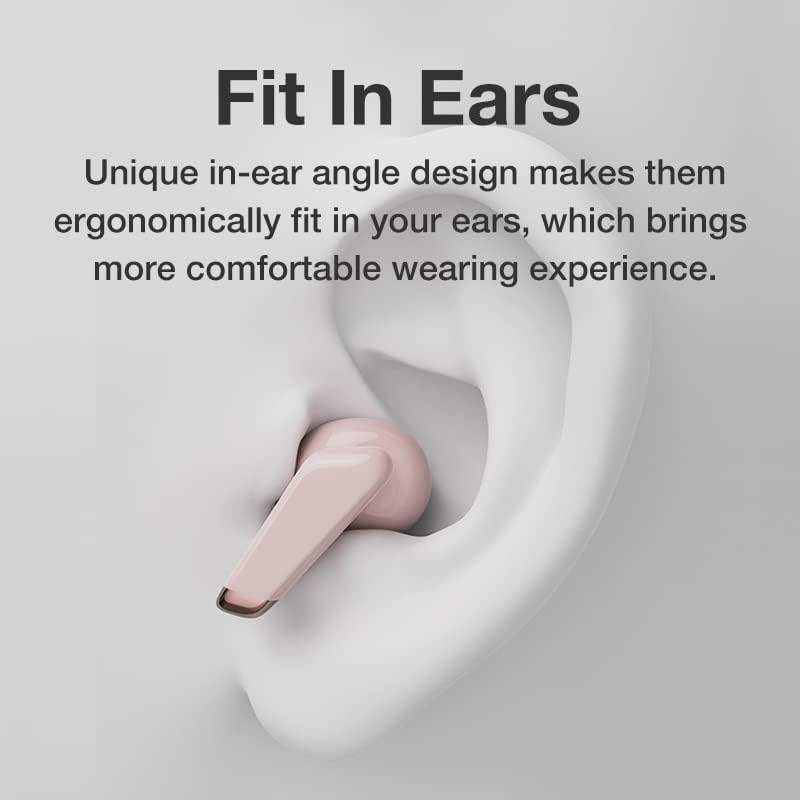
Image: An illustration showing an earbud comfortably and ergonomically fitted within the ear canal.
Tausiga
Fa'amamaina
- Faaaoga se ie vaivai, mago, ma e leai ni filo e faamama ai taliga ma le pusa e faʻaalu ai le eletise.
- Aua ne'i fa'aogaina ni mea fa'amama fa'amama, so'o, po'o fa'asuia aerosol.
- Gently clean the ear tips and speaker mesh to remove any earwax or debris.
Teuga
- Store the earphones in their charging case when not in use to protect them and keep them charged.
- Avoid storing in extreme temperatures, direct sunlight, or high humidity.
Fa'afitauli
- Earbuds not pairing with each other or with device:
- Ia mautinoa ua uma taligalu e lua.
- Toe tuu uma e lua taliga i totonu o le pusa e fa'atumu ai le komepiuta, tapuni le tapuni, fa'atali mo ni nai sekone, ona toe tatala lea o le tapuni.
- On your device, forget/delete the "Genai Earphones" from the Bluetooth list and try pairing again.
- Leai se leo pe maualalo le leo:
- Siaki le maualuga o le leo i luga o lau masini ma le taliga.
- Ia fa'amautinoa o lo'o feso'ota'i lelei pu fa'alogo i lau masini.
- Fa'amama so'o se otaota mai le pusi fa'alogo taliga.
- Totogi fa'afitauli:
- Ia mautinoa o lo'o feso'ota'i lelei le uaea o lo'o molia i le pusa ma le puna eletise.
- Ia fa'amautinoa o lo'o fa'agaoioia le puna o le eletise.
- Fa'amama mea fa'afeso'ota'i i luga o taliga fa'apea ma le pusa.
Fa'amatalaga
| Fa'aaliga | Fa'amatalaga |
|---|---|
| Fa'ata'ita'iga | B0BX5G53VT |
| Tekinolosi Feso'ota'i | Uaealesi (Bluetooth 5.0) |
| Ituaiga Ipu taliga | Semi-tatala |
| Numera o Aveta'avale | 2 |
| Metotia Totogi | Pusa e molia |
| Headphone Pads Material | Silikoni |
| Ta'avale Ta'avale | 10mm |
| Aofa'i Harmonic Distortion | 0.02% |
| Impedance Ranga | Up to 32 Ω |
| Mea | Silikoni |
| Tulaga taliga | I le taliga |
| Fa'ailoga Fa'ailoga | Uaealesi Moni |
Fa'amaonia ma Lagolago
The Genai True Wireless Earphones come with a 12-masina saisai from the date of purchase, covering manufacturing defects. For any quality problems or support inquiries, please contact the seller directly through your purchase platform.
We are committed to ensuring 100% customer satisfaction. If you encounter any issues, please do not hesitate to reach out for assistance, including full refunds or replacements as applicable.


