Folasaga
This manual provides essential instructions for the safe operation, maintenance, and troubleshooting of your Vorago SC-302-V2 Electric Scooter. Please read this manual thoroughly before using the scooter to ensure proper function and safety.
Fa'amatalaga Saogalemu
Always wear a helmet and appropriate safety gear when operating the scooter. Observe local traffic laws and regulations. Do not ride in adverse weather conditions or on slippery surfaces. Ensure the scooter is in good working order before each use.
- Maualuluga mamafa gafatia: 120 kg.
- Tausaga fautuaina: 12 tausaga ma luga atu.
- Avoid riding on steep inclines exceeding 15%.
- Aua le ta'avale i lalo o le malosi o le ava malosi po o fualaau faasaina.
O mea o lo'o i totonu
A uma ona tatala, faʻamautinoa o loʻo iai vaega uma:
- Vorago SC-302-V2 Electric Scooter
- Charger Mana
- Tusi Lesona a le Tagata (lenei pepa)
- Fa'amatalaga Fa'amaonia
Seti
Tatala le Scooter
Carefully remove the scooter from its packaging. Locate the folding mechanism near the base of the handlebar stem. Release the latch and lift the handlebar stem until it locks securely into place. Ensure all locking mechanisms are engaged before use.
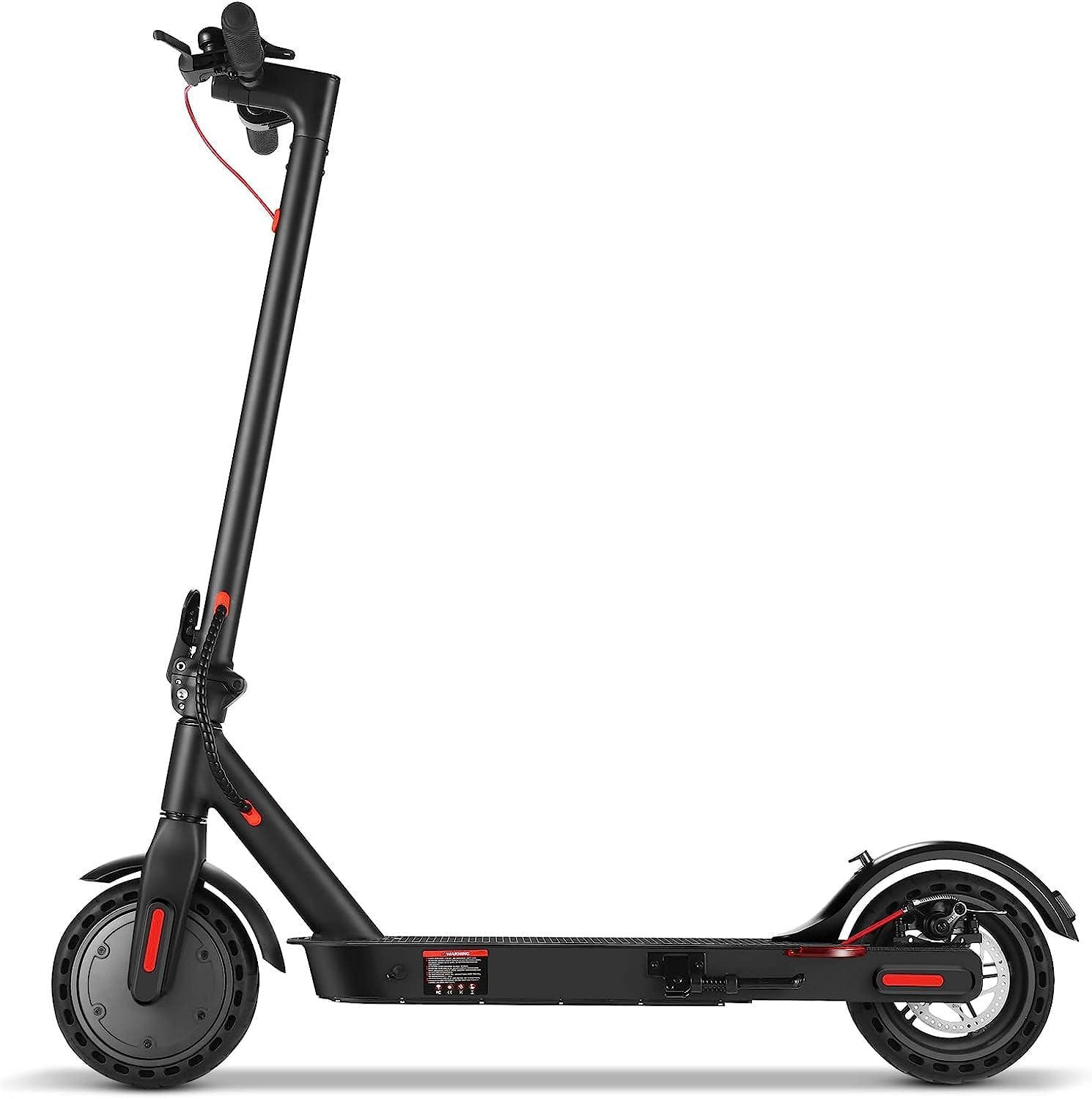
Ata: The Vorago SC-302-V2 Electric Scooter in its fully unfolded position, ready for use. This image shows the scooter from a side profile.
Totogiina le Maa
Before first use, fully charge the scooter's battery. Connect the charger to the charging port, typically located on the side of the deck, and then plug the charger into a standard electrical outlet. The charging indicator light on the charger will change color (e.g., red to green) when charging is complete. A full charge takes approximately 5 hours.

Ata: O se vaaiga vavalalata view of the scooter's deck, highlighting the charging port and indicating the electric brake feature. The image also shows an icon for "CARGA COMPLETA EN 4 HRS" (Full charge in 4 hours) and "FRENO ELÉCTRICO" (Electric Brake).
Handlebar Adjustment (if applicable)
Ensure the handlebars are at a comfortable height and securely fastened. Check all screws and quick-release levers for tightness.
Fa'atonuga o Galuega
Malosi / Pepe
Press and hold the power button on the digital display panel to turn the scooter on or off. The digital panel will display speed, battery level, and speed mode.

Ata: A view of the scooter's handlebar area, showing the digital display panel and LED lights. The display shows speed and battery information, and the LED lights are indicated for visibility.
Ti'eti'e le Scooter
- Tuu le vae e tasi i luga o le nofoa ma tulei ese le isi vae e maua ai le malosi muamua.
- Once moving, gently press the accelerator lever to engage the motor.
- Adjust speed using the accelerator. The scooter features multiple speed modes, allowing a maximum speed of 25 km/h.
- To change speed modes, refer to the digital display and control buttons.

Ata: An illustration of the scooter highlighting its maximum speed of 25 km/h and its protected battery system, indicating performance and safety features.
Taofi
The SC-302-V2 is equipped with both an electric brake and a disc brake for reliable stopping power. To brake, gently squeeze the brake lever on the handlebar. Apply both brakes simultaneously for optimal stopping performance, especially at higher speeds.
Gaugau mo Teuina/Felauaiga
To fold the scooter, ensure it is powered off. Locate the folding mechanism and release the latch. Carefully fold the handlebar stem down until it clicks into its folded position. This compact design allows for easy storage and transport.

Ata: A woman demonstrating the portability of the scooter by placing it, in its folded state, into the trunk of a car. This illustrates the scooter's convenient folding design for transport.
Tausiga
Tausiga maa
- Charge the battery regularly, even if the scooter is not in use, to prolong its lifespan.
- Aloese mai le sasaa atoa o le maa a'o le'i toe fa'atumuina.
- Store the scooter in a cool, dry place when not in use.
Fa'amamaina
Solo le scooter i fa'asalalaugaamp cloth. Do not use high-pressure water jets or immerse the scooter in water, as this can damage electronic components.
Omiga Pa'u
Regularly check tire pressure and inflate to the recommended PSI (pounds per square inch) as indicated on the tire sidewall or in the specifications section. Proper tire pressure ensures optimal performance and safety.
Su'ega taofi
Periodically inspect the brake system for wear and proper function. Ensure brake levers are responsive and brake pads are not excessively worn.
Fa'afitauli
| Fa'afitauli | Mafuaaga e ono tupu | Fofo |
|---|---|---|
| E le ola le Scooter | Ma'a maualalo; matala so'otaga | Totogi le maa; siaki uma fesootaiga uaea. |
| Fa'aitiitia le lautele po'o le saoasaoa | Under-inflated tires; low battery; heavy load | Inflate tires to correct pressure; fully charge battery; reduce load. |
| E vaivai le lagona o taofi | Pads taofi ua masaes; uaea taofi matala | Inspect and replace brake pads if necessary; adjust brake cable tension. |
| Pio e le masani ai i le taimi o le taotoga | Loose components; foreign object | Inspect scooter for loose parts; remove any foreign objects. If noise persists, contact support. |
Fa'amatalaga
| Fa'aaliga | Fa'amatalaga |
|---|---|
| Igoa Fa'ata'ita'iga | SC-302-V2 |
| Malosiaga afi | 250W |
| Saosaoa Maualuluga | 25 km/h |
| Range (Autonomy) | E oo atu i le 25 kilomita |
| Ituaiga maa | 6000mAh Lithium-Ion |
| Taimi Totogi | E tusa ma le 5 itula |
| Faiga taofi | Electric brake, Disc brake |
| Mea Fa'avaa | Alumini |
| Avanoa Maualuga Maualuga | 120 kilokalama |
| Vaaiga (tatala) | 106 x 44 x 115 cm |
| mamafa | 14.4 kilokalama |
| Fa'apitoa Fa'apitoa | Foldable design, Anti-slip deck, LED lights, Digital display panel |
Fa'amatalaga Fa'amaonia
The Vorago SC-302-V2 Electric Scooter comes with a 1 tausaga fa'amaonia from the date of purchase. This warranty covers manufacturing defects and material faults under normal use. Please retain your proof of purchase for warranty claims. The warranty does not cover damage caused by misuse, accidents, unauthorized modifications, or normal wear and tear.
For warranty service, please contact Vorago customer support with your product details and proof of purchase.
Lagolago Tagata Fa'atau
If you have any questions, require technical assistance, or need to report an issue with your Vorago SC-302-V2 Electric Scooter, please contact our customer support team.
- Webnofoaga: www.voragolive.com (Please check the official Vorago webnofoaga mo faʻamatalaga faʻafesoʻotaʻi lata mai.)
- imeli: Refer to the official Vorago website for support email.
- Telefoni: Refer to the official Vorago website for support phone numbers.
When contacting support, please have your model number (SC-302-V2) and purchase date available.


