
1. Fa'atonuga Taua mo le Saogalemu
Please read all instructions carefully before using this heater. Failure to follow these instructions may result in fire, electric shock, or injury.
- Aua le fa'aaogaina lenei masini fa'avevela i fafo. Ua mamanuina mo na'o totonu o le fale.
- Fa'asa'o i taimi uma mea fa'avevela i totonu o se pa puipui/ta'u. 'Aua ne'i fa'aoga i se uaea fa'alautele po'o se paipa eletise e mafai ona toe fa'aogaina (ta'avale/ta'avale eletise).
- E vevela lenei fa'avevela pe a fa'aoga. Ina ia aloese mai le mu, aua ne'i pa'i le pa'u e leai ni pa'u i mea vevela.
- Taofi mea e mu, e pei o meaafale, aluga, moega, pepa, lavalava, ma pupuni ia le itiiti ifo i le 3 futu (0.9 m) mai le pito i luma o le faamafanafana ma tuu ese mai itu ma tua.
- E tatau ona matua'i fa'aeteete pe a fa'aogaina so'o se fa'avevela e po'o lata ane i tamaiti po'o mama'i ma so'o se taimi e tu'u ai le fa'avevela e fa'agaioi ma leai se tausiga.
- Aveese i taimi uma le fa'avevela pe a le fa'aaogaina.
- Aua ne'i fa'aogaina so'o se mea fa'avevela i se uaea po'o se palaka ua leaga pe a mae'a fa'aletonu le fa'avevela, ua pa'u pe fa'aleagaina i so'o se faiga. Toe fa'afo'i le fa'avevela ile nofoaga fa'atagaina mo le su'ega, fetu'una'iga eletise po'o masini, po'o le toe fa'aleleia.
- Aua ne'i fa'aofiina pe fa'ataga mea mai fafo e ulufale i so'o se ea po'o se fa'avevela ona e ono mafua ai se eletise po'o se afi, pe fa'aleagaina ai le fa'avevela.
- Ina ia puipuia se afi e ono tula'i mai, 'aua ne'i poloka le 'ea fa'aoga po'o le fa'avevela i so'o se faiga. Aua le fa'aogaina i luga o mea vaivai, pei o se moega, e ono poloka ai avanoa.
- This heater has an automatic overheat protection system. If the heater overheats, it will automatically shut off. Unplug the heater, wait 10 minutes for it to cool down, then plug it back in.
- This heater is equipped with a tip-over safety switch. If the heater is accidentally tipped over, it will automatically shut off. Place the heater on a firm, level surface to resume operation.
2. Oloa Ua Ovaview
The PELONIS PSH10C2ABB is a compact and portable 1500W ceramic electric fan heater designed for efficient indoor heating. It features multiple heat settings and a fan-only mode for year-round use.
Vaega Autu:
- 3 Fa'atonuga vevela: 700W, 900W, and 1500W for customizable warmth.
- Faiga na'o le ili: Allows for air circulation without heat, suitable for all seasons.
- Fa'asa'o vevela: Tausi le vevela o le potu e te manaʻo ai.
- Fuafuaga ma'oti ma feavea'i: Easy to move between rooms with a cool-touch handle.
- Elemene fa'avevela keramika: Provides rapid and energy-efficient heating.
- Vaega o le Saogalemu: Overheat protection and tip-over switch for enhanced safety.
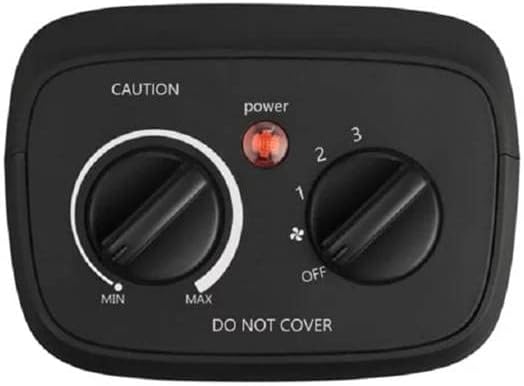
Ata: Luga view of the heater's control panel, showing the thermostat dial (Min to Max) and the mode selector dial (Off, Fan, Heat 1, Heat 2, Heat 3) with a power indicator light.
3. Seti
I totonu o le afifi:
- PELONIS PSH10C2ABB Ceramic Electric Fan Heater
- Tusi Taiala
Tu'uga:
- Unpack the heater from its packaging and remove all packing materials.
- Place the heater on a firm, level, and stable surface. Ensure it is at least 3 feet (0.9 meters) away from walls, furniture, and other combustible materials.
- Ensure the power cord is not pinched or placed under the heater.
- Fa'apipi'i sa'o le masini fa'avevela i totonu o le outlet eletise e 127V AC, 60Hz. Aua le fa'aaogaina uaea fa'aopoopo po'o ni tape eletise.

Image: The PELONIS ceramic heater positioned on a shelf, demonstrating proper placement in a living space.
4. Fa'atonuga o Galuega
The heater features two control dials on the top panel: one for thermostat control and one for mode selection.
Mode Selection Dial:
This dial controls the power and operating mode of the heater. Rotate the dial to select your desired setting:
- ESE: Tape le vevela.
- FAN (indicated by fan icon): Activates the fan without heat, providing air circulation.
- HEAT 1 (700W): Fa'atonuga maualalo le vevela.
- HEAT 2 (900W): Fa'atonuga vevela.
- HEAT 3 (1500W): High heat setting for maximum warmth.
Uamea Pulea le vevela:
This dial allows you to set your desired room temperature. It works in conjunction with the heat settings.
- Turn the Mode Selection Dial to one of the HEAT settings (1, 2, or 3).
- Rotate the Thermostat Control Dial clockwise towards "MAX" for higher temperatures, or counter-clockwise towards "MIN" for lower temperatures.
- Once the room reaches your desired temperature, slowly turn the Thermostat Control Dial counter-clockwise until the heater turns off. The heater will now cycle on and off to maintain this temperature.
Malamalama Faila Malamalama: A red light on the control panel illuminates when the heater is powered on and operating.
5. Tausiga
Regular cleaning and proper storage will help ensure the longevity and efficient operation of your heater.
Fa'amamaina:
- Aveese i taimi uma le fa'avevela ma fa'ataga e mālū atoatoa a'o le'i fa'amamā.
- Fa'aaogā se mea vaivai, oamp ie e solo ai pito i fafo o le faamafanafana. Aua ne'i fa'aogaina ni mea e fa'amama fa'amama po'o ni so'o.
- Use a vacuum cleaner with a brush attachment to gently remove dust and lint from the air intake and exhaust grilles.
- Never immerse the heater in water or allow water to drip into the interior of the heater.
Teuina:
When not in use, store the heater in its original packaging or a clean, dry place. Wrap the power cord loosely to prevent damage.
6. Faʻafitauli
| Fa'afitauli | Mafuaaga e ono tupu | Fofo |
|---|---|---|
| E le kilia le fa'avevela. |
|
|
| Heater produces no heat in a heat setting. |
|
|
| E fa'aola ma tape soo le fa'avevela. |
|
|
7. Fa'amatalaga
- Fa'ata'ita'iga: PSH10C2ABB (DUDULAILE-311-2643)
- Fa'ailoga: PELONIS
- Malosiaga e maua ai: 700W / 900W / 1500W
- Voltage: 127 Volts
- Numera o Saosaoa: 3 (Heat settings) + Fan-only
- itu: Approximately 26 x 22 x 13 cm (Package dimensions, actual unit is similar)
- mamafa: E tusa ma le 500 g
- Mea Fa'apitoa: Compact, space-saving, energy-saving, lightweight, portable, overheat protection, tip-over switch.
- Lanu: Lanu uliuli

Image: Diagram showing the approximate dimensions of the PELONIS heater: 23cm height, 10cm depth, 20cm width.
8. Fa'amaonia ma Lagolago
For warranty information and customer support, please refer to the warranty card included with your product or visit the official PELONIS webnofoaga. Taofi lau lisiti fa'atau e fai ma fa'amaoniga o le fa'atauga mo so'o se tagi fa'amaonia.
If you experience any issues not covered in the troubleshooting section, please contact PELONIS customer service for assistance.
Punaoa i luga ole laiga:
- Official PELONIS Webnofoaga: www.pelonis.com (Fa'aaliga: Ole mea lea e tu'u iai URL, please refer to your product documentation for the correct webnofoaga.)


