1. Fa'atonuga Taua mo le Saogalemu
Faitau fa'atonuga uma ma le fa'aeteete a'o le'i fa'aogaina le masini. Taofi le tusi lesona lenei mo fa'amatalaga i le lumana'i.
Saogalemu Lautele
- Aua ne'i taumafai e fa'agaioi le ogaumu lenei ma tatala le faitoto'a ona e mafai ona i'u ai i le afaina i le microwave.
- Aua nei tu'u so'o se mea i le va o le ogaumu pito i luma fa'asaga ma le faitoto'a pe fa'ataga fo'i le palapala po'o mea mama e fa'aputu i luga o fa'amaufa'ailoga.
- Aua le fa'againa le ogaumu pe a leaga. E taua tele le tapuni lelei o le faitotoa o le ogaumu ma ia leai se mea e faaleagaina ai: (1) Faitotoa (pi'o), (2) Fa'amau ma faamau (ta'i pe matala), (3) Fa'amaufa'ailoga faitoto'a ma fa'amaufa'ailoga.
- O le ogaumu e le tatau ona fetuutuunai pe toe faaleleia e se tasi sei vagana ai tagata faigaluega agavaa lelei.
- O lenei meafaigaluega ua fa'amoemoe mo na'o le fa'aoga ile aiga.
- Aua le faʻaaogaina vailaʻau leaga poʻo ausa i lenei masini.
- Aua le teuina lenei masini i fafo. Aua le fa'aogaina lenei oloa i tafatafa o vai.
- Aua ne'i faatofuina le uaea pe fa'amau i le vai.
- Taofi le uaea mai mea vevela.
- Aua ne'i tautau le uaea i le pito o le laulau po o le fata.
- Ina ia faʻaitiitia le lamatiaga o le afi i totonu o le ogaumu:
- Aua le soona kukaina meaai.
- Aveese fusi uaea mai pepa po'o taga palasitika a'o le'i tu'u le ato ile ogaumu.
- Afai o mea o lo'o i totonu o le ogaumu e tatau ona mu, tapuni le faitotoa o le ogaumu, tape le ogaumu, ma motusia le uaea eletise, pe tape le eletise i le fuse po'o le va'a ta'avale.
Saogalemu Faaeletise
- Ia mautinoa o le sapalai eletise e fetaui ma le voltagu fa'amaoti i luga o le fa'ailoga fa'atatau a le meafaigaluega.
- Fa'afeso'ota'i i taimi uma le mea faigaluega i totonu o se so'o fa'aeleele.
- Do not use extension cords unless absolutely necessary and ensure they are rated for the appliance's power consumption.
- Aveese le masini mai le alavai pe a le fa'aaogaina ma a'o le'i fa'amamāina.
2. Oloa Ua Ovaview
Familiarize yourself with the components and control panel of your SHARP YC-PS204AE-S microwave oven.
Vaega
- Oga ogaumu: O le potu i totonu e kuka ai mea'ai.
- Roteri: A glass tray that rotates to ensure even cooking.
- Mama Liliu: Lagolago le laulau pi'u.
- Faitotoa: Ua fa'apipi'iina i se faiga e loka ai le saogalemu.
- Vaega Pule: Contains the display, buttons, and dial for operation.
- moli totonu ole LED: Fa'amalamalamaina le avanoa o le ogaumu i le taimi e fa'agaoioi ai.
Pulea Vaega ma Fa'aaliga
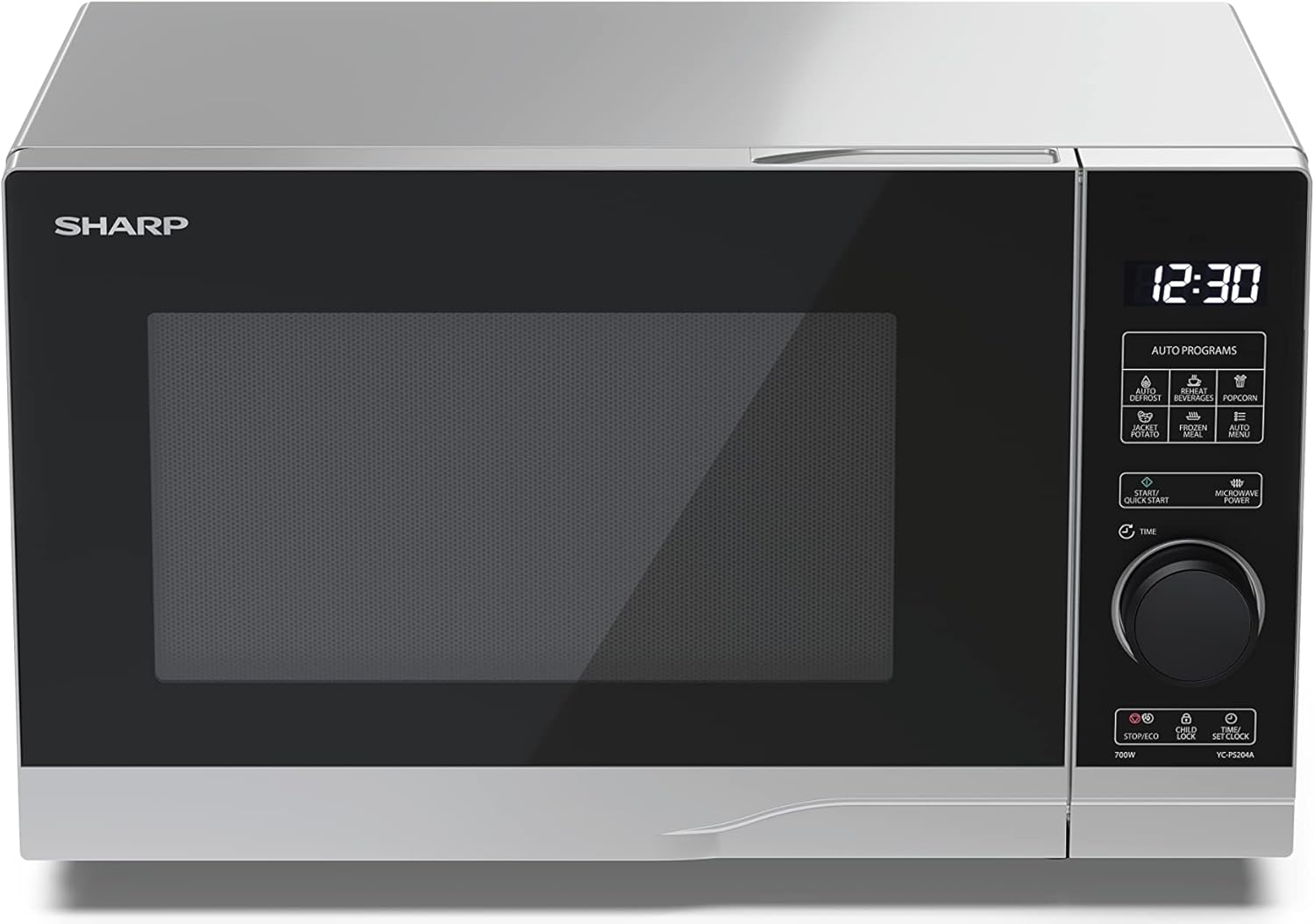
Ata: Luma view of the Sharp YC-PS204AE-S microwave oven, highlighting the semi-digital control panel on the right side. The display shows "88:88" and various auto program icons are visible above the main dial.
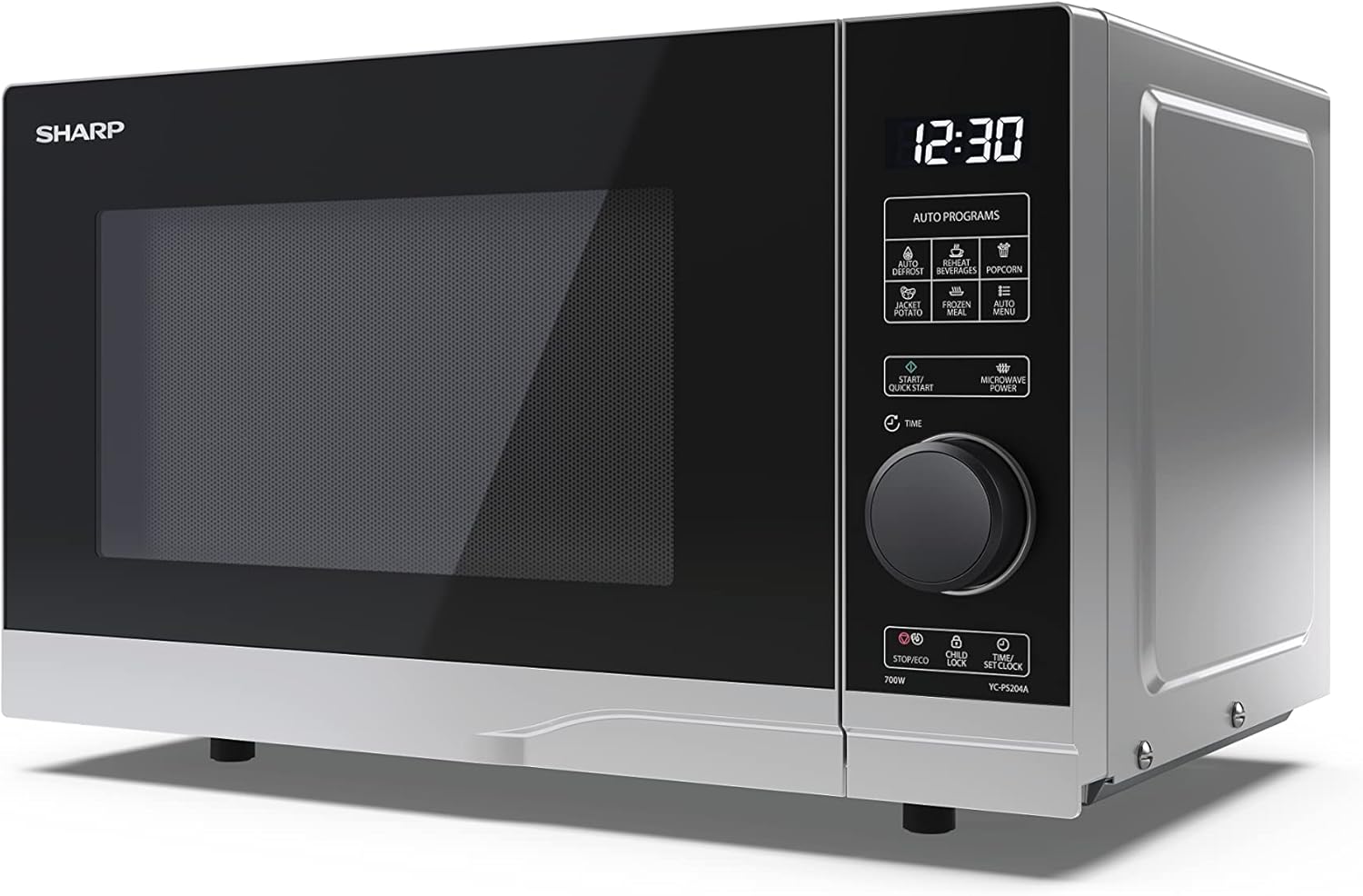
Ata: Fa'afa'afa'o i luma view of the Sharp YC-PS204AE-S microwave, showing the sleek silver and black design. The control panel is clearly visible with its digital display and rotary knob.
The control panel features a digital display, a rotary dial for setting time and power, and several touch buttons for various functions and automatic programs.
- Fa'aaliga: E fa'aalia ai le taimi, tulaga o le kuka, ma fa'ailoilo o le polokalame.
- Rotary Dial: Used to set cooking time, weight, and adjust clock.
- Polokalama ta'avale: Icons for Defrost, Reheat, Popcorn, Jacket Potato, Frozen Meal, Beverages, and Auto Menu.
- Start/Quick Start Button: Initiates cooking or starts quick cooking.
- Microwave Power Button: Selects power levels.
- Taofi/Eco Button: Stops cooking or activates ECO mode.
- Ki Loka Tamaiti: Activates/deactivates child lock.
- Time/Set Clock Button: Sets the clock or adjusts time.
3. Seti
Tatalaina
- Aveese ma le faaeteete le ogaumu microwave ma mea uma e teu mai le pusa.
- Siaki le ogaumu mo so'o se mea ua fa'aleagaina, e pei o ni po'o po'o se faitoto'a sese. Aua le fa'againa le ogaumu pe a leaga.
- Aveese so'o se ata puipui mai le pito i luga o le kapeneta.
- Ensure all accessories are present: glass turntable, turntable ring, and instruction manual.

Ata: The interior of the Sharp YC-PS204AE-S microwave oven with the door open, showing the glass turntable and the stainless steel interior. This view is useful for understanding how to place food and clean the cavity.
Tulaga
- Tuu le ogaumu i luga o se mea mafolafola, mautu e mafai ona lagolagoina lona mamafa ma mea'ai sili ona mamafa e ono vela i totonu.
- Ensure adequate ventilation: leave a minimum of 20 cm (8 inches) of space above the oven, 10 cm (4 inches) at the rear, and 5 cm (2 inches) on each side.
- Aua ne'i poloka so'o se avanoa e savili ai.
- Do not place the oven near heat sources such as radiators or stoves.
- Keep the oven away from radio and TV sets to avoid interference.

Ata: A diagram showing the dimensions of the Sharp YC-PS204AE-S microwave oven, with measurements for height (273 mm), width (455 mm), and depth (334 mm). This helps users ensure proper placement and ventilation space.
Seti Muamua
- Plug the power cord into a standard grounded electrical outlet (230V, 50Hz).
- The display will show "0:00" or "12:00".
- Seti le Uati:
- Press the "Time/Set Clock" button once. The hour digits will flash.
- Turn the rotary dial to set the hour (0-23 for 24-hour format).
- Press "Time/Set Clock" again. The minute digits will flash.
- Turn the rotary dial to set the minutes (0-59).
- Press "Time/Set Clock" a third time to confirm. The clock is now set.
4. Fa'atonuga o Galuega
Kuka Microwave Autu
- Tuu mea'ai i totonu o se koneteina saogalemu i le microwave i luga o le laulau.
- Tapuni lelei le faitotoa o le ogaumu.
- Press the "Microwave Power" button repeatedly to select the desired power level (e.g., P100 for 100% power, P80 for 80%, etc. There are 10 levels).
- Turn the rotary dial to set the cooking time (up to 95 minutes).
- Press the "Start/Quick Start" button to begin cooking.
Galuega Amata vave
- Press the "Start/Quick Start" button repeatedly to cook at 100% power for 30-second intervals. Each press adds 30 seconds.
- The maximum quick start time is 10 minutes.
Defrost Galuega
This function allows you to defrost food by weight.
- Tuu mea'ai 'aisa i luga o le laulau fa'ata'amilo.
- Press the "Defrost" button (usually indicated by a snowflake icon). The display will show "dEF1" or "dEF2" depending on the defrost mode.
- Turn the rotary dial to select the weight of the food (e.g., 100g to 2000g).
- Press "Start/Quick Start" to begin defrosting.
Automatic Programs (Auto Menu)
The microwave has 8 pre-set automatic programs for common food items.
- Press the "Auto Menu" button (often labeled with "Auto Programs" or specific icons).
- Turn the rotary dial to select the desired program (e.g., Popcorn, Potato, Pizza, Beverage, etc.). The display will show the program number (e.g., A-1, A-2).
- Press "Auto Menu" again to confirm the program.
- Turn the rotary dial to select the weight or quantity (if applicable for the program).
- Press "Start/Quick Start" to begin.
Galuega Loka Tamaiti
To prevent unintended operation, especially by children.
- Fa'agaoioi: Press and hold the "Child Lock" button (often combined with "Stop/Eco") for 3 seconds. A lock icon will appear on the display.
- Faʻaleaogaina: Press and hold the "Child Lock" button for 3 seconds again. The lock icon will disappear.
Faʻasao ECO
To save energy, the display can be turned off when the oven is not in use.
- Fa'agaoioi: In standby mode, press the "Stop/Eco" button once. The display will turn off.
- Faʻaleaogaina: Oomi so'o se ki pe tatala le faitoto'a e toe fa'agaoioi ai le fa'aaliga.
5. Tausiga ma Fa'amamā
O le fa'amama ma le tausiga faifaipea o le a mautinoa ai le umi o le ola ma le fa'atinoga lelei o lau umu microwave.
Fa'amamāina o le Ogaumu totonu
- Aveese i taimi uma le ogaumu a'o le'i faamamaina.
- Soloia le gutu o totonu pe a uma ona fa'aoga i fa'asalalaugaamp ie ma fufulu mama.
- For stubborn stains, place a bowl of water with lemon juice inside and heat for 2-3 minutes. The steam will loosen the residue.
- Aua ne'i fa'aogaina ni mea fa'amama fa'amama po'o ni pulumu u'amea, aua e mafai ona fa'aleagaina ai totonu.
Cleaning the Turntable and Ring
- E mafai ona aveese le moli tioata ma le mama moli mo le faamamaina.
- Fufulu i le vai mafanafana, fasimoli po'o le fufulu ipu.
- Ia mautinoa ua mago atoatoa a'o le'i toe tu'u i totonu o le ogaumu.
Fa'amamaina o fafo
- Solo le pito i fafo i se mea vaivai, oamp ie.
- ʻAloʻese mai le ulufale atu o le vai i totonu o pu e faʻaoso ai le ea.
- Clean the door and door seals regularly to ensure proper closure and prevent microwave leakage.
6. Faʻafitauli
Afai e te feagai ma fa'afitauli i lau umu microwave, fa'asino i fa'afitauli masani ma fofo.
| Fa'afitauli | Mafuaaga e ono tupu | Fofo |
|---|---|---|
| E le amataina le ogaumu. | E le'i fa'amauina le uaea eletise; Ua feula le fuse po'o le motusia o le matagaluega; E le'i tapunia lelei le faitoto'a. | Fa'apipi'i i le plug; Sui le fiusi pe toe seti le circuit breaker; Tapuni lelei le faitoto'a. |
| Mea'ai e le vela tutusa. | Mea'ai e le'i fa'afefeteina pe liliu; E le o taamilomilo. | Stir or turn food halfway through cooking; Ensure turntable and ring are correctly placed and clean. |
| O lo'o fa'amumu i totonu o le ogaumu. | Metal or foil in the oven; Dish not microwave-safe; Food residue. | Remove any metal; Use microwave-safe dishes; Clean oven cavity thoroughly. |
| Fa'aaliga fa'aalia fa'ailoga sese. | Fa'aletonu totonu. | Unplug the oven for a few minutes, then plug it back in. If the error persists, contact customer service. |
| Ua le ola le moli o le ogaumu. | E mana'omia le suitulaga. | Fa'afeso'ota'i tagata faigaluega agava'a mo le suia o matauila. |
If the problem persists after trying these solutions, please contact SHARP customer support.
7. Fa'amatalaga
Technical specifications for the SHARP YC-PS204AE-S Microwave Oven.
| Fa'aaliga | Fa'amatalaga |
|---|---|
| Numera Fa'ata'ita'i | YC-PS204AE-S |
| Malosiaga | 20 lita |
| Masini Malosiaga Microwave | 700 Watts |
| Malosiaga Levels | 10 |
| Ituaiga Pulea | Semi-digital |
| Oloa Fua (W x H x D) | 45.5 cm x 27.4 cm x 33.4 cm |
| mamafa | 10.5 kilokalama |
| Lanu | siliva |
| Mea i totonu | Apa siliva |
| Lisi Lisi | 245 mm |
| Fa'apitoa Fa'apitoa | Child Lock, ECO Function, Defrost System, LED Interior Lighting, 8 Auto Programs |
| Paoa sapalai | 230 Volts |
| Fa'aaofia Vaega | 1x Microwave SHARP YC-PS204AE-S, Glass Turntable, Multilingual Operating Instructions, Warranty Card |
8. Fa'amaonia ma Lagolago
SHARP provides a warranty for this product. Please refer to the warranty card included in the packaging for specific terms and conditions.
Lagolago Tagata Fa'atau
For technical assistance, troubleshooting beyond this manual, or warranty claims, please contact SHARP customer service.
- Visit the official SHARP webnofoaga mo faʻamatalaga fesoʻotaʻiga lagolago i lau itulagi.
- Have your model number (YC-PS204AE-S) and purchase date ready when contacting support.


