1. Folasaga
This manual provides comprehensive instructions for the installation, operation, and maintenance of the AXIS Q1656-LE 4 Megapixel Outdoor Network Camera. Designed for remote surveillance, this camera offers high-resolution imaging and robust performance in outdoor environments.
Key features include built-in IR LED for enhanced night vision and wired connectivity for reliable data transmission.
2. Fa'amatalaga Saogalemu
Please read these safety instructions carefully before installing or operating the camera. Failure to follow these instructions may result in injury, damage to the product, or voiding the warranty.
- Fa'apipi'i: Installation must be performed by qualified personnel in accordance with all local codes and regulations.
- Punavai Malosi: Use only the specified power adapter or Power over Ethernet (PoE) source. The camera operates at approximately 3.7 watts.
- Siosiomaga: This camera is designed for outdoor use with an International Protection Rating of IP66 and IP67, indicating protection against dust and water ingress.
- Fa'amamaina: Motusi le eletise a'o le'i fa'amamāina. Faaaoga se ie vaivai ma mago. Aua le fa'aaogaina ni mea fa'amamā vai po'o ni mea fa'amamā ea.
- Luga faʻavae: Do not attempt to disassemble or modify the camera. Refer all servicing to qualified service personnel.
3. Mea i totonu o le afifi
Fa'amautinoa o lo'o iai vaega uma i totonu o le afifi:
- AXIS Q1656-LE Network Camera (1 unit)
- Fa'atonu Taiala
- Mounting Bracket (Wall Mount)
- Siu ma Pa puipui
- Pusa Fesoʻotaʻiga
Fa'aaliga: Power adapter may be sold separately or supplied via PoE. Batteries are not included as the camera does not require them for operation.
4. Faʻamatalaga Faʻaletino
The AXIS Q1656-LE is a box-form factor camera designed for robust outdoor surveillance. Its dimensions are approximately 9 x 22 x 8 inches (L x W x H).
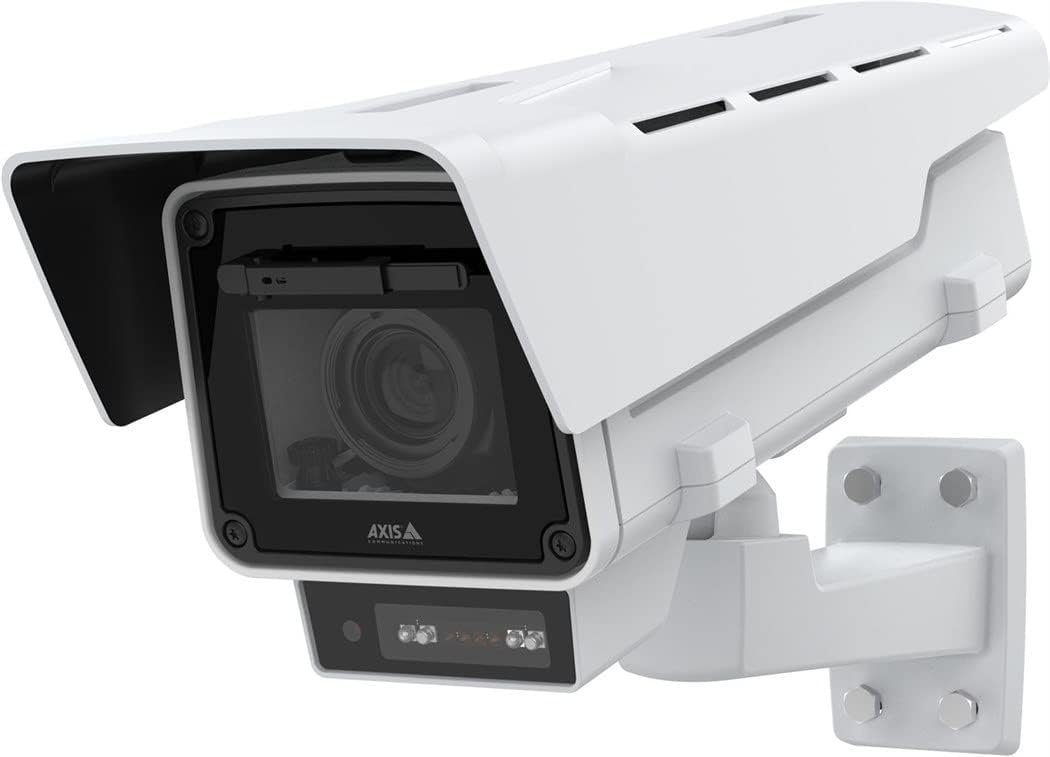
Ata 4.1: Itu i luma view of the AXIS Q1656-LE Network Camera, showing the lens, IR illuminators, and mounting bracket.
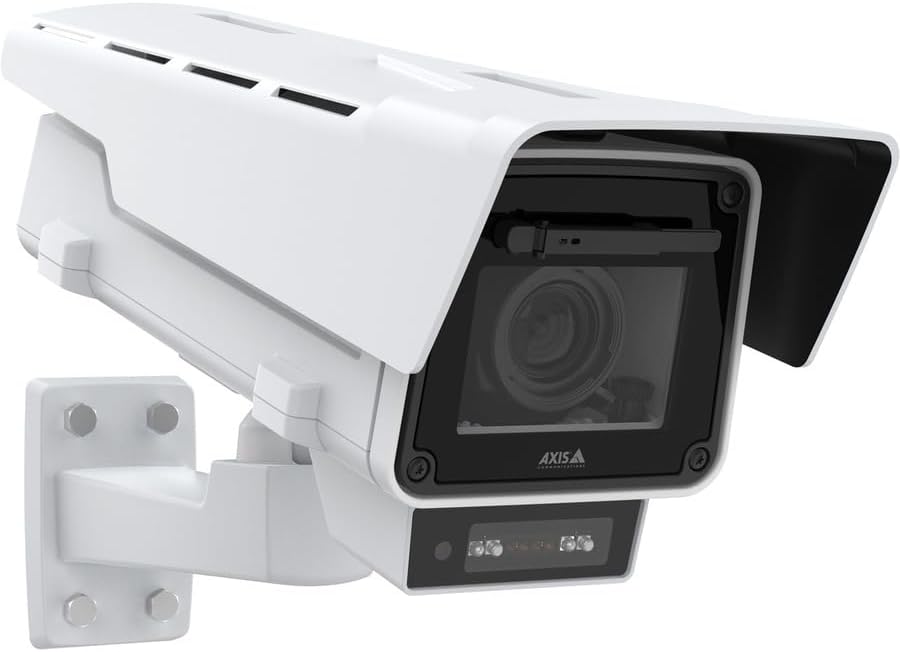
Ata 4.2: Fa'afagoto view of the AXIS Q1656-LE Network Camera, highlighting its robust housing and integrated sun shield.
The camera features a durable housing, an integrated sun shield, and a flexible mounting bracket for wall installation. The front panel includes the camera lens and built-in IR LEDs for night vision capabilities.
5. Seti ma Fa'apipi'i
5.1 Filifiliga o Nofoaga
Filifili se nofoaga e maua ai le fanua e te manaʻo ai view, adequate lighting, and protection from direct impact. Ensure the mounting surface is strong enough to support the camera's weight.
5.2 Faʻapipiʻi le Meapuʻeata
- Secure the wall mount bracket to the chosen surface using appropriate screws and wall plugs.
- Attach the camera to the mounting bracket, ensuring it is firmly secured.
- Adjust the camera's angle to achieve the optimal vieweria.
5.3 Feso'ota'iga o le Malosiaga ma le Feso'ota'iga o le Initaneti
The camera supports wired connectivity and can be powered via Power over Ethernet (PoE) or a separate power adapter.
- So'oga PoE: Connect an Ethernet cable from a PoE-enabled switch or injector to the camera's network port.
- Standard Power: If not using PoE, connect a compatible 12V DC power adapter (not included) to the camera's power input. Then, connect an Ethernet cable to the network port.
Ensure all connections are secure and weatherproofed for outdoor use.
6. Fa'atonuga o Galuega
6.1 Fa'asologa Muamua
Upon first power-up, the camera will acquire an IP address via DHCP. Use the Axis IP Utility or a network scanner to discover the camera on your network.
- Tatala a web le browser ma ulufale i le tuatusi IP a le meapueata.
- Follow the on-screen prompts to set a strong password for the administrator account.
- Configure basic network settings, date, and time.
6.2 Accessing the Camera Interface
The camera's web interface allows for full control and configuration. Log in using the administrator credentials.
- Ola View: Monitor real-time video feed.
- Vitio faʻatulagaina: Adjust resolution (up to 4 MP effective still resolution), frame rate (up to 60 fps), compression (MPEG-4), and image quality.
- Fa'atonuga feso'ota'iga: Configure static IP, DNS, and port forwarding if necessary.
- Event Management: Set up motion detection alerts (Motion Only alert type) and other event triggers.
- Pulega o Tagata Fa'aoga: Create and manage user accounts with different access levels.
6.3 Puleaina o Polokalama Feavea'i
The camera can be controlled via a dedicated mobile application. Download the official Axis Communications app from your device's app store. Follow the in-app instructions to add and manage your camera.
7. Tausiga
Regular maintenance ensures optimal performance and longevity of your AXIS Q1656-LE camera.
- Fa'amama tioata: Periodically clean the camera lens with a soft, lint-free cloth. For stubborn dirt, use a mild lens cleaning solution. Do not use abrasive materials.
- Asiasiga Fale: Inspect the camera housing and mounting bracket for any signs of damage, corrosion, or loose connections.
- Faʻalauiloa Firmware: Regularly check the Axis Communications website for firmware updates. Keeping the firmware up-to-date ensures access to the latest features and security patches.
- Pulega o uaea: Ensure all cables are securely fastened and protected from environmental elements.
8. Faʻafitauli
O lenei vaega o loʻo faʻatalanoaina ai faʻafitauli masani e te ono feagai ma lau meapueata.
| Fa'afitauli | Mafuaaga e ono tupu | Fofo |
|---|---|---|
| Leai se fafaga vitio | No power; Network cable disconnected; Incorrect IP address. | Check power supply/PoE connection; Verify network cable is securely connected; Confirm camera's IP address and network settings. |
| Leaga lelei o foliga | Dirty lens; Low light conditions; Incorrect video settings. | Clean the lens; Ensure IR LEDs are active in low light; Adjust resolution, compression, and exposure settings in the web feso'ota'iga. |
| Le su'esu'eina o gaioi e le o galue | Incorrect sensitivity settings; Detection area not configured. | Access event management in the web interface; Adjust motion detection sensitivity; Define the detection area correctly. |
| Le mafai ona maua web feso'ota'iga | Incorrect IP address; Network connectivity issue; Firewall blocking access. | Verify IP address; Ping the camera's IP address; Check firewall settings on your computer and network. |
If the problem persists, refer to the detailed support documentation on the Axis Communications webnofoaga po'o fa'afeso'ota'i le lagolago fa'apitoa.
9. Fa'amatalaga
| Fa'aaliga | Fa'amatalaga |
|---|---|
| Igoa Fa'ata'ita'iga | Q1656-LE |
| Fa'ailoga | Feso'ota'iga Axis |
| I'uga lelei pea | 4 MP |
| Fa'asologa Pu'e Vitio | MPEG-4 |
| Fua Fa'atatau | E oʻo i le 60 fps |
| Tekinolosi Feso'ota'i | Wired (Ethernet), Wi-Fi (for control/setup) |
| Metotia Pulea | App, Web Fa'afeso'ota'i |
| Alert Ituaiga | Na'o le lafo |
| Fa'ailoga Fa'ailoga | Pusa |
| Ituaiga Fa'amau | Mauga puipui |
| Fa'ailoga Fa'ava-o-malo Puipuiga | IP66, IP67 |
| Uatage | 3.7 watts |
| Ituaiga Mea (L x W x H) | 9 x 22 x 8 inisi |
| Tufuga | AXIS COMMUNICATION INC |
| Numera Vaega | 02168-001 |
| TAA tausisia | Ioe |
10. Fa'amaonia ma Lagolago
10.1 Fa'amaonia Tapulaa
The AXIS Q1656-LE Network Camera comes with a Limited Warranty. For detailed terms and conditions, please refer to the warranty documentation provided with your product or visit the official Axis Communications webnofoaga.
10.2 Lagolago Fa'ainisinia
For technical assistance, troubleshooting beyond this manual, or inquiries regarding product functionality, please contact Axis Communications technical support. Support resources, including FAQs, knowledge bases, and contact information, are available on their official webnofoaga:


