1. Folasaga
This manual provides essential instructions for the safe and efficient use of your Xiaomi Mi Portable Bluetooth Speaker. Please read this manual thoroughly before using the product and retain it for future reference. The speaker features high-quality sound, True Wireless Stereo (TWS) capability, Bluetooth 5.0 connectivity, and IPX7 waterproofing, making it suitable for various environments.

Ata: Fa'afago view of the Xiaomi Mi Portable Bluetooth Speaker, highlighting its compact design and control panel.
2. Mea i totonu o le afifi
Ia mautinoa o lo'o iai mea uma i totonu o le afifi:
- Xiaomi Mi Portable Bluetooth Speaker x1
- Charging Cable x1 (USB-C)
- Tusi Taiala x1
3. Vaega o Oloa
- Leo maualuga: Delivers clear and balanced audio.
- Moni Uaealesi Stereo (TWS): Connect two speakers for an immersive stereo experience.
- Bluetooth 5.0: Feso'ota'iga uaealesi mautu ma lelei.
- IPX7 Suavai: Protected against immersion in water up to 1 meter for 30 minutes.
- Taimi Ta'aloga Umi: Approximately 13 hours of playback at 50% volume.
- Maliofoni ua fausia i totonu: Mo le telefoni e leai ni lima.
- Ulufale AUX: Mo le feso'ota'iga leo uaea.
4. Pulea ma Fa'ailoga
Familiarize yourself with the speaker's control buttons and indicators:
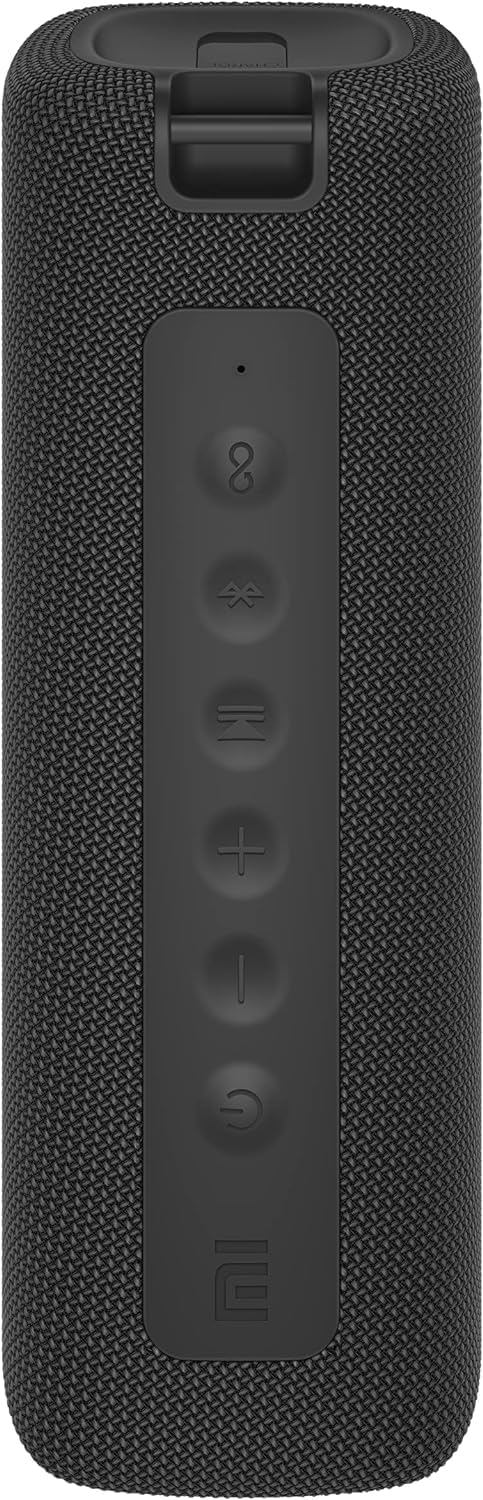
Ata: Luma view of the speaker with clearly visible control buttons.
| Fa'amau/Fa'ailoga | Galuega |
|---|---|
| Pule Malosi (⏻) | Press and hold for 2 seconds to power on/off. Short press to play/pause music or answer/end calls. |
| Volume i lalo (−) | Oomi puupuu e fa'aitiitia ai le leo. Oomi ma taofi mo le pese muamua. |
| I luga le Volume (+) | Oomi puupuu e fa'amalosi ai le leo. Oomi ma taofi mo le isi pese. |
| Fa'amau Bluetooth (Ⓑ) | Faʻasalalau puʻupuʻu e ulufale ai i le Bluetooth pairing mode. |
| TWS Button (∞) | Press to initiate True Wireless Stereo pairing with another Mi Portable Bluetooth Speaker. |
| Fa'ailoga LED | Indicates power status, charging status, and Bluetooth pairing status. |
5. Seti
5.1 Tuuina atu o le Fofoga Fetalai
- Connect the provided USB-C charging cable to the speaker's charging port.
- Connect the other end of the cable to a 5V 1A USB power adapter (not included) or a computer's USB port.
- The LED indicator will show charging status (e.g., red while charging, off when fully charged).
- E tusa ma le 4 itula le totogi atoa.
5.2 Malosi / Malosi
- I le Malosiaga: Press and hold the Power button for 2 seconds. You will hear an audible prompt, and the LED indicator will light up.
- Tape le Malosi: Press and hold the Power button for 2 seconds. You will hear an audible prompt, and the LED indicator will turn off.
5.3 Fa'atasiga Bluetooth
- Ensure the speaker is powered on. The LED indicator will flash blue, indicating it's in pairing mode.
- I luga o lau masini (smartphone, tablet, computer), fa'agaoioi le Bluetooth ma saili mo masini avanoa.
- Filifili le "Mi Portable Bluetooth Speaker" mai le lisi o masini.
- Once paired, the LED indicator will turn solid blue, and you will hear a confirmation sound.
- The speaker will automatically connect to the last paired device when powered on, if within range.
5.4 Fa'apipi'iina o le True Wireless Stereo (TWS)
To pair two Xiaomi Mi Portable Bluetooth Speakers for stereo sound:
- Ia mautinoa o lo'o ola uma sipika ma e le o feso'ota'i i se isi masini Bluetooth.
- On one speaker (this will be the primary speaker), short press the TWS button (∞). The LED indicator will flash.
- On the second speaker, short press the TWS button (∞).
- The two speakers will automatically connect to each other. You will hear a confirmation sound, and the LED indicators on both speakers will turn solid blue.
- Now, connect your device to the primary speaker via Bluetooth as described in section 5.3. The sound will play in stereo through both speakers.
5.5 AUX Fesoʻotaʻiga
Mo le toe fa'alogoina o leo uaea:
- Connect a 3.5mm audio cable (not included) from your audio source to the AUX IN port on the speaker.
- E otometi lava ona sui le failauga ile AUX mode.
- Control playback and volume from your audio source device.
6. Fa'atonuga o Galuega
6.1 Tafaoga Musika
- Ta'alo/Taofi: Oomi puupuu le faamau Malosi.
- I luga le Volume: Short press the Volume Up (+) faamau.
- Volume Lalo: Short press the Volume Down (−) faamau.
- Su'ega Sosoo: Press and hold the Volume Up (+) faamau.
- Ala na muamua atu: Press and hold the Volume Down (−) faamau.
6.2 Pulea Valaau
- Tali/Fa'ai'u le Valaau: Short press the Power button when a call comes in or during a call.
- Te'ena Valaau: Press and hold the Power button for 2 seconds when a call comes in.
7. Tausiga
- Fa'amamaina: Solo le sipika i se malu, oamp ie. Aua ne'i fa'aogaina ni mea fa'amama fa'afefete po'o ni solu.
- Teuina: Teu le sipika i se nofoaga mālūlū ma matutu mamao ese mai le susulu o le la ma le vevela tele.
- Suavai Tetee: The speaker is IPX7 waterproof. Ensure the charging port cover is securely closed before exposure to water. Do not submerge the speaker for extended periods or beyond specified depths.
- Tausiga maa: To prolong battery life, avoid fully discharging the speaker frequently. Charge it regularly, even if not in use for long periods.
8. Faʻafitauli
| Fa'afitauli | Fofo e ono mafai |
|---|---|
| E le ola le Fofoga Fetalai. | Ia mautinoa ua fa'atumuina le maa. Fa'afeso'ota'i i se punaoa eletise ma toe taumafai. |
| E le mafai ona fa'afeso'ota'i e ala ile Bluetooth. |
|
| Leai se leo pe maualalo le leo. |
|
| Ua le manuia le fa'atasiga TWS. |
|
| Le lelei leo. |
|
9. Fa'amatalaga

Ata: Lalo view of the speaker, displaying model number and certifications.
| Parameter | Taua |
|---|---|
| Fa'ata'ita'iga | MDZ-36-DB |
| Fua o Mea | W 213 x D 74 x H 74 mm (approx. 8 x 3 x 3 inches) |
| Feso'ota'i | Bluetooth 5.0, 3.5mm AUX IN |
| Fuafuaga Fa'atatau | 2 x 8W (16W total) |
| Fua Faatatau o Faailo-i-Pisa | ≥ 70dB |
| TWS Connection Range | ≤ 5m |
| Fa'ailoga e le Suavai | IPX7 |
| Ituaiga maa | Lithium-ion, 3.7V |
| Malosiaga ma'a | 2600mAh |
| Taimi e Totogiina ai maa | Pe tusa. 4 itula |
| Taimi Toe Ta'alo | Pe tusa. 13 itula (i le 50% voluma) |
| Va'aiga Fa'atele | 80Hz i le 20KHz |
| Fa'ailoga Fa'asalaina | 4 Ω |
| Mamao Fa'asalalau | 15m |
| Fa'ailoga Fa'atatau | 5V 1A |
| Mea mamafa | 500 kalama (1.1 pauna) |
10. Fa'amaonia ma Lagolago
Mo faʻamatalaga auiliili faʻamaonia, faʻamolemole faʻafesoʻotaʻi le pepa faʻamaonia o loʻo aofia ai ma lau oloa pe asiasi ile Xiaomi aloaia webnofoaga.
If you encounter any issues not covered in this manual, please contact Xiaomi customer support or visit their official support channels for assistance.


