1. Fa'amatalaga Taua mo le Saogalemu
Before operating the Matrix Fitness TF50 Treadmill, please read and understand all safety instructions. Failure to follow these instructions may result in injury or damage to the equipment.
- Fa'afeso'ota'i se Foma'i: Fa'afeso'ota'i i taimi uma se foma'i fa'alesoifua maloloina a'o le'i amataina se polokalame fa'amalositino fou.
- Vaavaaiga: O lenei masini e le'o fa'amoemoe mo le fa'aogaina e tagata e fa'aitiitia le malosi o le tino, lagona po'o le mafaufau, po'o le leai o se poto masani ma le malamalama, se'i vagana ua tu'uina atu ia i latou le vaavaaiga po'o le fa'atonuga e uiga i le fa'aogaina o le masini e se tagata e nafa ma lo latou saogalemu. E tatau ona vaavaaia tamaiti ina ia mautinoa latou te le taaalo i le masini.
- Taofi Faalavelave Faafuasei: Familiarize yourself with the safety key and its function. Always attach the safety key clip to your clothing during operation. In case of an emergency, pulling the safety key will immediately stop the treadmill.
- Tulaga Talafeagai: Place the treadmill on a level, stable surface with adequate clearance around it (at least 6 feet behind and 2 feet on each side). Do not place on thick carpet as it may interfere with ventilation.
- Uaea Malosi: Ensure the power cord is not pinched or damaged. Do not use extension cords. Plug directly into a grounded outlet.
- Tausiga: Fai le tausiga masani e pei ona faamatalaina i lenei tusi lesona ina ia mautinoa le saogalemu o le faagaoioiga.
WARNING: To reduce the risk of electric shock, fire, and serious injury, read all instructions before using this equipment.
2. Oloa Ua Ovaview
The Matrix Fitness TF50 Treadmill with XUR 22" Touchscreen Console is designed to provide a club-quality workout experience in a home environment. It features a robust frame, a spacious running deck, and an interactive console for diverse training options.
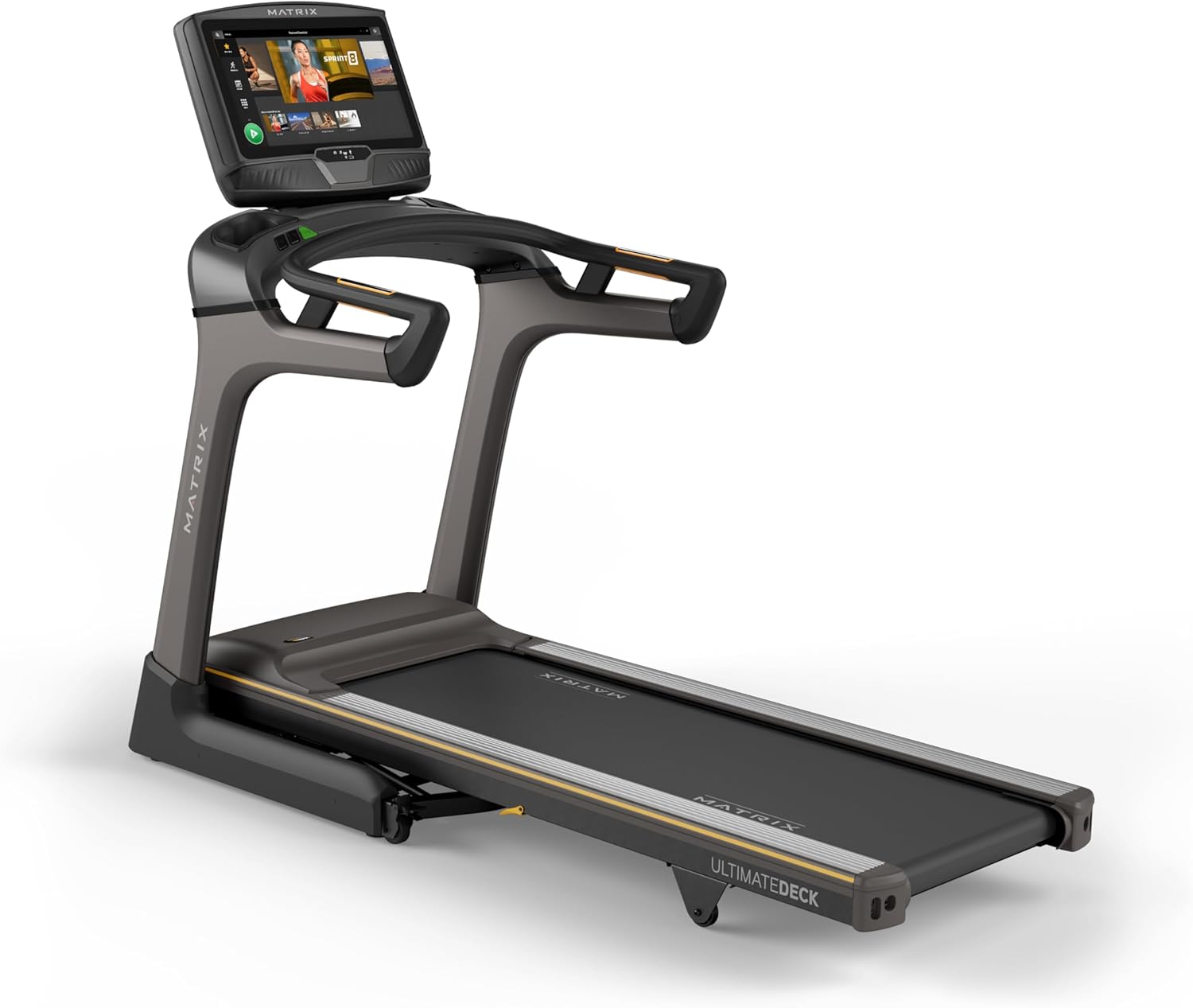
Ata: Luma view of the Matrix Fitness TF50 Treadmill, showcasing the 22-inch touchscreen console and the running deck.
Vaega Autu
- XUR 22" Touchscreen Console: Offers streaming apps, iFIT integration, virtual active programs, and performance tracking.
- Johnson Drive System: A quiet, durable, and responsive motor for consistent performance.
- Ultimate Deck System: Provides industrial-grade cushioning for a comfortable running experience.
- Gaugauina Design: Near 90-degree folding for space-saving storage.
- Expanded Running Surface: 20" x 60" deck accommodates various stride lengths.
- Speed and Incline: 0.5-12.5 mph speed range and 0-15% incline for versatile workouts.

Image: Diagram highlighting key features of the TF50 Treadmill, including its folding design, 20"x60" Ultimate Deck System, quiet DC motor, 0-15% incline range, 0.5-12.5 mph speed range, and industrial-grade cushioning.
3. Seti ma Fonotaga
The Matrix Fitness TF50 Treadmill requires assembly. It is recommended to have two people for assembly due to the size and weight of the components. Ensure all parts listed in the hardware kit are present before beginning.
3.1 Ta'ese'ese ma Tu'u
- Carefully remove all components from the packaging. Keep packaging materials until assembly is complete.
- Place the treadmill in a location that meets the recommended clearance requirements: at least 6 feet (1.8 meters) behind the treadmill and 2 feet (0.6 meters) on each side.
- Ensure the surface is level and stable. Avoid placing on thick carpet that could obstruct ventilation.
3.2 Laasaga Fono
Refer to the included assembly guide for detailed, step-by-step instructions and diagrams. General steps include:
- Attach the upright masts to the treadmill frame.
- Secure the console base and handlebars to the masts.
- Connect all necessary cables between the console and the frame.
- Install any remaining covers or accessories.
3.3 So'oga Malosi
- Ensure the treadmill is turned off before plugging it in.
- Plug the power cord directly into a dedicated, grounded electrical outlet. Do not use extension cords or adapters.
- Turn on the main power switch, usually located near the front of the treadmill base.
4. Fa'atonuga o Galuega
This section details how to operate your Matrix Fitness TF50 Treadmill and utilize its features.
4.1 Fa'atasi le Consoleview (XUR 22" Touchscreen)
The XUR console provides access to various workout programs, entertainment apps, and performance data.

Image: Close-up of the XUR 22-inch touchscreen console, highlighting its extra-large HD display, streaming app capabilities (Netflix, YouTube, Spotify), Virtual Active Sprint 8 and iFIT integration, Bluetooth FTMS, integrated HDMI, 13 metric-driven programs, and Bluetooth HR strap connectivity.
- Malosiaga: Once plugged in and the main power switch is on, the console will power up.
- Seti Muamua: Follow the on-screen prompts to connect to Wi-Fi, set up user profiles, and activate any included subscriptions like iFIT.
- Tautai: Use the touchscreen to navigate through menus, select workouts, and access applications.

Image: The main workout screen of the XUR console, displaying various workout options and a 'Sprint 8' program tile.

Image: The entertainment apps screen on the XUR console, showing icons for Netflix, YouTube, Spotify, Facebook, Twitter, Instagram, and other applications.
4.2 Amataina se Toleniga
- Fa'apipi'i le Ki Saogalemu: Clip the safety key to your clothing. The treadmill will not operate without the safety key in place.
- Select Program/Mode: From the console, choose a quick start, a pre-programmed workout, an iFIT workout, or a virtual active route.
- Amata: Press the START button on the console. The belt will begin to move at a low speed.
- Adjust Speed and Incline: Use the speed and incline buttons on the console or handlebars to adjust your workout intensity.

Image: Close-up of the treadmill handlebars, showing integrated speed and incline control buttons for easy adjustments during a workout.
4.3 Taofi se Toleniga
- Normal Stop: Press the STOP button on the console. The belt will gradually slow down and stop.
- Taofi Faalavelave Faafuasei: Pull the safety key from the console. The treadmill will stop immediately.
4.4 Gaugau ma Teuina
The TF50 Treadmill features an easy-folding design for convenient storage.
- Ensure the treadmill is stopped and powered off.
- Carefully lift the running deck until it locks into the upright position.
- To unfold, gently push the deck release lever and slowly lower the deck to the floor.

Image: The Matrix TF50 Treadmill shown in its folded, upright position, demonstrating its space-saving design.

Image: A woman demonstrating the folding mechanism of the treadmill, lifting the running deck into its upright storage position.
5. Tausiga
O le tausiga faifaipea e mautinoa ai le umi o le ola ma le fa'atinoga lelei o lau ta'avale.
5.1 Fa'amamāina
- Aso uma: Wipe down the console and handlebars with a soft, damp cloth after each use. Avoid abrasive cleaners or excessive moisture.
- Vaiaso: Vacuum around and under the treadmill to prevent dust and debris buildup.
5.2 Running Belt Maintenance
- Lubrication: The Ultimate Deck System is designed for low maintenance. Refer to the full product manual for specific lubrication schedules, if any. Over-lubrication can cause damage.
- Tension and Alignment: Periodically check the running belt for proper tension and alignment. If the belt slips or drifts to one side, consult the full manual for adjustment procedures or contact customer support.

Image: A cutaway diagram illustrating the multi-layered cushioning of the Ultimate Deck System, designed for impact absorption.
5.3 Motor Compartment
- Siaki Faaletausaga: Annually, or as needed, unplug the treadmill and carefully remove the motor cover. Vacuum any dust or debris from the motor area. Do not touch any electrical components. Replace the cover securely.

Ata: O se tipi view of the Johnson Drive System motor, showing its internal components and design for quiet and responsive operation.
6. Faʻafitauli
This section provides solutions to common issues you might encounter with your TF50 Treadmill. For more complex problems, contact Matrix Fitness customer support.
| Fa'afitauli | Mafuaaga e ono tupu | Fofo |
|---|---|---|
| E le ola le taila. | Power cord not plugged in; Main power switch off; Circuit breaker tripped. | Ensure power cord is securely plugged in. Turn on the main power switch. Check household circuit breaker. |
| Running belt does not move. | Safety key not in place; Emergency stop activated; Motor issue. | Ensure safety key is fully inserted. Check if emergency stop button is pressed. If problem persists, contact support. |
| Console is unresponsive or frozen. | Software glitch; Temporary electrical issue. | Turn off the main power switch, wait 30 seconds, then turn it back on. If issue continues, contact support. |
| O le fusipa'u tamo'e e se'e pe fa'atuai. | Belt tension too loose; Belt lubrication needed. | Refer to the full manual for belt tension adjustment. Check lubrication schedule. |
If you encounter an issue not listed here or if the suggested solutions do not resolve the problem, please contact Matrix Fitness customer support.
7. Fa'amatalaga
Detailed technical specifications for the Matrix Fitness TF50 Treadmill with XUR Console.

Image: Diagram showing the dimensions of the Matrix TF50 Treadmill: 81 inches (D) x 35 inches (W) x 62 inches (H).
| Fa'aaliga | Fa'amatalaga |
|---|---|
| Fa'ailoga | Matrix |
| Igoa Fa'ata'ita'iga | Matrix Fitness TF50 Treadmill |
| Console | XUR 22" Touchscreen |
| Fua o Mea (LxWxH) | 81" x 35" x 62" |
| Tele gaugau | 42" x 35" x 76" |
| Mea mamafa | 310 pauna |
| Maualuluga o Tagata Fa'aaoga | 400 pauna |
| Running Surface (Deck Length x Width) | 60" x 20" |
| Saosaoa Maualuluga | 12.5 maila i le itula |
| Saosaoa Laiti | 0.5 maila i le itula |
| Ole maualuga ole Fa'aa'e pasenetage | 15% |
| Fofo tiʻetiʻe uila | 3.25 Solofanua |
| Mea | Uamea uamea |
| Punavai Malosi | Uaea Eletise |
| Tekinolosi Feso'ota'i | HDMI, USB, WiFi, Bluetooth |
| Fua Fua | Distance, Speed, Incline, Calories, Time |
| Fonotaga Manaomia | Ioe |
| UPC | 763165008938 |
8. Fa'amaonia ma Lagolago
Matrix Fitness provides comprehensive warranty coverage for the TF50 Treadmill.
8.1 Fa'amatalaga Fa'amaonia
- Fa'avaa: Fa'amaonia i le olaga atoa
- Motor and Cushioning: Fa'amaonia i le olaga atoa
- Parts (Console): 5 tausaga
- Labor (Console): 1 tausaga
- Parts (Frame): 7 tausaga
- Labor (Frame): 2 tausaga
Please retain your proof of purchase for warranty claims. Warranty terms may vary by region. For full details, refer to the warranty card included with your product or visit the official Matrix Fitness webnofoaga.
8.2 Fesoasoani mo Tagata Fa'atau
For technical assistance, parts, or service inquiries, please contact Matrix Fitness customer support. Have your model number (TF50 Treadmill with XUR) and serial number ready when contacting support.
Asiasi i le Matrix Fitness Store on Amazon mo nisi fa'amatalaga pe e te mana'o e maua fa'amatalaga fa'afeso'ota'i.


