Folasaga
This manual provides detailed instructions for the installation, operation, and maintenance of your DeLOCK USB Type-C to 2.5 Gigabit LAN Adapter (Model 66645). Please read this manual thoroughly before using the device to ensure proper functionality and to prevent damage.
Ua Umaview
The DeLOCK USB Type-C to 2.5 Gigabit LAN Adapter expands your PC or notebook with a network interface via a USB Type-C port. It is also compatible with Thunderbolt 3 interfaces. This adapter supports NBASE-T technology, allowing data transfer speeds of 1 Gbps and 2.5 Gbps over standard network cables, automatically negotiating the best possible transfer rate.

Image: DeLOCK 2.5 Gigabit LAN Adapter in its retail packaging.
The adapter features a SuperSpeed USB (USB 3.2 Gen 1) Type-C male connector for connecting to your host device and a 2.5 Gigabit LAN RJ45 female port for network cable connection. The compact design ensures portability and ease of use.
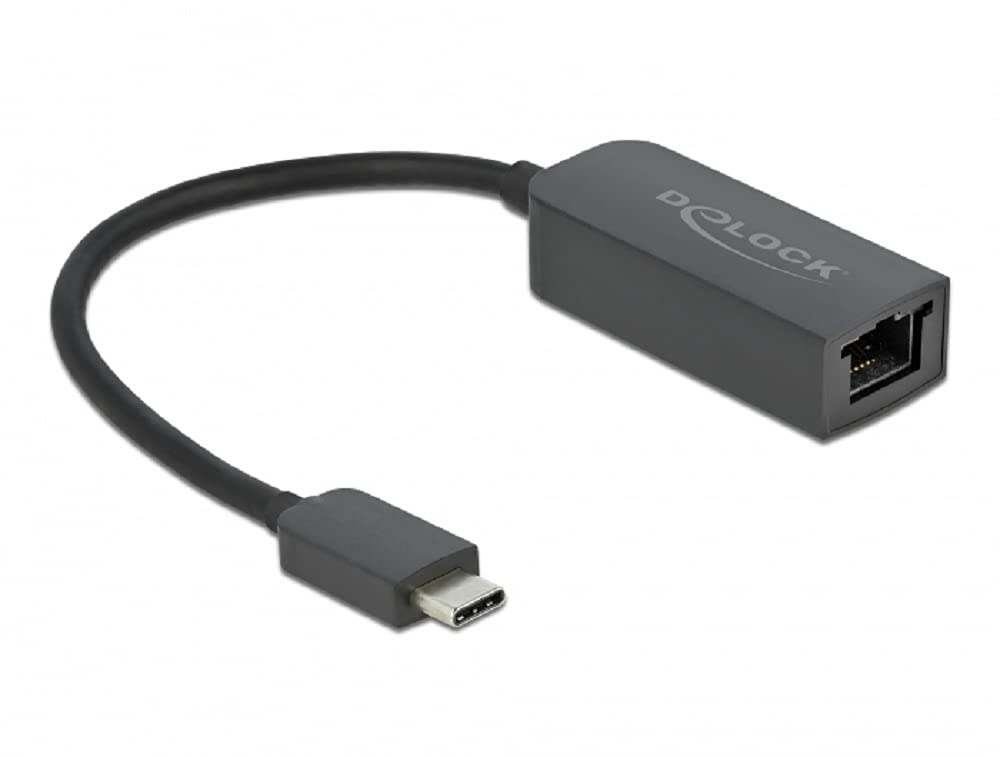
Image: Diagram illustrating the USB Type-C male connector, the 16 cm cable, and the 2.5 Gigabit LAN RJ45 female jack of the DeLOCK adapter.
Seti Faatonuga
- Fa'afeso'ota'i i le masini talimalo: Plug the USB Type-C male connector of the DeLOCK adapter into an available USB Type-C port on your PC or notebook. Ensure the port supports USB 3.2 Gen 1 or Thunderbolt 3 for optimal performance.
- Feso'ota'i ile Network: Connect a standard RJ45 Ethernet network cable from your router, modem, or network switch to the 2.5 Gigabit LAN RJ45 female port on the DeLOCK adapter.
- Fa'apipi'i Aveta'avale: In most modern operating systems (Windows 10/11, macOS, Linux), the adapter is plug-and-play and drivers will install automatically. If prompted, allow the system to install necessary drivers. If automatic installation fails, visit the official Delock web'upega tafaʻilagi mo le la'uina mai o aveta'avale e fa'apitoa mo le fa'ata'ita'iga 66645.
- Fa'amaonia So'oga: Once connected, check your operating system's network settings to confirm that the new network adapter is recognized and has established a connection.
Fa'agaoioi le Adapter
After successful setup, the DeLOCK adapter functions as a standard wired network interface. Your operating system will automatically detect and utilize it for internet and local network access. The NBASE-T technology will automatically negotiate the highest possible speed (up to 2.5 Gbps) supported by your network infrastructure and cable quality.
- Ensure your network cable is securely connected to both the adapter and your network device.
- For optimal performance, use Cat5e or higher-rated Ethernet cables.
- Monitor your system's network activity indicators to confirm data transmission.
Tausiga
The DeLOCK USB Type-C to 2.5 Gigabit LAN Adapter requires minimal maintenance.
- Fa'amamaina: Use a soft, dry cloth to clean the exterior of the adapter. Avoid using liquid cleaners or solvents.
- Teuina: A le fa'aaogaina, teu le mea fa'apipi'i i se nofoaga mālūlū ma matutu mamao ese mai le susulu o le la ma le vevela tele.
- Taulimaina: Avoid bending or twisting the cable excessively, and do not apply undue force when connecting or disconnecting the adapter.
Fa'afitauli
- Leai se feso'ota'iga feso'ota'iga:
- Ensure the adapter is firmly plugged into the USB Type-C port.
- Verify the Ethernet cable is securely connected to both the adapter and the network device.
- Restart your computer and network equipment (router/modem).
- Check your operating system's network settings to ensure the adapter is enabled.
- Try a different USB Type-C port on your device.
- Fa'ata'ita'i i se isi uaea Ethernet.
- Telese So'oga Saosaoa:
- Ensure your network infrastructure (router, switch, cables) supports 2.5 Gigabit Ethernet.
- Use Cat5e or Cat6 Ethernet cables for optimal performance.
- Update the adapter's drivers from the official Delock webnofoaga pe a maua.
- Check for other network activity or bandwidth-intensive applications running on your device.
- Fetuuna'i E le'o Iloa:
- Ensure your USB Type-C port is functional.
- Try connecting the adapter to another computer to rule out a device-specific issue.
- Manually install drivers from the Delock website if automatic installation failed.
- Check your device manager (Windows) or system information (macOS/Linux) for any unrecognized devices or driver conflicts.
Fa'amatalaga
| Numera Fa'ata'ita'i: | 66645 |
| Feso'ota'i: | 1 x SuperSpeed USB (USB 3.2 Gen 1) USB Type-C male 1 x 2.5 Gigabit LAN RJ45 female |
| Chipset: | Realtek RTL8156 |
| Fua Fa'aliliuga: | Ethernet up to 10 Mbps (half/full duplex) Fast Ethernet up to 100 Mbps (half/full duplex) Gigabit Ethernet up to 1000 Mbps (half/full duplex) NBASE-T up to 2.5 Gbps (half/full duplex) |
| USB Fa'amatalaga: | SuperSpeed USB - 5Gbps |
| Vaega: | Lagolagoina le Auto MDI-X (otometi le su'esu'eina o tulaga masani po'o le crossover network cable) NBASE-T technology for 1Gbps and 2.5Gbps speeds |
| Fa'afeso'ota'i Meafaigaluega: | Ethernet, Thunderbolt, USB, USB Type C |
| Meafaigaluega talafeagai: | Desktop, Laptop |
| Lanu: | Lanu uliuli |
| Fua o Mea: | 5.51 x 4.72 x 1.18 inisi |
| Mea mamafa: | 1.76 aunese (50 kalama) |
Fa'amaonia ma Lagolago
For warranty information and technical support, please refer to the documentation included with your purchase or visit the official Delock webnofoaga. E masani ona e su'eina punaoa lagolago, FAQs, ma fa'amatalaga fa'afeso'ota'i mo auaunaga a tagata fa'atau iina.


