Folasaga
This manual provides detailed instructions for the setup, operation, and maintenance of your BUFFBEE Glow Alarm Clock HRS-BLACK. Please read this manual thoroughly before using the product to ensure proper function and longevity.
Ua Umaview
The BUFFBEE Glow Alarm Clock is a versatile device combining a digital alarm clock, FM radio, and a 7-color night light. It is designed to enhance your sleep and wake-up experience with customizable features.
Vaega Autu:
- Galuega 3-i-1: Digital alarm clock, FM radio, and night light.
- 7-lanu moli o le po: Adjustable with 5 brightness levels.
- Fa'ailoga Lua: Set two independent alarms with choice of FM radio, built-in beep, or bird sounds.
- Adjustable Display Dimmer: 0-100% brightness control for the time display.
- Ki fa'amalamalama: For easy operation in low light conditions.
- Taimi moe: Quick nap setting from 10 to 120 minutes.
- Auto-Off Sleep Timer: Automatically turns off night light and FM radio after a set duration.
- USB Port Totogi: For charging external electronic devices.
- Filifiliga Malosiaga: AC powered with AAA battery backup (batteries not included).
I totonu o le afifi:
- 1 x BUFFBEE Glow Alarm Clock
- 1 x Pule Fetuuna'i
- 1 x Tusi Fa'aoga
Fa'amatalaga Fa'ailoga:
Refer to the image below for an overview of the alarm clock's buttons and display.

Ata: Luma view of the BUFFBEE Glow Alarm Clock, showing the digital time display, alarm indicators, and control buttons on the top panel. The top edge features a light strip.
Seti
1. So'oga Malosi:
- Connect the provided power adapter to the DC input port on the back of the alarm clock.
- Fa'afeso'ota'i le mea fa'apipi'i i totonu o se pa puipui masani.
2. Battery Backup (Optional):
Mo le fa'agaoioiga e le motusia i le taimi e tape ai le eletisetages, install 3 AAA batteries (not included) into the battery compartment on the bottom of the unit. The clock will maintain time and alarm settings, and the alarm will still function, but the display and night light may be limited to conserve power.

Ata: Tua view of the alarm clock showing the power input and battery compartment, alongside a power adapter and three AAA batteries (not included).
3. Initial Time Setting:
- When first powered on, the display will show a default time.
- Oomi ma uu le TAIMI TAIMI button (usually located on the top panel) until the hour digits flash.
- Fa'aaoga le +/- buttons (or similar navigation buttons) to adjust the hour.
- Tusitala TAIMI TAIMI again to confirm the hour and move to minute adjustment.
- Fa'aaoga le +/- faamau e fetuunai ai minute.
- Tusitala TAIMI TAIMI one more time to confirm and exit time setting mode.
- Mo le fesuia'i i le va o le faatulagaga o le 12-itula ma le 24-itula, oomi le 12/24H button (if available, often combined with time set or a dedicated button).
Fa'atonuga o Galuega
1. Setting Alarms (Alarm 1 & Alarm 2):
The clock supports two independent alarms.
- Oomi le FAʻAALIGA 1 faamau (po FAʻAALIGA 2) once to display the current alarm time.
- Oomi ma uu le FAʻAALIGA 1 (po o FAʻAALIGA 2) button until the hour digits flash.
- Fa'aaoga le +/- faamau e fetuunai ai le itula.
- Oomi le ALAGALO button again to confirm the hour and move to minute adjustment.
- Fa'aaoga le +/- faamau e fetuunai ai minute.
- Oomi le ALAGALO button again to select the alarm sound: FM radio, built-in beep, or bird sounds. Use +/- e taamilo i filifiliga.
- Oomi le ALAGALO button one more time to confirm and activate the alarm. An alarm icon will appear on the display.
- To turn off an active alarm, press the corresponding ALAGALO button. The alarm icon will disappear.
2. Fa'agogo Galuega:
A tatagi se fa'ailo, oomi le fa'amau tele SNOOZE / Malamalama button on top to temporarily silence the alarm for 9 minutes. The alarm will sound again after the snooze period.
3. Night Light Operation:
The alarm clock features a 7-color night light with adjustable brightness.

Image: The alarm clock shown with its top light strip illuminated in various colors, demonstrating the 7-color night light feature.
- Oomi le MALAMALAMA button (often combined with SNOOZE or a dedicated button) to turn the night light on/off.
- When the night light is on, press the MALAMALAMA fa'aauau pea ona sui le faamau e sui ai lanu e 7 o lo'o avanoa.
- To adjust the brightness, use the +/- buttons while the night light is active. There are 5 brightness levels.
4. Leitio FM:
The built-in FM radio allows you to listen to your favorite stations.
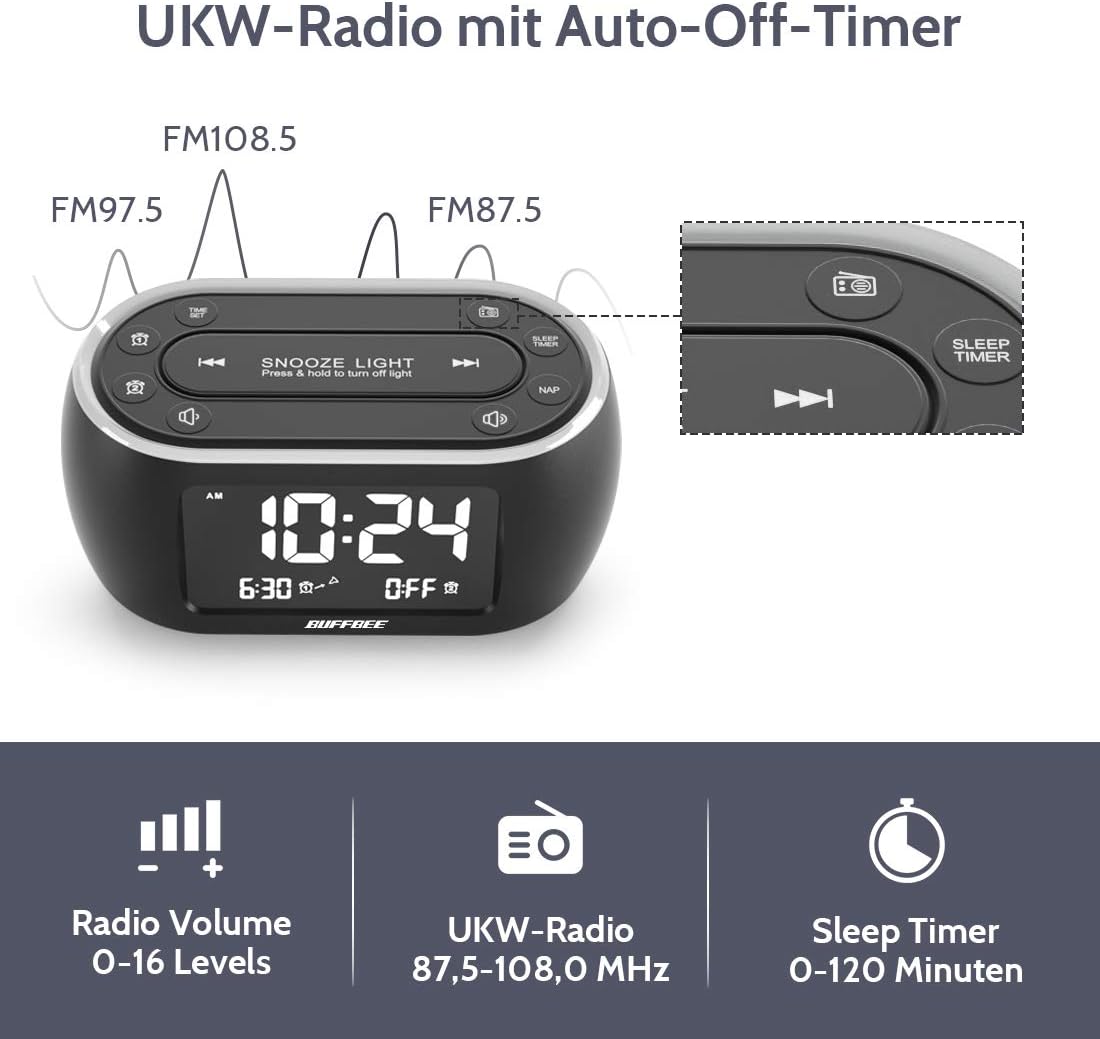
Image: The alarm clock display showing FM radio frequencies (FM108.5, FM97.5, FM87.5) and icons for radio volume and sleep timer.
- Oomi le LEITIITI button to turn the FM radio on/off.
- Oomi le SU'E button (or similar) to automatically scan and save available FM stations.
- Fa'aaoga le MUA/SOSI buttons to navigate through saved stations or manually tune.
- Fetuunai le leo e faaaoga ai le TUSI +/- buttons. The volume can be set from 0 to 16 levels.
5. Nap Timer:
The nap timer allows for quick, short sleep periods without affecting regular alarm settings.
- Oomi le NAP button. The display will show the default nap time (e.g., 10 minutes).
- Oomi le NAP button repeatedly to cycle through preset nap durations (e.g., 10, 20, 30, 60, 90, 120 minutes).
- The nap timer will start automatically after selection.
- To cancel the nap timer, press the NAP button until "OFF" is displayed.
6. Auto-Off Sleep Timer:
Set a timer for the night light and/or FM radio to automatically turn off after a specified duration.
- While the night light or FM radio is active, press the TAIMI MOE faamau.
- Oomi le TAIMI MOE button repeatedly to cycle through available durations (e.g., 15, 30, 60, 90, 120 minutes, or OFF).
- The selected duration will be displayed, and the timer will begin. The night light and/or FM radio will turn off automatically when the timer expires.
7. Display Dimmer:
Adjust the brightness of the main time display from 0% to 100%.

Image: Six different views of the alarm clock display, illustrating the range of brightness from very dim to fully bright, and also showing the night light dimmer.
Faaaoga le tuuto TAIMI vili pe TULAFONO +/- buttons (if available) to adjust the display brightness to your preference. This allows for comfortable viewi soo se tulaga moli.
8. USB Charging Port:
A USB port is located on the back of the unit for charging small electronic devices.

Image: The alarm clock with a smartphone plugged into its side USB port, indicating the charging function.
Connect your device's USB charging cable to the port. The clock must be powered by the AC adapter for the USB charging function to work.
Tausiga
To ensure the longevity and optimal performance of your BUFFBEE Glow Alarm Clock, follow these maintenance guidelines:
- Fa'amamaina: Wipe the unit with a soft, dry cloth. Do not use abrasive cleaners, waxes, or solvents as they may damage the surface.
- Malosiaga: Always disconnect the power adapter from the wall outlet before cleaning or if the unit will be unused for an extended period.
- Siosiomaga: Keep the alarm clock away from direct sunlight, heat sources, and excessive moisture.
- Suiga maa: If using battery backup, replace AAA batteries annually or when the battery indicator suggests low power. Ensure correct polarity when inserting new batteries.
Fa'afitauli
If you encounter issues with your BUFFBEE Glow Alarm Clock, refer to the following common problems and solutions:
| Fa'afitauli | Mafuaaga e ono tupu | Fofo |
|---|---|---|
| Clock display is blank or flickering. | No power or loose connection. Low battery backup. | Ensure the power adapter is securely plugged into the clock and the wall outlet. Check if AAA batteries are installed correctly and have sufficient charge. |
| E le leo le faailo. | E le'i fa'agaoioia le fa'ailo. Ua maualalo tele le leo o le fa'ailo. | Verify that the alarm icon is displayed. Check the alarm volume setting. Ensure the correct alarm time is set. |
| E leaga le taliaina o leitio FM. | Weak signal. Antenna not extended. Interference. | Extend the FM antenna fully. Try repositioning the clock. Perform an auto-scan for stations again. |
| Night light is not working. | Light function turned off. | Press the LIGHT button to turn it on. Check if the brightness is set to 0%. |
| E le o galue le fa'atumuina e ala i le USB. | Clock not connected to AC power. Device not compatible. | Ensure the clock is powered by the AC adapter. Check if your device is compatible with standard USB charging. |
Fa'amatalaga
| Fa'aaliga | Fa'amatalaga |
|---|---|
| Fa'ailoga | BUFFBEE |
| Numera Fa'ata'ita'i | HRS-BLACK |
| Fua (L x W x H) | 12 x 3.81 x 6 cm (4.72 x 1.5 x 2.36 inisi) |
| mamafa | 330 kalama (0.73 lbs) |
| Malosiaga Ulufale | AC 100-240V, 50/60Hz |
| Lagolago ma'a | 3 x AAA maa (e le o aofia ai) |
| Fa'aaliga Ituaiga | Faafuainumera |
| Faaalia le Malamalama | 0-100% fetuutuunai |
| Lanu Malamalama o le po | 7 lanu |
| Night Light Brightness | 5 tulaga fetuutuunai |
| Televise Faʻasalalau FM | 87.5-108.0 MHz |
| Alarm Volume | 0-16 tulaga fetuutuunai |
| Fa'apitoa Fa'apitoa | Ambient light, Dual Alarm, Nap Timer, Sleep Timer, USB Charging Port |
Fa'amaonia ma Lagolago
BUFFBEE products are designed for reliability and performance. For specific warranty information, please refer to the documentation included with your purchase or contact BUFFBEE customer support.
If you require technical assistance or have questions regarding your BUFFBEE Glow Alarm Clock, please visit the official BUFFBEE web'upega tafaʻilagi pe faʻafesoʻotaʻi la latou matagaluega o auaunaga i tagata faʻatau. O faʻamatalaga faʻafesoʻotaʻi e masani ona maua i luga o le afifiina o oloa poʻo le pepa a le kamupani gaosi oloa webnofoaga.


