1. Folasaga
Thank you for choosing the FREESTYLE FH0955 LED Bluetooth Headphones. This manual provides essential information for the proper setup, operation, and maintenance of your new headphones. Please read it carefully before use to ensure optimal performance and longevity of the product.
2. Oloa Ua Ovaview
The FREESTYLE FH0955 headphones offer a wireless audio experience with integrated features designed for convenience and style. Key features include Bluetooth 5.0 + EDR connectivity, a built-in microSD card slot for direct music playback, a foldable headband for portability, and subtle LED backlighting on the earcups.

Ata 2.1: Luma view of the FREESTYLE FH0955 LED Bluetooth Headphones, showcasing the over-ear design and LED lighting.

Ata 2.2: Itu profile of the FREESTYLE FH0955 LED Bluetooth Headphones, highlighting the earcup and headband design.

Image 2.3: A person wearing the FREESTYLE FH0955 LED Bluetooth Headphones, demonstrating typical usage.
3. Seti
3.1. Totogiina le Headphones
Before first use, fully charge the headphones. The FH0955LB model is equipped with a 400 mAh Lithium-ion battery.
- Connect the supplied MicroUSB charging cable to the charging port on the headphones.
- Connect the other end of the cable to a USB power source (e.g., computer USB port, USB wall adapter, or power bank).
- The LED indicator will illuminate during charging and turn off or change color once fully charged.
- A full charge typically takes approximately 2 hours and provides up to 10 hours of continuous music playback.
3.2. Paʻaga Bluetooth
Ina ia fa'afeso'ota'i au headphone i se masini e aunoa ma se uaealesi:
- Ia mautinoa o lo'o fa'amuina ma tape le taliga.
- Press and hold the Power button on the headphones until the LED indicator flashes, indicating pairing mode.
- I luga o lau masini (smartphone, tablet, computer), fa'agaoioi le Bluetooth ma saili mo masini avanoa.
- Select "FH0955" or a similar name from the list of found devices.
- Once connected, the LED indicator will stop flashing and remain solid or turn off, depending on the model.
- The Bluetooth 5.0 + EDR technology allows for a stable connection up to 10 meters.
3.3. Toe ta'alo le Kata MicroSD
The headphones feature an integrated microSD card slot for direct music playback without a connected device.
- Insert a microSD card (pre-loaded with audio files) into the designated slot on the headphones.
- The headphones should automatically switch to microSD playback mode. If not, use the Mode button (if available) to switch.
- Use the playback controls on the headphones to manage your music.
3.4. Wired Connection (3.5mm Audio Jack)
For devices without Bluetooth or when the battery is depleted, you can use the included 3.5mm audio cable.
- Fa'afeso'ota'i le tasi pito o le uaea leo 3.5mm i le jack leo i luga o headphone.
- Fa'afeso'ota'i le isi pito i le 3.5mm audio output a lau masini.
- The headphones will operate in passive mode, and Bluetooth functionality will be disabled.
4. Fa'atonuga o Galuega
4.1. Malosi / Malosi
- Malosiaga: Oomi ma uu le faamau Malosi mo le tusa ma le 3 sekone seia oo ina moli le faailo o le LED.
- Tapē le eletise: Press and hold the Power button for approximately 3-5 seconds until the LED indicator turns off.
4.2. Toe Tataina Musika
- Ta'alo/Taofi: Oomi le faamau Taalo/Taofi tasi.
- Su'ega Sosoo: Press the "Next" button (often Volume Up, long press).
- Ala na muamua atu: Press the "Previous" button (often Volume Down, long press).
- I luga le Volume: Oomi puupuu le faamau Volume Up.
- Volume Lalo: Oomi puupuu le faamau e fa'aitiitia ai le leo.
4.3. Valaau Pulega
With the built-in microphone, you can manage phone calls when connected via Bluetooth.
- Tali/Fa'ai'u le Valaau: Oomi faatasi le faamau Play/Pause a o iai se telefoni o loʻo ulufale mai.
- Te'ena Valaau: Press and hold the Play/Pause button for approximately 2 seconds during an incoming call.
- Toe vili Numera Mulimuli: Oomi faalua le faamau Play/Pause.
4.4. LED Backlighting
The headphones feature subtle LED backlighting. Refer to the specific controls on your device for toggling or changing LED modes, if available. This feature is primarily aesthetic.
5. Tausiga
5.1. Fa'amamaina
- Use a soft, dry cloth to clean the surface of the headphones.
- Do not use abrasive cleaners, alcohol, or chemical solvents, as these may damage the finish.
- Ia aua ne'i tu'u le uafu e fa'atumu ai le komepiuta ma le jack leo mai le efuefu ma otaota.
5.2. Teuina
- Teu le taligalu i se nofoaga mālūlū ma matutu mamao ese mai le susulu o le la ma le vevela tele.
- When not in use for extended periods, charge the battery at least once every three months to maintain battery health.
- Utilize the foldable headband feature for compact storage and transport.
6. Faʻafitauli
| Fa'afitauli | Mafuaaga e ono tupu | Fofo |
|---|---|---|
| E le ola taligalu. | Ma'a maualalo. | Totogi atoa le headphone. |
| E le mafai ona fa'afeso'ota'i e ala ile Bluetooth. | Telefoni e le o i le faiga fa'apaiga; tape le masini Bluetooth; mamao tele mai masini. | Ensure headphones are in pairing mode. Turn device Bluetooth off/on. Move closer to device (within 10m). |
| Leai se leo. | Ua vaivai tele le leo; sese le puna o le leo; e le'i feso'ota'i headphone. | Increase volume on headphones and device. Check Bluetooth connection or 3.5mm cable. Ensure correct mode (Bluetooth/MicroSD). |
| E lē ta'alo le kata MicroSD. | E le'i fa'apipi'iina sa'o le kata; e le lagolagoina file format; card corrupted. | Reinsert card. Ensure audio files are in a supported format (e.g., MP3). Try a different microSD card. |
7. Fa'amatalaga
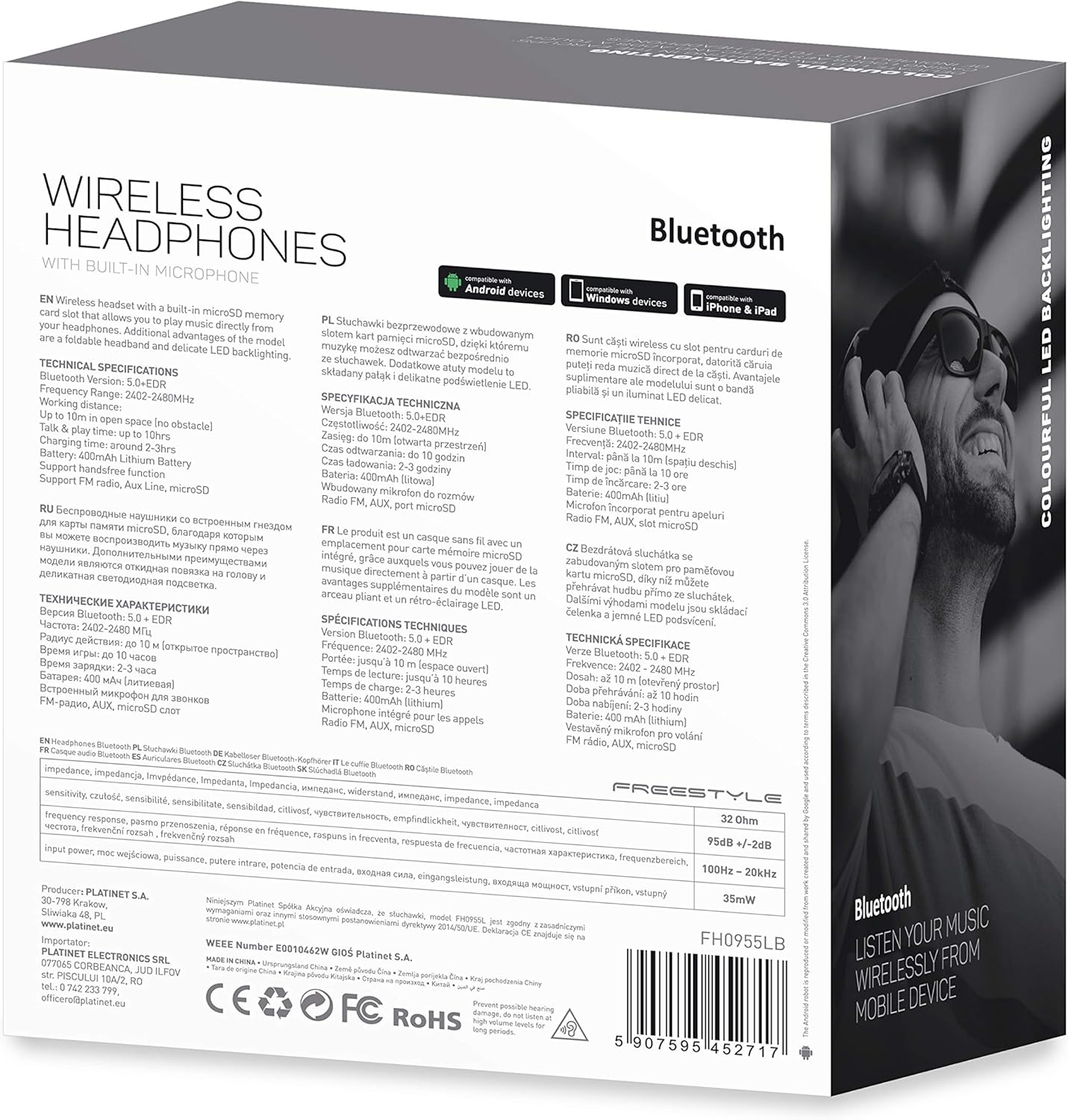
Ata 7.1: Auiliiliga view of the product packaging, showing technical specifications and compliance information.
| Fa'aaliga | Fa'amatalaga |
|---|---|
| Numera Fa'ata'ita'i | FH0955LB |
| Fa'ailoga | Sa'olotoga |
| Tekinolosi Feso'ota'i | Wireless (Bluetooth 5.0 + EDR) |
| Uaealesi tulaga | E oʻo i le 10 mita |
| Siaki leo | 3.5 mm |
| Fa'ailoga Fa'ailoga | Over-Ear (Circum-Auricular) |
| Fa'apitoa Fa'apitoa | Noise Cancellation, LED Backlighting, MicroSD Card Slot |
| Ituaiga maa | Integrated Lithium-ion (400 mAh) |
| Taimi Toe Ta'alo | E oʻo atu ile 10 itula |
| Taimi Totogi | E tusa ma le 2 itula |
| Taulaga Totogi | MicroUSB |
| Lanu | Lanu uliuli |
| Mea | Leather (earpads/headband) |
| Suavai Tetee Level | Tete'e vai |
| Fa'aaofia Vaega | 1 pea taligalu |
| Tufuga | Platinet |
8. Fa'amaonia ma Lagolago
O fa'amatalaga patino fa'amaonia e masani ona tu'uina atu i lau fa'atauga po'o luga ole ofisa ole gaosi oloa webnofoaga. Fa'amolemole taofi lau fa'amaoniga o le fa'atau mo so'o se tagi fa'amaonia.
For technical support or inquiries, please refer to the contact information provided by your retailer or the manufacturer, Platinet.
9. Fa'amatalaga Saogalemu
- Aua ne'i fa'ailoa le taliga i le vevela tele, susū, po'o vai.
- Aloese mai le fa'alogo i le maualuga o le leo mo se taimi umi e puipuia ai le fa'aleagaina o le fa'alogo.
- Do not attempt to disassemble or modify the headphones, as this may void the warranty and cause damage.
- Taofi ese mai tamaiti.
- Dispose of the product responsibly according to local electronic waste regulations.


