1. Folasaga
This manual provides essential instructions for the safe and efficient operation of your ARISEN RockTeen Portable Bluetooth Speaker. Please read this manual thoroughly before using the product and retain it for future reference.
1.1 Fa'amaumauga o Mea
- ARISEN RockTeen Bluetooth Speaker
- USB Totogi Uaea
- Audio Cable (AUX)
- Tusi Taiala
- Kata Faamaonia
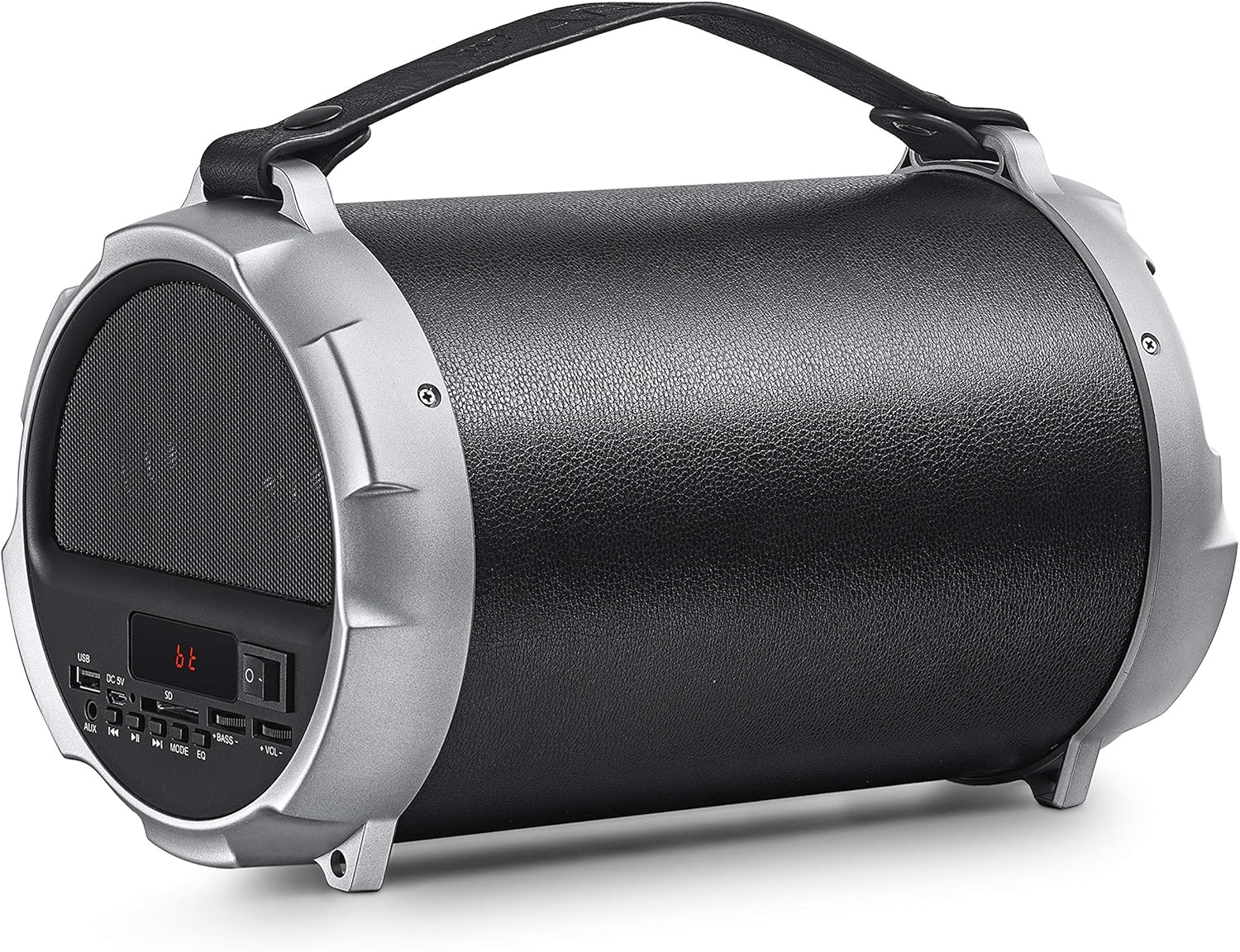
Figure 1.1: ARISEN RockTeen Portable Bluetooth Speaker. This image displays the speaker from an angled perspective, showcasing its cylindrical design, control panel on the left side, and integrated carrying handle.
2. Oloa Ua Ovaview
2.1 Speaker Components and Controls
Familiarize yourself with the various parts and controls of your speaker:
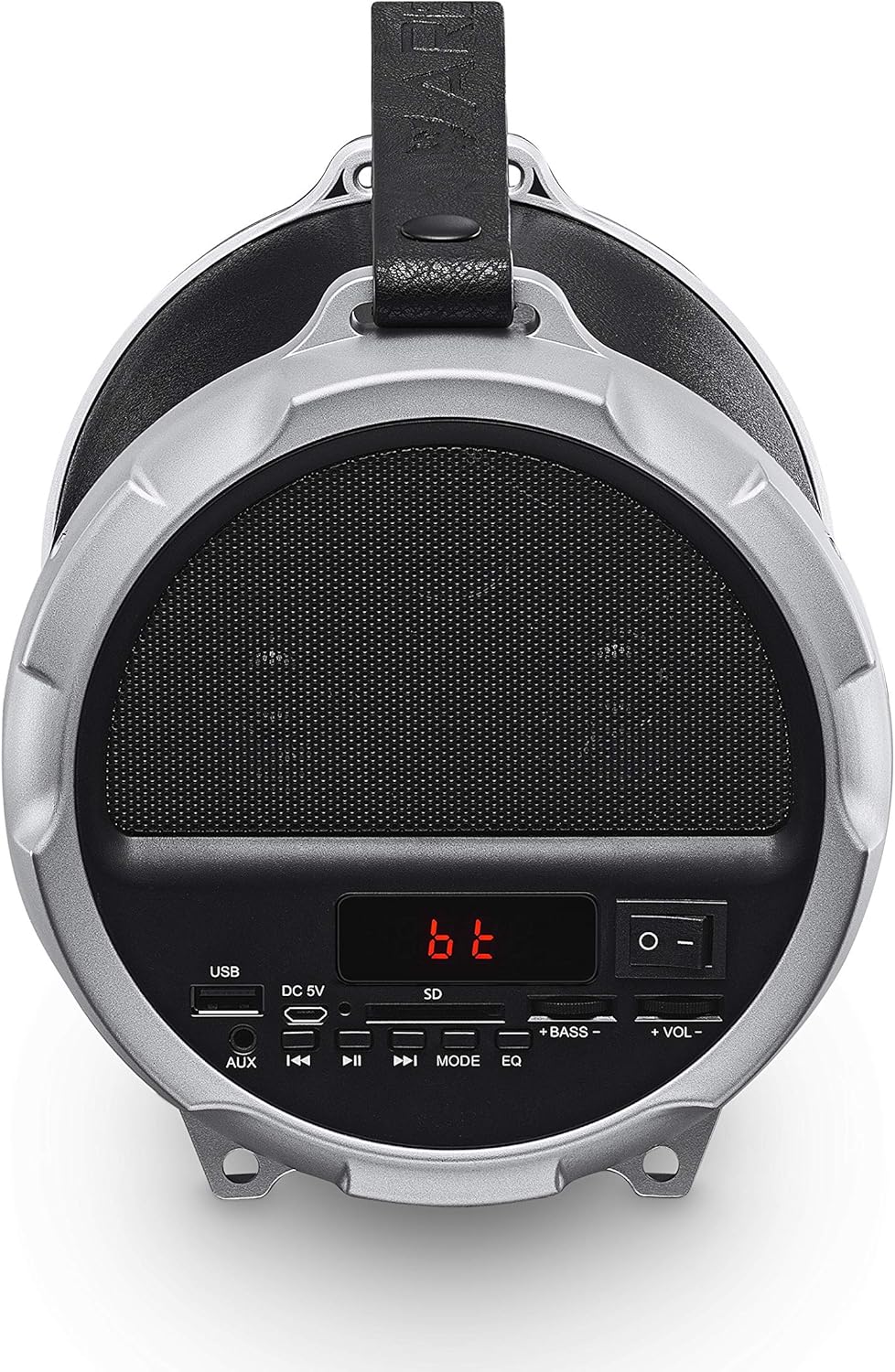
Ata 2.1: Fa'alatalata view of the ARISEN RockTeen speaker's control panel. The panel features a USB port, DC 5V charging port, AUX input, SD card slot, power switch, mode button, play/pause, track skip buttons, and volume/bass controls.
- Taulaga USB: Mo le toe fa'afo'iina o le ta'avale USB flash drive.
- DC 5V Taulaga: Mo le molia o le sipika.
- Ulufale AUX: Mo le fa'afeso'ota'i masini fa'alogo i fafo e ala i le uaea leo 3.5mm.
- SD Card Slot: For TF card playback.
- Ki malosiaga: To turn the speaker On or Off.
- Faiga Fa'amau: To switch between Bluetooth, FM Radio, USB, TF Card, and AUX modes.
- Ta'alo/Taofi faamau: To play or pause audio.
- Ki o le Su'ega Muamua/Sosoo: To skip tracks or tune radio stations.
- Volume/Bass Controls: Separate controls for adjusting overall volume and bass levels.
- EQ faamau: To cycle through equalizer presets.
3. Seti
3.1 Tuuina atu o le Fofoga Fetalai
- Connect the provided USB charging cable to the DC 5V port on the speaker.
- Fa'afeso'ota'i le isi pito o le uaea USB i se feso'ota'iga eletise USB (e le'o aofia ai) po'o se uafu USB a le komepiuta.
- The charging indicator will illuminate. Allow approximately 3-4 hours for a full charge.
- A mae'a loa ona fa'atumuina, tatala le uaea e molia ai.
Fa'aaliga: The rechargeable Li-ion battery provides up to 6 hours of music playback at 50% volume.
3.2 Fa'aola i luga/Pepe
- To power on the speaker, slide the Power Switch to the 'ON' position.
- To power off the speaker, slide the Power Switch to the 'OFF' position.
4. Fa'atonuga o Galuega
4.1 Feso'ota'iga Bluetooth
- Ia mautinoa ua fa'agaoioia le sipika ma ua i le Bluetooth mode. A leai, oomi le Faiga button until "bt" appears on the display.
- Fa'afeso'ota'i le Bluetooth i lau masini feavea'i (telefoni, papalama, komepiuta feavea'i).
- Saili mo available Bluetooth devices. Select "ARISEN RockTeen" from the list.
- Once paired, the speaker will emit a confirmation sound, and the display will indicate a successful connection.
- You can now play audio from your device through the speaker. The Bluetooth range is approximately 30 feet (10 meters).
4.2 FM Leitio Galuega
- Malo le sipika ma oomi le Faiga button to switch to FM Radio mode. The display will show the radio frequency.
- Ina ia su'esu'e otometi ma teu nofoaga avanoa, oomi ma uu le Ta'alo/Taofi button. The speaker will automatically search and store all strong signals.
- To manually tune or navigate through saved stations, use the Ala muamua/sosoo faamau.
- To manually select a saved station, use the number buttons on the control panel (if available, otherwise use track buttons).

Figure 4.1: The ARISEN RockTeen speaker being used outdoors, demonstrating its FM Radio function. A hand is shown interacting with the control panel, with the display showing 'FM' and a frequency.
4.3 USB/TF Card Playback
- Insert a USB flash drive or TF (Micro SD) card into the respective slot on the control panel.
- The speaker will automatically switch to USB or TF card mode and begin playing audio files. Afai e leai, oomi le Faiga faamau e filifili ai le punaoa sa'o.
- Fa'aaoga le Ta'alo/Taofi ma Ala muamua/sosoo faamau e pulea ai le toe faia.
4.4 AUX Input Mode
- Connect one end of the provided audio cable to the AUX input port on the speaker.
- Fa'afeso'ota'i le isi pito o le uaea leo i le headphone jack po'o le audio output a lau masini i fafo.
- Oomi le Faiga button until the speaker switches to AUX mode.
- Pulea le toe ta'alo ma le leo mai lau masini fafo.
4.5 True Wireless Stereo (TWS) Function
The TWS function allows you to pair two ARISEN RockTeen speakers together for enhanced stereo sound. (Requires two ARISEN RockTeen speakers).
- Ensure both speakers are powered on and in Bluetooth mode, but not yet paired with any device.
- I luga o se tasi o sipika, oomi ma uu le Faiga button for a few seconds until you hear a pairing tone. This speaker will become the primary unit.
- The two speakers will automatically connect to each other.
- Once connected, pair your mobile device to the primary speaker via Bluetooth as described in section 4.1.
- Audio will now play in stereo through both speakers.
4.6 Valaau e Sa'oloto Lima
When connected via Bluetooth to a smartphone, the speaker can be used for hands-free calls.
- Tali Valaau: Oomi le Ta'alo/Taofi faamau tasi e tali ai se valaau ulufale.
- Fa'ai'u le Valaau: Oomi le Ta'alo/Taofi button once during a call to end it.
- Te'ena Valaau: Oomi ma uu le Ta'alo/Taofi faamau e teena ai se valaau ulufale.
- Toe vili Numera Mulimuli: Oomi faalua le Ta'alo/Taofi ki e toe faʻalua ai le numera mulimuli.
4.7 Volume and Bass Adjustment
- Fa'aaoga le +VOL- knob to adjust the overall volume level.
- Fa'aaoga le +PASI- knob to adjust the bass intensity.
- Oomi le EQ button to cycle through available equalizer presets.
5. Tausiga
5.1 Fa'amamāina
- Ia mautinoa ua tape le sipika ma motusia mai so'o se puna eletise a'o le'i fufulu.
- Use a soft, dry, lint-free cloth to wipe the exterior surfaces of the speaker.
- Aua ne'i fa'aogaina ni mea e fa'amama, solo, po'o so'o so'o aua e ono fa'aleagaina ai le fa'auma.
- Aloese mai le susū i totonu o so'o se avanoa.
5.2 Teuina
- Teu le sipika i se nofoaga mālūlū ma matutu mamao ese mai le susulu o le la ma le vevela tele.
- If storing for an extended period, charge the battery to approximately 50% every few months to prolong its lifespan.
5.3 Tausiga maa
- Do not expose the battery to excessive heat or direct flame.
- 'Alo'ese le fa'amama fa'ato'a uma o le ma'a, aua e mafai ona fa'aitiitia ai lona olaga atoa.
- If the speaker will not be used for a long time, charge it periodically to maintain battery health.
6. Faʻafitauli
6.1 Mataupu masani ma Fofo
- Speaker will not power on:
Ensure the battery is charged. Connect the speaker to a power source using the USB charging cable. - Leai se leo:
Check the volume level on both the speaker and your connected device. Ensure the correct input mode (Bluetooth, AUX, USB, TF) is selected. Verify that the audio cable is securely connected in AUX mode. - Ua faaletonu le feso'ota'iga Bluetooth:
Ensure the speaker is in Bluetooth pairing mode. Turn off Bluetooth on your device and then turn it back on. Remove "ARISEN RockTeen" from your device's Bluetooth list and attempt to re-pair. Ensure your device is within the 30-foot Bluetooth range. - FM Radio reception is poor:
Relocate the speaker to an area with better signal reception. Ensure no large metal objects are obstructing the signal. - USB/TF card not playing:
Ensure the USB drive or TF card is inserted correctly. Verify that the audio files are in a compatible format. Try a different USB drive or TF card.
7. Fa'amatalaga
7.1 Faʻamatalaga Faʻamatalaga
| Fa'aaliga | Fa'amatalaga |
|---|---|
| Igoa Fa'ata'ita'iga | RockTeen |
| Tele o Seu | 2 inisi |
| Lapo'a Subwoofer | 4 inisi |
| Sau Fa'ailo | 3W x 2, 4Ω |
| Fa'aoso le Subwoofer | 12W, 4Ω |
| Tali Faatele | 100Hz - 20KHz |
| Paoa sapalai | DC 5V |
| Fa'aliliuga Bluetooth | 5.0 |
| Lau'ele'ele Bluetooth | E oo atu ile 30 futu (10 mita) |
| Ola ma'a | E oʻo atu i le 6 itula (i le 50% voluma) |
| Masini Fegalegaleai | Laptop, Smartphone, Tablet |
| Metotia Pulea | Oomi Faamau |
| Tekinolosi Feso'ota'i | Bluetooth, USB, AUX, TF Card |
| Fa'alavelave | 4 Ohm |
| Uatage (Total) | 12 Watts (Subwoofer) |
8. Fa'amaonia ma Lagolago
8.1 Fa'amatalaga Fa'amaonia
Your ARISEN RockTeen Portable Bluetooth Speaker comes with a warranty. Please refer to the included Warranty Card for detailed terms and conditions, including the warranty period and coverage.
8.2 Fesoasoani mo Tagata Fa'atau
For any questions, technical assistance, or warranty claims, please contact ARISEN customer support. Refer to the contact information provided on your Warranty Card or the seller's details where you purchased the product.