1. Folasaga
Fa'afetai mo le fa'atauasing the Lenco SPR-100BK Splash-Proof Bluetooth Speaker. This portable speaker delivers powerful sound with strong bass and features FM radio, USB, SD card playback, and integrated light effects. Designed for durability, it is splash-proof, making it suitable for various environments. This manual provides essential information for safe and optimal use of your device.
2. Fa'atonuga Taua mo le Saogalemu
- Aua le fa'aalia le masini i le vevela tele, sa'o le la, po'o le maualuga o le susu.
- Ensure the charging port cover is securely closed when near water to maintain splash-proof integrity.
- Aua le tatala pe suia le masini. Tuu atu auaunaga uma i tagata agavaa.
- Fa'aaoga na'o le uaea fa'atonu.
- Taofi le masini mai maneta malolosi.
- Aloese mai le pa'u pe tu'u le masini i ni aafiaga malolosi.
3. Oloa Ua Ovaview
Familiarize yourself with the components of your Lenco SPR-100BK speaker.
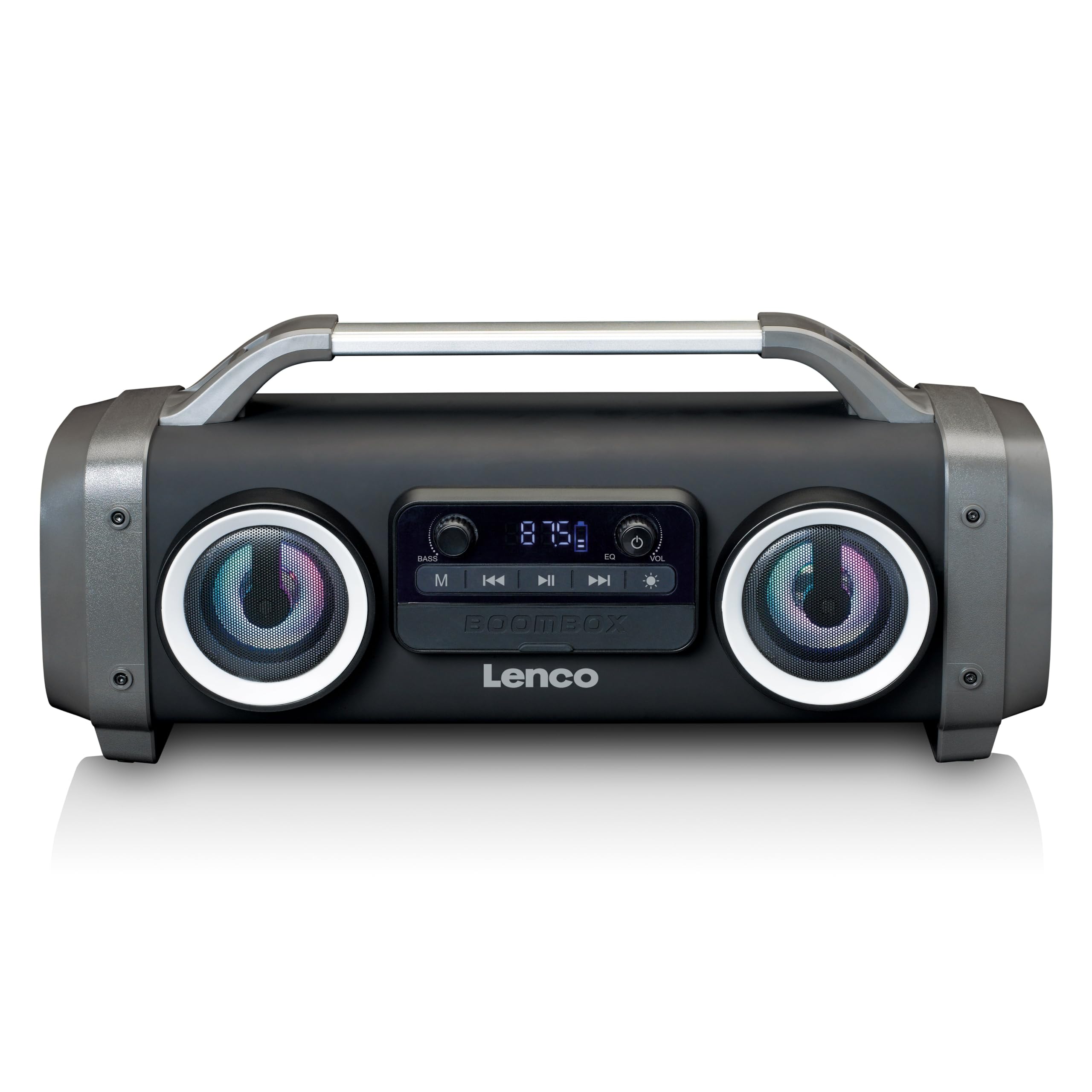
Ata 1: Luma view of the Lenco SPR-100BK speaker, showing the main speaker grille, control panel, and integrated light effects.
3.1 Pulea ma Uafu
- Ki Malosi: Ki'i pe tape le sipika.
- Faiga Fa'amau: Switches between Bluetooth, FM Radio, USB, SD, and AUX modes.
- Ta'alo/Taofi faamau: Tata pe taofi leo.
- Kipi Pulea leo: Fetuuna'i le leo tele.
- Bass Boost Knob: Fetuuna'i le tulaga bass.
- Light Effect Button: Cycles through or turns off light effects.
- Taulaga USB: Mo le toe fa'afo'iina o le ta'avale USB flash drive.
- SD Card Slot: Mo le toe ta'aloina o le kata SD.
- Ulufale AUX (3.5mm): Mo le fa'afeso'ota'i masini fa'alogo fafo.
- Charging Port (Mini USB): Mo le tauina o le maa i totonu.
4. Seti
4.1 Tatalaina
Carefully remove the speaker and all accessories from the packaging. Ensure the following items are present:
- Lenco SPR-100BK Bluetooth Speaker
- USB Totogi Uaea
- 3.5mm Audio Cable (AUX cable)
- Tusi Taiala
4.2 Totogiina o le Maa
- Locate the Mini USB charging port on the speaker.
- Fa'afeso'ota'i le uaea fa'a USB ua tu'uina atu i le uafu fa'aola o le sipika.
- Connect the other end of the USB cable to a compatible USB power adapter (5V/1A, not included) or a computer's USB port.
- O le moli fa'ailo o le fa'atumuina o le a moli, e masani lava mumu, a'o fa'atumuina. O le a tape pe suia le lanu (e pei o le lanumoana) pe a atoa le fa'atumuina.
- A full charge takes approximately 4-5 hours and provides up to 15 hours of playback (without light effects).
4.3 Malosiaga Muamua i luga
Oomi ma uu le Pule Malosi for a few seconds until the speaker powers on and you hear an audible prompt or see the display light up.
5. Galuega
5.1 Malosi / Malosi
- Fa'aola: Oomi ma uu le Pule Malosi.
- E tape le eletise: Oomi ma uu le Pule Malosi toe.
5.2 Feso'ota'iga Bluetooth
- Ki le sipika. O le a otometi lava ona ulufale i le Bluetooth pairing mode, e fa'ailoa mai i se moli LED emo.
- Fa'agaoioi le Bluetooth i lau masini feavea'i (telefoni, papalama, ma isi).
- Saili mo available Bluetooth devices and select "SPR-100BK"mai le lisi.
- Once paired, the speaker will emit a confirmation sound, and the LED will stop flashing.
- Faiga Fa'alogo Uaealesi Moni (TWS): If you have two SPR-100BK speakers, you can pair them for stereo sound.
- Ia mautinoa ua fa'aola uma sipika ma ua iai i le Bluetooth mode.
- On one speaker (the master), press and hold the Fa'amau Fa'ailoga until you hear a TWS pairing prompt.
- The two speakers will automatically connect. Once connected, pair your device to the master speaker as described above.
Leitio 5.3 FM
- Oomi le Fa'amau Fa'ailoga repeatedly until you select FM Radio mode.
- Mo le otometi ona su'esu'e ma sefe nofoaga: Oomi ma uu le Ta'alo/Taofi Ki. The speaker will scan for available FM stations and save them automatically.
- To switch between saved stations: Use the Previous/Next Track Buttons (if available, otherwise it will cycle through automatically).
- Fa'aaliga: For better FM reception, ensure the included 3.5mm audio cable is plugged into the AUX input, as it acts as an external antenna.
5.4 USB/SD Card toe ta'alo
- Fa'aofi se USB flash drive po'o se SD card (fa'atasi ai ma leo e lagolagoina) files) into the respective port/slot.
- The speaker will automatically switch to USB or SD mode and begin playback. If not, press the Fa'amau Fa'ailoga e filifili le puna sa'o.
- Fa'aaoga le Ta'alo/Taofi Ki ma Previous/Next Track Buttons to control playback.
5.5 AUX Ulufale
- Connect one end of the supplied 3.5mm audio cable to the AUX input on the speaker.
- Fa'afeso'ota'i le isi pito i le so'o fa'alogo po'o le fa'alogo leo o lau masini fafo.
- Oomi le Fa'amau Fa'ailoga e filifili le AUX mode.
- Pulea le toe ta'alo ma le leo mai lau masini fafo.
5.6 Aafiaga Malamalama
Oomi le Ki o Aafiaga Malamalama to cycle through different light modes or to turn the lights off. The speaker features 12 color light effects.
5.7 Fetuunaiga leo
- Volume: Liliu le Volume Pulea nifo to increase or decrease the overall sound level.
- Bass: Liliu le Bass Boost Knob to adjust the intensity of the bass.
6. Tausiga
6.1 Fa'amamāina
Wipe the speaker with a soft, dry cloth. Do not use abrasive cleaners, waxes, or solvents. For stubborn dirt, a slightly damp cloth can be used, ensuring all port covers are sealed.
6.2 Tausiga maa
- To prolong battery life, fully charge the speaker before first use.
- Aloese mai le sasaa atoa o le maa i taimi uma.
- If storing the speaker for an extended period, charge it to about 50% every few months.
6.3 Teuina
Store the speaker in a cool, dry place, away from direct sunlight and extreme temperatures.
7. Faʻafitauli
| Fa'afitauli | Mafuaaga e ono tupu | Fofo |
|---|---|---|
| E le ola le Fofoga Fetalai. | Ua uma le maa. | Fa'atumu le sipika e fa'aaoga ai le uaea USB ua saunia. |
| Leai se leo. | Volume is too low; incorrect mode selected; device not connected. | Increase volume; press Mode button to select correct source; ensure Bluetooth device is paired or AUX cable is connected. |
| Ua le manuia feso'ota'iga Bluetooth. | Le failauga e le o fa'atasi; mamao tele le masini; fa'alavelave. | Ensure speaker is in Bluetooth pairing mode (flashing LED); move device closer; turn off other Bluetooth devices. |
| Le lelei le taliaina o leitio FM. | No external antenna; weak signal. | Plug in the 3.5mm AUX cable to act as an antenna; try moving the speaker to a different location. |
| USB/SD playback not working. | Le lagolagoina file faatulagaga; e le'i fa'apipi'iina sa'o le kata/tietie ta'avale; ua fa'aleagaina files. | Ia mautinoa files are in a supported format (e.g., MP3); reinsert the USB drive/SD card; try a different drive/card. |
8. Fa'amatalaga
| Numera Fa'ata'ita'i | SPR-100BK |
| Fa'ailoga | Lenco |
| Malosiaga | 25 Watts RMS |
| Feso'ota'i | Bluetooth, USB, SD Card, 3.5mm AUX Input |
| Ituaiga maa | Lithium-ion (4400mAh) |
| Taimi Toe Ta'alo | Up to 15 hours (reduced with light effects) |
| Totogi Fa'aulu | 5V/1A (Mini USB) |
| Fa'apitoa Fa'apitoa | Splash-proof design, Integrated light effects, FM Radio, TWS function |
| Fua (L x W x H) | 60 x 60 x 85 cm |
| mamafa | 2 kilokalama |
Manatua: O faʻamatalaga e mafai ona suia e aunoa ma se faʻaaliga muamua.
9. Fa'amaonia ma Lagolago
9.1 Fa'amatalaga Fa'amaonia
This Lenco product is covered by a warranty for a period of 2 tausaga on parts from the date of purchase. This warranty covers manufacturing defects and workmanship under normal use. It does not cover damage caused by misuse, accidents, unauthorized modifications, or normal wear and tear.
9.2 Fa'afouga polokalame
Software updates for this product are guaranteed until Aperila 13, 2030.
9.3 Fesoasoani mo Tagata Fa'atau
For technical assistance, warranty claims, or product inquiries, please contact Lenco customer support through their official website or the retailer where the product was purchased. Please have your model number (SPR-100BK) and proof of purchase ready.
Lenco aloa'ia Webnofoaga: www.lenco.com


