1. Folasaga
This manual provides essential instructions for the safe installation, operation, and maintenance of your Legrand Arteor USB Charger Module, Model 573422. Please read this manual thoroughly before installation and retain it for future reference.
2. Fa'amatalaga Saogalemu
LAPATAIGA: Electrical shock hazard. Installation must be performed by a qualified electrician in accordance with all local and national electrical codes. Disconnect power at the circuit breaker before installation or servicing.
- Aua le tu'uina atu le masini i le susu po'o le vevela tele.
- Aua le taumafai e fa'a'ese'ese pe suia le masini.
- Ensure proper grounding where required.
- Use only with compatible USB devices.
3. Mea i totonu o le afifi
Fa'amautinoa o lo'o iai vaega uma a'o le'i fa'agasolo le fa'apipi'iina:
- 1x Legrand Arteor USB Charger Module (IS13252 Part 1 / IEC 60950,1)

Ata 1: Luma view of the Legrand Arteor USB Charger Module, showing two USB-A ports and a battery charging icon.
4. Seti ma Fa'apipi'i
This USB charger module is designed for integration into a compatible Legrand Arteor mounting frame and plate. Professional installation is recommended.
- Malosi motusia: Before beginning any electrical work, ensure the main power supply to the circuit is turned off at the circuit breaker. Verify with a voltage su'e.
- Fa'aofiina Module: Carefully insert the USB charger module into the designated slot within the Arteor mounting frame. Ensure it clicks securely into place.
- Feso'ota'iga uaea: Connect the electrical wires (Live, Neutral, Earth) to the corresponding terminals on the rear of the module. Refer to the wiring diagram provided with your Arteor mounting frame or consult a qualified electrician. Ensure all connections are tight and secure.
- Fa'apipi'iina o mea fa'apipi'i: Once the module is wired and secured in the frame, attach the Arteor cover plate according to its specific instructions.
- Toe Fa'aleleia Malosiaga: Toe fa'afo'i le mana i le ta'avale ta'avale.

Ata 2: Itu view of the module, illustrating its compact design for integration into a wall plate.

Ata 3: Fa'afagota view showing the rear housing and terminal access for wiring.
5. Fa'atonuga o Galuega
The Legrand Arteor USB Charger Module provides convenient power for charging compatible USB devices.
- Feso'ota'i le masini: Plug a standard USB-A charging cable into one of the two USB ports on the module.
- Amata Totogi: Connect the other end of the USB cable to your compatible device (e.g., smartphone, tablet, PC). The device should begin charging automatically.
- Fa'ailoga o le Totogi: The module does not feature an explicit charging indicator light. Refer to your device's screen for charging status.
- motusia le masini: Once charging is complete, safely disconnect your device and then the USB cable from the module.
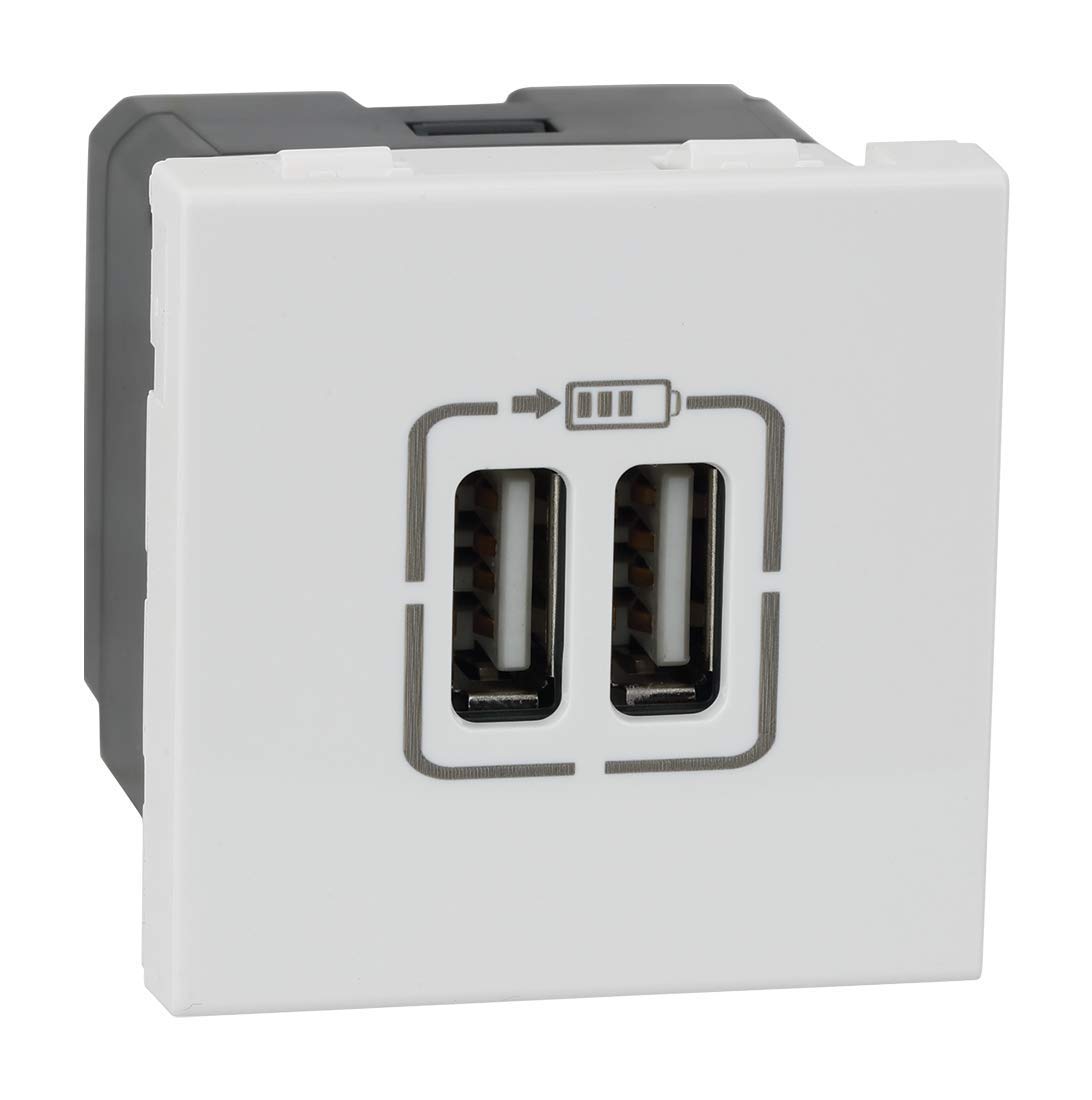
Ata 4: Fa'afa'afa'o i luma view highlighting the two USB-A charging ports.
6. Tausiga
- Fa'amamaina: Disconnect power before cleaning. Wipe the surface of the module with a soft, dry, or slightly damp cloth. Do not use abrasive cleaners, solvents, or excessive moisture.
- Asiasiga: Periodically inspect the module and surrounding plate for any signs of damage, loose connections, or discoloration. If any issues are observed, disconnect power and consult a qualified electrician.
7. Faʻafitauli
| Fa'afitauli | Mafuaaga e ono tupu | Fofo |
|---|---|---|
| E le o totogi le masini. | Leai se eletise i le module. Uaea USB sese. Masini e le fetaui. Module faaletonu. | Siaki le va'ava'a. Taumafai se isi uaea USB. Ensure device is USB-compatible. Fa'afeso'ota'i se fai eletise agavaa. |
| Totogi lemu. | High power demand from device. Uaea USB sese. | Ensure device is not running power-intensive applications. Try a different, high-quality USB cable. |
8. Fa'amatalaga
- Numera Fa'ata'ita'i: 573422
- Fa'ailoga: Legrand
- Ituaiga Feso'ota'i: USB-A
- Aofa'i Taulaga USB: 2
- Sao Voltage: 5 Volts (from mains supply via internal conversion)
- Galuega Fa'atino i le taimi nei: 3 Amps (Total)
- Mea: Polycarbonate
- Lanu: Lanu pa'epa'e
- Fua o Mea: 4.5 x 4.5 x 4.2 cm
- Mea mamafa: 80 g
- Tulaga: IS13252 (Part 1) / IEC 60950,1
9. Fa'amatalaga Fa'amaonia
This Legrand Arteor USB Charger Module comes with a 2 tausaga fa'amaonia provided by the manufacturer from the date of purchase. Please retain your proof of purchase for warranty claims. The warranty covers manufacturing defects under normal use conditions. It does not cover damage resulting from improper installation, misuse, accidents, or unauthorized modifications.
10. Lagolago Tagata Fa'atau
For technical assistance, warranty claims, or further information, please contact Legrand customer service. Refer to the Legrand official webnofoaga po'o oloa afifiina mo fa'amatalaga fa'afeso'ota'i nei.
Legrand Official Webnofoaga: www.legrand.co.in


