Folasaga
Thank you for choosing the Hektar Work Lamp with Wireless Charging. This manual provides essential information for the safe and efficient use of your new lamp. Please read it thoroughly before installation and operation, and keep it for future reference.
This versatile work lamp combines focused illumination with the convenience of integrated wireless charging, making it an ideal addition to any workspace or bedside table.
Ua Umaview
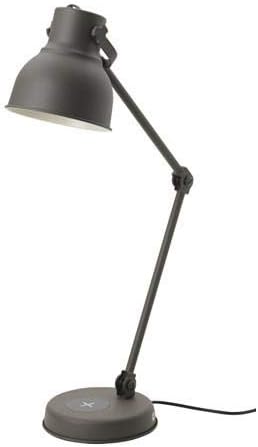
Ata 1: The Hektar Work Lamp in dark grey, featuring an adjustable arm and shade, and a round base with integrated wireless charging.

Ata 2: O se vaaiga vavalalata view of the Hektar Work Lamp's base, demonstrating the wireless charging pad in use with a smartphone placed on it.
Seti
- Tatala: Carefully remove all components from the packaging. Ensure all parts are present: lamp assembly, power cord.
- Tu'uga: Tuu le lamp base on a stable, flat surface. Ensure there is enough space around the lamp for adjusting the arm and shade.
- Fesoʻotaʻi le Mana: Insert the power cord into the lamp's power input, typically located at the back of the base. Plug the other end of the power cord into a standard electrical outlet.
- Fa'atonu Lamp: Loosen the adjustment knobs on the lamp arm and shade to position the light as desired. Tighten the knobs to secure the position.
Fa'atonuga o Galuega
Lamp Fa'agaioiga
- Malosi/Pepe: Locate the push-button switch, typically on the lamp base or cord. Press the button once to turn the lamp on, and press it again to turn it off.
- Fetuuna'i le itu o le Malamalama: O le lamp features an adjustable arm and shade. Loosen the wing nuts or adjustment points to reposition the light, then tighten them to secure the desired angle.
Totogi uaealesi
- Fegalegaleai: The integrated wireless charger is compatible with Qi-enabled devices. Ensure your device supports wireless charging.
- Tu'uga: Place your Qi-enabled device (e.g., smartphone) directly onto the designated charging pad area on the lamp's base. The charging area is usually marked with a cross or circle symbol.
- Fa'ailoga o le Totogi: A small LED indicator on the lamp base may illuminate or change color to confirm that charging has begun. Refer to your device's charging indicator for confirmation.
- Totogi sili ona lelei: For best results, ensure the device is centered on the charging pad. Remove any thick cases that might interfere with charging.
Tausiga
- Fa'amamaina: Momotu le lamp from the power outlet before cleaning. Wipe the lamp surfaces with a soft, dry cloth. For stubborn marks, a slightly damp cloth can be used, followed by drying. Do not use abrasive cleaners or solvents.
- Suiga maupulu: O lenei lamp uses an integrated LED light source, which is designed for a long lifespan and is not user-replaceable. If the light source fails, the entire luminaire should be replaced.
- Tausiga uaea: Regularly inspect the power cord for any damage. Do not use the lamp pe afai ua masaesae pe faaleagaina le uaea.
Fa'afitauli
| Fa'afitauli | Mafuaaga e ono tupu | Fofo |
|---|---|---|
| Lamp e le liliu. |
|
|
| E le o galue le fa'atumuina uaealesi. |
|
|
| Lamp emoemo pe faanenefu. |
|
|
Fa'amatalaga
- Ituaiga Malamalama: Galuega Lamp
- Fa'ailoga: HEKTAR
- Fa'ata'ita'iga: Hektar Work Lamp
- Lautele Paolo: 16 cm
- Diameter (Base): 18 cm
- Umi ole uaea: 1.9 m
- Malosiaga: 7.0 W
- Mea: Alumini, Uamea Alu
- Mea Paolo: Aluminium, Paint, Epoxy powder coating
- Mea fa'apa'u: Steel, Epoxy powder coating
- Faauma Ituaiga: Ufiufi Pa'u
- Mea Faavae: Uamea uamea
- Mea mamafa: 3.1 kalama
- Lanu Paolo: Lanu efuefu
- Suiga Ituaiga: Oomi Faamau
- Mea Fa'apitoa: Totogi uaealesi
- Punavai Malosi: Uaea Eletise
- ASIN: B081TP9FBB
- Tufuga: HEKTAR
- Aso Muamua Maua: 21 Novema 2019
Fa'amaonia ma Lagolago
Specific warranty details for the Hektar Work Lamp are typically provided at the point of purchase or within separate warranty documentation included with the product. Please refer to those documents for comprehensive information regarding warranty coverage, terms, and conditions.
For technical support, troubleshooting assistance beyond this manual, or inquiries about replacement parts, please contact HEKTAR customer service through their official web'upega tafaʻilagi poʻo le faioloa na e faʻatau mai ai le oloa. Ia teu lau faʻamaoniga o le faʻatauga pe a faʻafesoʻotaʻi le lagolago.
You may find additional support resources, FAQs, and contact information on the official HEKTAR brand page or the product's listing page on Amazon.


