1. Folasaga
This manual provides detailed instructions for the assembly, operation, and maintenance of your FITUEYES TT306503GBN Mobile TV Stand. This stand is designed to accommodate 32-70 inch televisions or monitors weighing up to 40kg, offering mobility, adjustable height, and a swivel function for optimal viewing.
Please read this manual thoroughly before assembly and use to ensure safe and correct operation.

Image 1: The FITUEYES TT306503GBN Mobile TV Stand with a television mounted, featuring a black finish and two middle shelves.
2. Seti
2.1 Fa'amaumauga o Mea
Verify that all components listed in the packing list are present and undamaged before beginning assembly. If any parts are missing or damaged, please contact customer support.
2.2 VESA Compatibility
This TV stand supports VESA mounting patterns ranging from a minimum of 20x10cm to a maximum of 60x40cm. It is suitable for televisions and monitors between 32 and 70 inches, with a maximum weight capacity of 40kg.

Image 2: Technical diagram illustrating the VESA mounting patterns and overall dimensions of the TV stand.
2.3 Faatonuga mo le Fonotaga
Follow the step-by-step instructions provided in the included assembly guide. Ensure all screws are tightened securely, but do not overtighten. It is recommended to have two people for certain assembly steps, especially when mounting the television.
- Attach the base to the main column.
- Install the casters onto the base.
- Mount the TV bracket to the main column.
- Attach the VESA plates to the back of your television.
- Hang the television onto the TV bracket.
- Install the middle shelves at your desired height.
2.4 Pulega o Uaea
The stand features integrated cable management to keep wires organized and out of sight. Route your cables through the designated channels on the main column for a tidy appearance.
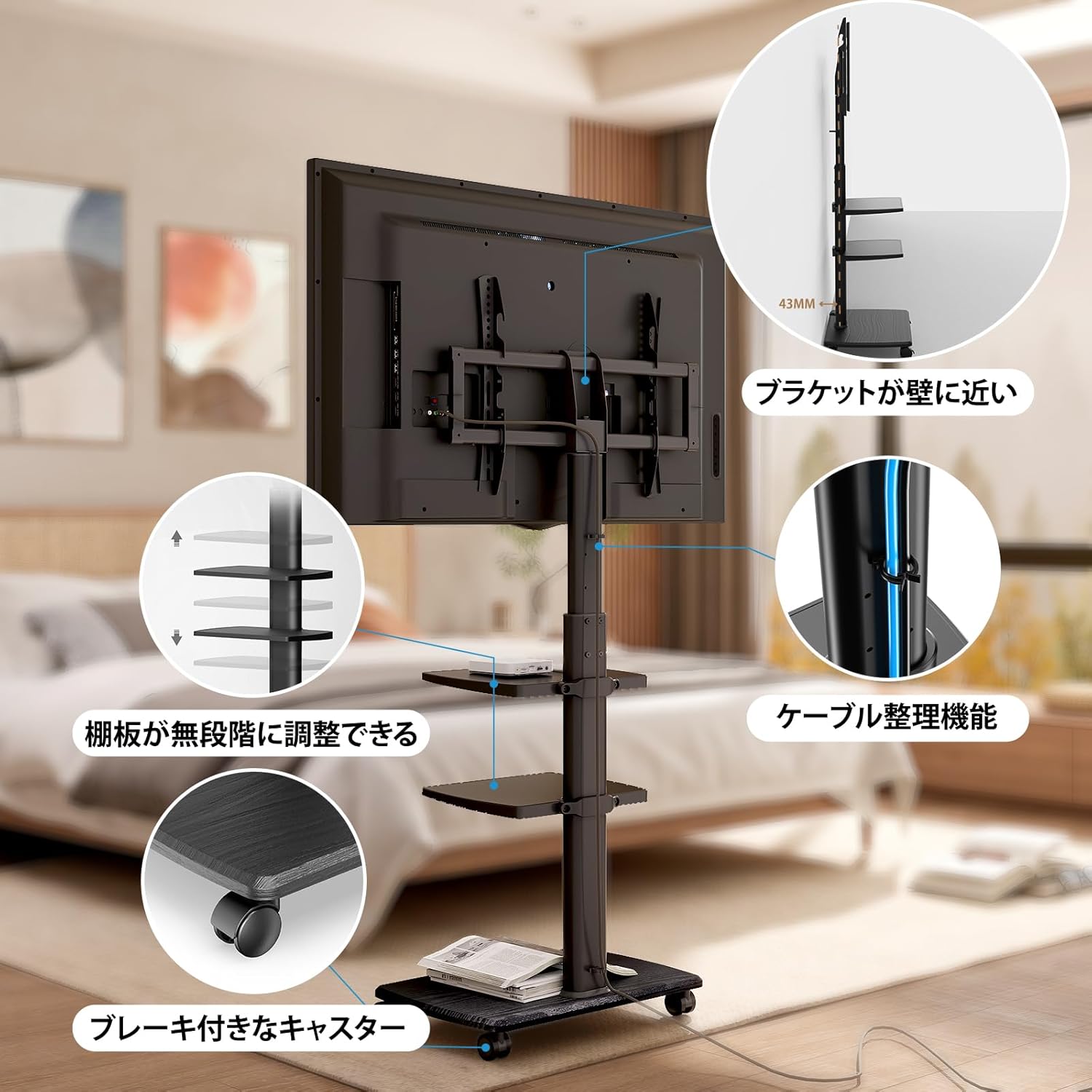
Ata 3: Auiliiliga view of the stand's features, including cable routing, adjustable shelves, and lockable casters.
3. Faʻagaioiga
3.1 Fetuunaiga Maualuluga
The television mounting height can be adjusted to 6 different levels, ranging from 127cm to 147cm, by repositioning the hardware on the support column. The two middle shelves also offer stepless height adjustment, allowing you to customize their position for various devices such as recorders or game consoles.

Image 4: Illustration of how the TV stand's height can be adjusted to suit different viewmea e fiafia i ai.
3.2 Galuega Fa'ata'amilomilo
The TV mounting bracket allows for a 30° swivel rotation to the left and right. This feature enables you to adjust the viewing angle for optimal comfort from various positions within a room.

Image 5: The TV stand's swivel function demonstrated in a modern living space.
3.3 Mobility and Locking
Equipped with casters, the TV stand can be easily moved by one person, simplifying cleaning and repositioning. The casters include foot-operated stoppers, allowing you to securely lock the stand in place without bending down.

Image 6: The stand positioned in a corner and near a wall, illustrating its versatility and compact footprint.
4. Tausiga
4.1 Fa'amamāina
To clean the stand, use a soft, damp cloth. Avoid abrasive cleaners or harsh chemicals, as these may damage the finish. For the wood grain base, ensure the cloth is not overly wet to prevent water damage.
4.2 Tausiga Lautele
Regularly check all screws and connections to ensure they remain tight. Do not exceed the maximum weight capacity of 40kg for the television or the shelves. Avoid placing heavy objects on the edges of the shelves to prevent tipping.

Image 7: The durable wood grain base, designed for easy cleaning and stability.
5. Faʻafitauli
5.1 Stand is unstable
- Ia mautinoa o lo'o fa'amau lelei fa'amau fa'apipi'i uma.
- Verify that the television weight does not exceed the 40kg capacity.
- Check that the casters are locked when the stand is stationary.
- Ia mautinoa o loʻo tuʻu le tulaga i luga o se mea mafolafola ma tutusa.
5.2 Difficulty moving the stand
- Unlock all casters before attempting to move the stand.
- Check for any obstructions on the floor that might impede movement.
5.3 TV not level after mounting
- Recheck the VESA plate attachment to the TV and the bracket attachment to the stand to ensure they are aligned correctly.
- Some TV brackets allow for minor leveling adjustments; consult your TV's manual or the stand's assembly guide for specific instructions.
6. Fa'amatalaga
| Fa'aaliga | Fa'amatalaga |
|---|---|
| Numera Fa'ata'ita'i | TT306503GBN |
| Tele Tele talafeagai | 32 - 70 inisi |
| Avanoa Maualuga Maualuga | 40 kilokalama |
| VESA Fegalegaleaiga | Min: 20x10cm, Max: 60x40cm |
| Fua o le Iunite Autū (W x D x H) | 65 x 38.5 x 127-147 cm |
| Fua Fa'avae | 60 x 38.5 cm (29.5 cm to column) |
| Oloa mamafa | Pe tusa. 11.7 kilokalama |
| Meafaitino | Main unit: Alloy Steel; Base plate: Wood grain wooden board (20mm thick, FSC certified) |
| Lanu | Lanu uliuli |
| Su'e Livi | ±30 tikeri |
| Ituaiga Gaoioiga | Swivel, Mobile (with lockable casters) |

Image 8: Visual representation of the stand's compatibility with different television sizes.
7. Fa'amaonia ma Lagolago
For warranty information or technical support, please refer to the documentation included with your product or visit the official FITUEYES webnofoaga. E mafai fo'i ona e fa'afeso'ota'i le fa'atau oloa na e fa'atauina ai le oloa mo se fesoasoani.


