1. Folasaga
The Denver MRD-51 is a versatile multi-function music system designed to play various audio formats. It integrates a record player, DAB+ and FM/AM radio tuner, CD player, and cassette deck into a single unit. Additionally, it features a USB port for digitizing audio from CDs, records, or cassettes, and an AUX input for connecting external devices. The system includes two integrated stereo speakers for a complete audio experience.
2. Faatonuga Saogalemu
- Faitau ma le faaeteete faatonuga uma a'o le'i faagaoioia le masini.
- Taofi le tusi lesona lenei mo fa'amatalaga i le lumana'i.
- Aua ne'i tu'u le iunite i le timu po'o le susu e puipuia ai le mu po'o le fa'ate'ia eletise.
- Ia mautinoa lelei le ea savili; 'aua ne'i poloka so'o se avanoa e savili ai le ea.
- Tuu le iunite i luga o se fale mautu, mafolafola.
- Disconnect the power plug from the wall outlet if the unit is not in use for a long period.
- Aua le taumafai e tautua le iunite e oe lava ia. Fa'asino atu auaunaga uma i tagata faigaluega agavaa.
3. Mea i totonu o le afifi
Fa'amautinoa o lo'o iai mea uma pe a uma ona tatala:
- Denver MRD-51 Multi-Function Music System
- Uaea Malosi
- Pulea Mamao
- Tusi Taiala
4. Oloa Ua Ovaview

Ata 4.1: Denver MRD-51 Multi-Function Music System with turntable open. This image displays the Denver MRD-51 music system from a front-top perspective, with the turntable lid open and a vinyl record placed on the platter. The control panel, including the LCD display, knobs, and buttons, is visible below the turntable.

Ata 4.2: Denver MRD-51 Multi-Function Music System, front view. A front view of the Denver MRD-51 music system with the turntable lid closed. This image highlights the integrated stereo speakers on the sides and the central control panel, emphasizing its classic design.
4.1 Pulea Vaega i luma
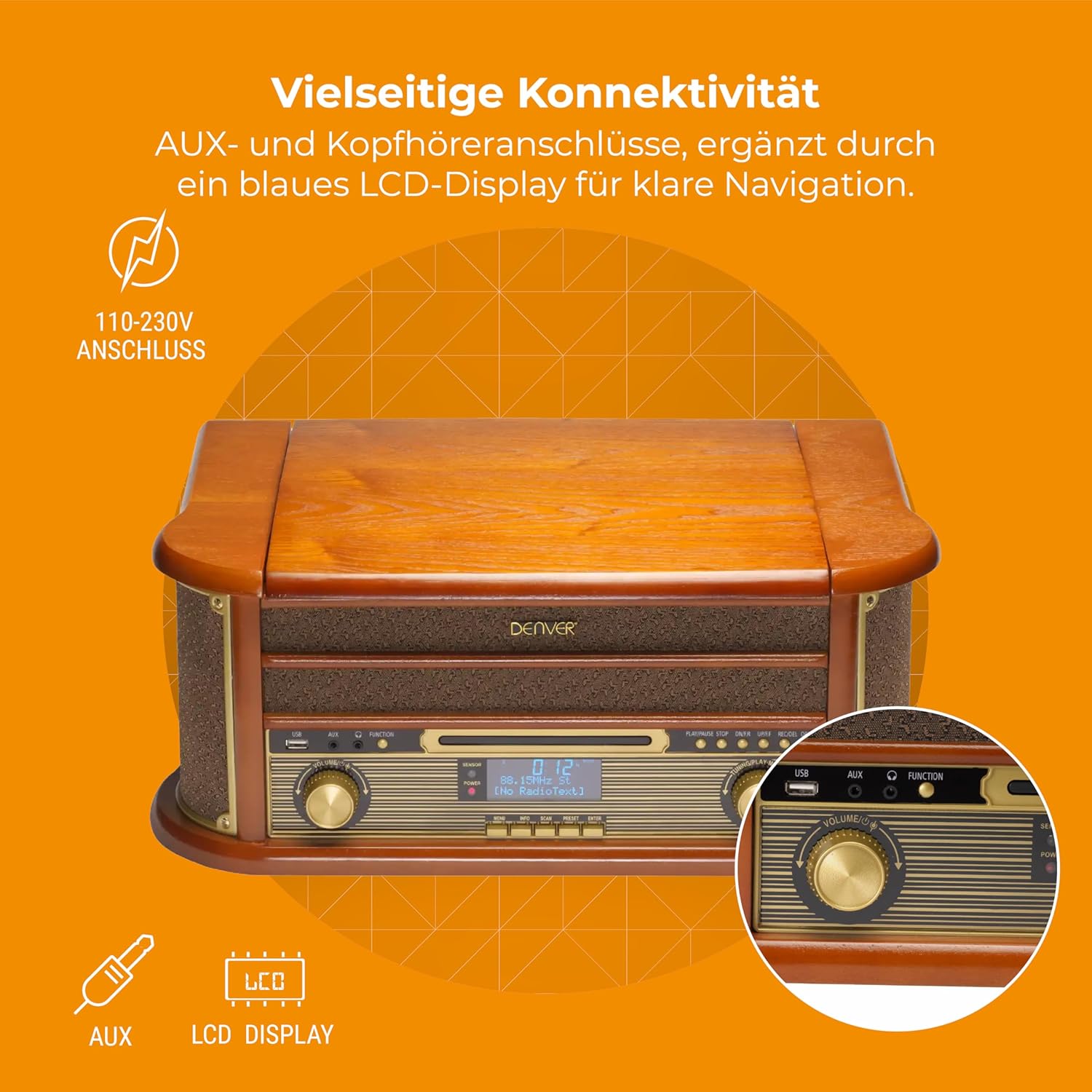
Ata 4.3: Denver MRD-51 front panel with USB, AUX, and LCD display. A close-up of the Denver MRD-51's front control panel, showcasing the USB port, AUX input, and the blue LCD display for clear navigation. This view details the various connectivity options available.
- Faamau Mana: Ki'i pe tape le iunite.
- FUNCTION Button: Selects between Turntable, CD, Cassette, DAB+, FM, AM, AUX, and USB modes.
- Taulaga USB: For connecting USB storage devices for playback or recording.
- Ulufale AUX: 3.5mm jack mo le fa'afeso'ota'i puna'oa fa'alogo fafo.
- Fa'aaliga LCD: Shows current mode, track information, radio frequency, and other system status.
- Ta'alo/T'A'U Fa'amau: Starts or pauses playback for CD, Cassette, or USB.
- STOP button: Taofi le toe ta'alo.
- SKIP Buttons (◀◀ / ▶▶): Skips tracks or fast forwards/rewinds.
- Faamaumau faamau: Initiates recording to USB.
- VOLUME Knob: Fetuuna'i le aofa'iga o le voluma fa'aulufale.
- Ki o le Fa'asa'oina: Adjusts radio frequency in FM/AM mode or navigates menus in DAB+ mode.
4.2 Turntable and Cassette Deck

Ata 4.4: Denver MRD-51 showing open turntable and cassette deck. This image illustrates the versatility of the Denver MRD-51, featuring the open turntable with a record and an arrow pointing to the cassette deck slot on the side, indicating its multi-format playback capabilities.
- ipu liu liu: For playing vinyl records.
- Tone Arm with Stylus: Reads the grooves of vinyl records.
- Filifiliga Saosaoa: Allows selection of 33, 45, or 78 RPM.
- Cassette Deck Slot: For inserting audio cassettes.
4.3 CD Player

Ata 4.5: Denver MRD-51 with CD tray open and remote control. This image shows the Denver MRD-51 with its CD tray open, ready for disc insertion. A remote control is also pictured, indicating convenient operation of the system's functions.
- CD Fata: For inserting compact discs.
- Fa'amau TATALA/TAPUNI: Tatala ma tapuni le fata o le CD.
5. Seti
5.1 Ta'ese'ese ma Tu'u
- Aveese ma le faaeteete le iunite mai lona afifiina.
- Place the unit on a flat, stable surface away from direct sunlight, heat sources, and excessive dust or moisture.
- Ensure there is adequate space around the unit for ventilation.
5.2 So'oga Malosi
- Connect the power cable to the AC IN socket on the rear of the unit.
- Plug the other end of the power cable into a standard wall outlet (110-230V).
5.3 Feso'ota'iga Antenna
For optimal radio reception, extend the telescopic antenna fully for FM/DAB+ or adjust its position for AM.
6. Fa'atonuga o Galuega
6.1 Galuega Lautele
- Oomi le MANA faamau e ki ai le iunite.
- Oomi le GALUEGA button repeatedly to cycle through available modes: Turntable, CD, Cassette, DAB+, FM, AM, AUX, USB.
- Fetuunai le TUSI knob to your desired listening level.
6.2 Turntable Operation
- Select the 'Turntable' function.
- Open the turntable lid.
- Tuu se pepa vinyl i luga o le ipu.
- Set the speed selector to match the record's speed (33, 45, or 78 RPM). For 45 RPM records, use the included adapter if necessary.
- Gently lift the tone arm and position the stylus over the desired track on the record.
- Lower the tone arm slowly onto the record. Playback will begin.
- At the end of the record, the tone arm may automatically return to its rest, or you may need to manually lift and return it.
6.3 Fa'agaioiga o le CD Player
- Select the 'CD' function.
- Oomi le TATAU/TATAU faamau e tatala ai le fata CD.
- Place a CD (CD/CD-R/CD-RW compatible) with the label side facing up into the tray.
- Oomi le TATAU/TATAU toe fa'amau le fa'amau e tapuni ai le fata. O le a faitauina e le iunite le tisiketi.
- Tusitala TALO/TOTO e amata toe ta'alo.
- Fa'aaoga le FA'AVAE faamau (◀◀ / ▶▶) e feoa'i ai i le va o ala.
- Tusitala TUMAU e fa'auma le toe ta'alo.
6.4 Cassette Player Operation
- Select the 'Cassette' function.
- Insert an audio cassette into the cassette deck slot until it clicks into place.
- Oomi le TALI button (often integrated with the cassette mechanism) to start playback.
- Fa'aaoga le TUMAU button to end playback. Fast forward and rewind functions are typically available via dedicated buttons on the cassette deck.
6.5 Fa'agaioiga o le Leitio (DAB+/FM/AM)
- Select the desired radio function (DAB+, FM, or AM).
- For DAB+ Radio: The unit will typically perform an automatic scan for available stations upon first use. Use the FA'ALIGA ki poʻo FA'AVAE buttons to navigate through the list of stations.
- For FM/AM Radio: Fa'aaoga le FA'ALIGA knob to manually tune to a station. The frequency will be displayed on the LCD.
6.6 Faamaumauga USB
The MRD-51 allows you to digitize audio from your records, CDs, or cassettes directly to a USB storage device.
- Fa'aofi se USB flash drive i totonu o le Taulaga USB.
- Select the source function you wish to record from (Turntable, CD, or Cassette).
- Start playback of the audio source (e.g., play a record, CD, or cassette).
- Oomi le FAAMATALAGA button. The recording indicator on the display will illuminate, and recording will begin.
- Oomi le FAAMATALAGA toe faamau po o le TUMAU button to end the recording. The recorded file o le a sefe i luga o le USB drive.
6.7 AUX Ulufale
- Fa'afeso'ota'i se masini fa'alogo i fafo (fa'ata'ita'iga, telefoni, ta'aloga MP3) i le AUX sao fa'aaogaina o se uaea leo 3.5mm.
- Select the 'AUX' function.
- Start playback on your external device. The audio will be played through the MRD-51's speakers.
7. Tausiga
7.1 Fa'amamaina o le Vaega
- Aveese i taimi uma le iunite mai le paoa a'o le'i faamamaina.
- Fa'aaogā se ie mālū ma mago e solo ai pito i fafo.
- Aua ne'i fa'aogaina ni mea e fa'amamā ai, solo, po'o so'o.
7.2 Turntable Stylus Care
- Gently clean the stylus regularly with a soft brush, brushing from back to front.
- Avoid touching the stylus with your fingers.
- Replace the stylus when sound quality deteriorates or if it is visibly damaged.
7.3 CD/Cassette Player Care
- Handle CDs and cassettes by their edges to avoid fingerprints and scratches.
- Keep the CD tray and cassette deck free of dust and debris.
8. Faʻafitauli
| Fa'afitauli | Mafuaaga e ono tupu | Fofo |
|---|---|---|
| Leai se mana | Power cable not connected; Wall outlet not active | Ensure power cable is securely connected; Try a different outlet |
| Leai se leo | Volume too low; Incorrect function selected; External device not playing | Increase volume; Select correct function; Ensure external device is playing and connected properly |
| Turntable not spinning or poor sound | Speed setting incorrect; Stylus dirty or damaged; Record dirty | Adjust speed selector; Clean or replace stylus; Clean record |
| CD e le o taina | CD inserted incorrectly; CD scratched or dirty; CD format not supported | Reinsert CD correctly; Clean or replace CD; Ensure CD is CD/CD-R/CD-RW format |
| Le lelei le taliaina o leitio | Antenna not extended/positioned correctly; Weak signal | Extend and adjust antenna; Try repositioning the unit |
| E le o galue le pueina o le USB | USB drive full or incompatible; Source not playing | Use a different USB drive or clear space; Ensure audio source is playing during recording |
9. Fa'amatalaga
| Fa'aaliga | Fa'amatalaga |
|---|---|
| Fua o Mea | 20.08 x 13.39 x 8.46 inisi |
| Mea mamafa | 15.18 pauna (6.9 Kilograms) |
| Numera Fa'ata'ita'i | MRD-51 (Internal: 111201210000) |
| Fa'ailoga | Denver |
| Ole Saosaoa Fa'asolo Tele | 78 RPM (supports 33, 45, 78 RPM) |
| Fa'aaofia Vaega | MRD-51 unit |
| Fa'apitoa Fa'apitoa | Adjustable Speed, Digital Recorder, Integrated Speakers |
| Mea | Aluminum (internal components), Wood (housing) |
| Lanu | Wood |
| Masini Fegalegaleai | Personal Computer (for USB transfer) |
| Leitio Tuner | DAB+, FM, AM |
| Ta'alo CD | Supports CD/CD-R/CD-RW |
| Fa'alogo leo | 2 x 2.5W Fa'aliga Teleo |
10. Fa'amaonia ma Lagolago
For warranty information and technical support, please refer to the documentation provided with your purchase or contact Denver customer service through their official webnofoaga. Taofi lau fa'amaoniga o le fa'atau mo so'o se tagi fa'amaonia.


