1. Folasaga
The Poly Blackwire C5220 is a wired, dual-ear (stereo) headset designed for professionals requiring reliable audio communication. It features a boom microphone and offers versatile connectivity options including USB-A and 3.5 mm, making it compatible with PCs, Macs, tablets, and cell phones. This manual provides comprehensive instructions for setting up, operating, maintaining, and troubleshooting your headset.
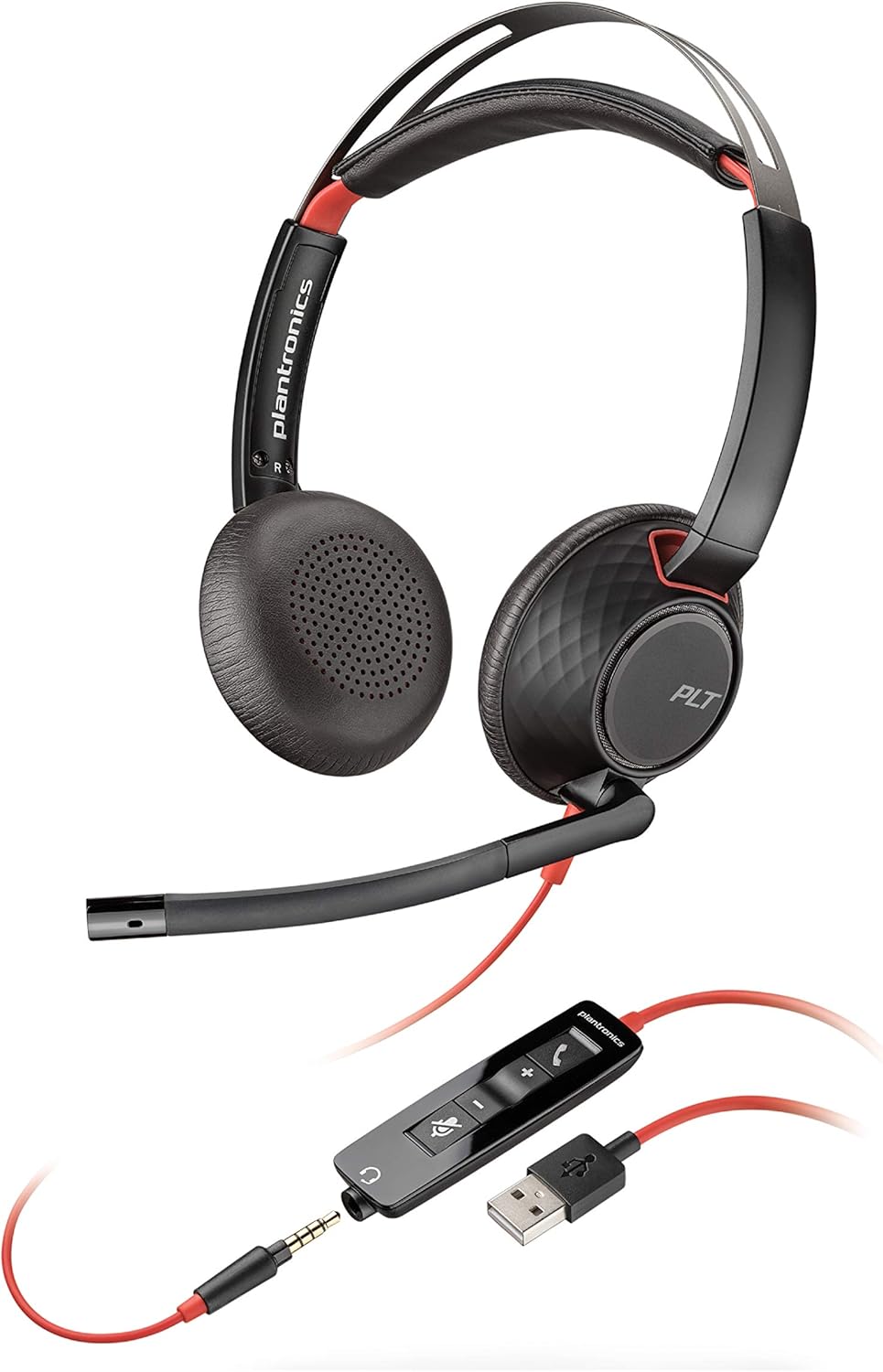
Figure 1: Poly Blackwire C5220 Wired Headset, showcasing its dual-ear design and integrated boom microphone.
2. O a mea oi totonu o le Pusa
Your Poly Blackwire C5220 package includes the following components:
- Blackwire C5220 Headset (with attached USB-A cable and 3.5mm jack)
- Pusa malu
- Quick Start Guide (physical card)

Figure 2: The Blackwire C5220 headset, its inline controls, and the included carrying case, highlighting its wired USB-A connectivity.
3. Seti
The Blackwire C5220 headset offers plug-and-play functionality for quick setup.
- Feso'ota'i i le PC/Mac: Insert the USB-A connector of the headset into an available USB-A port on your computer. The headset will be automatically recognized by your operating system.
- Connect to Mobile Device/Tablet: Disconnect the 3.5mm jack from the USB-A inline control unit. Plug the 3.5mm jack directly into the audio port of your mobile phone or tablet.
- Fa'apipi'i Polokalama (Filifili): For enhanced features and customization, download and install the Poly Lens Desktop App from the official Poly website. This software allows for firmware updates, personalized settings, and troubleshooting.
4. Fa'agaoioia o le Headset
The inline control unit provides easy access to essential call management functions.
- Fa'amau Valaau: Fetaomi atu e tali pe faʻamutaina se valaʻau.
- Voli i luga (+): Press to increase listening volume.
- Volume i lalo (-): Press to decrease listening volume.
- Faʻamau faʻamau: Press to mute or unmute the microphone. An audible voice prompt will confirm "Mute On" or "Mute Off".

Figure 3: A user wearing the Blackwire C5220 headset, demonstrating the position of the noise-canceling microphone for clear voice capture.
5. Fegalegaleai
The Blackwire C5220 headset is designed for broad compatibility with various communication platforms and devices.
- Faiga fa'agaioiga: Compatible with PC (Windows) and Mac.
- Communication Platforms: Optimized for Microsoft Teams and other leading collaboration platforms such as Zoom, GoToMeeting, Skype, Google Meet, and Webmuamua.
- Meafaigaluega: Connects to PC/Mac via USB-A, and to tablets and cell phones via 3.5 mm audio jack.

Figure 4: A user engaged in a video call, illustrating the headset's compatibility with Microsoft Teams and other collaboration platforms.
6. Comfort and Wearing Style
The Blackwire C5220 is engineered for extended wear and user comfort.
- Aluga taliga: Features ultra-soft leatherette ear cushions wrapped around pillow-soft memory foam for all-day comfort.
- fusi ulu: A lightweight cushioned metal headband provides durability and allows for a comfortable, custom fit.
- Ofuina faiga: Over-the-head style with two earpieces. The boom microphone can be positioned on either the left or right side, offering reversible wear.

Ata 5: Fa'alatalata view of the headset's ear cushions, emphasizing the ultra-soft leatherette and memory foam for enhanced comfort.
7. Audio Performance
Experience clear and consistent audio with your Blackwire C5220 headset.
- Fa'aleo leo-Fa'aleo leo: Ensures your voice is heard clearly by minimizing background noise.
- Tulaga Leo Automatically switches between wideband for telephony and hi-fi stereo for music, providing superb audio quality for various uses.
- SoundGuard DIGITAL: Protects against sound levels over 118 dBA, sudden loud sounds, and long-term exposure, ensuring safe listening.
8. Tausiga
To ensure the longevity and optimal performance of your headset, follow these maintenance guidelines:
- Fa'amamaina: Solo mālie ia aluga taliga ma le fusi ulu i se solo vaivai.amp ie. Aloese mai le fa'aaogaina o vaila'au malolosi po'o mea fa'a'a'asa.
- Teuina: When not in use, store the headset in its provided soft carrying case to protect it from dust and physical damage.
- Tausiga uaea: Avoid sharp bends or excessive pulling on the cable to prevent internal wire damage. The detachable 3.5mm jack from the USB-A inline control unit is designed to prevent damage if the cable is accidentally pulled.
9. Faʻafitauli
If you encounter issues with your Blackwire C5220 headset, try the following solutions:
| Fa'afitauli | Fofo e ono mafai |
|---|---|
| No audio or microphone not working. |
|
| Le lelei leo lelei po'o le tumau. |
|
| Inline controls not responding. |
|
10. Fa'amatalaga
| Fa'aaliga | Fa'amatalaga |
|---|---|
| Igoa Fa'ata'ita'iga | Plantronics Blackwire C5220 Headset |
| Tekinolosi Feso'ota'i | USB-A, 3.5 mm audio jack |
| La'ei Siila | Over-the-head, Dual-Ear (Stereo) |
| Microphone | Noise-canceling boom mic |
| Audio Protection | SoundGuard DIGITAL (protects against sound levels over 118 dBA) |
| Talitaliga | Ultra-soft leatherette with memory foam |
| Tali Faatele (Felefoni) | 20 Hz - 20,000 Hz |
| Frequency Response (Microphone) | 100 Hz - 6,800 Hz |
| Mea mamafa | 164.2 kalama (pe tusa 5.8 aunese) |
| Numera Fa'ata'ita'i | 207576-01 (Item model number: 207576-03) |
11. Fa'amaonia ma Lagolago
The Poly Blackwire C5220 headset comes with a 2-tausaga le fa'amaonia o le lalolagi.
For further assistance, technical support, or warranty claims, please visit the official Poly support webnofoaga po'o le va'ai i fa'amatalaga fa'afeso'ota'i o lo'o tu'uina atu i lau afifiina o oloa.
E mafai fo'i ona e tagai i le PDF o le ta'iala fa'aoga aloaia mo nisi fa'amatalaga auiliili: Fa'aoga Taiala (PDF)


