1. Folasaga
The SonicWall TZ500 is a high-performance network security/firewall appliance designed to provide robust protection and secure connectivity for businesses, schools, remote offices, and retail sites. This device integrates advanced security features to defend against cyberattacks while offering comprehensive network management capabilities.
Key functionalities include intrusion prevention, malware protection, application control, content filtering, spyware protection, URL filtering, and denial of service (DoS) attack mitigation. The TZ500 operates with stateful packet filtering and signature-based intrusion prevention to ensure a secure network environment.
2. Mea i totonu o le afifi
Verify that your SonicWall TZ500 package contains the following items:
- SonicWall TZ500 Network Security/Firewall Appliance
- Uaea eletise
- Pusa fata-faʻapipiʻi
- Uaea fa'amafanafana
- Ta'iala Amata vave (pe a iai)
3. Ova Faaletinoview
Familiarize yourself with the ports and indicators on your SonicWall TZ500 appliance.

Ata 3.1: Front panel of the SonicWall TZ500 appliance. This image shows the front of the SonicWall TZ500, featuring the SonicWall logo, model number TZ500, two USB 3.0 ports (labeled U0/U1), status indicator LEDs, and eight RJ-45 Gigabit Ethernet ports (labeled X0-X7) with corresponding activity LEDs.
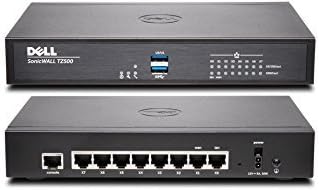
Ata 3.2: Front and rear panels of the SonicWall TZ500 appliance. The top image displays the front panel as described in Figure 3.1. The bottom image shows the rear panel, which includes the power input, a console port, and the eight RJ-45 Gigabit Ethernet ports (X0-X7) from a rear perspective.
3.1 Luma Vaega
- USB 3.0 Ports (U0/U1): Two SuperSpeed USB ports for connecting external devices such as 3G/4G/5G wireless WAN adapters or for system backups.
- LED tulaga: Indicators for power, system status, and network activity.
- Ethernet Ports (X0-X7): Eight 10/100/1000Base-T Gigabit Ethernet ports for LAN and WAN connections. Each port has dedicated link/activity LEDs.
3.2 Laufanua Tua
- Malosiaga Ulufale: Connector for the power adapter.
- Console Port: RJ-45 serial port for command-line interface (CLI) access.
- Ethernet Ports (X0-X7): Tua view of the eight Gigabit Ethernet ports.
4. Seti
4.1 Ta'ese'ese ma Tu'u
- Carefully remove the SonicWall TZ500 appliance and all accessories from the packaging.
- Place the appliance on a stable, flat surface or install it in a rack using the provided rack-mount kit. Ensure adequate ventilation around the device to prevent overheating.
- Aloese mai le tu'uina o le masini i tafatafa o puna'oa vevela po'o le susulu sa'o o le la.
4.2 Feso'ota'i le Masini
- Fesoʻotaʻi le Mana: Plug the power cable into the appliance's power input and then into a suitable power outlet.
- Feso'ota'i le WAN: Connect your internet service provider's modem or router to the designated WAN port (typically X1) on the SonicWall TZ500 using an Ethernet cable.
- Feso'ota'i le LAN: Connect your internal network devices (e.g., switches, computers) to the LAN ports (e.g., X0, X2-X7) using Ethernet cables.
- Feso'ota'iga i le Console (Filifiliga): For initial CLI configuration, connect the console cable from the appliance's console port to a serial port on your computer.
4.3 Fa'asologa Muamua
After connecting the hardware, power on the device. The SonicWall TZ500 can be configured via a web-based management interface or through the command-line interface (CLI).
- Web Fetufa'aiga: Tatala a web browser on a computer connected to the LAN side of the TZ500. Enter the default IP address (e.g., 192.168.168.168) in the address bar. Follow the on-screen prompts for initial setup, including changing default passwords and configuring network settings.
- CLI: Use a terminal emulator (e.g., PuTTY) to connect to the console port. Refer to the SonicWall documentation for CLI commands and procedures.
5. Fa'agaoioia le Masini
The SonicWall TZ500 provides a comprehensive suite of features to manage and secure your network.
5.1 Galuega Autu
- Pa puipui: Controls inbound and outbound network traffic based on predefined security rules.
- Network Address Translation (NAT): Translates private IP addresses to public IP addresses, allowing multiple devices on a private network to share a single public IP address.
- VPN (Feso'ota'iga Tumaoti Fa'apitoa): Establishes secure, encrypted connections over public networks.
5.2 Vaega Malupuipuia
The TZ500 integrates advanced security services to protect your network:
- Faiga e Puipuia ai le Fa'alavelave Fa'afuase'i (IPS): Detects and blocks network intrusions and exploits.
- Malware Protection: Scans and blocks viruses, worms, and other malicious software.
- Pulea o Talosaga: Manages and restricts access to specific applications or application categories.
- Filifiliga o mea: Blocks access to inappropriate or unproductive web anotusi.
- Spyware Protection: Prevents and removes spyware infections.
- URL Filifiliga: Filifiliga web access based on URL categories and reputation.
- Denial of Service (DoS) Protection: Defends against various DoS and Distributed Denial of Service (DDoS) attacks.
5.3 Fesoʻotaʻiga o Fesoʻotaʻiga
O le web management interface provides tools for configuring:
- Fa'asagaga Fa'afeso'ota'i: Configure IP addresses, subnet masks, and other parameters for LAN and WAN interfaces.
- Auala: Define static routes or enable dynamic routing protocols.
- DHCP Server: Configure the appliance to assign IP addresses to network devices automatically.
- Wireless Settings (if applicable): Configure integrated wireless access points.
6. Tausiga
Regular maintenance ensures optimal performance and security of your SonicWall TZ500 appliance.
- Faʻalauiloa Firmware: Periodically check for and install the latest firmware updates from the SonicWall support portal. Firmware updates often include security patches and new features.
- Fa'atonu Fa'aola: Regularly back up your appliance's configuration settings. This allows for quick restoration in case of a system failure or misconfiguration.
- Log Monitoring: Review system logs regularly for any unusual activity or security alerts.
- Su'ega Faaletino: Ensure all cables are securely connected and that the appliance has adequate airflow. Keep the device free from dust and debris.
7. Faʻafitauli
O lenei vaega o loʻo tuʻuina atu ai laasaga faʻafitauli faʻafitauli mo faʻafitauli masani.
7.1 Leai se Malosi
- Verify that the power cable is securely connected to both the appliance and a working power outlet.
- Siaki le palaka eletise i se isi masini e faamautinoa ai o loo galue lelei.
- Ensure the power adapter is the correct one supplied with the device.
7.2 No Network Connectivity
- Check the Ethernet cable connections to the WAN and LAN ports. Ensure the link/activity LEDs are illuminated.
- Verify IP address configurations on the appliance and connected devices.
- Confirm that your internet service provider's modem is operational.
- Restart the SonicWall appliance and connected network devices.
7.3 Le mafai ona Avanoa Web Pulega Interface
- Ensure your computer is connected to a LAN port of the TZ500.
- Verify that your computer's IP address is in the same subnet as the TZ500's LAN interface (e.g., if TZ500 is 192.168.168.168, your computer should be 192.168.168.x).
- Taumafai e fa'amama le fa'aoga o lau su'ega po'o le fa'aogaina o se isi su'esu'ega.
- If the default IP address has been changed, use the new IP address.
8. Fa'amatalaga
Technical specifications for the SonicWall TZ500 Network Security/Firewall Appliance:
| Fa'aaliga | Fa'amatalaga |
|---|---|
| Numera Fa'ata'ita'i | 01-SSC-0445 |
| Mea mamafa | 1.05 Kilokalama (2.31 pauna) |
| Fua o Mea (LxWxH) | 5.91 x 8.86 x 1.38 inisi |
| Mea Mea | palasitika |
| Ituaiga Interface | RJ45 |
| Fua Fa'aliliuga Fa'amatalaga | 1000 Megabits ile Lua (Gigabit Ethernet) |
| RAM | 1024 MB |
| Ituaiga uaealesi | 802.11a, 802.11n (if applicable to specific model variant) |
| Numera o USB 2.0 Ports | 2 (USB 3.0 ports are present, often backward compatible) |
| Faiga Fa'atonu | SonicOS 6.x |
| Tele o le Faamanatuga Flash | 64 MB |
| Numera o Taulaga | 8 (Gigabit Ethernet) |
| Fa'aaofia Vaega | Power cable, rack-mount kit, console cable |
9. Fa'amaonia ma Lagolago
The SonicWall TZ500 appliance typically includes a 1-year Comprehensive Gateway Security Suite and 24x7 Support. This suite provides ongoing protection and access to technical assistance.
For detailed warranty information, technical support, or to renew your security services, please visit the official SonicWall support website or contact your authorized SonicWall reseller. Ensure you have your product's serial number available when contacting support.
Punaoa i luga ole laiga: For the latest documentation, firmware, and knowledge base articles, please refer to the SonicWall support portal.


