1. Folasaga
This manual provides essential information for the safe and efficient installation, operation, and maintenance of your FANTECH prioAir 8 Inline Mixed Flow Duct Fan. Please read these instructions thoroughly before installation and retain this manual for future reference.
The FANTECH prioAir 8 is an 8-inch inline mixed flow duct fan designed for ventilation applications. It features a compact design, high efficiency, and quiet operation, making it suitable for various residential and light commercial settings. Constructed from a special composite material, the fan is lightweight and durable.
2. Fa'atonuga Taua mo le Saogalemu
LAPATAIGA: Ina ia faʻaitiitia le lamatiaga o le afi, faʻateʻia eletise, poʻo manuʻa i tagata, mataʻituina mea nei:
- Faitau fa'atonuga uma a'o le'i fa'apipi'iina pe tausia lenei ili.
- O le fa'apipi'iina e tatau ona fa'atino e se fai eletise agava'a e tusa ai ma tulafono fa'ale-eletise uma a le atunu'u ma le atunu'u.
- Always disconnect power at the service panel before wiring, cleaning, or servicing the unit.
- Ia mautinoa ua sa'o le fa'a'ele'eleina o le ili.
- Do not use this fan with any solid-state speed control device unless specifically designed for this fan.
- Do not use this fan in potentially explosive atmospheres.
- Keep fingers and foreign objects away from the fan blades during operation.
- O lenei ili e mo na'o le fa'aaogaina lautele mo le ea. Aua ne'i fa'aaogaina e fa'amamago ai mea mata'utia po'o mea pāpā ma ausa.
3. O a mea oi totonu o le Pusa
A uma ona tatala, fa'amolemole fa'amautinoa o lo'o iai uma vaega ma e le'i fa'aleagaina:
- FANTECH prioAir 8 Inline Mixed Flow Duct Fan unit
- Mounting hardware (e.g., screws, brackets) - (Specific hardware may vary, refer to packaging)
- Tusi Lesona a le Tagata (lenei pepa)

Figure 1: FANTECH prioAir 8 Inline Mixed Flow Duct Fan unit.
4. Fa'amatalaga Fa'apitoa
| Fa'aaliga | Fa'amatalaga |
|---|---|
| Numera Fa'ata'ita'i | prioAir 8 |
| Fua o Mea | 6 x 5 x 7 inisi |
| mamafa | 8 pauna |
| Fa'ailoga | FANTECH |
| Voltage | 120 Volts |
| Uatage | 35 watts |
| Metotia malulu | Ea Fa'amalosi |
| Tulaga Pio | 45 Tesipela |
| Mea | Fa'atasi |
| Ole Saosaoa Fa'asolo Tele | 2400 RPM |
| Avanoa o le Ea | 647 Kupita Futu ile minute (CFM) |
| Ituaiga Feso'ota'i Malosi | 3-Pini |
5. Fa'apipi'i ma Fa'atonu
5.1 Lisi Siaki a'o le'i fa'apipi'iina
- Ensure the installation location is suitable for an 8-inch duct fan.
- Verify that the power supply matches the fan's requirements (120V).
- Gather necessary tools: screwdriver, wire strippers, drill, duct tape/clamps.
5.2 Fa'amauina o le Pepa
The prioAir 8 fan is designed for inline installation within ductwork. It can be mounted at any angle.
- Select a secure location in your duct system where the fan can be easily accessed for maintenance.
- Cut a section of the ductwork to accommodate the fan's length. Ensure the cut is clean and straight.
- Insert the fan into the ductwork. The fan can be oriented to push or pull air, depending on your ventilation needs. Observe the airflow direction arrow on the fan housing.
- Secure the fan to the ductwork using appropriate duct clamps or heavy-duty duct tape to ensure an airtight seal.
- If additional support is needed, use the provided mounting brackets to secure the fan to a joist or other structural element.
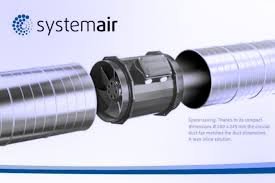
Ata 2: Esoample of the prioAir 8 fan installed inline with ductwork.
5.3 So'oga Fa'aeletise
CAUTION: Ensure power is disconnected at the circuit breaker before proceeding with electrical wiring.
- Locate the electrical connection box on the fan housing.
- Open the cover of the connection box.
- Connect the power supply wires to the fan's terminals according to the wiring diagram provided inside the connection box cover. Typically, this involves connecting Live (L), Neutral (N), and Ground (G) wires. The fan uses a 3-pin power connector type.
- Ia mautinoa o so'oga uma o lo'o malupuipuia ma fa'amama lelei.
- Close the connection box cover securely.

Ata 3: Pa view illustrating the internal structure and location of the electrical connection box.

Ata 4: Auiliiliga view of the fan's internal components, including the impeller and motor housing.
6. Fa'atonuga o Galuega
Once the FANTECH prioAir 8 fan is properly installed and wired, operation is straightforward:
- Toe fa'afo'i le eletise i le matagaluega i le laulau tautua.
- If connected to a wall switch or thermostat, activate the switch or set the thermostat to the desired operating conditions.
- The fan will begin to operate, moving air through the duct system.
The prioAir 8 is designed for continuous operation. Monitor the airflow and noise level to ensure proper function.
7. Tausiga
WARNING: Always disconnect power to the fan at the service panel before performing any maintenance or cleaning.
O le tausiga faifaipea e mautinoa ai le fa'atinoga lelei ma fa'alautele le ola o lau ili.
7.1 Cleaning the Fan Blades and Housing
Dust and debris can accumulate on the fan blades and inside the housing, reducing efficiency. Clean the fan periodically, depending on the operating environment.
- Disconnect power to the fan.
- Carefully remove the fan from the ductwork or access the internal components if possible.
- Use a soft brush or a vacuum cleaner with a brush attachment to remove dust and debris from the fan blades and the interior of the housing.
- For stubborn dirt, a damp cloth with mild detergent can be used, ensuring no moisture enters the motor or electrical components.
- Allow all parts to dry completely before reassembling or restoring power.

Ata 5: Fa'alatalata view of the fan's impeller, highlighting the blades that require periodic cleaning.
7.2 U'u afi
E fa'a'asu'uina tumau le afi ili ma e le mana'omia se fa'a'asu'uina fa'aopoopo.
8. Faʻafitauli
Before contacting technical support, please review mataupu masani nei ma fofo:
| Fa'afitauli | Mafuaaga e ono tupu | Fofo |
|---|---|---|
| E le amata le ili | Leai se eletise So'oga uaea matala Faulty switch/thermostat | Check circuit breaker and power source Verify all electrical connections are secure (with power off) Test or replace switch/thermostat |
| Fa'aitiitia le ea | Clogged fan blades/housing Ductwork obstruction Sese le fa'atulagaina o le ili | Clean fan blades and housing Inspect ductwork for blockages Ensure fan is oriented for desired airflow direction |
| Pio e le masani ai po o le vibration | Fa'amau fa'atalatala O lapisi i totonu o le ili Impeller ua faaleagaina | Tighten mounting hardware Disconnect power and remove any debris Contact FANTECH support if impeller is damaged |
9. Fa'amaonia ma Lagolago
FANTECH products are manufactured to high-quality standards and are backed by a manufacturer's warranty. For specific warranty terms and conditions, please refer to the warranty card included with your product or visit the official FANTECH webnofoaga.
For technical assistance, replacement parts, or warranty claims, please contact FANTECH customer support:
- Webnofoaga: www.fantech.net
- Telefoni: Tagai i le FANTECH webnofoaga mo numera fa'afeso'ota'i fa'aitulagi.
When contacting support, please have your product model number (prioAir 8) and purchase date available.