Folasaga
This manual provides comprehensive instructions for the operation and maintenance of your ONN X5 HiFi Music Player. Please read this manual thoroughly before using the device to ensure proper functionality and to maximize your listening experience. The ONN X5 is designed to deliver high-fidelity audio playback in a compact and user-friendly format.
Ua Umaview
The ONN X5 is a portable HiFi music player featuring a 2.0-inch TFT screen and an aluminum alloy shell. It supports a wide range of audio formats, including lossless files, and offers expandable storage via a MicroSD card.
Vaega Autu:
- Leo maualuga-faamaoni: Supports WAV, FLAC, ALAC, APE, OGG lossless formats, and high-definition music up to 24Bit/192 KHz.
- Fa'aaliga: 2.0-inch TFT screen (176x220 pixels) for clear navigation and information display.
- Teuina: 8GB internal memory, expandable up to 32GB with a MicroSD/TF card.
- Fuafuaga Tumau: Lightweight aluminum alloy body (60g) for enhanced durability and reduced external interference noise.
- Fa'aoga fa'aoga: Intuitive key-based operation.
- Vaega Faaopoopo: FM Radio support.
- ma'a: High-capacity rechargeable lithium polymer battery.
- Lagolago i gagana e tele: English, Russian, Korean, German, Japanese, Polish, Indonesian, Chinese.
Fa'atulagaina o masini:

Ata: Luma view of the ONN X5 HiFi Music Player, showing its display and control buttons. The screen displays track information, audio quality (e.g., 24BIT, 88HHZ), and playback status.

Ata: Itu view of the ONN X5 HiFi Music Player, illustrating the location of the MicroSD card slot on the right side of the device.

Ata: Luma ma tua view of the ONN X5 HiFi Music Player. The back panel shows the model number "X5" and branding information.
Seti
1. Totogiina le Masini:
- Connect the ONN X5 to a power source using the provided USB cable.
- O le faailoilo o le maa i luga o le lau o le a faʻaalia ai le tulaga o le faʻatumuina.
- A full charge is recommended before first use. The device uses a high-capacity rechargeable lithium polymer battery.
2. Inserting a MicroSD/TF Card:
- Locate the MicroSD/TF card slot on the side of the player.
- Gently insert a compatible MicroSD/TF card (up to 32GB) into the slot until it clicks into place.
- Ia mautinoa ua sa'o le fa'aofiina o le kata ina ia 'alofia ai le fa'aleagaina.

Image: Contents of the ONN X5 package, showing the player, USB charging cable, and other accessories. This illustrates the components available for setup.
3. Fesiitaiga o Musika Files:
- Connect the ONN X5 to your computer using the USB cable.
- O le a aliali mai le masini o se ta'avale e mafai ona aveese.
- Drag and drop your desired audio files (MP3, WMA, APE, FLAC, WAV, ALAC, OGG) into the player's internal storage or the MicroSD card.
- Ia aveese ma le saogalemu le masini mai lau komepiuta a'o le'i motusia le uaea USB.
Fa'atonuga o Galuega
Malosi/Pepe:
- To power on, press and hold the power button (usually marked with a universal power symbol) until the screen illuminates.
- Ina ia tape, oomi ma uu le ki o le mana seia tapuni le masini.
Tautai:
The ONN X5 uses physical buttons for navigation. Refer to the device layout for button identification.
- VOL: Fa'atonu le leo.
- M (Menu): Accesses menus and confirms selections.
- Arrow Buttons (< / >): Navigate through menus, select tracks, or fast forward/rewind during playback.
- Ki Malosi: Also functions as a play/pause button during music playback.
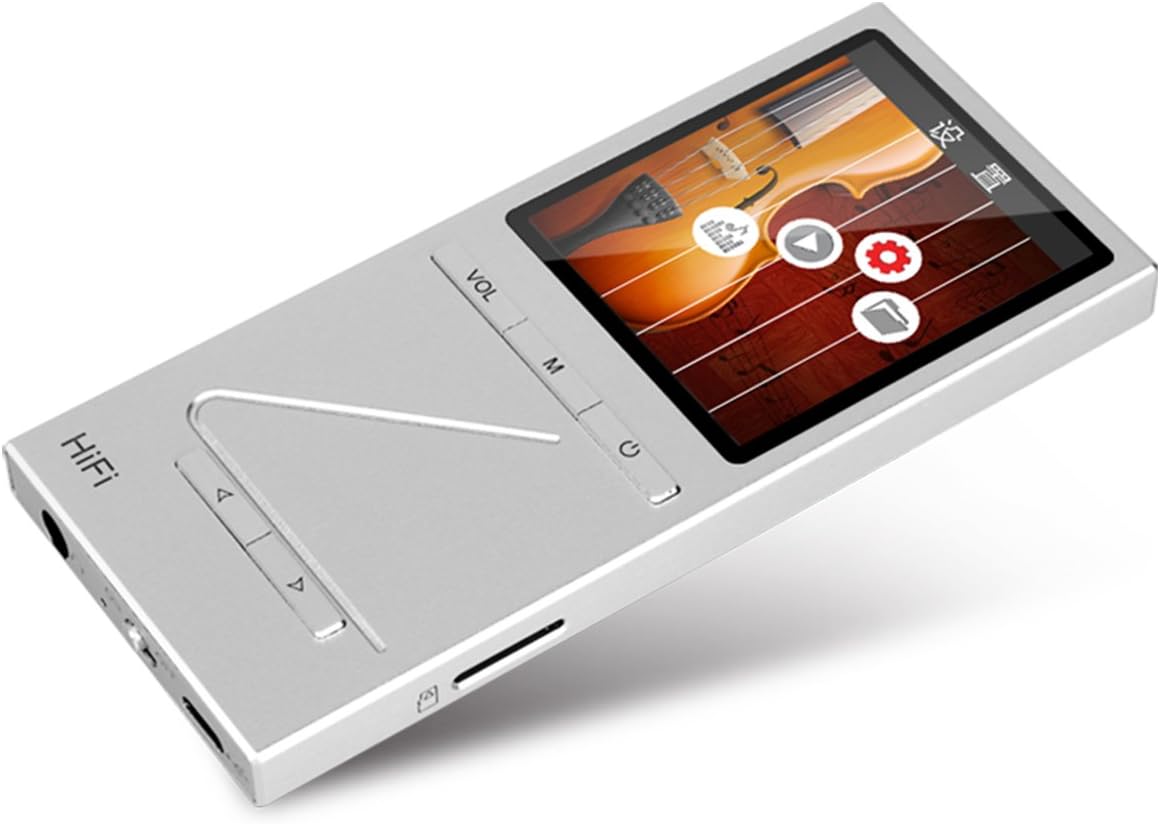
Ata: Fa'afago view of the ONN X5 HiFi Music Player, showing the screen with various menu icons, indicating the user interface for navigation.
Ta'alo Musika:
- From the main menu, navigate to "Music" or "Files".
- Browse through your folders and select a track to play.
- Press the Power/Play button to start or pause playback.
- Use the arrow buttons to skip tracks or fast forward/rewind.
- Adjust volume using the VOL button.
Leitio FM:
- Navigate to the "FM Radio" option from the main menu.
- Use the navigation buttons to scan for stations or manually tune to a frequency.
- Ensure headphones are connected as they often act as the antenna for FM radio.
Gagana Fa'atonu:
E lagolagoina e le masini le tele o gagana. Suia le gagana:
- Go to "Settings" from the main menu.
- Select "Language" and choose your preferred language from the list (English, Russian, Korean, German, Japanese, Polish, Indonesian, Chinese).
Tausiga
- Fa'amamaina: Fa'aaogā se ie mālū ma mago e fa'amama ai le masini. 'Alo'ese mea fa'amama vai po'o mea fa'asa.
- Teuina: Teu le mea taalo i se nofoaga malulu ma matutu mamao ese mai le susulu o le la ma le vevela tele.
- Tausiga maa: Ina ia faaumiumi le ola o le maa, aloese mai le lafoaia atoatoa o le maa i taimi uma. Totogi le masini i taimi uma, tusa lava pe le o faʻaaogaina mo se taimi umi.
- Aloese mai A'afiaga: The aluminum alloy shell provides durability, but avoid dropping the device or subjecting it to strong impacts.
- Suavai Fa'aaliga: O lenei masini e le susu. Aloese mai le aafia i le vai poo le maualuga o le susu.
Fa'afitauli
Device Will Not Power On:
- Ia mautinoa ua uma le maa. Fa'afeso'ota'i le masini i se puna eletise ma fa'ataga e fa'aola mo le itiiti ifo i le 30 minute a'o le'i taumafai e toe ki.
- Try performing a hard reset (if applicable, refer to manufacturer's specific instructions for hard reset, usually involves holding power button for an extended period).
Leai se leo:
- Check the volume level and ensure it is not muted.
- Verify that headphones or external speakers are properly connected.
- Test with different headphones or audio output devices.
- Ia mautinoa le leo file is not corrupted or in an unsupported format.
E le mafai ona fesiita'i Files:
- Ia mautinoa o lo'o feso'ota'i lelei le uaea USB i le ta'alo ma le komepiuta.
- Taumafai i se isi uafu USB i lau komepiuta pe fa'aaoga se isi uaea USB.
- Verify that the device is recognized by your computer as a removable drive.
- Check if the MicroSD card is properly inserted and not full.
Ua lē tali mai le lau / ua taofia:
- Press and hold the power button for approximately 10-15 seconds to force a restart.
- If the issue persists, ensure the battery is charged.
Fa'amatalaga
| Fa'aaliga | Fa'amatalaga |
|---|---|
| Numera Fa'ata'ita'i | X5 |
| Fa'ailoga | ONN |
| Tele lau | 2.0 Inches TFT (176x220 PIXEL) |
| Manatu i Totonu | 8 GB |
| Teuina Fa'alautele | MicroSD/TF card up to 32 GB |
| Lagolagoina Fa'alogo leo | APE, FLAC, ALAC, WAV, WMA, OGG, MP3 (up to 24Bit/192 KHz) |
| Tekinolosi Feso'ota'i | Aux, USB |
| Fa'apitoa Fa'apitoa | Leitio FM |
| Ma'a | 1 Lithium Ion battery required (High-capacity rechargeable lithium polymer) |
| Mea mamafa | 7 aunese (pe tusa ma le 0.2 Kilokalama) |
| Fuafuaga Mea | 6.21 x 4.7 x 1.2 inisi |
| Tufuga | SZTZWY |
Fa'amaonia ma Lagolago
For detailed warranty information, please refer to the warranty card included with your purchase or visit the official ONN product support website. For technical assistance or further inquiries, please contact ONN customer support through their official channels.


