1. Folasaga
Welcome to the user manual for the MULTICOMP SSM-001 Black Lever Push Button SPDT 500MA Electronic Switch. This manual provides essential information for the safe and effective installation, operation, and maintenance of your new electronic switch. Please read this manual thoroughly before using the product and retain it for future reference.
The SSM-001 is a compact and reliable single-pole, double-throw (SPDT) switch designed for various electronic control applications, featuring a lever actuator for manual operation.
2. Oloa Ua Ovaview
2.1 Vaega Autu
- Faiga Fa'atino: Tusi Lesona
- Ituaiga Fa'afeso'ota'i: SPDT (Tu'i Fa'alua Fa'alua Fa'atasi)
- Fa'ailoga o lo'o iai nei: 500mA
- Ituaiga Actuator: Leve
- Metotia Pulea: Pa'i
- Lanu: Lanu uliuli
- Mea fa'afeso'ota'i: Kopa
- Ituaiga Feso'ota'i: Crimp
2.2 Vaega
The SSM-001 switch consists of a durable black housing, a movable lever actuator, and three electrical terminals for connection. The lever mechanism allows for tactile control, switching the internal contacts between two positions.
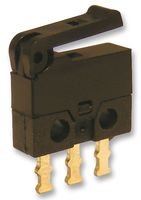
Figure 1: The MULTICOMP SSM-001 electronic switch, showing its black housing, lever actuator, and three gold-colored terminals at the base.
3. Seti
3.1 Puipuiga o le Saogalemu
- Ensure power is disconnected before installation or wiring to prevent electrical shock.
- Ia ofuina ni mea e puipuia ai le tagata lava ia (PPE) e pei o mata tioata saogalemu ma totigilima.
- Do not exceed the specified current rating of 500mA.
- Install in a dry environment, away from moisture and extreme temperatures.
3.2 Laasaga Fa'apipi'i
- Fa'amauina: Securely mount the switch in the desired location using appropriate fasteners. Ensure the mounting surface is stable and free from vibrations.
- Uaea:
- Identify the Common (COM), Normally Open (NO), and Normally Closed (NC) terminals. For SPDT switches, there is one common terminal and two switched terminals.
- Use appropriate crimp connectors for secure and reliable electrical connections.
- Connect the power source to the Common terminal.
- Connect the load(s) to either the Normally Open or Normally Closed terminal, depending on the desired circuit behavior.
- Ia mautinoa o feso'ota'iga uma e matua'i lelei ma e tete'e atu i le vevela e puipuia ai mai le pupuu o feso'ota'iga.
- Su'ega: After installation, carefully apply power and test the switch functionality to ensure it operates as expected before full deployment.
4. Faʻagaioiga
The SSM-001 is a manual touch control switch with a lever actuator. Its operation is straightforward:
- Lever Actuation: To change the state of the switch, gently press or move the lever actuator. The lever will click into position, indicating the change in contact state.
- SPDT Functionality: As an SPDT switch, it has one common terminal that connects to either of two other terminals (Normally Open or Normally Closed). When the lever is in one position, the common terminal is connected to the Normally Closed terminal. When the lever is actuated, the common terminal switches its connection to the Normally Open terminal.
- Pulea Pa'i: The switch responds to direct physical interaction with its lever.
Ensure the switch is used within its specified electrical parameters (500mA current rating) to prevent damage or malfunction.
5. Tausiga
The SSM-001 switch is designed for durability and requires minimal maintenance. Following these guidelines will help ensure its longevity:
- Fa'amamaina: Keep the switch free from dust, dirt, and debris. Use a soft, dry cloth to wipe the exterior. Avoid using abrasive cleaners or solvents, which can damage the housing or internal components.
- Asiasiga: Periodically inspect the switch for any signs of physical damage, loose connections, or wear on the lever. Ensure the terminals are free from corrosion.
- Tulaga Siosiomaga: Operate the switch within its recommended environmental conditions. Avoid exposing it to excessive moisture, extreme temperatures, or corrosive substances.
- Actuator Care: Do not apply excessive force to the lever actuator. Operate it smoothly to prevent mechanical stress.
6. Faʻafitauli
If you encounter issues with your SSM-001 switch, refer to the following common problems and their potential solutions:
- E le tali mai le Suiga:
- Check all electrical connections to ensure they are secure and correctly wired.
- Ia mautinoa o loʻo tuʻuina atu le eletise i le matagaluega.
- Ensure the load connected to the switch is functioning correctly.
- Fa'agaoioiga fa'alavelave:
- Inspect for loose wiring or damaged insulation.
- Check for any debris or foreign objects obstructing the lever mechanism.
- Ensure the switch is not operating beyond its rated current, which can cause overheating and intermittent contact.
- Physical Damage to Lever:
- If the lever is bent or broken, the switch may need to be replaced. Avoid applying excessive force during operation.
If the problem persists after attempting these solutions, contact a qualified technician or the manufacturer for further assistance.
7. Fa'amatalaga
| Fa'amatalaga | Fa'amatalaga |
|---|---|
| Mea mamafa | 0.01 aunese |
| Numera fa'atusa mea | SSM-001-MULTICOMP |
| Aso Muamua Maua | Iulai 12, 2014 |
| Tufuga | MULTICOMP |
| ASIN | B00MMYC2EE |
| Faiga Fa'agaioiga | tusi lesona |
| Ituaiga Faafesootai | Spdt |
| Ituaiga Feso'ota'i | Crimp |
| Terminal | Spdt |
| Ituaiga Actuator | Leve |
| Fa'afeso'ota'i Mea | Kopa |
| Metotia Pulea | Pa'i |
| Feso'ota'iga Protocol | X-10 |
| Lanu | Lanu uliuli |
| Faitauga o Iunite | 1.0 Faitau |
8. Fa'amaonia ma Lagolago
Warranty information for the MULTICOMP SSM-001 switch is typically provided by the seller or manufacturer at the time of purchase. Please refer to your purchase documentation or contact the retailer for specific warranty terms and conditions.
For technical support, inquiries, or assistance with troubleshooting beyond the scope of this manual, please contact MULTICOMP customer service or the authorized distributor from whom you purchased the product. Provide your model number (SSM-001-MULTICOMP) and ASIN (B00MMYC2EE) for faster service.