1. Folasaga
This manual provides essential instructions for the safe and efficient use of your Kyocera EBVK-2650 Engine Blower Vacuum. Please read this manual thoroughly before operating the machine and keep it for future reference. The EBVK-2650 is designed for blowing and vacuuming leaves and light debris in outdoor environments.
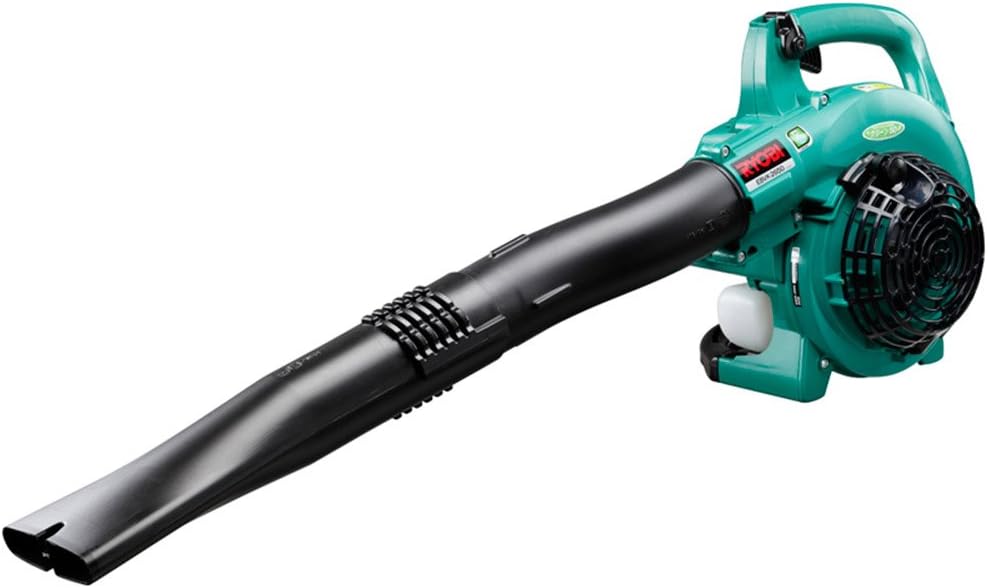
Image 1.1: The Kyocera EBVK-2650 Engine Blower Vacuum in its primary blower configuration. This image shows the main unit with the straight nozzle attached, ready for blowing leaves and debris.
2. Fa'amatalaga Saogalemu
Fa'amuamua i taimi uma le saogalemu pe a fa'aogaina meafaigaluega eletise. O le le mulimulitaia o nei faatonuga e ono i'u ai i se manu'a tuga po'o le faaleagaina o meatotino.
2.1 Tulafono Lautele Saogalemu
- Faitau ma malamalama i fa'atonuga uma a'o le'i fa'aogaina le masini.
- Wear appropriate personal protective equipment (PPE), including eye protection, hearing protection, gloves, and sturdy footwear.
- Do not operate the machine in wet conditions or in the presence of flammable liquids or gases.
- Keep children, bystanders, and pets at a safe distance (at least 15 meters / 50 feet) from the operating area.
- Inspect the machine for loose parts, damage, or wear before each use. Do not operate a damaged machine.
- Ensure proper ventilation when operating the engine, as exhaust fumes contain carbon monoxide.
- Aua ne'i fa'asino i tagata po'o manu le fa'asu'u feula.
- Turn off the engine and allow it to cool before refueling, cleaning, or performing maintenance.
- Teu le masini i se nofoaga mago, malupuipuia, ia lē mafai ona aapa atu i ai tamaiti.
2.2 Saogalemu Suau'u
- Use only the recommended fuel mixture: unleaded gasoline and 2-cycle engine oil at a 50:1 ratio.
- Mix fuel in a well-ventilated area, away from sparks or open flames.
- Do not smoke while mixing or refueling.
- Aveese vave so'o se suauu masaa.
- Teu suauu i totonu o se atigipusa faamaonia i se nofoaga malulu ma mago.
3. Fa'amaumauga o Mea ma Vaega
Fa'amautinoa o lo'o iai uma vaega ma e le'i fa'aleagaina pe a tatala.
3.1 Mea Faʻaaoga e aofia ai
- Main Unit (Engine Blower Vacuum)
- Sa'o Nozzle
- Pi'opi'o pupuu
- Paipa Suction
- Su'e ili
- Pusa efuefu
- Socket Wrench (13x19mm)
- Tusi Taiala
3.2 Key Components Overview
Familiarize yourself with the main parts of the EBVK-2650.

Image 3.1: The Kyocera EBVK-2650 configured for vacuuming. This view shows the suction pipe and the dust bag attached, ready to collect leaves and debris.
- Iunite afi: The core power source.
- tane suauu: For mixed fuel.
- U'u amata: Mo le fa'aola lima o le afi.
- Kilo o le Fa'ata'avale: Pulea le saoasaoa o le afi.
- Taofi Suiga: To turn off the engine.
- Ufiufi o le Faamama Ea: Puipui le faamama ea.
- Fa'apala: For ignition.
- Blower/Vacuum Port: Where nozzles or suction pipe attach.
- Dust Bag Connection: For attaching the collection bag in vacuum mode.
4. Seti ma Fonotaga
4.1 Assembling for Blower Mode
- Ia mautinoa ua tape le afi ma ua mālūlū.
- Attach the desired nozzle (straight or curved) to the blower port. Twist until securely locked.
- Confirm all connections are tight before use.

Ata 4.1: Fa'alatalata view of the Kyocera EBVK-2650 in operation, demonstrating the blower function. The user is holding the unit, directing the airflow.
4.2 Assembling for Vacuum/Mulching Mode
- Ia mautinoa ua tape le afi ma ua mālūlū.
- Remove any blower nozzles from the blower port.
- Attach the suction pipe to the intake port. Secure it firmly.
- Connect the dust bag to the exhaust port. Ensure the bag is properly sealed to prevent debris leakage.
- Confirm all connections are tight before use.

Image 4.2: The Kyocera EBVK-2650 being used in vacuum mode. The suction pipe is directed towards leaves, and the dust bag is visible, collecting the mulched debris.
4.3 Fuel Preparation and Filling
The EBVK-2650 uses a 2-cycle engine. It requires a specific mixture of unleaded gasoline and 2-cycle engine oil.
- Fuel Ratio: Unleaded Gasoline : 2-Cycle Engine Oil = 50:1
- Use high-quality 2-cycle engine oil specifically designed for air-cooled engines.
- Mix the fuel in a separate, approved fuel container. Shake well before filling.
- Open the fuel tank cap slowly to release pressure.
- Fill the fuel tank (capacity 0.47 L) carefully, avoiding overfilling.
- Tapuni lelei le tapuni tane suauu.
5. Fa'atonuga o Galuega
5.1 Amataina le Inisinia
- Tuu le masini i luga o se mea mafolafola ma mautu.
- Ensure the stop switch is in the "ON" position.
- Fa'amau le leve latina (pe a amata malulu).
- Oomi faatele le matauila amata seia iloa atu le suauu.
- Pull the starter handle firmly and smoothly until the engine starts. Do not pull the rope to its full extension.
- O le taimi lava e ola ai le afi, faasolosolo malie ona aveese le latina.
- Tu'u le afi e fa'amafanafana mo ni nai minute a'o le'i fa'agaoioia le saoasaoa atoa.

Image 5.1: A user demonstrating the engine starting procedure for the Kyocera EBVK-2650. The starter handle is being pulled to ignite the engine.
5.2 Fa'agaioiina o le fa'amu
- Hold the machine firmly with both hands.
- Fa'asaga le pito o le isu i otaota e te mana'o e aveese.
- Gradually increase the throttle to achieve the desired airflow.
- Fa'aaogā se salu salu e fa'aputu ai lau ma otaota i faupu'ega.

Image 5.2: A user operating the Kyocera EBVK-2650 in blower mode, clearing leaves from a path. The machine is held comfortably, directing the airflow.
5.3 Vacuum/Mulching Operation
- Ensure the machine is correctly assembled for vacuum mode with the dust bag attached.
- Hold the machine firmly, guiding the suction pipe over the leaves.
- Move slowly and steadily to allow the machine to pick up and mulch debris.
- Monitor the dust bag and empty it when it becomes full to maintain optimal performance.
- Note: Mulching performance varies based on leaf type, size, and moisture content. Avoid vacuuming wet leaves or large, hard objects.

Image 5.3: A user operating the Kyocera EBVK-2650 in vacuum mode, actively collecting leaves from a paved area. The dust bag is visible, indicating collection.
5.4 Taofi le Inisinia
- Release the throttle lever to allow the engine to idle.
- Move the stop switch to the "OFF" position.
- Allow the machine to cool down before storage or maintenance.
6. Tausiga
Regular maintenance ensures optimal performance and extends the lifespan of your EBVK-2650. Always ensure the engine is off and cool before performing any maintenance.
6.1 Fa'amamaina ole Ea
- Aveese le ufiufi faamama o le ea.
- Carefully remove the air filter element.
- Clean the filter by tapping it gently or using compressed air. If heavily soiled, wash with warm, soapy water, rinse thoroughly, and allow to dry completely before reinstallation.
- Toe sui le ufiufi o le ea.
6.2 Spark Plug Inspection and Replacement
- Aveese le pulou mo'i.
- Use the provided socket wrench to remove the spark plug (NGK BPM8Y).
- Inspect the spark plug for wear, carbon buildup, or damage. Clean if necessary.
- Check the electrode gap and adjust if needed.
- Replace with a new spark plug of the recommended type if worn or damaged.
- Reinstall the spark plug and cap securely.
6.3 Filifiliga Suauu
The fuel filter is located inside the fuel tank. Inspect it periodically for debris. If clogged, replace it. This procedure may require professional assistance.
6.4 Fetuunaiga Carburetor
Carburetor adjustments should ideally be performed by a qualified service technician. Incorrect adjustments can lead to engine damage or poor performance.
6.5 Teuina
- For long-term storage, drain all fuel from the tank and run the engine until it stops to clear the carburetor.
- Fa'amama le pito i fafo o le masini.
- Store in a dry, dust-free location, away from direct sunlight and extreme temperatures.
7. Faʻafitauli
O lenei vaega o loʻo faʻatalanoaina faʻafitauli masani e te ono feagai. Mo fa'afitauli e le o lisiina iinei, fa'afeso'ota'i le lagolago a tagata fa'atau.
| Fa'afitauli | Mafuaaga e ono tupu | Fofo |
|---|---|---|
| E le ola le afi |
|
|
| Engine runs, but lacks power |
|
|
| Tete tele |
|
|
8. Fa'amatalaga
| Fa'aaliga | Fa'amatalaga |
|---|---|
| Fa'ailoga | Kyocera |
| Numera Fa'ata'ita'i | EBVK-2650 |
| Ituaiga afi afi | Air-cooled 2-cycle single cylinder gasoline engine |
| Fa'aliliuga | 25.4 ml |
| Average Air Volume | 8.7 m³/min |
| Ole maualuga ole ea | 67.5 m³/min |
| Metotia afi | Electronic ignition (Flywheel magnet) |
| Fa'amu | NGK BPM8Y |
| Ituaiga Carburetor | Ituaiga diaphragm |
| Suau'u | Mixed fuel (Unleaded gasoline: 2-cycle engine oil = 50:1) |
| Avanoa Tane Suau'u | 0.47 L |
| Dimensions (L x W x H, excluding nozzle) | 330 x 270 x 345 mm |
| Weight (excluding nozzle, fuel) | 4.2 kilokalama |
| Fa'aaofia Mea Fa'aopoopo | Straight nozzle, Curved nozzle, Suction pipe, Fan nozzle, Dust bag, Socket wrench (13x19mm) |
| Fautuaina Fa'aoga | Dust cleaning, Leaf cleaning |
Note: Product specifications are subject to change without notice for improvement. The listed weight of 8.1 kg in some product descriptions likely includes packaging and all accessories, while 4.2 kg refers to the bare unit.
9. Fa'amaonia ma Lagolago
For warranty information, service, or technical support, please refer to the warranty card included with your product or visit the official Kyocera webnofoaga. Taofi lau fa'amaoniga o le fa'atau mo tagi fa'amaonia.
Kyocera Customer Support: Please visit the official Kyocera website or contact your local dealer for assistance.


