Folasaga
The YAESU MH-31B8 Hand Microphone is a standard accessory designed for use with various YAESU transceivers, including the FT-847, FT-1000D, and FT-1000MP. This microphone provides clear audio transmission for amateur radio communications and other compatible applications. It features a durable construction and an 8-pin connector for reliable performance.
O mea o lo'o i totonu
- YAESU MH-31B8 Hand Microphone
Seti ma So'oga
To set up your YAESU MH-31B8 Hand Microphone, follow these steps:
- Fa'ailoa le Feso'ota'iga: Locate the 8-pin microphone jack on your compatible YAESU transceiver.
- Fa'atulaga le Feso'ota'iga: Carefully align the 8-pin connector of the MH-31B8 microphone with the transceiver's microphone jack. Ensure the pins are correctly oriented to avoid damage.
- Faaofi ma Puipuia: Gently push the connector into the jack until it is fully seated. Some transceivers may have a locking collar or screw to secure the connection; if present, tighten it clockwise until snug. Do not overtighten.
- Pulega o uaea: Position the coiled cable to prevent strain on the connector and to keep your operating area tidy.
Note: Always ensure your transceiver is powered off before connecting or disconnecting the microphone to prevent potential damage.
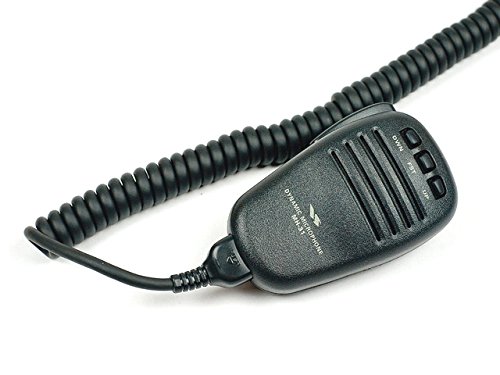
Image: The YAESU MH-31B8 Hand Microphone, featuring its black casing, speaker grille, and control buttons, connected to a coiled cord. This image illustrates the microphone's physical appearance and its attached cable.
Fa'atonuga o Galuega
The MH-31B8 Hand Microphone is designed for straightforward operation. It typically includes buttons for basic functions:
- Fa'amau PTT (Oomi-e-Talanoa): Located on the side of the microphone. Press and hold this button to transmit your voice. Release it to receive.
- Fa'amau i luga/lalo: These buttons, often labeled "UP" and "DWN" (or "OWN" as seen in the image, which is likely a specific function or variant of DWN), are typically used for frequency tuning or channel selection on the connected transceiver. Refer to your transceiver's manual for specific functionality.
- FST Button: This button (often labeled "FST" for "Fast") may enable faster tuning or scanning when used in conjunction with the UP/DOWN buttons. Consult your transceiver's manual for exact usage.
Fa'aliliuina leo: Hold the microphone approximately 2-5 inches (5-12 cm) from your mouth when speaking. Speak clearly and at a normal volume for optimal audio quality.
Tausia ma Tausiga
To ensure the longevity and optimal performance of your MH-31B8 Hand Microphone:
- Fa'amamaina: Wipe the microphone's exterior with a soft, dry cloth. For stubborn dirt, a slightly damp E mafai ona fa'aaoga le ie, ona fa'amago loa lea. 'Alo'ese mai le fa'aaogaina o vaila'au malolosi po'o ni mea fa'amama e fa'amama ai.
- Teuina: Store the microphone in a clean, dry environment away from direct sunlight and extreme temperatures.
- Tausiga uaea: Avoid sharp bends or kinks in the coiled cable. Do not pull on the cable to disconnect the microphone; always grasp the connector itself.
- Susū: Protect the microphone from moisture and liquids. If it becomes wet, disconnect it immediately and allow it to dry completely before reuse.
Fa'afitauli
If you encounter issues with your MH-31B8 Hand Microphone, consider the following:
- No Audio Transmission:
- Ensure the microphone is securely connected to the transceiver's 8-pin jack.
- Verify the PTT button is fully depressed during transmission.
- Check the transceiver's settings to ensure the correct microphone input is selected and microphone gain is appropriately set.
- Test with another known-good microphone if available, or test this microphone with another compatible transceiver to isolate the issue.
- Leo fa'aletonu:
- Adjust the microphone gain setting on your transceiver. Too high a gain can cause distortion.
- Ensure you are speaking at an appropriate distance from the microphone (2-5 inches).
- Check for any physical damage to the microphone grille or cable.
- UP/DOWN/FST Buttons Not Functioning:
- Confirm compatibility with your specific transceiver model. Some older or different models may not fully support all microphone button functions.
- Refer to your transceiver's instruction manual for details on external microphone control functions.
If problems persist after attempting these steps, contact YAESU customer support or a qualified service technician.
Fa'amatalaga
| Fa'aaliga | Fa'amatalaga |
|---|---|
| Igoa Fa'ata'ita'iga | MH-31B8 |
| Fa'ailoga | IAESU |
| Fa'ailoga Fa'aaufa'atasi | U'ulima |
| Tekinolosi Feso'ota'i | Uaea |
| Ituaiga Feso'ota'i | 8-pine |
| Punavai Malosi | Corded Electric (powered by transceiver) |
| Mamanu Polar | Tu'atasi |
| Fua Faatatau o Faailo-i-Pisa | 70 dB |
| Numera o Auala | 1 |
| Masini Fegalegaleai | YAESU FT-847, FT-1000D, FT-1000MP, and other compatible radio models |
| Fa'apitoa Fa'apitoa | Adaptable for modifications (e.g., W4RT One Big Punch OBP Modification) |
| Mea mamafa | 8 aunese |
| Tufuga | Iaesu |
| UPC | 701630968158 |
Fa'amaonia ma Lagolago
For information regarding the warranty period and terms for your YAESU MH-31B8 Hand Microphone, please refer to the documentation included with your original transceiver purchase or visit the official YAESU website. YAESU provides customer support for their products, including technical assistance and service inquiries.
Official YAESU Webnofoaga: www.yaesu.com
Manatua: E ono fesuisuia'i tuutuuga o le tusi saisai e tusa ai ma le itulagi ma le faleoloa. Taofi lau fa'amaoniga o le fa'atau mo tagi mo le tusi saisai.


