Folasaga
This user manual provides comprehensive instructions for the installation, operation, and maintenance of your RCA RTS736W 30-Inch Streaming Soundbar. Please read this manual thoroughly before using the product to ensure proper functionality and to prevent damage.
The RCA RTS736W is designed to enhance your home audio experience with its 3.0 channel sound and integrated Wi-Fi for streaming online content.
Vaega Autu
- Wi-Fi Built-In for streaming video content to a TV.
- 3.0 Channel Left/Center/Right audio configuration.
- HDMI 1080p Output for high-definition connectivity.
- Includes 1 Rear Analog Audio-in Jack and 1 Side Line-in Jack for various audio sources.
- Flexible placement options: includes table or wall mounting brackets.
O mea o lo'o i totonu
Fa'amautinoa o lo'o iai mea uma i totonu o le afifi:
- RCA RTS736W 30-Inch Streaming Soundbar
- Pulea Mamao
- Fetuunaiga Malosi
- Table or Wall Mounting Brackets
- Tusi Lesona a le Tagata (lenei pepa)
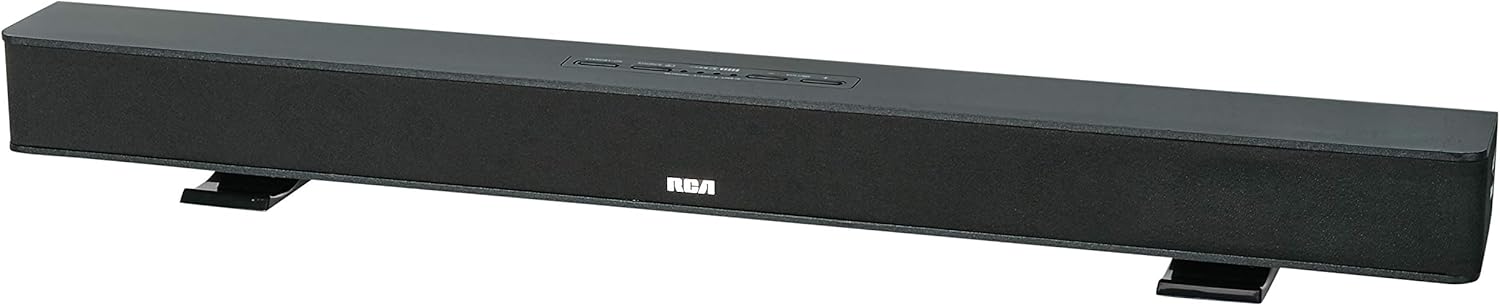
Image: The RCA RTS736W 30-Inch Streaming Soundbar, shown with its sleek black design and integrated controls.
Seti
1. Filifiliga Tulaga
The soundbar offers flexible placement:
- Tu'u i luga ole laulau: Place the soundbar on a flat, stable surface in front of your television. Ensure there is adequate ventilation around the unit.
- Fa'amauina o le puipui: Use the included wall mounting brackets to secure the soundbar to a wall. Refer to the separate wall mounting template (if provided) for detailed instructions. Ensure the wall can support the weight of the soundbar.

Image: The RCA RTS736W soundbar positioned on a TV stand, demonstrating a typical home theater setup with various streaming service icons displayed on the television screen.
2. Feso'ota'i i le Mana
- Connect the power adapter to the DC IN 13.5V port on the back of the soundbar.
- Fa'afeso'ota'i le isi pito o le feso'ota'iga eletise i totonu o se pa puipui.
3. Leo Faʻafesoʻotaʻiga
Choose one of the following methods to connect the soundbar to your audio source:
- HDMI Output: Connect an HDMI cable from the HDMI OUT port on the soundbar to an HDMI input on your television. This connection supports 1080p video output from the soundbar's streaming functions.
- Analog Audio-in (AUX 1 / AUX 2): Use RCA audio cables to connect your TV or other audio devices to the AUX 1 or AUX 2 input jacks on the back of the soundbar. Match the red and white connectors.
- Side Line-in Jack: For portable devices like smartphones or tablets, connect a 3.5mm audio cable from your device's headphone jack to the Line-in jack located on the side of the soundbar.

Ata: Se va'aiga view of the rear panel of the RCA RTS736W soundbar, highlighting the AUX 1, AUX 2, DC IN 13.5V, HDMI OUT, and VIDEO OUT ports for various connections.
4. Feso'ota'iga feso'ota'iga (Wi-Fi)
To utilize the streaming features, connect the soundbar to your home Wi-Fi network. This process is typically guided by on-screen prompts when the soundbar is first powered on and connected to a TV via HDMI.
- Ensure your TV is connected to the soundbar via HDMI and powered on.
- Mulimuli i faʻatonuga o loʻo i luga o le lau e filifili ai lau fesoʻotaʻiga Wi-Fi ma tuʻu le upu faʻalilolilo.
Fa'atonuga o Galuega
1. Malosi / Malosi
Oomi le Malosiaga oomi le fa'amau i luga o le soundbar po'o le remote control e ki pe tape ai le masini.
2. Filifiliga sao
Oomi le Ulufale button on the remote control or the soundbar to cycle through available audio sources: HDMI, AUX 1, AUX 2, Line-in, and Wi-Fi streaming.
3. Pulea le Volume
Fa'aaoga le Volume + ma Volume - buttons on the remote control or the soundbar to adjust the audio level.
Oomi le Gūgū faamau e fa'afilemu ai le leo mo sina taimi.
4. Fa'asa'o Mea
Once connected to Wi-Fi and your TV via HDMI, you can access various streaming applications. Navigate using the directional buttons and OK faamau i le pule mamao.
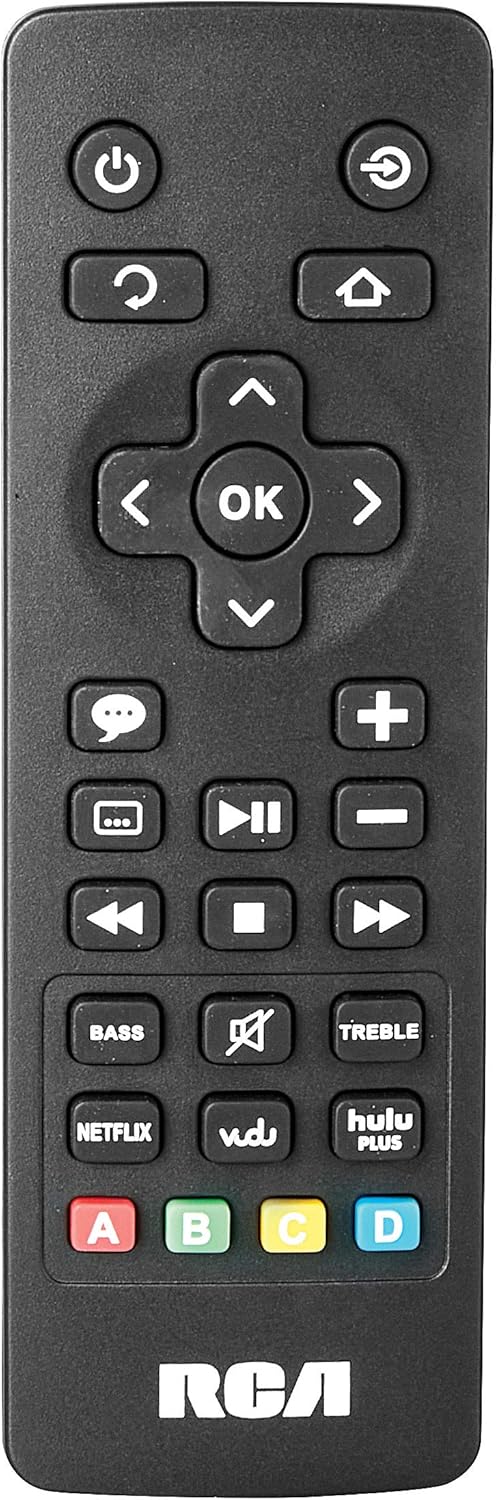
Image: The remote control for the RCA RTS736W soundbar, featuring dedicated buttons for power, volume, input selection, navigation, and direct access to streaming services like Netflix, Vudu, and Hulu Plus.
Dedicated buttons for services like Netflix, Vudu, and Hulu Plus may be available on the remote for direct access.
5. Fetuunaiga leo
Fa'aaoga le FUA ma FUAFUAGA buttons on the remote control to fine-tune the audio output to your preference.
Tausiga
- Fa'amamaina: Disconnect the soundbar from the power outlet before cleaning. Use a soft, dry cloth to wipe the exterior surfaces. Do not use liquid cleaners or abrasive materials.
- Savili: Ensure that the ventilation openings on the soundbar are not blocked. Proper airflow prevents overheating.
- Teuina: Afai e teuina le leo mo se vaitaimi faaumiumi, vavae ese mai le eletise ma teu i se nofoaga malulu ma matutu mamao ese mai le susulu o le la ma le vevela tele.
Fa'afitauli
Leai se Malosi
- Siaki pe ua fa'afeso'ota'i lelei le adapter power i le soundbar ma le outlet i le puipui o lo'o galue.
- Ensure the power outlet is active by testing it with another device.
Leai se leo
- Verify that the correct input source is selected on the soundbar.
- Check all audio cable connections between the soundbar and your audio source (TV, etc.).
- Ensure the volume on both the soundbar and the connected audio source is turned up and not muted.
- If using HDMI, confirm that your TV's audio output settings are configured to send audio to the soundbar.
Streaming Issues (Buffering, Freezing)
- Check your Wi-Fi network connection. Ensure the signal strength is adequate.
- Restart your home router and modem.
- Restart the soundbar by unplugging it from the power outlet for a few minutes, then plugging it back in.
- Ensure your internet service is active and performing correctly.
Pulea mamao e le o galue
- Toe sui maa i le masini mamao.
- Ia mautinoa e leai ni fa'alavelave i le va o le fa'atonu mamao ma le fa'alogo leo.
- Fa'asino sa'o le mamao i le pa'o.
Fa'amatalaga
| Numera Fa'ata'ita'i | RTS736W |
| Ituaiga Fofoga Fetalai | Soundbar |
| Auala | 3.0 (Left/Center/Right) |
| Feso'ota'i | HDMI, RCA, Wi-Fi |
| Tekonolosi uaealesi | Wi-Fi |
| HDMI Auaunaga | 1080p |
| Faʻalogo leo | 2x Analog Audio-in (RCA), 1x Side Line-in (3.5mm) |
| Tele o le Fofoga Fetalai | 30 Inisi |
| Malosi o le Tuuina Atu | 150 Watts |
| Fa'alavelave | 8 Ohm |
| Punavai Malosi | Uaea Eletise |
| Fua o Mea (L x W x H) | 33.5 x 6.5 x 5.5 inisi |
| Mea mamafa | 5.55 pauna |
| Tufuga | Alco Electronics Ltd. |
Fa'amatalaga Fa'amaonia
Specific warranty details for the RCA RTS736W Soundbar are typically provided with the product packaging or can be found on the official RCA webnofoaga. Fa'amolemole taofi lau fa'amaoniga o le fa'atau mo tagi fa'amaonia.
For warranty service, contact RCA customer support with your model number and purchase date.
Lagolago Tagata Fa'atau
For further assistance, technical support, or service inquiries, please refer to the contact information provided in your product's original documentation or visit the official RCA support webnofoaga.
Punaoa i luga ole laiga: Asiasi i le Faleoloa RCA i luga o le Amazon
Pepa Fa'atatau - RTS736W
 |
RCA Ultra HD Smart TV Puipuiga o le Saogalemu ma le Ta'iala Amata Fa'atonuga mo le saogalemu, fa'atonuga taua, lisi o mea fa'aoga, ma ta'iala amata mo RCA Ultra HD Smart TV, e aofia ai fa'amatalaga mamao ma maa. |
 |
Tusitaiala mo le TV Atamai RCA RNSMU5836 58-inisi 4K UHD O se tusi lesona atoatoa mo le RCA RNSMU5836 58-inisi 4K UHD Smart TV. E aofia ai le setiina, feso'ota'iga, foliga atamai, filifiliga o le lisi, ma le fa'aleleia o le fa'aogaina o masini mo le poto masani sili ona lelei a le tagata fa'aoga. |
 |
RCA SBT17015B Soundbar User Manual and Setup Guide Comprehensive user manual for the RCA SBT17015B Soundbar, detailing setup, connections, Bluetooth pairing, audio adjustments, safety precautions, and warranty information. |
 |
RCA RPJ135 Standard HD Projector ma le Roku Streaming Stick - Tusitaiala a le Tagata Fa'aoga O le tusi lesona mo le RCA RPJ135 Standard HD Projector, e aofia ai le setiina, fa'agaioiga, fa'afitauli o le fa'afitauli, ma fa'amatalaga o le tusi saisai mo le projector ma le Roku Streaming Stick ua tu'ufa'atasia. |
 |
RCA RS32H2-EU 32-Inisi ta'ita'i HD LCD TV Tusi Taiala Fa'aaoga tusi lesona mo le RCA RS32H2-EU 32-Inch LED HD LCD TV, e aofia ai faatonuga mo le saogalemu, seti, fa'agaioiga, fa'amatalaga, ma fa'afitauli. |
 |
RCA RENO Tusi Taiala Ta'iala fa'aoga atoatoa mo le telefoni RCA RENO, fa'amatalaga fa'atulagaina, foliga, feso'ota'iga, meafaigaluega, saogalemu, ma le tausiga mo le Android 10 (Go edition). |