1. Folasaga
Thank you for choosing the TFA 30.5027.02 Digital Thermometer/Hygrometer. This device is designed to accurately measure and display indoor temperature and humidity, providing a clear indication of the comfort level in your environment. Its ultra-flat design and high-gloss surface make it a discreet and functional addition to any room. Please read this manual carefully to ensure proper setup and operation.
2. Fa'amatalaga Saogalemu
- Taofi le tusi lesona lenei mo faʻamatalaga i le lumanaʻi.
- O lenei masini e fa'amoemoe mo na'o totonu.
- Do not expose the device to extreme temperatures, direct sunlight, moisture, or strong vibrations.
- Aua le faatofuina le masini i le vai po o isi vai.
- Do not attempt to open or modify the device. This will void the warranty.
- Taofi ma'a ia aua ne'i maua e tamaiti. Afai e folo, saili vave togafitiga faafomai.
- Lafoa'i ma'a fa'aaoga e tusa ai ma tulafono fa'alotoifale.
- Fa'amama le masini i se mea vaivai, oamp ie. Aua ne'i fa'aogaina ni mea fa'amama fa'afefete po'o ni solu.
3. Mea i totonu o le afifi
Fa'amolemole siaki pe o iai uma vaega ma e le'i fa'aleagaina:
- 1x TFA 30.5027.02 Digital Thermometer/Hygrometer
- 1x CR2 Lithium Battery (pre-installed or separate)
- 1x Fa'atonuga Tusi Taiala (lenei pepa)
4. Oloa Ua Ovaview
The TFA 30.5027.02 features a clear digital display showing current temperature and humidity. It also includes a comfort level indicator and a maximum/minimum value memory function.

Ata 1: Luma view of the TFA 30.5027.02 Digital Thermometer/Hygrometer. The display shows temperature in Celsius and relative humidity percentage, along with a comfort level icon.
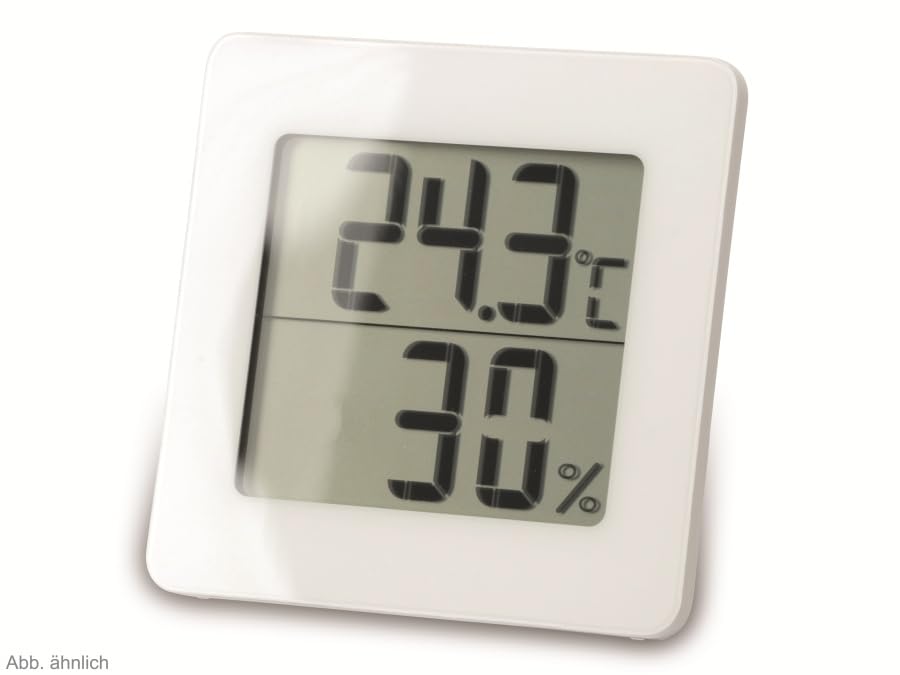
Ata 2: Su'i view of the TFA 30.5027.02 showing different temperature and humidity readings, demonstrating the device's clear digital display.
Vaega Autu:
- Digital display for temperature (°C) and humidity (% RH)
- Ultra-flat design with high-gloss finish
- Comfort level indicator (smiley icon)
- Maximum and minimum value memory function
- Fa'amauina puipui
5. Seti
5.1 Fa'apipi'i ma'a
- Su'e le ufiufi o le vaega o maa i tua o le masini.
- Remove the cover by sliding or gently prying it open.
- Insert one CR2 Lithium battery, ensuring the correct polarity (+/-) as indicated inside the compartment.
- Su'e lelei le ufiufi o le vaega maa.
- The device display should activate, showing current temperature and humidity readings.
5.2 Tulaga Muamua
For accurate readings, place the thermometer/hygrometer in a location free from direct sunlight, drafts, or heat sources. The device can be placed on a flat surface or mounted on a wall using the integrated mounting hole on the back.
- Fa'amauina o le puipui: Use a small screw (not included) suitable for your wall type. Hang the device securely.
- Tu'u i luga ole laulau: Ensure the device is stable on a flat, level surface.
6. Fa'atonuga o Galuega
6.1 Fa'aali i lugaview
The large digital display shows two main values:
- Fa'aaliga pito i luga: Current temperature in degrees Celsius (°C).
- Fa'aaliga maualalo: Current relative humidity in percentage (% RH).
- Fa'ailoga Tulaga Fa'amafanafana: A small icon (e.g., a smiley face) indicates the current indoor climate comfort level based on temperature and humidity.
6.2 Max/Min Galuega
The device records the maximum and minimum temperature and humidity values measured since the last reset. To access these values:
- Oomi le MAX/MIN button (if present, typically on the back or side). The display will show the maximum recorded temperature and humidity.
- Oomi le MAX/MIN toe faamau i view the minimum recorded temperature and humidity.
- Oomi le MAX/MIN fa'amau fa'atolu e toe fo'i i faitauga o lo'o iai nei.
To reset the MAX/MIN values, press and hold the MAX/MIN button for a few seconds while viewing the MAX or MIN values. The memory will clear, and new maximum and minimum values will begin recording from that point.
6.3 Fa'ailoga Tulaga Fa'amafanafana
The comfort level indicator provides a quick visual reference for indoor climate conditions:
- Happy Face: Indicates optimal comfort (e.g., 20-25°C and 40-70% RH).
- Foliga Lē Faaituau: Indicates acceptable but not optimal conditions.
- Foliga Fa'anoanoa: Indicates uncomfortable conditions (e.g., too dry, too humid, too hot, or too cold).
Note: Specific ranges for comfort levels may vary slightly by model. Refer to the device's display for the exact icon representation.
7. Tausiga
7.1 Fa'amamāina
Fa'amama le masini i se mālū, teisi oamp cloth. Do not use abrasive cleaning agents, solvents, or alcohol, as these can damage the surface and display.
7.2 Suiga maa
When the battery power is low, a low battery indicator (if available) will appear on the display. Replace the battery as follows:
- Tatala le ufiufi o le vaega o maa i tua o le masini.
- Remove the old CR2 Lithium battery.
- Insert a new CR2 Lithium battery, observing the correct polarity (+/-).
- Tapuni le ufiufi o le vaega o maa.
Note: After battery replacement, the device may reset, and MAX/MIN values will be cleared.
8. Faʻafitauli
| Fa'afitauli | Mafuaaga e ono tupu | Fofo |
|---|---|---|
| Leai se fa'aaliga pe leai se fa'aaliga | Ua mate le maa pe ua sese foi le faaofiina. | Replace the battery with a new CR2 Lithium battery, ensuring correct polarity. |
| Faitauga le sa'o | Device is placed in an unsuitable location (e.g., near a window, heat source, or vent). | Relocate the device to a stable indoor environment away from direct influences. Allow 15-30 minutes for readings to stabilize. |
| Comfort indicator always shows the same face | Environmental conditions are consistently outside or within a specific comfort range. | This indicates the device is functioning correctly. Adjust your indoor environment if desired. |
9. Fa'amatalaga
- Numera Fa'ata'ita'i: 30.5027.02
- Fa'ailoga: TFA
- Lanu: Lanu pa'epa'e
- Fua o Mea (L x W x H): 10 x 1.2 x 8.2 cm (3.94 x 0.47 x 3.23 inisi)
- Mea mamafa: 70 kalama (2.47 aunese)
- ma'a: 1 x CR2 Lithium (ua aofia ai)
- Ituaiga Fa'amau: Mauga puipui
- Operational Humidity Range: 20% i le 95% RH
- Upper Rated Temperature: 50°C (122°F)
- Sa'o o le vevela: ±1°C
- Sa'o lelei o le Faitauga: ±1°C
10. Fa'amaonia ma Lagolago
For warranty information and customer support, please refer to the terms and conditions provided by your retailer or contact the manufacturer directly. Keep your proof of purchase for any warranty claims.
Tufuga: TFA Dostmann GmbH & Co. KG
For further assistance, please visit the official TFA webnofoaga po'o fa'afeso'ota'i le latou matagaluega o auaunaga.