1. Folasaga
This manual provides comprehensive instructions for the safe and effective use of the PeakTech True RMS P 3131 Clamp Meter with Multimeter. This device is designed for measuring AC/DC currents without circuit interruption, as well as AC/DC voltage and resistance, with continuity testing capabilities. It features a 3 3/4 digit LCD display with True RMS measurement for accurate readings.
Fa'amolemole faitau mae'ae'a lenei tusi lesona a'o le'i fa'aogaina le masini ma taofi mo le fa'asinoga i le lumana'i.
2. Fa'amatalaga Saogalemu
WARNING: Improper use of this meter can cause damage, shock, injury, or death. Always follow all safety precautions.
- Ia tausisi pea i tulafono fa'alenu'u ma le atunu'u.
- Do not use the meter if it appears damaged or if the insulation on test leads is compromised.
- Ensure the meter is set to the correct function and range before making measurements.
- Avoid contact with live circuits. Use appropriate personal protective equipment (PPE).
- The device is rated for CAT II 600V. Do not exceed these limits.
- Sui vave maa pe a aliali mai le faailoilo ua maualalo le maa.
- Do not operate the meter in explosive atmospheres.
3. Oloa Ua Ovaview ma Vaega
The PeakTech P 3131 is a robust and reliable clamp meter. Familiarize yourself with its main components:

Ata 1: Luma view of the PeakTech P 3131 Clamp Meter, showing the clamp jaw, function selector, LCD display, and input terminals.
- Clamp Auvae: For non-contact AC/DC current measurement.
- Function Selector Dial: To select measurement modes (A~, A=, V~, V=, Ω/Continuity, OFF).
- Fa'aaliga LCD: Shows measurement readings, units, and indicators.
- Fa'amau: AC/DC, ZERO, H/MAX (Data Hold/Max Hold).
- Totogi tiga: COM (common) and VΩ (voltage/resistance) for test leads.
- Leoleo Lima: Provides protection against accidental contact.
4. Seti
4.1 Fa'apipi'i ma'a
The PeakTech P 3131 requires two 1.5V AAA batteries (included). To install or replace batteries:
- Ia mautinoa ua PI le masini.
- Locate the battery compartment cover on the rear of the meter.
- Fa'aaoga se sikulifili e tatala ai le vaega.
- Insert the two AAA batteries, observing correct polarity (+ and -).
- Toe sui le ufiufi o le vaega o le maa ma fa'amau i le sikulima.
When the low battery indicator appears on the display, replace the batteries immediately to ensure accurate measurements.
4.2 Feso'ota'i Su'ega Ta'ita'i
Mo voltage, resistance, and continuity measurements, connect the supplied test leads:
- Fa'aofi le ta'i su'e uliuli i totonu o le COM (common) input terminal.
- Fa'aofi le ta'a su'ega mumu i totonu o le VΩ mea fa'aoga.

Figure 2: PeakTech P 3131 Clamp Meter shown with its carrying case, test leads, batteries, and user manual.
5. Fa'atonuga o Galuega
5.1 Malosi / Malosi
Rotate the function selector dial from the "OFF" position to any desired measurement function to power on the meter. To power off, rotate the dial back to "OFF". The meter features an automatic power-off function (can be deactivated) to conserve battery life.
5.2 AC/DC Current Measurement (Clamp)
To measure current without breaking the circuit:
- Liliu le vili filifili galuega i le A~ (AC Current) or A= (DC Current) position.
- Oomi le AC/DC button if you need to switch between AC and DC current modes (if the dial position combines them).
- Oomi le O button to zero the display before measuring DC current, especially for small currents, to compensate for residual magnetism.
- Tatala le clamp auvae i le oomiina o le ki.
- Enclose only tasi conductor with the clamp auvae. Ia mautinoa ua tapuni atoa le auvae.
- Faitau le tau o lo'o iai i luga ole fa'aaliga LCD.
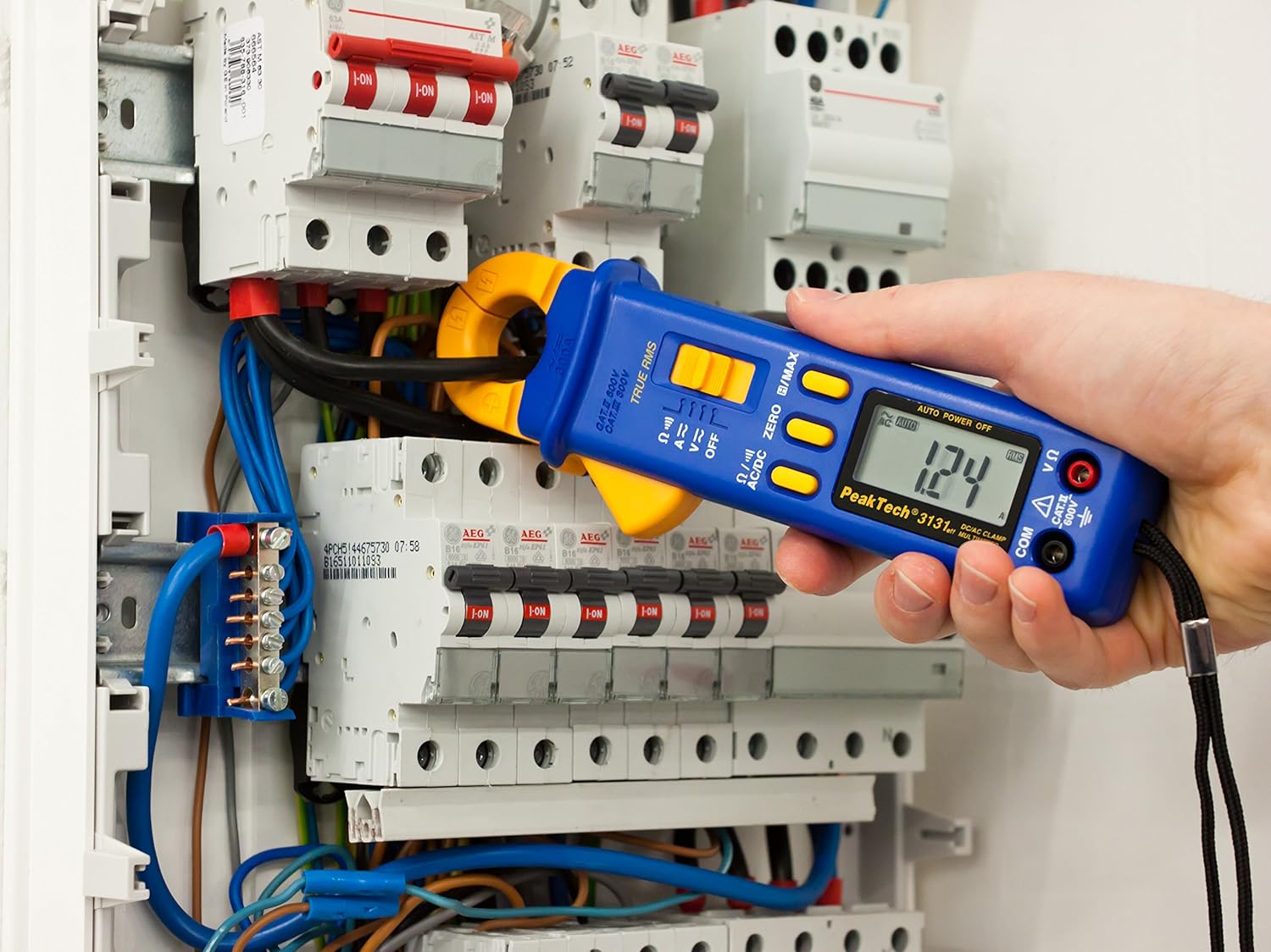
Figure 3: The PeakTech P 3131 Clamp Meter in use, measuring current on a single conductor within an electrical panel.
5.3 AC/DC Voltagu Fua
E fua voltage:
- Connect the test leads as described in Section 4.2.
- Liliu le vili filifili galuega i le V~ (AC Voltage) po'o V= (DC Voltage) tulaga.
- Connect the test probes in parallel to the circuit or component you wish to measure.
- Faitau le voltage taua ile fa'aaliga LCD.
5.4 Resistance and Continuity Measurement
To measure resistance or check for continuity:
- Connect the test leads as described in Section 4.2.
- Liliu le vili filifili galuega i le Ω/))) (Resistance/Continuity) position.
- For resistance: Connect the test probes across the component. Ensure the circuit is de-energized.
- For continuity: Touch the test probes to the two points you want to check. A continuous beep indicates a low-resistance path (continuity).
- Faitau le tau o le tete'e i luga o le laupepa LCD.
5.5 Galuega Fa'apitoa
- RMS Moni: The meter measures True Root Mean Square values for AC voltage and current, providing accurate readings for non-sinusoidal waveforms.
- Data Hold (H): Oomi le H/MAX button briefly to freeze the current reading on the display. Press again to release.
- Maximum Value Hold (MAX): Oomi ma uu le H/MAX button to capture and display the maximum measured value. Press again to exit.
- ZERO Function: Used to zero the display for DC current measurements to eliminate offset errors.
- Auto Ranging: The meter automatically selects the appropriate measurement range.
- Otometi le Malosi The meter automatically turns off after a period of inactivity to save battery. This feature can typically be disabled by holding a specific button during power-on (refer to the device's on-screen indicators or a more detailed manual if available).
6. Tausiga
6.1 Fa'amamāina
Wipe the meter's case with a damp cloth and a mild detergent. Do not use abrasives or solvents. Ensure the meter is completely dry before use.
6.2 Suiga maa
Refer to Section 4.1 for instructions on battery replacement. Always use two fresh 1.5V AAA batteries. Remove batteries if the meter is not used for an extended period to prevent leakage.
6.3 Teuina
Store the meter in a cool, dry place, away from direct sunlight and extreme temperatures. Use the provided carrying case for protection.
7. Faʻafitauli
| Fa'afitauli | Mafuaaga e ono tupu | Fofo |
|---|---|---|
| E le ki le mita. | Pepe pe sese le fa'apipi'iina o maa. | Siaki le polarity o le maa; sui maa. |
| "OL" or "OVER" displayed. | Measurement exceeds selected range or meter's maximum capacity. | Select a higher range (if manual ranging) or ensure measurement is within meter's limits. |
| Inaccurate DC current reading. | Residual magnetism in clamp auvae. | Oomi le O button before measurement. |
| Leai se leo pi faifai pea. | Open circuit or high resistance. | Check connections; ensure circuit is complete. |
If problems persist, contact PeakTech customer support or a qualified service technician.
8. Fa'amatalaga Fa'apitoa
| Parameter | Fa'amatalaga |
|---|---|
| Fa'aaliga | 3 3/4 digit LCD, max. 3999 counts |
| DC Voltagu (DCV) | 0.1 mV to 600 V (Accuracy: 0.5% + 2 digits) |
| AC Voltagu (ACV) | 1 mV to 600 V (Accuracy: 1.5% + 5 digits) |
| DC nei (DCA) | 10 mA to 300 A (Accuracy: 1% + 2 digits) |
| AC i le taimi nei (ACA) | 10 mA to 300 A (Accuracy: 1% + 3 digits) |
| Tetee (Ω) | 0.1 Ω to 40 MΩ (Accuracy: 0.9% + 2 digits) |
| Su'ega Fa'aauau | Galuega fa'amau |
| RMS moni | Yes, for AC measurements |
| Tatala Auvae | 22 mm max. conductor diameter |
| Fa'ailoga Saogalemu | EN 61010-1, CAT II 600 V |
| Paoa sapalai | 2 x 1.5V AAA maa |
| Fua (L x W x H) | 192 x 66 x 27 mm (pe tusa 7.56 x 2.6 x 1.06 inisi) |
| mamafa | 205 kalama (pe tusa ma le 0.45 pauna) |
9. Fa'amaonia ma Lagolago
PeakTech products are manufactured under strict quality control. This product is covered by a standard manufacturer's warranty against defects in materials and workmanship. Please refer to the warranty card included with your product or visit the official PeakTech webnofoaga mo fa'amatalaga fa'amaonia aiaiga ma aiaiga.
For technical support, service, or calibration inquiries, please contact your local PeakTech distributor or the PeakTech customer service department. Contact information can typically be found on the PeakTech webnofoaga po'o totonu o le afifiina o oloa.


