1. Folasaga
Fa'afetai mo le fa'atauasing the RCA DHT235A 3.5-Inch LED-lit 720p 60Hz TV. This portable television is designed to provide digital television viewing on a compact screen. This manual provides instructions for the proper setup, operation, and maintenance of your device.
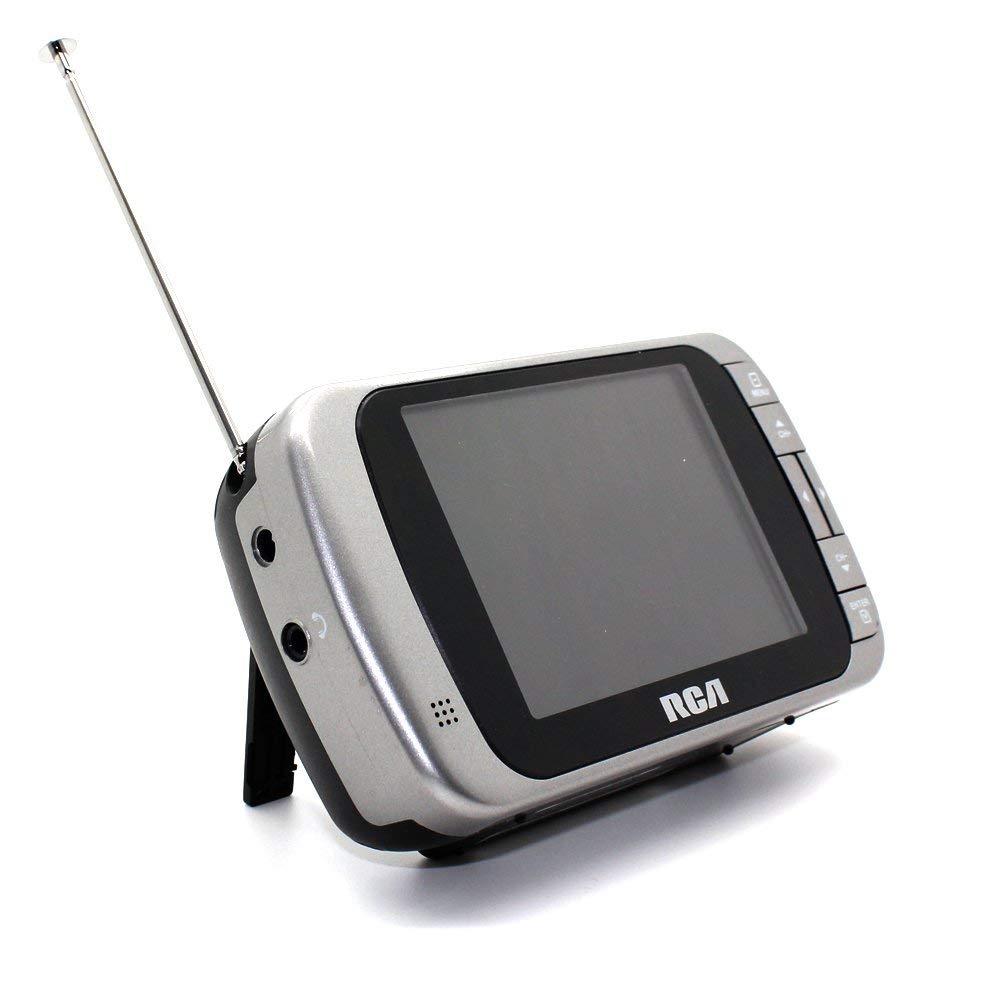
Image 1.1: The RCA DHT235A portable television, featuring its 3.5-inch screen and compact design.
2. Fa'amatalaga Saogalemu
- Faitau fa'atonuga uma a'o le'i fa'aogaina le masini.
- Aua ne'i tu'u le iunite i le timu po'o le susu e puipuia ai le mu po'o le fa'ate'ia eletise.
- Aua le poloka avanoa e savili ai. Ia mautinoa ia lava le avanoa e fa'ata'amilo ai le iunite mo le sa'o o le ea.
- Use only specified power sources (4 AA batteries or compatible AC adapter).
- ʻAloʻese mai le paʻū pe tuʻimomomoina foʻi le iunite i ni paʻō malolosi.
- Aua le taumafai e tautuaina oe lava ia oloa. Faʻasino uma auaunaga i tagata agavaʻa tautua.
- Lafoa'i lelei maa e tusa ai ma tulafono a le lotoifale.
3. Mea i totonu o le afifi
Fa'amautinoa o lo'o iai mea uma i totonu o le afifi:
- RCA DHT235A Portable TV Unit
- Tutu
- Quick Guide (refer to this manual for detailed instructions)
- Tusi Lesona a le Pule (lenei pepa)
4. Oloa Ua Ovaview
The RCA DHT235A features a 3.5-inch LED-lit display, designed for portable digital television reception. Key components include:
- 3.5-Inch LED Backlit LCD Display: Provides clear visual output.
- Fa'alogo i totonu: Mo galuega fa'alogo.
- Ulu o le Headphone: Mo le faalogo patino.
- Embedded Monopole Antenna: For receiving terrestrial ATSC and NTSC signals.
- Vaega ma'a: Mo 4 maa AA.
- AC Adapter Input (9-24VDC): For external power.
- Pule Fa'amau: For power, channel, volume, and menu navigation.
5. Seti
5.1 Powering the TV
The TV can be powered by 4 AA batteries or an optional AC adapter.
Fa'aaogā ma'a:
- Locate the battery compartment on the back of the TV.
- Tatala le ufiufi o le vaega o maa.
- Fa'aofi 4 maa AA, fa'amautinoa le sa'o polarity (+/-).
- Tapuni lelei le ufiufi o le vaega o maa.
Using AC Adapter (Optional):
- Connect a compatible 9-24VDC AC adapter (not included) to the DC input jack on the TV.
- Fa'afeso'ota'i le AC adapter i totonu o se pa puipui masani.
5.2 Seti Antenna
Extend the embedded monopole antenna fully for optimal signal reception. For improved reception, especially in areas with weak signals, an external antenna may be connected to the dedicated RCA connector input.
6. Fa'atonuga o Galuega
6.1 Malosi / Malosi
Oomi le MANA ki e ki pe tape ai le TV.
6.2 Initial Channel Scan
Upon first use or after moving to a new location, perform an auto channel scan to find available digital and analog channels.
- Oomi le MENU faamau.
- Navigate to the "Channel" or "Setup" menu using the arrow buttons.
- Select "Auto Scan" or "Auto Program" and confirm.
- The TV will scan for available channels. This process may take several minutes.
6.3 Filifiliga Auala
- Fa'aaoga le CH+ ma CH- buttons to cycle through available channels.
- For direct channel input, use the numeric keypad (if available on your model) or the "Direct Channel Changing" option in the menu.
6.4 Fetuunaiga Volume
Fa'aaoga le VOL+ ma VOL- faamau e fetuunai ai le leo leo.
6.5 Fa'asagaga Menu
Oomi le MENU button to access settings. Use the arrow buttons to navigate and the OK or Ulufale button to confirm selections. Press MENU again or an ALUFAU faamau e alu ese ai mai le lisi.
Available menu options include:
- Fa'atonu Ata: Adjust brightness, contrast, color.
- Fa'atonuga leo: Adjust audio mode, balance.
- Fa'atonuga ala: Auto scan, manual scan, channel editing.
- Fa'atonu Taimi: Auto time setting, time zone.
- Gagana: Select menu language (English, Spanish).
- Fa'amatalaga tapuni: Enable/disable digital closed captioning (E1A-708B compliant).
7. Tausiga
7.1 Fa'amamāina
- Before cleaning, ensure the TV is powered off and disconnected from any external power source.
- Fa'aaogā se ie mālū ma mago e solo ai le lau ma pito i fafo.
- Mo fa'ailoga ma'a'a, fa'amama le oampen the cloth with water. Do not use abrasive cleaners, waxes, or solvents.
- Avoid spraying liquids directly onto the screen or into any openings.
7.2 Teuina
When storing the TV for an extended period, remove the batteries to prevent leakage. Store the unit in a cool, dry place away from direct sunlight and extreme temperatures.
8. Faʻafitauli
| Fa'afitauli | Fofo e ono mafai |
|---|---|
| Leai se Malosi | Ensure batteries are correctly inserted and not depleted. If using AC adapter, verify it is properly connected and the outlet is functional. |
| No Picture/Weak Signal | Extend the antenna fully. Perform an auto channel scan. Try repositioning the TV or antenna. Consider using an external antenna for better reception. Check signal strength display in the menu. |
| Leai se leo | Increase the volume. Check if headphones are plugged in. Ensure the Mute function is not active. |
| E Le Taliina Ki | Turn the TV off and then on again. If the issue persists, remove and reinsert batteries or disconnect/reconnect the AC adapter. |
| Screen Scratches Easily | Handle the screen with care. Use a screen protector if desired (not included). |
| Puupuu le ola o le maa | Use fresh, high-quality alkaline or rechargeable batteries. Consider using the AC adapter for extended viewing. |
| Low Audio Volume | Ensure volume is set to maximum. For better audio, consider connecting external speakers to the headphone jack. |
9. Fa'amatalaga
- Fa'ata'ita'iga: DHT235A
- Tele fa'aaliga: 3.5 Inisi (diagonal)
- Ituaiga Fa'aali: LED Backlit LCD
- I'uga: 320 x 240 digital RGB (720p compatible)
- Fua Fa'afouina: 60Hz
- Filifiliga Vitio: MPEG-2 (MP at ML, MP at HL)
- Filifiliga leo: Dolby Digital Audio, Digital multi-lingual
- Fa'alogo: Terrestrial ATSC 8VSB, Terrestrial NTSC CH2 - CH69
- Punavai Malosi: 4 AA Batteries or 9-24VDC AC Adapter (optional)
- Ola ma'a: Approximately 2+ hours of DTV playback on 4 AA batteries
- Fa'alogo leo: Headphone jack, Built-in speaker
- Vaega Faaopoopo: Real-time signal strength display, On-screen program information, Direct channel changing, Channel editing, Time zone setting, Auto channel scan, Digital Closed Captioning (E1A-708B compliant), Menu languages (English, Spanish).
- itu: E tusa ma le 4.84 x 1.34 x 2.83 inisi
- mamafa: E tusa ma le 5.6 aunese
10. Fa'amatalaga Fa'amaonia
This product is covered by a limited warranty. For detailed warranty terms and conditions, please refer to the warranty card included with your purchase or visit the official RCA webnofoaga. Taofi lau fa'amaoniga o le fa'atau mo tagi fa'amaonia.
11. Lagolago Tagata Fa'atau
If you encounter any issues or have questions not covered in this manual, please contact RCA customer support. You can find contact information on the official RCA webnofoaga po'o fa'amaumauga tu'uina atu ma lau oloa.
Lagolago i luga ole laiga: Visit the official RCA webnofoaga mo FAQs ma punaoa lagolago.
Fesoasoani Telefoni: Refer to your product packaging or the RCA webnofoaga mo numera fa'afeso'ota'i o iai nei.


