1. Oloa Ua Ovaview
The Fantech FB 6 In-line Filter Box is designed to enhance indoor air quality by providing additional filtration within your HVAC ductwork. It is typically installed after an HRV (Heat Recovery Ventilator) or an inline fan to filter incoming air. This unit includes a MERV 13 filter for efficient particle removal.

Ata 1: I fafo view of the Fantech FB 6 In-line Filter Box, showing the duct connection on the left and the access knob on the right.
2. Fa'amatalaga Saogalemu
Please read all instructions carefully before installation and operation. Failure to follow these instructions may result in property damage, injury, or death.
- Ensure power to the HVAC system is disconnected before installation or maintenance.
- Ia ofuina ni mea e puipui ai le tagata lava ia (PPE) talafeagai i le taimi e faʻapipiʻi ai ma tausia ai.
- Consult a qualified HVAC professional for complex installations or if you are unsure about any steps.
- Aua le fa'aogaina le masini pe afai ua faaleagaina pe misi ni vaega.
- Dispose of old filters according to local regulations.
3. Mea i totonu o le afifi
Fa'amautinoa o lo'o iai vaega uma a'o le'i amata fa'apipi'i.
- Fantech FB 6 In-line Filter Box
- MERV 13 Filter (pre-installed or separate)
- Fa'atonu Taiala (lenei tusi lesona)
4. Fa'apipi'i ma Fa'atonu
4.1 Lisi Siaki a'o le'i fa'apipi'iina
- Confirm duct size compatibility (6-inch duct).
- Ensure adequate space for installation and future filter replacement.
- Gather necessary tools (e.g., duct cutters, sealant, screwdriver).
4.2 Laasaga Fa'apipi'i
- Filifili nofoaga: Install the filter box in the ductwork after your HRV or inline fan, ensuring it is accessible for maintenance.
- Sauni le alavai: Cut a section of the existing 6-inch ductwork to accommodate the filter box. Ensure clean, straight cuts.
- Connect to Ductwork: Slide the filter box onto the prepared duct ends. Secure connections using appropriate duct clamps or screws and seal with HVAC-approved tape or mastic to prevent air leaks.
- Verify Filter Installation: Open the access panel (refer to Figure 2) and ensure the MERV 13 filter is correctly seated.
- Saogalemu Avanoa Panel: Close and secure the access panel using the provided knobs/screws.
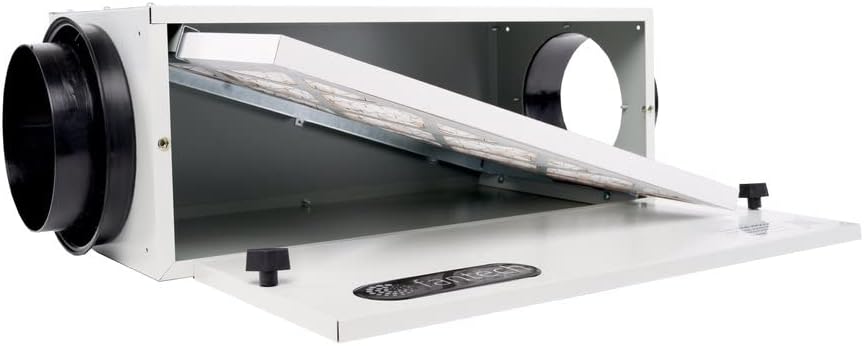
Ata 2: totonu view of the Fantech FB 6 In-line Filter Box with the access panel open, revealing the MERV 13 filter angled inside.
5. Galuega
The Fantech FB 6 In-line Filter Box operates passively as part of your ventilation system. Once installed, it continuously filters the air passing through it. No user interaction is required for its daily operation.
6. Tausiga
6.1 Suiga Filter
Regular filter replacement is crucial for maintaining optimal air quality and system performance. The frequency of replacement depends on usage and environmental conditions, but it is generally recommended every 3-6 months.
- motusia le Malosi: Ensure the HVAC system connected to the filter box is powered off at the circuit breaker.
- Open Access Panel: Loosen the knobs/screws on the access panel and carefully open it.
- Aveese le filiga tuai: Gently slide out the old MERV 13 filter. Note its orientation for correct installation of the new filter.
- Fa'aofi le Filter Fou: Slide a new MERV 13 filter into the filter box, ensuring it is properly seated and oriented.
- Tapuni Avanoa Laulau: Close the access panel and tighten the knobs/screws securely.
- Faʻafoʻi Mana: Turn the power back on to the HVAC system.
7. Faʻafitauli
| Fa'afitauli | Mafuaaga e ono tupu | Fofo |
|---|---|---|
| Condensation/Sweating on unit (in cold climates) | Insufficient insulation around the unit, especially when used for fresh air intake. | Apply additional insulation around the exterior of the filter box to prevent condensation. Ensure proper sealing. |
| Access panel screws spin freely / do not tighten | Internal riveted nut may have come loose or stripped. | Carefully inspect the internal nut. If loose, attempt to secure it. If stripped, consider using a different fastening method or contacting Fantech support. |
| Filter does not fit perfectly or seal properly | Screw heads or internal components obstructing filter path; incorrect filter size. | Ensure you are using the correct filter size (e.g., 20x20x1 if adapting). Carefully position the filter to avoid obstructions. |
8. Fa'amatalaga
| Fa'aaliga | Fa'amatalaga |
|---|---|
| Numera Fa'ata'ita'i | FB 6 (CECOMINOD072653) |
| Tufuga | Fantech |
| Duct Size Compatibility | 6 inisi |
| Filter Type Included | MERV 13 |
| Mea mamafa | 10 pauna (4.54 kilokalama) |
| Fuafuaga Mea | 26.9 x 15.1 x 13.1 inisi (68.3 x 38.4 x 33.3 cm) |
| Mea | 22-gauge galvanized steel with baked powder coat finish |
| UPC | 650737403041 |
9. Fa'amaonia ma Lagolago
For warranty information and technical support, please refer to the official Fantech webnofoaga po'o fa'afeso'ota'i la latou 'au'aunaga fa'atau.
You can visit the official Fantech store on Amazon for more products and information: FANTECH Store.


