1. Folasaga
Thank you for choosing the Nortek Soundream 2.1 Attive Minispeaker system. This manual provides essential information for the proper setup, operation, and maintenance of your new audio system. Please read this manual thoroughly before using the product to ensure optimal performance and safety.
2. Fa'amatalaga Saogalemu
To prevent fire, electric shock, or product damage, please observe the following safety precautions:
- Aua le faʻaalia lenei mea faigaluega i le timu poʻo le susu.
- Aua ne'i tu'u mea e tumu i vai, e pei o fagu, i luga o le masini.
- Ia mautinoa lelei le ea. Aua ne'i poloka so'o se avanoa e savili ai.
- Aua ne'i fa'apipi'i i tafatafa o so'o se mea fa'avevela e pei o fa'avevela, fa'amau fa'avevela, ogaumu, po'o isi masini (e aofia ai amplifiers) e maua ai le vevela.
- Puipui le uaea eletise mai le savali i luga pe faapipiʻi, ae maise lava i momono, mea e faʻafaigofie ai, ma le tulaga latou te o ese ai mai le masini.
- Fa'aaoga na'o mea fa'apipi'i/mea fa'apipi'i ua fa'ailoa mai e le gaosi oloa.
- Aveese le mea faigaluega i taimi o afa uila poʻo pe a le faʻaaogaina mo se taimi umi.
3. Mea i totonu o le afifi
Fa'amolemole siaki pe o iai uma mea i totonu o le afifi:
- 1 x Nortek Soundream 2.1 Subwoofer
- 2 x Satelite Speakers
- 1 x Power Cable (Corded Electric)
- 1 x Audio Input Cable (e.g., 3.5mm stereo jack)
- 1 x User Manual (lenei pepa)
4. Oloa Ua Ovaview
The Nortek Soundream 2.1 system consists of a subwoofer and two satellite speakers designed to deliver enhanced audio for various devices.
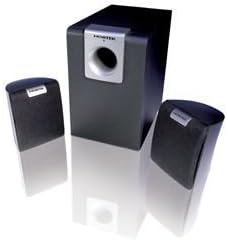
Image: The Nortek Soundream 2.1 Attive Minispeaker system, featuring a central subwoofer unit and two compact satellite speakers.
Vaega:
- Subwoofers: The main unit containing the amplifier, bass driver, and primary controls.
- Fa'amatalaga Satelite: Two compact speakers for mid-range and high-frequency audio.
- Pulea: Typically located on the subwoofer, these include power on/off, master volume, and potentially bass level adjustment.
5. Seti
Follow these steps to set up your Nortek Soundream 2.1 system:
- Tu'uga:
- Place the subwoofer on the floor, preferably near a wall or in a corner for optimal bass response.
- Position the two satellite speakers on either side of your listening area, facing towards you. Ensure they are equidistant from your listening position for balanced stereo sound.
- Feso'ota'i Sipika Satelite:
- Connect the cables from the satellite speakers to the corresponding output jacks on the back of the subwoofer. Ensure correct polarity if applicable (e.g., red to red, black to black).
- Feso'ota'i le Puna o le Leo:
- Connect one end of the audio input cable (e.g., 3.5mm stereo jack) to the 'Audio In' port on the subwoofer.
- Connect the other end of the audio input cable to the audio output jack of your device (e.g., computer, smartphone, MP3 player, TV).
- Fesoʻotaʻi le Mana:
- Plug the power cable into the power input on the subwoofer.
- Fa'afeso'ota'i le isi pito o le uaea eletise i se pa puipui fa'aeletise masani.
6. Fa'atonuga o Galuega
Once the system is set up, follow these steps to operate your speakers:
- Malosiaga: Locate the power button or switch on the subwoofer and turn it to the 'ON' position. An indicator light may illuminate.
- Pulea le Volume: Turn the master volume knob on the subwoofer to a low setting before playing audio. Gradually increase the volume to your desired listening level.
- Bass Adjustment (if available): If your subwoofer has a separate bass control knob, adjust it to achieve your preferred bass level.
- Ta'alo leo: Start playing audio from your connected device.
- Tapē le eletise: When finished, turn the power switch on the subwoofer to the 'OFF' position. For extended periods of non-use, it is recommended to unplug the system from the power outlet.
7. Tausiga
Proper maintenance ensures the longevity and performance of your speaker system:
- Fa'amamaina: Disconnect the power before cleaning. Use a soft, dry cloth to wipe the surfaces of the speakers and subwoofer. Do not use liquid cleaners or abrasive materials.
- Savili: Ensure that the ventilation openings on the subwoofer are not blocked by dust or other objects.
- Teuina: If storing the system for an extended period, unplug it and store it in a cool, dry place away from direct sunlight and extreme temperatures.
- Tausiga uaea: Avoid bending or crimping the audio and power cables excessively.
8. Faʻafitauli
If you encounter issues with your Nortek Soundream 2.1 system, refer to the following common problems and solutions:
- Leai se leo:
- Ensure the power cable is securely plugged into both the subwoofer and the wall outlet.
- Verify the power switch on the subwoofer is in the 'ON' position.
- Check that the audio input cable is securely connected to both the subwoofer and your audio source.
- Increase the master volume on the subwoofer and the volume on your audio source device.
- Test with a different audio source or cable to rule out a faulty source or cable.
- Leo fa'asese:
- Reduce the volume on both the subwoofer and your audio source.
- Ensure the audio input cable is fully inserted and not damaged.
- Siaki mo soʻo se faʻalavelave mai isi masini eletise.
- Only One Satellite Speaker Working:
- Check the connection of the non-working satellite speaker to the subwoofer.
- Ensure the audio source is outputting stereo sound.
9. Fa'amatalaga
- Fa'ata'ita'iga: Nortek Soundream 2.1
- Fa'atonuga: 2.1 Channel (Subwoofer + 2 Satellite Speakers)
- Power Output (Wattagu): 2 Watts
- Punavai Malosi: Uaea Eletise
- Mea mamafa: E tusa ma le 1.5 kg (3.31 pauna)
- ASIN: B000CFYA2C
- Tufuga: Nortek
10. Fa'amaonia ma Lagolago
For warranty information and technical support, please refer to the warranty card included with your product or visit the official Nortek webnofoaga. Taofi lau lisiti fa'atau e fai ma fa'amaoniga o le fa'atauga mo so'o se tagi fa'amaonia.


