
Folasaga
Thank you for choosing the EcoLink Tiny Tornado Mini Fan. This compact and portable personal fan is designed to provide powerful, quiet, and convenient cooling for various environments. Please read this manual carefully before use to ensure proper operation and maintenance.
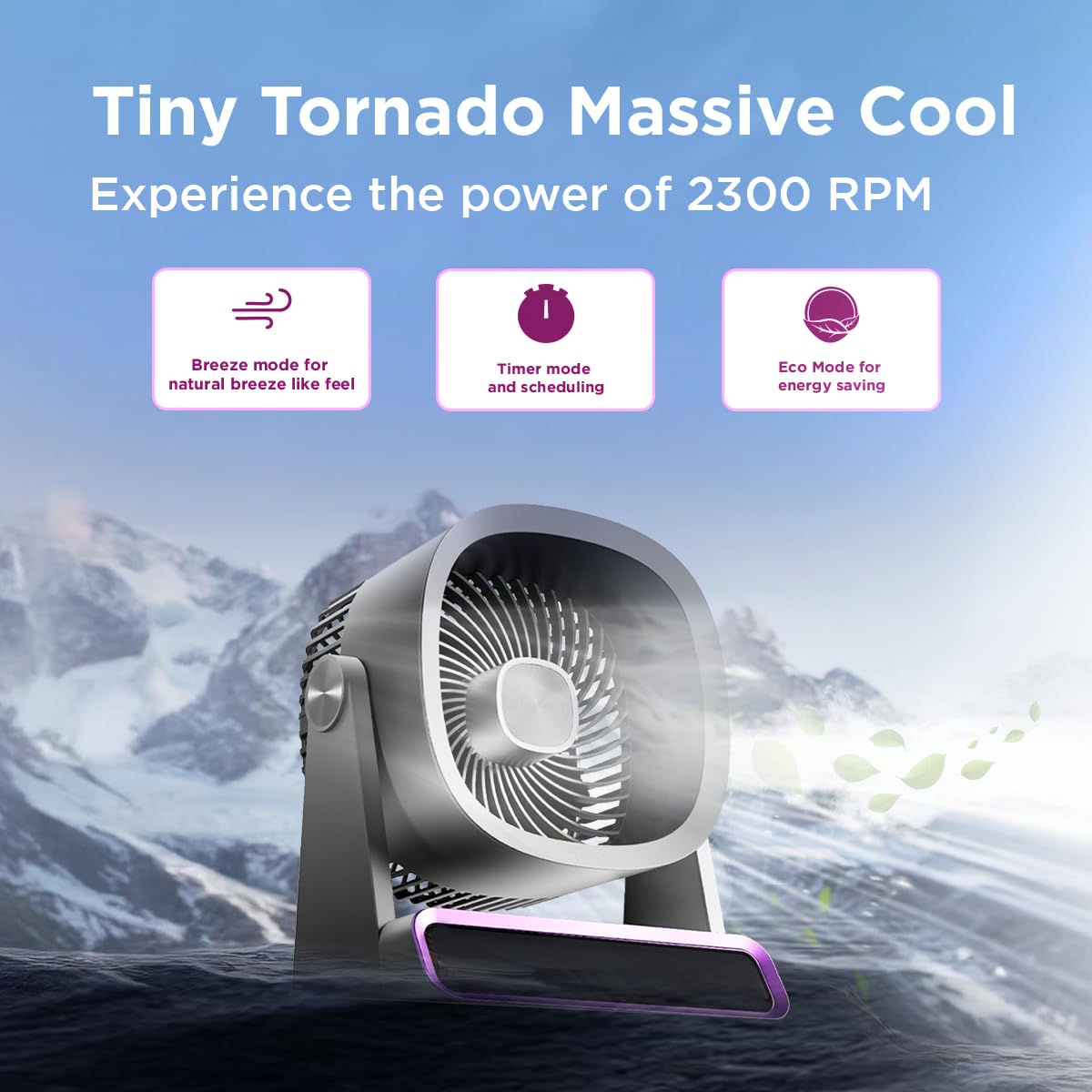
The EcoLink Tiny Tornado Mini Fan delivers powerful airflow in a compact design.
Vaega Autu:
- Mini Yet Powerful Cooling: Delivers strong airflow in a compact size for instant personal cooling.
- Matua Laʻititi ma Mama: Easy to carry and place on desks, tables, or in bags.
- Smooth & Quiet Operation: Low-noise performance suitable for various quiet environments.
- USB Toe fa'aaogaina Fa'afaigofie: Rechargeable via laptop, power bank, or USB adapter.
- Fa'aaogāga tele: Ideal for desk use, travel, outdoor activities, commuting, and emergency cooling.
O mea o lo'o i totonu
Ia mautinoa o lo'o iai mea uma i totonu o le afifi:
- EcoLink Tiny Tornado Mini Fan (1 unit)
- USB Type-C Charging Cable (1 unit)

The fan comes with a Type-C charging cable for easy recharging via various devices.
Faatonuga Saogalemu
To prevent injury or damage, please observe the following safety precautions:
- Do not insert fingers or any objects into the fan grille.
- Taofi le ili mai vai po'o isi vai.
- Do not use the fan in excessively humid or dusty environments.
- Taofi ese mai tamaiti ma fagafao.
- Use only the provided USB cable or a certified Type-C cable for charging.
- Aua le taumafai e tatala pe toe faaleleia le ili oe lava. Faafesootaʻi le tautua a tagata faatau mo se fesoasoani.
- Avoid blocking the air intake or outlet during operation.
Seti
Totogi Muamua:
- Connect the provided USB Type-C cable to the charging port on the fan.
- Connect the other end of the USB cable to a power source such as a USB adapter (not included), computer, or power bank.
- The charging indicator light will illuminate (color may vary) to show that the fan is charging.
- A full charge typically takes 10 to 12 hours. The indicator light will change or turn off when charging is complete.
Tu'uga:
Place the fan on a stable, flat surface. Ensure there is adequate space around the fan for proper airflow.
Fa'atonuga o Galuega
Malosi/Pepe:
- To turn on the fan, press the power button (usually located on the base or front panel).
- To turn off the fan, press and hold the power button, or cycle through the speed settings until it turns off.
Fetuuna'i le Saosaoa o le ili:
Press the power button repeatedly to cycle through different fan speeds. The fan typically has multiple speed settings (e.g., Low, Medium, High, Boost).
Faiga Fa'atino:
The fan may feature different operating modes, indicated by specific icons or lights:
- Faiga Savili: Simulates a natural breeze with varying fan speeds.
- Fa'asologa o le Taimi: Allows scheduling the fan to turn off after a set period. Refer to the fan's display or specific button for timer settings.
- Faiga fa'akomepiuta: Optimizes fan speed for energy saving, extending battery life.

The fan features digital touch screen control and a boost mode for high-speed output.
Ola ma'a:
The fan offers extended battery life, with up to 17 hours of run time at the lowest speed on a full charge. Run time decreases with higher fan speeds.

The 6000 mAh battery provides long-lasting power, with up to 17 hours of run time at speed 1.
Tausiga
Fa'amamaina:
- Ia mautinoa ua tape le ili ma tatala le pala a'o le'i fufulu.
- Solo le pito i fafo i se mea vaivai, oamp ie. Aua ne'i fa'aogaina ni mea fa'amama fa'afefete po'o ni solu.
- Use a soft brush or vacuum cleaner to gently remove dust from the fan grille.
- Aua ne'i faatofu le ili i le vai po o se isi lava vai.
Teuina:
When not in use for extended periods, store the fan in a cool, dry place, away from direct sunlight and extreme temperatures. It is recommended to fully charge the battery before storing.
Fa'afitauli
| Fa'afitauli | Mafuaaga e ono tupu | Fofo |
|---|---|---|
| E le kiila le ili. | Ua uma le maa. | Charge the fan using the provided USB Type-C cable. |
| Fa'aletonu le ea. | Fan grille is obstructed or dirty. | Clean the fan grille. Ensure nothing is blocking the air intake or outlet. |
| E le masani ai le pisapisao. | Foreign object inside the fan. | Turn off and unplug the fan. Carefully inspect for any foreign objects. If unable to resolve, contact customer support. |
| Le fa'ailoga o lo'o totogia e le o galue. | Fa'afitauli i le uaea po'o le puna o le eletise. | Try a different USB Type-C cable or a different power source. Ensure connections are secure. |
Fa'amatalaga
| Fa'aaliga | Fa'amatalaga |
|---|---|
| Fa'ailoga | EcoLink |
| Numera Fa'ata'ita'i | 915006708301_1 |
| Lanu | Lanu viole |
| Fuafuaga ili eletise | Wearable Fan / Tabletop Mount |
| Punavai Malosi | Malosi le ma'a (USB toe fa'aaogaina) |
| Sitaili | Mini |
| Fua o Mea (D x W x H) | 19.5D x 14.5W x 25.8H Sinimita |
| Mea mamafa | 940 kalama |
| Uatage | 4.6 Watts |
| Fa'aaofia Vaega | Handheld Pack of 1 (Fan, USB Type-C Cable) |
| Fa'aoga i totonu/I fafo | I totonu, i fafo |
| Ituaiga Fa'apipi'i | feaveai |
| Smart Home Fegalegaleaiga | Not Smart Home Compatible |

The fan is equipped with a powerful and silent BLDC motor for smooth, consistent, and energy-efficient airflow.
Fa'amatalaga Fa'amaonia
This EcoLink product is covered by a manufacturer's warranty. Please refer to the warranty card included with your purchase or contact EcoLink customer support for detailed warranty terms and conditions. Keep your purchase receipt as proof of purchase for warranty claims.
Lagolago Tagata Fa'atau
For any questions, technical assistance, or warranty claims, please contact the manufacturer:
- Tufuga: Signify Innovations India Limited
- Fa'amatalaga Fa'afeso'ota'i: Refer to the packaging or official EcoLink webnofoaga mo fa'amatalaga lata mai fa'afeso'ota'i.