
Folasaga
Thank you for choosing the JUOVI ZS300 Portable Bluetooth Speaker. This manual provides essential information for the safe and efficient operation of your device. Please read it thoroughly before use and retain it for future reference.
The JUOVI ZS300 is a versatile portable speaker designed for high-quality audio playback in various environments. It features 20W stereo sound, IP68 water and dust resistance, up to 24 hours of battery life, and multiple connectivity options including Bluetooth, Micro SD, and AUX input.
O a mea i totonu o le Pusa
- JUOVI ZS300 Portable Bluetooth Speaker (SOUND J1) x 1
- Uaea Totogi USB-C x 1
- 3.5mm Line-in Audio Cable x 1
- Lanyard x 1
- Tusi Taiala x 1
Ua Umaview
Fa'amasani oe i vaega ma ta'iala a le failauga.

Ata: Luga view of the JUOVI ZS300 speaker showing control buttons and a detailed diagram of each button's function.
Pule Fa'amau:
- Ki Malosi: Oomi ma taofi e ola/tape le mana.
- Ta'alo/Taofi faamau: Oomi e tā pe taofi leo.
- Voli i luga (+): Oomi puupuu e fa'amalosi ai le leo. Oomi umi mo le isi pese.
- Volume i lalo (-): Oomi puupuu e fa'aitiitia ai le leo. Oomi umi mo le pese muamua.
- Fa'amau (M): Press to switch between Bluetooth, Micro SD, and AUX input modes.
- Bluetooth Pair Key: Oomi e ulufale i le faiga fa'atasi Bluetooth.
- Artificial Intelligence Key: Press to activate your smartphone's voice assistant (Siri/Google Assistant).
- Tali/Fa'ai'u le Valaau: Oomi e tali pe faamuta se telefoni.
- Te'ena Valaau: Fetaomi ma taofi e teena ai se valaau sau.
- Multi-Call/Switching: Press to manage multiple calls.
Taulaga:

Ata: Auiliili view of the speaker's port panel, showing the USB-C charging port, USB-A power bank output, Micro SD card slot, and AUX input. Note the rubber cap for water resistance.
- Charging Port (IN) Type-C: Mo le molia o le sipika.
- Power Bank (OUT) USB-A: Mo le fa'atumuina o masini fafo po'o le fa'alogologo i musika mai se masini USB.
- Laiti Laiti Card SD: Mo le taina leo files directly from a Micro SD card.
- AUX I totonu: For wired audio connection using the 3.5mm audio cable.
Important: Keep rubber caps closed over all ports (Micro SD/AUX/Charging ports) to maintain water resistance (IP68 rating).
Seti
1. Totogiina o le Fofoga Fetalai
Before first use, fully charge the speaker. Connect the provided USB-C charging cable to the speaker's Type-C port and a USB power adapter (not included). The charging indicator will show the charging status. A full charge takes approximately 2.5 hours.
2. Malosi / Malosi
- I le Malosiaga: Press and hold the Power button for 2-3 seconds. You will hear an audible startup sound.
- Tape le Malosi: Press and hold the Power button for 2-3 seconds.
3. Paʻaga Bluetooth

Image: A person in a car pairing the JUOVI ZS300 speaker with their smartphone, illustrating the Bluetooth connection process.
- Ensure the speaker is powered on and in Bluetooth mode (indicated by a flashing blue LED). If not, press the Mode button (M) to switch to Bluetooth mode.
- I lau telefonipoto po'o se masini e fa'aogaina le Bluetooth, alu i fa'atulagaga Bluetooth ma saili mo masini o lo'o avanoa.
- Select "JUOVI SOUND J1" from the list.
- Once connected, the speaker will emit a confirmation sound, and the blue LED will remain solid.
- O le a otometi lava ona toe fa'afeso'ota'i le sipika i le masini soso'o mulimuli pe a fa'aola, pe afai o lo'o i totonu le masini.
4. Fa'aigoa Moni Uaealesi (TWS).
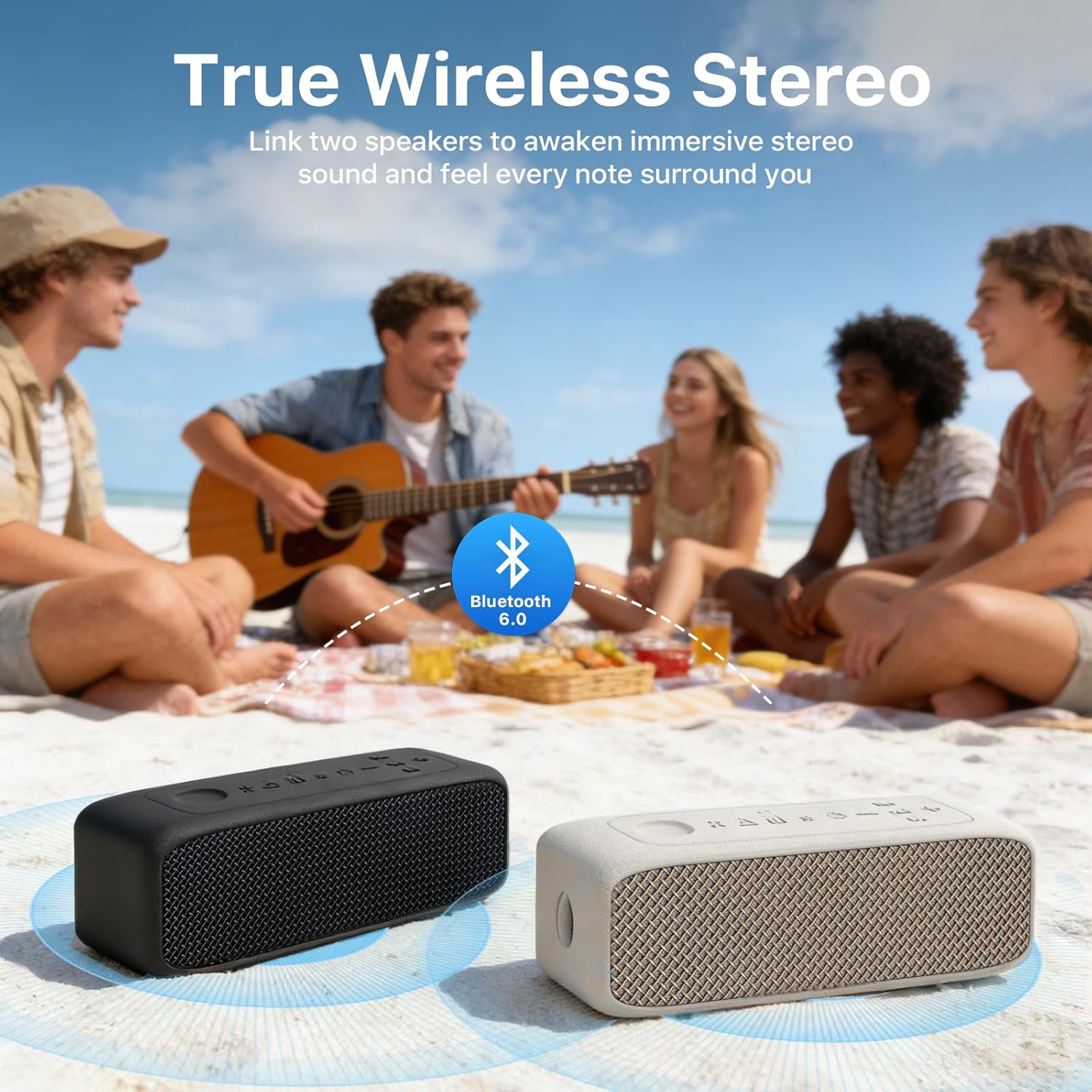
Image: Two JUOVI ZS300 speakers placed on a beach blanket, wirelessly connected via TWS for a stereo audio experience, with people enjoying music in the background.
TWS allows you to pair two JUOVI ZS300 speakers for an immersive stereo sound experience.
- Ia mautinoa o lo'o fa'agaoioia sipika uma e lua ma o lo'o iai i le Bluetooth mode, ae aua ne'i feso'ota'i i so'o se masini.
- On one speaker (this will be the primary speaker), press and hold the Bluetooth Pair button for 2-3 seconds until you hear a pairing tone.
- O le a otometi lava ona feso'ota'i sipika e lua. A uma ona feso'ota'i, o le a e fa'alogoina se leo fa'amaonia.
- Now, connect your smartphone or Bluetooth device to the primary speaker (the one you initiated TWS pairing on) as described in the Bluetooth Pairing section.
- O le a faalogoina nei le leo i le stereo e ala i sipika uma e lua.
Fa'atonuga o Galuega
1. Toe Faʻalogo leo
- Ta'alo/Taofi: Oomi le faamau Play/Pause.
- Fetuunaiga le Volume: Short press the '+' or '-' buttons.
- Su'ega Sosoo: Oomi umi le faamau '+'.
- Ala na muamua atu: Oomi umi le faamau '-'.
2. Valaauga Sa'oloto

Image: Two individuals communicating via a phone call using the JUOVI ZS300 speaker's built-in microphone and hands-free function.
When connected to your smartphone via Bluetooth:
- Tali Valaau: Oomi le ki Tali/Fa'ai'u Valaau.
- Fa'ai'u le Valaau: Press the Answer/End Call button during a call.
- Te'ena Valaau: Press and hold the Answer/End Call button when a call comes in.
3. Fa'agaoioia Fesoasoani leo
Press the Artificial Intelligence Key to activate your smartphone's voice assistant (e.g., Siri, Google Assistant).
4. Faiga Fa'aofi

Image: The JUOVI ZS300 speaker positioned among various compatible devices such as a smartphone, tablet, laptop, and television, demonstrating its multiple connectivity options.
Press the Mode button (M) to cycle through the available input sources:
- Faiga Bluetooth: For wireless audio streaming from Bluetooth-enabled devices.
- Faiga Micro SD Card: Insert a Micro SD card (up to 32GB, FAT32 format) with audio files (FLAC, WAV, MP3, M4A) into the slot. The speaker will automatically begin playback.
- AUX Input Mode: Connect an audio device using the provided 3.5mm audio cable to the AUX In port.
- USB-Audio Mode: Connect a USB flash drive with audio files to the Power Bank (OUT) USB-A port.
5. Galuega a le Faletupe Malosiaga
The speaker can act as an emergency power bank. Connect your mobile device to the USB-A Power Bank (OUT) port using a compatible USB cable to charge it.
Tausiga
Fa'amamaina
Solo le sipika i se malu, oamp cloth. Do not use harsh chemicals or abrasive cleaners. Ensure all port covers are securely closed before cleaning with moisture.
Teuga
Store the speaker in a cool, dry place away from direct sunlight and extreme temperatures. If storing for an extended period, charge the battery to approximately 50% every few months to prolong its lifespan.
Suavai ma le Pefu Tetee (IP68)

Image: The JUOVI ZS300 speaker partially submerged in shallow water, highlighting its IP68 waterproof rating. A note reminds users to keep rubber caps closed for water resistance.
The JUOVI ZS300 speaker is rated IP68, meaning it is fully dustproof and can withstand immersion in water up to 1.5 meters deep for 30 minutes. To maintain this rating, ensure all port covers are firmly sealed before exposing the speaker to water or dust. Do not expose the speaker to saltwater or other chemicals, as this may degrade its protective seals.
Fa'afitauli
| Fa'afitauli | Mafuaaga e ono tupu | Fofo |
|---|---|---|
| E le ola le Fofoga Fetalai. | Ma'a maualalo. | Totogi atoa le sipika. |
| E le mafai ona fa'afeso'ota'i e ala ile Bluetooth. | Speaker not in pairing mode; device too far; Bluetooth off on source device. | Ensure speaker is in Bluetooth pairing mode (flashing blue LED). Move device closer. Turn Bluetooth on/off on source device. Forget and re-pair "JUOVI SOUND J1". |
| Leai se leo. | Ua maualalo tele le leo; sese le faiga o le input; e le o taina le masini. | Increase speaker and device volume. Press 'M' button to select correct input mode. Ensure audio is playing on your source device. |
| Ua le manuia le fa'atasiga TWS. | Speakers already connected to another device; incorrect pairing procedure. | Ensure both speakers are disconnected from all devices. Follow TWS pairing instructions carefully. |
| Le lelei/fa'api'opi'o le leo. | Source audio quality; volume too high; interference. | Try different audio source. Reduce volume. Move speaker away from other electronic devices. |
Fa'amatalaga
| Fa'aaliga | Fa'amatalaga |
|---|---|
| Igoa Fa'ata'ita'iga | ZS300 / J6311 |
| Fa'ailoga | JUOVI |
| Ituaiga Fofoga Fetalai | Fofoga Fetalai feaveaʻi |
| Tekinolosi Feso'ota'i | Bluetooth 6.0, AUX, Micro SD, USB-Audio |
| Lau'ele'ele Bluetooth | E oo atu ile 10 mita (33 futu) |
| Leo Faʻalauiloa Galuega | Stereo |
| Mata'utia le Malosi o le Fofoga Fetalai | 20W (24W Peak) |
| Tele Avetaavale | 2 x 50mm Dynamic Drivers |
| Tali Faatele | 20 Hz - 20 KHz |
| Fua Faatatau o Faailo-i-Pisa | 90 dB |
| Fa'alavelave | 4 Ohm |
| Malosiaga ma'a | 5400mAh |
| Taimi ta'alo | E oʻo atu i le 24 itula (i le 50% voluma) |
| Taimi Totogi | Pe tusa. 2.5 itula |
| Sao Voltage | 5 Volts |
| Suavai Tetee Level | IP68 (Dustproof, Waterproof up to 1.5m for 30 mins) |
| Fua (L x W x H) | 19.6 x 6.2 x 6.6 cm (7.7 x 2.4 x 2.6 inisi) |
| mamafa | 530 kalama (1.17 lbs) |
| Fa'apitoa Fa'apitoa | TWS Pairing, Hands-free Calling, Voice Assistant, Power Bank Function |
Fa'amaonia ma Lagolago
Fa'amatalaga Fa'amaonia
The JUOVI ZS300 Portable Bluetooth Speaker comes with a 1-tausaga tapulaa faatapulaaina mai le aso na faʻatau mai ai. O lenei tusi saisai e aofia ai mea sese i le gaosiga ma le faiga o galuega i lalo o le faʻaaogaina masani. E le aofia ai mea leaga na mafua mai i le faʻaaogaina sese, faʻalavelave, suiga e leʻi faʻatagaina, poʻo le ofuina ma le masaesae masani.
Fa'amolemole taofi lau fa'amaoniga o le fa'atau mo tagi fa'amaonia.
Lagolago Tagata Fa'atau
For technical assistance, warranty claims, or any questions regarding your JUOVI ZS300 speaker, please contact our customer support team. Refer to the contact information provided on the product packaging or the official JUOVI webnofoaga.
We are committed to providing excellent service and support for our products.