
Ua Umaview
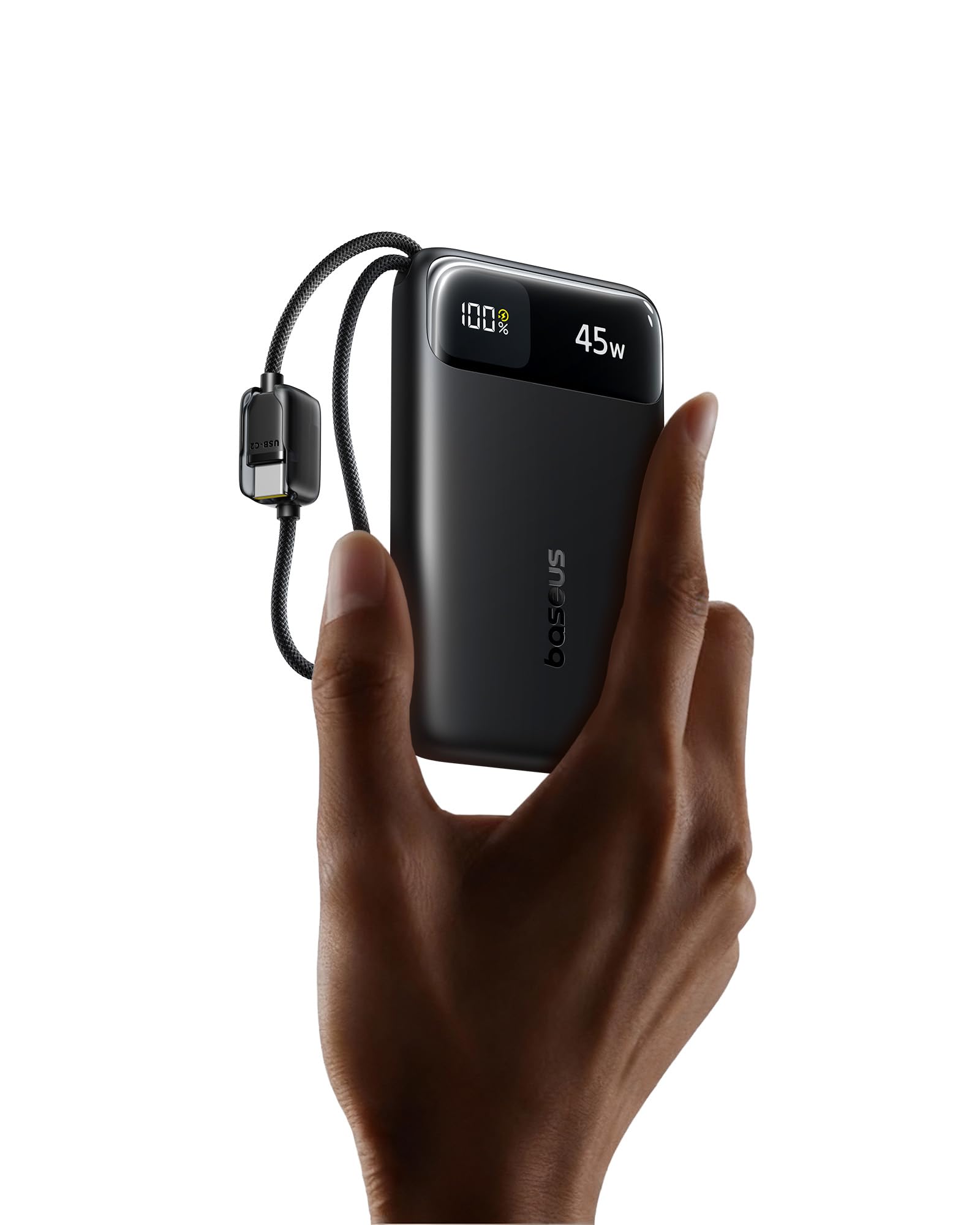
The Baseus 45W Ultra Slim 10000mAh Power Bank (Model E00310) is a portable charging solution designed for various electronic devices. It features built-in USB-C cables for convenience and supports 45W fast charging. This power bank is CCC certified and suitable for travel due to its compact size and airline-approved capacity.
Vaega Autu
- Ultra-Slim & Portable Design: Measures 4.3 × 2.6 × 0.7 inches and weighs 7 oz, making it easy to carry.
- 10,000mAh Maualuga Maualuga: Provides multiple charges for smartphones and other devices.
- 45W Talosaga Saosaoa: Delivers fast charging for compatible devices, boosting an iPhone 17 Pro to 67% and a Samsung S25 Ultra to 60% in approximately 30 minutes.
- Dual Built-in USB-C Cables: Eliminates the need for external cables, offering convenience and tangle-free use. Cables are tested for durability.
- Four-in-One Charging: Features two built-in USB-C cables, one USB-C port, and one USB-A port, allowing simultaneous charging of up to four devices.
- 30W Rapid Input: Enables quick recharging of the power bank itself.
- NTC Temperature Control: Built-in sensors monitor temperature for safe operation during high-speed charging.
- Puipuiga Saogalemu Tele: Guards against overcurrent, overvoltage, overheating, over-discharge, and short circuits.
- Airline-Approved: Suitable for air travel due to its capacity and compact build.

Seti Taiala
Fa'atumuina Muamua o le Power Bank
- Connect one of the built-in USB-C cables or an external USB-C cable to the power bank's USB-C input port.
- Plug the other end of the cable into a compatible USB wall charger (30W or higher recommended for rapid charging).
- The digital display on the power bank will show the charging status and current battery percentage.
- Charge the power bank until it reaches 100% for optimal initial use.

Fa'atonuga o Galuega
Totogiina o Au Masini
- Using Built-in USB-C Cables:
- Pull out one of the built-in USB-C cables from the power bank.
- Connect the USB-C end to your compatible device (e.g., smartphone, tablet).
- The power bank will automatically begin charging your device. The digital display will show the remaining battery level and output wattage.
- Using USB-C or USB-A Ports:
- Connect your device's charging cable to either the USB-C output port or the USB-A output port on the power bank.
- Connect the other end of your cable to your device.
- O le a amata otometi le tauina.
- Totogi fa'atasi: The power bank supports charging up to four devices concurrently using its two built-in USB-C cables, one USB-C port, and one USB-A port.

Fa'amatalaga Fa'aaliga Fa'atekinolosi
The integrated digital display provides real-time information:
- Batini Pasenetage: Shows the remaining charge level of the power bank.
- Output/Input Wattage: Displays the current power output when charging devices or input wattage when recharging the power bank.

Tausia ma Tausiga
- Fa'amamaina: Fa'aaogā se ie mālū ma mago e fa'amama ai le pito i luga o le pusa eletise. Aloese mai le fa'aaogaina o vaila'au malolosi po'o mea fa'a'a'asa.
- Teuina: Teu le pusa eletise i se nofoaga malulu, matutu mamao ese mai le susulu o le la, vevela ogaoga, ma le susu.
- Soifua Maloloina maa: For optimal battery longevity, fully charge the power bank at least once every three months if not in regular use.
- Tausiga uaea: Avoid excessive bending or pulling of the built-in cables to prevent damage.
Fa'afitauli
- Power bank is not charging devices:
- Ensure the power bank itself has sufficient charge. Check the digital display.
- Verify that the charging cables are securely connected to both the power bank and your device.
- Try using a different cable or port on the power bank.
- Ia fa'amautinoa e fetaui lau masini ma fa'amatalaga fa'apitoa a le power bank.
- Power bank is not recharging:
- Ensure the wall charger is functioning correctly and provides adequate power (30W recommended).
- Check the connection of the charging cable to both the power bank and the wall charger.
- Try a different wall charger or cable.
- Power bank becomes warm during use:
- It is normal for the power bank to generate some heat during charging or discharging, especially during high-speed operations.
- If the power bank becomes excessively hot, disconnect it immediately and allow it to cool down. Ensure it is used in a well-ventilated area.
- The built-in NTC temperature control system is designed to prevent overheating. If persistent excessive heat occurs, contact customer support.

Fa'amatalaga o oloa
| Fa'ailoga | Baseus |
| Numera Fa'ata'ita'i | E00310 |
| Malosiaga ma'a | 10000 Miliamp Itula (mAh) |
| Ituaiga Feso'ota'i | USB Ituaiga A, USB Ituaiga C |
| Punavai Malosi | Ma'a |
| Voltage | 5 Volts |
| Numera o Taulaga | 4 (2x Built-in USB-C, 1x USB-C, 1x USB-A) |
| Mea mamafa | 7.16 aunese |
| Item Dimensions (L x W x Th) | 4.33" x 2.67" x 0.7" |
| Fa'apitoa Fa'apitoa | Portable, Lightweight, Ultra Slim, 45W Fast Charging, Built-in Two USB-C Cables, CCC Certified, Pocket Size, Smart Display, Low Current Mode |
| Tufuga | Shenzhen Baseus Technology Co., Ltd. |
Fa'amatalaga Saogalemu
- Do not expose the power bank to extreme temperatures (hot or cold), direct sunlight, or high humidity.
- ʻAloʻese mai le paʻū, paʻi, poʻo le tatala o le masini.
- Keep away from water and flammable liquids.
- Aua le fa'aaogaina pe afai ua faaleagaina le power bank, fulafula, pe tafe.
- Taofi ese mai tamaiti.
- Lafoa'i lelei le oloa e tusa ai ma tulafono fa'alotoifale.
Fa'amaonia ma Lagolago
This Baseus power bank comes with a 2-Tausaga Fa'amaumauga Fa'atonu.
For technical support, warranty claims, or further inquiries, please contact Baseus customer service or visit the official Baseus Brand Store:
Vitio oloa
Fa'aaliga vitiō oloa aloa'iacasing the features and usage of the Baseus Enerfill FC11 45W 10000mAh Power Bank.