
Folasaga
This manual provides essential information for setting up, operating, and maintaining your TCL 32S5K 32-inch HD QLED Google Smart TV. Please read this manual thoroughly before using your television to ensure safe and optimal performance. Keep this manual for future reference.
Fa'amatalaga Saogalemu
Ia mulimuli i taimi uma i puipuiga masani mo le saogalemu pe a faʻaaogaina lenei televise e faʻaitiitia ai le lamatiaga o le afi, eletise eletise, ma manuʻa. Aua le tu'u le TV ile timu po'o le susu. Aua le tatalaina le TV iasing; refer all servicing to qualified personnel. Ensure proper ventilation and avoid placing the TV near heat sources. Use only the power cord and accessories specified by the manufacturer.
O mea o lo'o i totonu
Fa'amautinoa o lo'o iai mea uma i totonu o le afifi:
- TCL 32S5K 32-inch HD QLED Google Smart TV
- Pulea Mamao
- Uaea Malosi
- Tu'u TV (2 fasi pepa) ma Siu
- Taiala vave amata
- Kata Faamaonia
Seti
Fa'apipi'i Fa'aletino
Fa'apipi'i Tu'u: Place the TV screen-down on a soft, flat surface. Attach the two stand pieces to the designated slots on the bottom of the TV using the provided screws. Ensure the stand is securely fastened.
Fa'amauina o le puipui: If wall-mounting, ensure you use a VESA-compatible wall mount (not included) and follow the wall mount manufacturer's instructions. Disconnect the power cord before mounting.
Feso'ota'i Meafaigaluega
Connect your external devices to the appropriate ports on the TV. Refer to the image below for port locations and types.

Figure 1: Rear and Side Connectivity Ports. This image illustrates the various input and output ports available on the TCL 32S5K Smart TV, including USB 2.0, LAN, Antenna/Cable In, Digital Audio Out (Optical), HDMI 1, HDMI 2, and AV In adapter.
- HDMI Ports (1, 2): Fa'afeso'ota'i masini ta'alo Blu-ray, masini ta'aloga, pusa uaea/satelite, po'o isi masini e fa'aogaina le HDMI.
- USB 2.0 Taulaga: Fa'afeso'ota'i masini e teu ai USB mo le toe fa'afo'i fa'asalalauga.
- LAN Port: Fa'afeso'ota'i le uaea Ethernet mo se feso'ota'iga initaneti uaea.
- Antenna/Uaea I totonu: Fa'afeso'ota'i se antenna po'o se fa'ailo TV uaea.
- Leo Fa'atekinolosi i fafo (Optical): Connect to an external audio receiver or soundbar for digital audio.
- AV In Adapter: Use the provided adapter to connect older devices with composite video and stereo audio outputs.
Fa'agaoioia Muamua ma le Fa'atulagaina o le Google TV
After connecting all necessary cables, plug the power cord into an electrical outlet. Press the power button on the remote control or on the TV. Follow the on-screen instructions to complete the initial setup, which includes selecting your language, connecting to a Wi-Fi network, and signing in to your Google account to access Google TV features.
Fa'agaioiga
Galuega Pulea Mamao
The remote control allows you to navigate the Google TV interface, adjust volume, change channels, access apps, and control playback. Familiarize yourself with the button layout for easy operation.
Feso'ota'iga a le Google TV
Google TV organizes your favorite movies, shows, and live TV from across your apps and subscriptions. Use the remote to browse recommendations, search for content, and manage your watch list. Access the Google Play Store to download additional applications.
Faiga Feso'ota'i
- Wi-Fi: Connects your TV to your home wireless network for internet access and streaming.
- Bluetooth: Pair Bluetooth-enabled devices such as headphones or game controllers for a personalized experience.
- Googlecast (Chromecast built-in): Cast content from your compatible mobile devices or computer directly to your TV screen.
Fa'atonu Ata ma Leo
Your TCL 32S5K TV features QLED technology, Full HD resolution, HDR10 support, and Dolby Audio for an enhanced viewing and listening experience. Adjust picture modes (e.g., Standard, Vivid, Movie) and sound modes (e.g., Standard, Music, Movie) through the TV settings menu to suit your preferences.

Figure 2: Image Quality Features. This image highlights the key display technologies of the TCL 32S5K Smart TV, including QLED for vibrant colors, FHD (Full High Definition) for clear resolution, and HDR10 for enhanced contrast and brightness.
Tausiga
Fa'amamā lau TV
Always unplug the TV before cleaning. Use a soft, dry cloth to wipe the screen and cabinet. For stubborn marks, lightly dampen the cloth with water or a mild, non-abrasive screen cleaner. Never spray cleaner directly onto the screen or allow liquids to enter the TV's openings.
Fa'afouga polokalame
Your Google TV may receive automatic software updates. Ensure your TV is connected to the internet to receive these updates, which can improve performance and add new features. You can also manually check for updates in the TV's settings menu.
Fa'afitauli
Afai e te feagai ma faʻafitauli i lau TV, vaʻai i fofo masani nei:
- Leai se Malosi: Check if the power cord is securely plugged into both the TV and the electrical outlet. Try a different outlet.
- Leai se Ata/Ata Le Lelei: Ensure all cables are correctly connected. Check the input source. Adjust picture settings. If using an antenna, check signal strength.
- Leai se Leo/Leaga le Leo: Check volume levels and mute settings. Ensure external audio devices are properly connected and selected as the audio output.
- Pulea mamao e le o galue: Sui maa. Ia mautinoa e leai ni fa'alavelave i le va o le mamao ma le IR sensor a le TV.
- Fa'afitauli Feso'ota'iga: Restart your router and modem. Reconnect to the Wi-Fi network in the TV settings. For wired connections, ensure the Ethernet cable is properly connected.
- Google TV Slow/Unresponsive: Restart the TV by unplugging it for a few minutes and plugging it back in. Clear cache for problematic apps in settings.
For persistent issues, consult the TCL support webnofoaga po'o fa'afeso'ota'i le 'au'aunaga fa'atau.
Fa'amatalaga
Below are the technical specifications for the TCL 32S5K Smart TV:
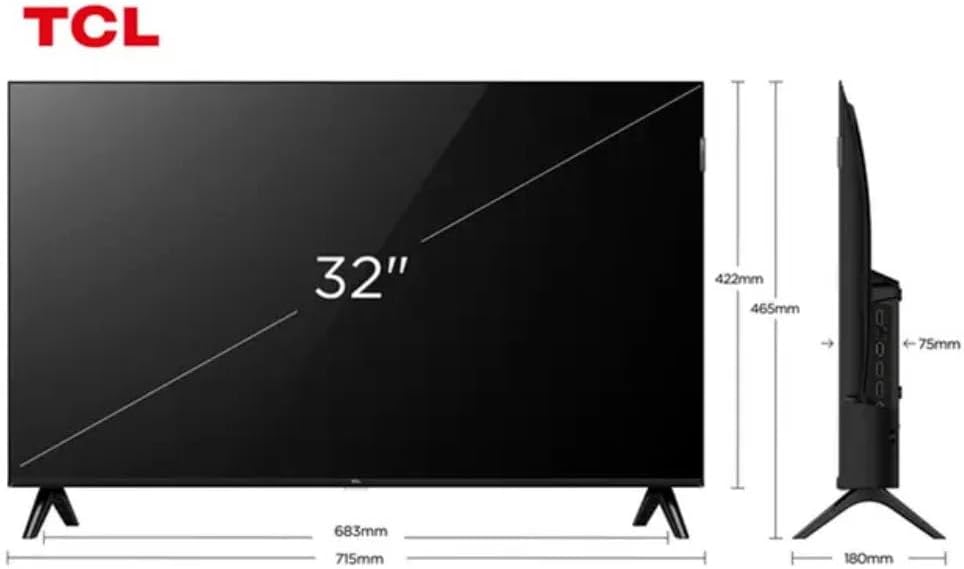
Figure 3: TV Dimensions. This image provides a detailed diagram of the TCL 32S5K Smart TV's physical dimensions, including screen size (32 inches), width (715mm), height (422mm without stand, 465mm with stand), and depth (75mm).
| Fa'aaliga | Fa'amatalaga |
|---|---|
| Igoa Fa'ata'ita'iga | 32S5K |
| Tele lau | 32 Inisi |
| Fa'aaliga Tekonolosi | QLED |
| I'ugafono | 1080p (Aotele HD) |
| Fua Fa'afouina | 60 Hz |
| Feso'ota'i | Bluetooth, Ethernet, HDMI, USB, Wi-Fi |
| Aofa'i HDMI Taulaga | 2 |
| Fa'apitoa Fa'apitoa | Integrated Speaker, Google TV, Googlecast Integrated, HDR10, Dolby Audio |
| Fua o Mea (D x W x H) | 7.6P x 71.6L x 42.3A centimeters (approx. 3 x 28.2 x 16.7 inches) |
| Tufuga | TCL |
| Atunuu na Afua mai ai | Brazil |
Fa'amaonia ma Lagolago
Fa'amatalaga Fa'amaonia
The TCL 32S5K Smart TV comes with a 1-tausaga le fa'amaoniaga a le gaosiga. This warranty covers defects in materials and workmanship under normal use. Please retain your proof of purchase for warranty claims. For specific terms and conditions, refer to the warranty card included in your package or visit the official TCL webnofoaga.
Lagolago Tagata Fa'atau
If you require technical assistance, have questions about your product, or need to initiate a warranty claim, please contact TCL customer support. You can typically find contact information on the TCL official webnofoaga po'o lau fa'amaumauga o oloa.
Before contacting support, please have your TV model number (32S5K) and serial number ready, along with a detailed description of the issue.