
Folasaga
This manual provides detailed instructions for the safe installation, operation, and maintenance of your TCL 62-inch ceiling fan. Please read this manual thoroughly before installation and keep it for future reference. Ensure all safety precautions are followed to prevent injury or damage.
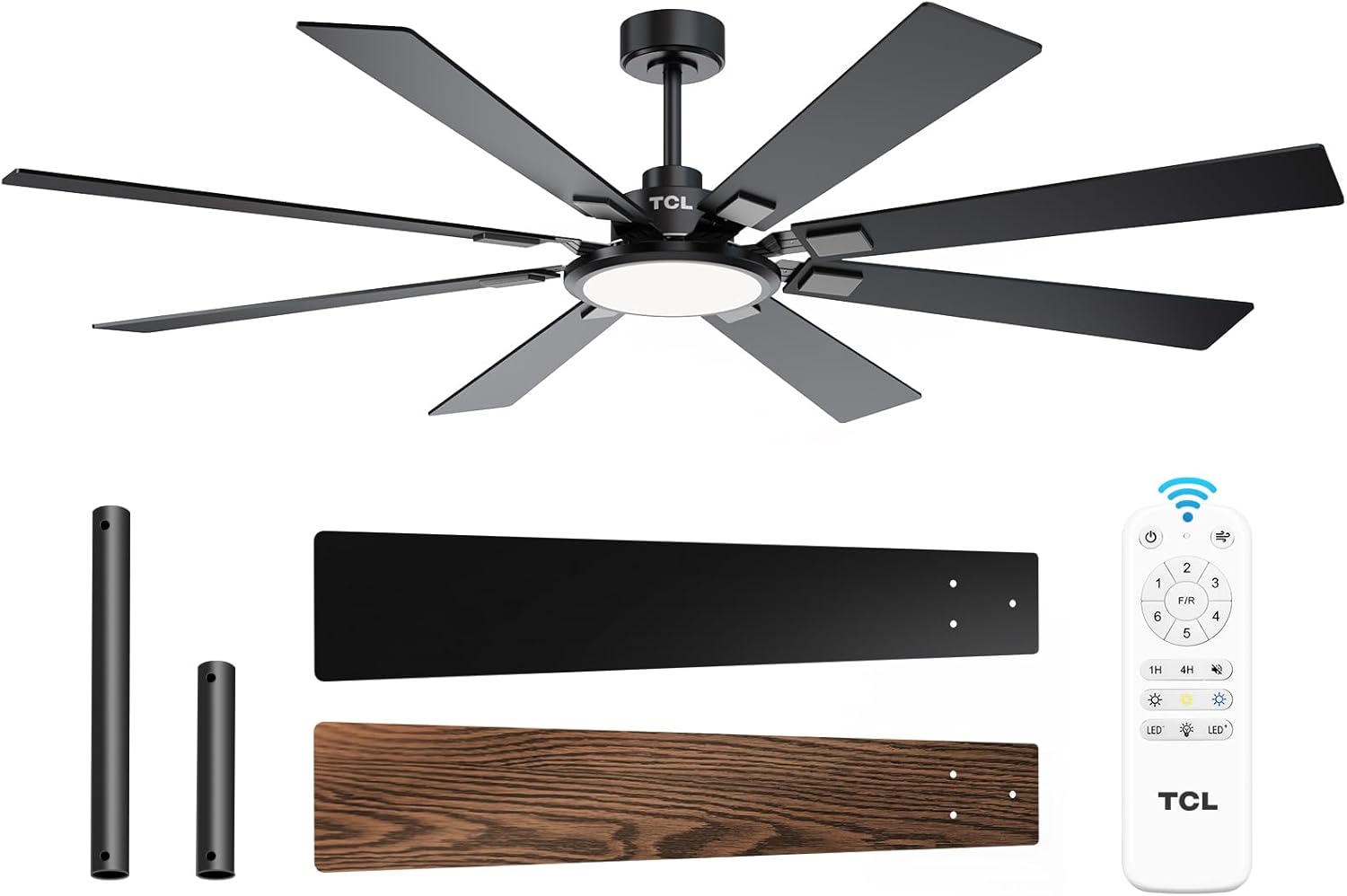
Figure 1: TCL 62-Inch Ceiling Fan Overview
Fa'amatalaga Saogalemu
Always follow basic safety precautions when installing and operating this appliance to reduce the risk of fire, electric shock, and personal injury.
- Faitau faatonuga uma: Familiarize yourself with the fan's components and installation steps before beginning.
- Saogalemu Faaeletise: Ensure the power is turned off at the circuit breaker before installation or servicing. All wiring must be in accordance with national and local electrical codes.
- Fa'amauina: The fan must be mounted to a structurally sound ceiling joist or outlet box capable of supporting the fan's weight (12.4 lbs).
- Fa'amama lau: Ia tausisia se mamao e le itiiti ifo i le 7 futu mai le fola i lau o le ili.
- Fa'atonuga fa'apitoa: Afai e te lē o mautinoa e uiga i uaea poʻo le faʻapipiʻiina, faʻafesoʻotaʻi se tagata eletise agavaa.
Seti ma Fa'apipi'i
Fa'aaofia Vaega
Before beginning installation, verify that all parts are present:
- 1 Ceiling Fan with 8 Blades
- Tusi Faʻatonuga (lenei pepa)
- Pulea Mamao
- Downrods (10-inch and 5-inch switchable)

Figure 2: Fan Components and Features
Laasaga Fa'apipi'i
- Tape le Malosi: Disconnect power at the main circuit breaker to avoid electrical shock.
- Fa'apipi'i Fa'amau Fa'amau: Securely attach the mounting bracket to the ceiling outlet box or a structural support. Ensure it can safely hold the fan's weight.
- Fa'apotopoto le Downrod: Choose the appropriate downrod (5-inch or 10-inch) and assemble it with the fan motor unit.
- Tautau le Fan: Si'i ma le faaeteete le fa'apotopotoga ili ma tautau i luga o le fa'amau fa'amau.
- Uaea: Connect the electrical wires according to the wiring diagram provided in the separate installation guide. Ensure all connections are secure.
- Fa'apipi'i Lau: Securely attach the 8 fan blades to the motor housing. Note that blades are reversible with black and wood-grain sides.
- Fa'apipi'i le Pusa Malamalama: Connect and install the LED light panel to the bottom of the fan.
- Faʻafoʻi Mana: A mae'a le fa'apipi'iina ma siaki uma feso'ota'iga, toe fa'afo'i le paoa i le ta'avale ta'avale.
Fa'atonu Vitio Taiala
Video 1: Step-by-step guide on how to install the TCL ceiling fan, demonstrating the ease of assembly and mounting.
Fa'atonuga o Galuega
Your TCL ceiling fan is operated using the included remote control. Ensure batteries are correctly installed in the remote.
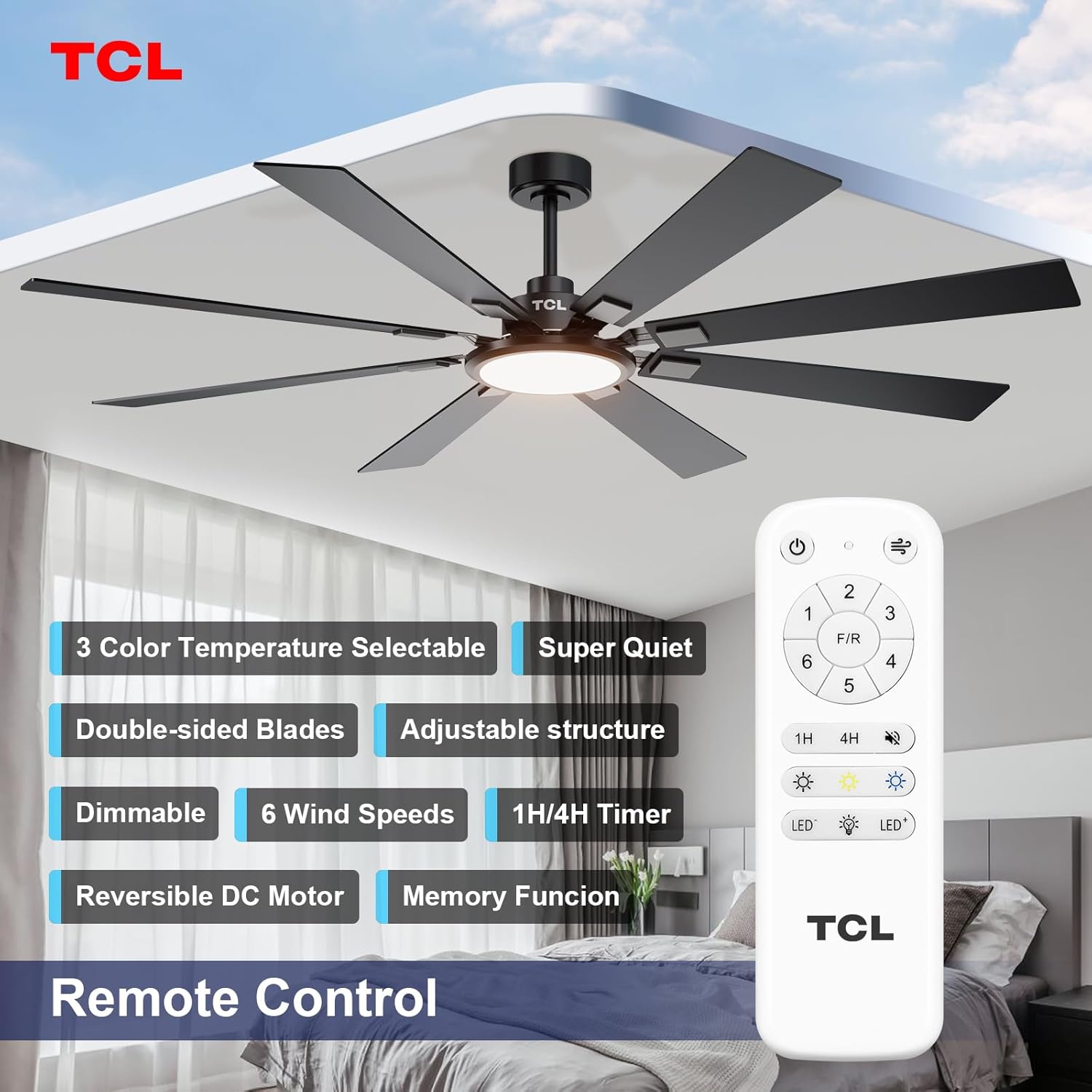
Figure 3: Remote Control Layout
Pule Saosaoa ili
The fan features 6 adjustable speeds to suit your comfort needs. Use the '1' through '6' buttons on the remote to select your desired speed.
- Laasaga 1-2: Low, comfortable wind for gentle air circulation.
- Laasaga 3-4: Medium, natural wind for moderate cooling.
- Laasaga 5-6: High, powerful wind for maximum cooling.
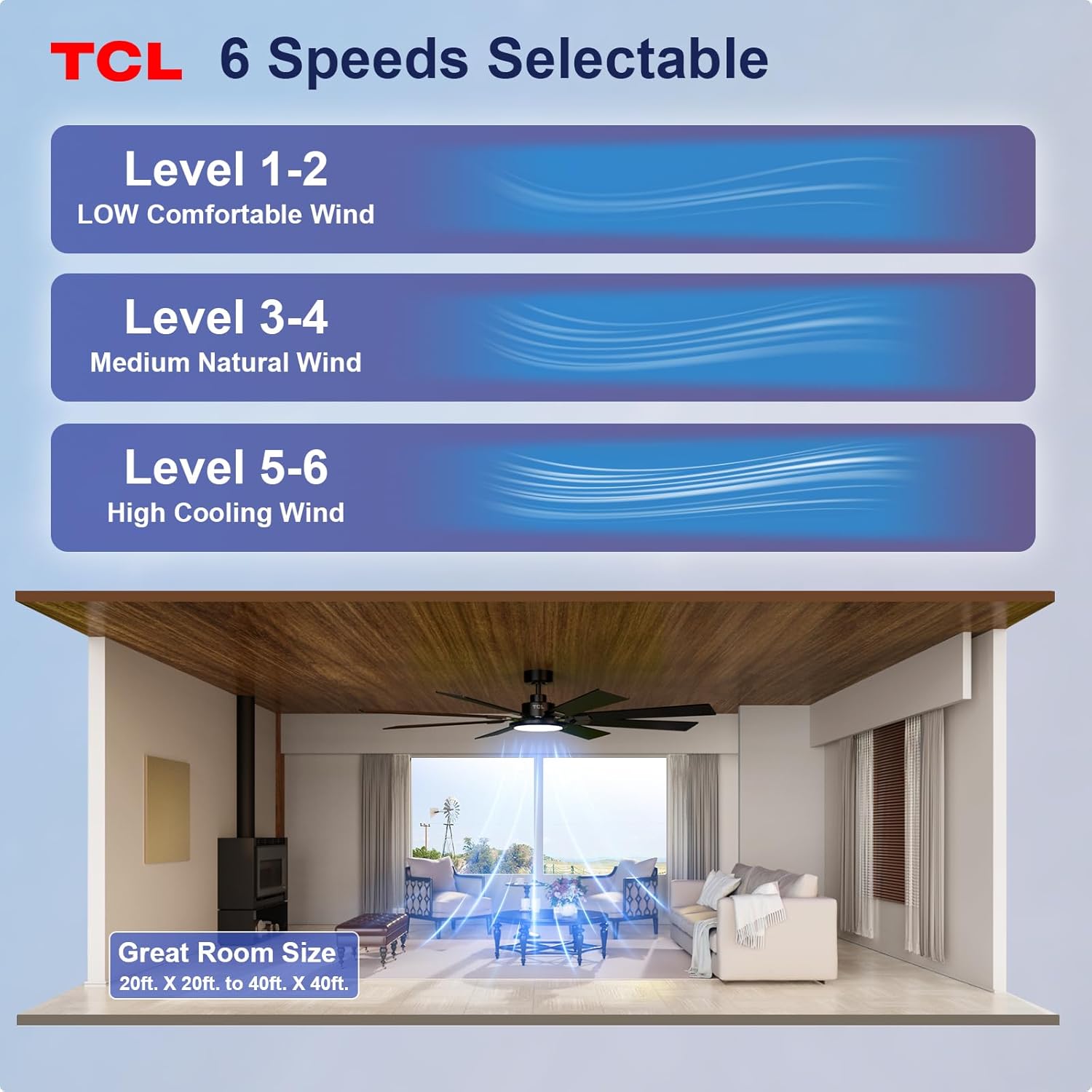
Figure 4: Fan Speed Settings
Gaoioiga Malamalama
The integrated LED light offers dimmable brightness and 3 color temperature options:
- Ki/Peti: Use the light button on the remote to turn the light on or off.
- Pouliuli: Use the dimming buttons (up/down arrows) to adjust brightness from 10% to 100%.
- Lanu Tevela: Cycle through 3000K (Warm White), 4000K (Natural White), and 6000K (Cool White) using the color temperature button.
- Galuega Fa'amanatu: The fan remembers your last light setting (brightness and color temperature) when turned off and on again. To ensure memory function works correctly, wait at least 20 seconds after turning off the light before turning it back on.

Figure 5: Customizable Light Settings
Fa'aliliuina DC afi
The fan features a reversible DC motor, allowing you to change the direction of airflow for year-round comfort. Use the 'F/R' button on the remote control.
- Faiga o le tau mafanafana (Fa'asolo i lalo le Ea): Blades rotate counter-clockwise, creating a downward breeze that provides a cooling effect.
- Faiga Taumalulu (A'a i luga): Blades rotate clockwise, drawing cool air up and pushing warm air down from the ceiling, helping to balance indoor heating.

Figure 6: Reversible DC Motor Function
Galuega o le Taimi
Set the fan to automatically turn off after a specified period using the timer buttons (1H/4H) on the remote control.
Gaioiina filemu
The fan is designed for noiseless operation, ensuring a peaceful environment.

Figure 7: Noiseless Operation Comparison
Galuega Vitio
Vitio 2: Ua umaview of the TCL ceiling fan, highlighting its modern design and large size suitable for various rooms.
Video 3: Demonstrates the cooling power and stylish lighting features of the TCL ceiling fan.
Vitio 4: O se fa'amatalaga atoaview of the TCL ceiling fan's features and benefits.
Tausiga
O le tausiga masani e fa'amautinoa ai le lelei o le fa'atinoga ma fa'aumiina ai le umi e ola ai lau ili fa'alo.
- Fa'amamaina: Fa'amama i lea taimi ma lea taimi lau ili ma le fale afi i se malu, oamp ie. Aua ne'i fa'aogaina ni mea e fa'amama fa'amama po'o ni so'o. Ia mautinoa ua pe le paoa a'o le'i faamamaina.
- Su'ega o lau: Check fan blades for any cracks or damage. Replace damaged blades immediately.
- Fa'amau fa'amau: Over time, screws may loosen. Periodically check and tighten all screws on the motor housing and blade attachments.
- Light Cover: Ensure the light cover is securely fastened.
Fa'afitauli
Afai e te feagai ma faʻafitauli ma lau ili, vaʻai i faʻafitauli masani ma fofo:
| Fa'afitauli | Mafuaaga e ono tupu | Fofo |
|---|---|---|
| E le amata le ili | Leai se malosi i le ili; So'oga uaea matala; Ma'a fa'atonu mamao ua mate. | Siaki le va'ava'a; Fa'amautinoa ua malupuipuia uma feso'ota'iga uaea; Sui maa fa'atonu mamao. |
| E le aoga le malamalama | Loose wire connection; LED panel issue. | Check light kit wiring; Contact customer support if LED panel is faulty. |
| Fa'atetetete tele | Loose blades or mounting hardware; Unbalanced blades. | Ensure all blade screws and mounting screws are tight; Use a balancing kit (not included) if necessary. |
| Ta'aga pisapisao | Loose screws; Motor issue. | Tighten all screws; If noise persists, contact customer support. |
Fa'amatalaga
Detailed technical specifications for the TCL 62-inch ceiling fan:
| Fa'aaliga | Fa'amatalaga |
|---|---|
| Fa'ailoga | TCL |
| Numera Fa'ata'ita'i | HFSB-000000D |
| Tele | 62 Inisi |
| Lanu | Lanu uliuli |
| Mea | Uamea, Laau |
| Sitaili | Fa'aonaponei |
| Fa'aoga i totonu/I fafo | I totonu, i fafo |
| Punavai Malosi | DC |
| Metotia Pulea | Mamao |
| Punavai Malamalama | LED |
| Numera o Punavai Malamalama | 1 |
| Voltage | 120 Volts |
| Lanu Malamalama | Mafanafana i le mālū Pa'epa'e (2700K-6500K) |
| Uatage | 66 watts |
| Malamalama | 3000 Lumen (Maualuga) |
| Lelei | LED, Dimmable |
| Mea mamafa | 12.4 pauna |
| Fua (L x W x H) | 72"L x 72"W x 20"H (Note: Product is 62-inch, this dimension might refer to overall span) |
| UPC | 846042019989 |
Fa'amaonia ma Lagolago
Fa'amatalaga Fa'amaonia
This TCL ceiling fan is covered by a limited manufacturer's warranty. Please refer to the warranty card included in your product packaging for specific terms, conditions, and duration. Retain your proof of purchase for warranty claims.
Lagolago Tagata Fa'atau
For technical assistance, troubleshooting not covered in this manual, or warranty inquiries, please contact TCL customer service. Contact information can typically be found on the product packaging or the official TCL webnofoaga.