
1. Folasaga
This manual provides detailed instructions for the safe and effective use of your Moukey MPS5 Portable Karaoke Machine. Please read this manual thoroughly before operating the device and retain it for future reference. The MPS5 is a versatile portable speaker system designed for various audio playback needs, including karaoke, music streaming, and public address, featuring wireless microphones and multiple connectivity options.
2. O a mea oi totonu o le Pusa
Aveese ma le fa'aeteete mea uma mai le pusa. Ia mautinoa o lo'o iai vaega uma o lo'o lisiina i lalo ma o lo'o iai i se tulaga lelei.
- Moukey MPS5 Portable Karaoke Machine (1 unit)
- Wireless Microphones (2 units)
- Uaea Totogi USB (1 iunite)
- 3.5mm AUX Cable (1 unit)
- Shoulder Strap (1 unit)
- Tusi Taiala (1 iunite)
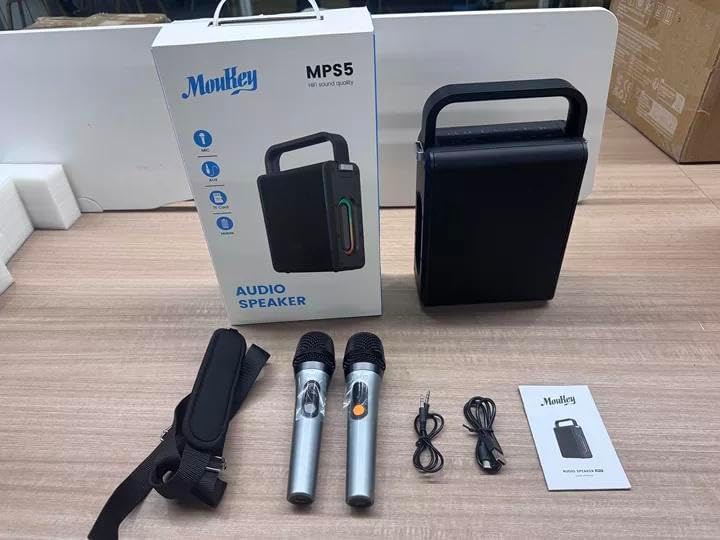
Image: All components included in the Moukey MPS5 package.
3. Oloa Ua Ovaview
The Moukey MPS5 is a compact yet powerful portable karaoke machine. It features a robust design with integrated LED lighting on the sides, enhancing the user experience. A sturdy handle and an included shoulder strap provide convenient portability.
Ata: Luma view of the Moukey MPS5 speaker.

Ata: Itu view of the Moukey MPS5, showing the LED lighting.
4. Vaega Autu
- Excellent Sound Output: The MPS5 delivers 200W peak power (RMS 60W) through a 4-inch woofer and two 2-inch tweeters, providing full-range stereo sound with enhanced bass.
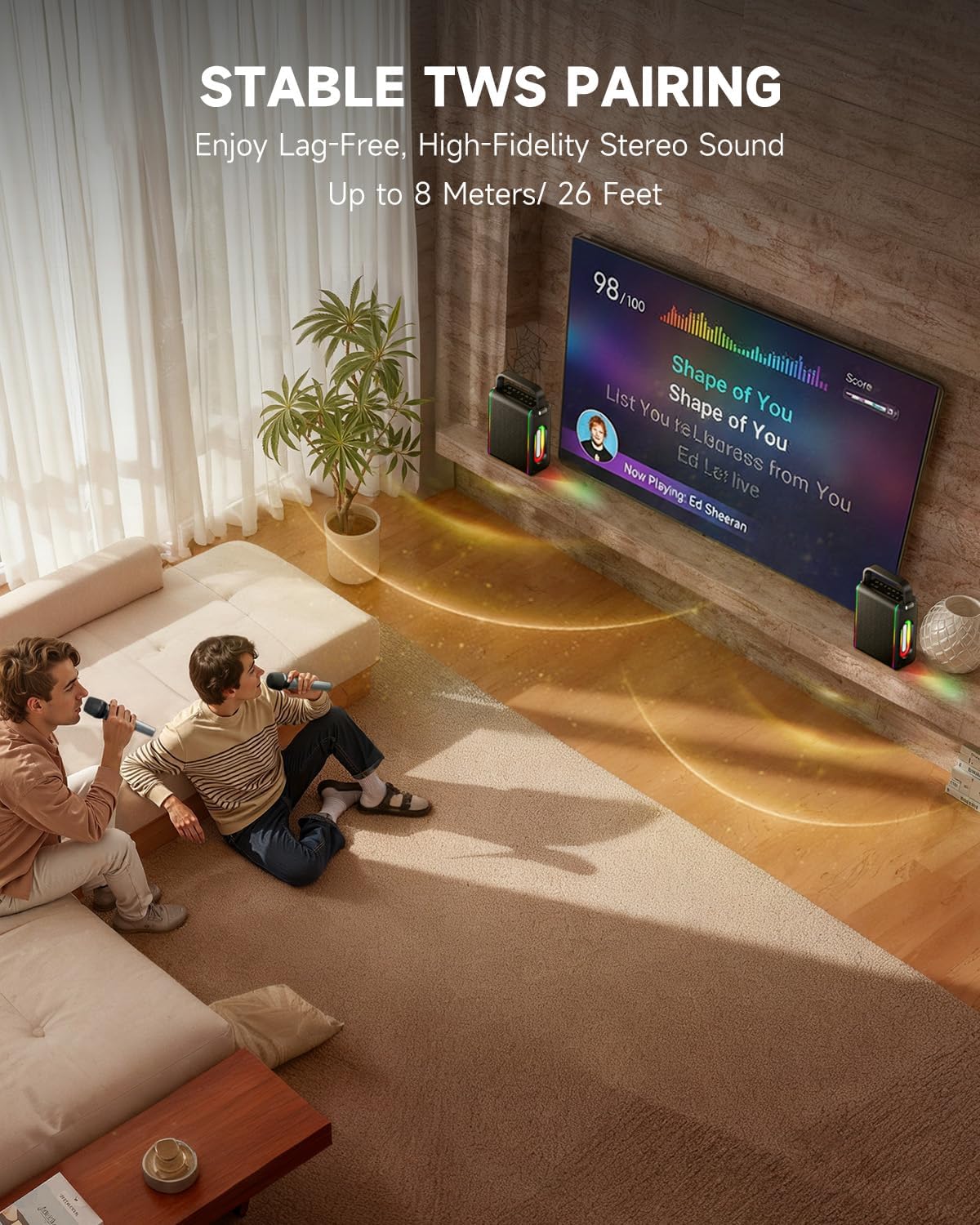
- Powerful Functionality: Supports Bluetooth 5.3 for wireless connection to various devices. Also includes Micro TF card, Flash USB, MP3, and AUX IN playback options. Features stable TWS (True Wireless Stereo) pairing for connecting two MPS5 units for a wider stereo soundstage.
- Ma'a Tele-Uumi Ola: The rechargeable battery provides up to 8 hours of continuous music playback on a 2-hour charge, suitable for extended use indoors or outdoors.
- Fuafuaga mama ma feavea'i: Weighing only 2kg, the MPS5 is designed for easy transport. It can be carried by hand using the integrated handle or with the included shoulder strap.
- Lua Uelese Microphones: Includes two 2.4Ghz rechargeable microphones with a connection range of up to 60 feet and up to 8 hours of use time per charge (2-3 hours charging time). Features one-tap connectivity for effortless pairing.

Image: Internal speaker components of the MPS5.

Image: MPS5 connected to multiple devices via Bluetooth.

Image: Battery life and charging details for the MPS5.

Image: Demonstrating the portability of the MPS5 with hand and shoulder strap options.

Image: The two wireless microphones for the MPS5.
5. Seti
5.1 Charging the Speaker and Microphones
Before first use, fully charge the MPS5 speaker and both wireless microphones.
- Fofoga Fetalai: Connect the provided USB Type-C cable to the charging port on the speaker and to a compatible USB power adapter (not included). The charging indicator light will show charging status. A full charge takes approximately 2 hours.
- Microphones: Each microphone has a charging port. Connect them to a USB power source using the provided USB cable. Charging time for microphones is 2-3 hours.
5.2 Malosi / Malosi
- To power on the speaker, press and hold the power button (U) on the top panel for 2 seconds.
- To power off, press and hold the power button (U) toe 2 sekone.
5.3 Fa'atasiga Bluetooth
- Ensure the MPS5 speaker is powered on and in Bluetooth mode (indicated by a blue LED). If not, press the 'M' (Mode) button to switch to Bluetooth mode.
- I luga o lau masini feavea'i (smartphone, tablet, etc.), fa'agaoioi le Bluetooth ma su'e masini avanoa.
- Select 'Moukey MPS5' from the list of devices to pair. A voice prompt will confirm successful connection.
5.4 Fa'apipi'iina o le TWS (True Wireless Stereo)
To achieve stereo sound, you can pair two Moukey MPS5 speakers together.
- Ensure both MPS5 speakers are powered on and in Bluetooth mode, but not connected to any other device.
- On one of the speakers, double-press the 'M' (Mode) button. The speaker will enter TWS pairing mode.
- The two speakers will automatically connect to each other. A voice prompt will confirm successful TWS pairing.
- Once TWS is established, connect your mobile device to one of the MPS5 speakers via Bluetooth as described in section 5.3. Both speakers will then play audio in stereo.
Vitio: Fa'atopetopeview of the MPS5 Karaoke Machine, demonstrating TWS pairing and other features.
6. Fa'atonuga o Galuega
6.1 Pulea i lugaview
The top panel of the MPS5 speaker features several buttons for controlling playback, volume, and microphone settings.
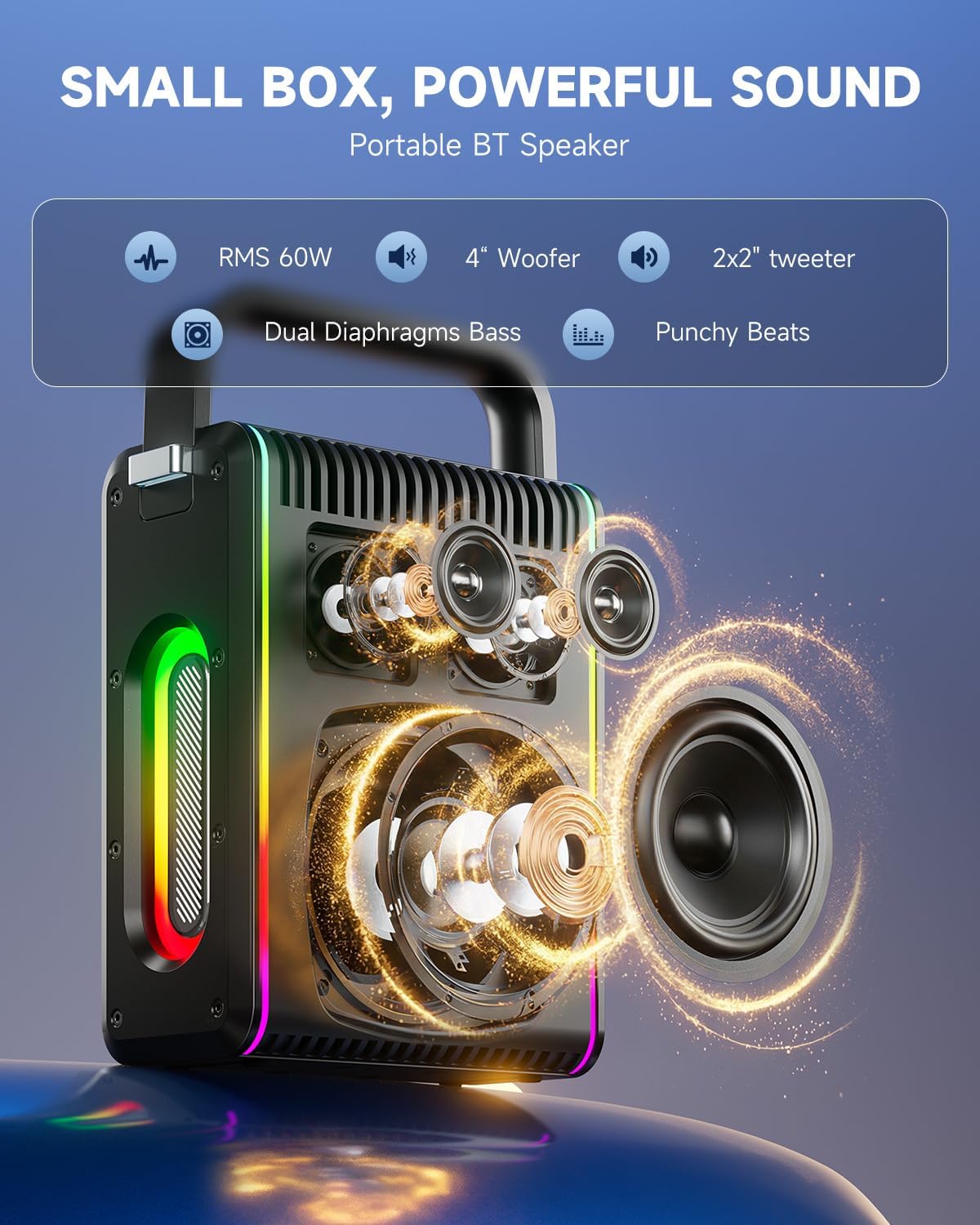
Image: Top control panel of the MPS5.
- Malosi (U): Oomi ma taofi mo le 2 sekone e fa'aola/ tape ai.
- Fa'amau (M): Short press to cycle through input modes (Bluetooth, AUX, USB, TF Card). Double-press to initiate TWS pairing.
- Microphone Volume (Mic - / Mic +): Adjusts the volume of the connected microphones.
- Echo Adjustment (R- / R+): Adjusts the echo effect for the microphones.
- Ta'alo/Taofi (▶): Ta'alo pe taofi le pese o iai nei.
- Volume Down (-): Decreases the main speaker volume.
- Volume Up (+): Increases the main speaker volume.
- EQ A/E: Short press to switch between EQ modes. Long press to toggle between original sound and accompaniment elimination.
6.2 Fa'aogaina o le masini faaleotele leo
The MPS5 comes with two wireless microphones for karaoke and vocal performances.
- Malosi/Pepe: Oomi ma uu le faamau malosi i luga o le masini faaleotele leo e ki ai pe tape ai.
- Fa'atasi: The microphones are pre-paired with the speaker. If re-pairing is needed, ensure the speaker is on, then power on the microphone. They should connect automatically.
- Microphone Disconnect/Reconnect: Press the dedicated microphone button on the speaker's control panel to quickly disconnect or reconnect the microphones.
6.3 Faiga o le Ulufaleina o Leo
In addition to Bluetooth, the MPS5 supports several wired and local storage input options.

Image: Input ports on the MPS5 speaker.
- Ulufale AUX: Connect an external audio device using the 3.5mm AUX cable. Select AUX mode using the 'M' button.
- USB toe taʻalo: Fa'aofi se USB flash drive o iai le leo MP3 files i totonu o le uafu USB. O le a otometi lava ona sui le sipika i le faiga USB ma amata loa ona toe ta le leo.
- Ta'aloga TF Card: Insert a Micro TF card containing MP3 audio files into the TF card slot. The speaker will automatically switch to TF card mode and begin playback.
6.4 Uila moli
The MPS5 features dynamic LED lighting on its sides. Use the dedicated LED button (if available, or refer to the 'M' button for light control if combined) to cycle through different light modes or turn them off.
7. Tausiga
- Fa'amamaina: Faaaoga se ie vaivai ma mago e faamama ai le pito i fafo o le sipika. Aua le faaaogaina ni vai faamama po o ni mea e olo ai.
- Teuina: Teu le masini i se nofoaga malulu, matutu mamao ese mai le susulu o le la ma le vevela tele.
- Tausiga maa: Ina ia faaumiumi le ola o le maa, aloese mai le lafoaia atoatoa o le maa i taimi uma. Totogi le masini i taimi uma, tusa lava pe le o faʻaaogaina mo se taimi umi.
8. Faʻafitauli
If you encounter issues with your Moukey MPS5, refer to the following common problems and solutions:
| Fa'afitauli | Mafuaaga e ono tupu | Fofo |
|---|---|---|
| Leai se mana | Ua uma le maa. | Totogi le failauga e fa'aaoga ai le uaea USB Type-C. |
| Leai se leo mai le sipika | Volume is too low or muted. Incorrect input mode selected. | Increase volume using the '+' button. Press 'M' to cycle through input modes. |
| Ua le manuia le feso'ota'iga Bluetooth | Speaker is not in pairing mode. Device is too far. | Ensure speaker is in Bluetooth mode. Move device closer to speaker. Try restarting both devices. |
| Ua le aoga le masini faaleotele leo | Microphone is off or uncharged. Microphone is disconnected. | Ensure microphone is charged and powered on. Press the microphone button on the speaker to reconnect. |
| Ua le manuia le fa'atasiga TWS | Speakers are already connected to another device. | Ensure both speakers are not connected to any other Bluetooth device before initiating TWS pairing. |
9. Fa'amatalaga
- Fa'ailoga: Moukey
- Numera Fa'ata'ita'i: MPS5
- Tuuina atu Wattage: 200 Watts (Peak)
- Tekinolosi Feso'ota'i: Bluetooth 5.3
- Fa'alogo leo: Bluetooth, TF card, USB, MP3, AUX, Wired microphones
- Numera o Auala: 2
- Punavai Malosi: Malosi maa
- Ituaiga Feso'ota'i: USB Ituaiga C
- Ituaiga Mea (L x W x H): 2.36 x 6.3 x 12.2 inisi
- Mea mamafa: E tusa ma le 2 kilokalama
- Meafaigaluega talafeagai: Smartphone, Tablet, Laptop, MP3 Player, Microphone
- Lanu: Black with Silver Accents
10. Tuutuuga & Lagolago
The Moukey MPS5 Portable Karaoke Machine comes with a 1-Tausaga Fa'amaonia mai le aso na faʻatau ai. O lenei tusi saisai e aofia ai mea sese o le gaosiga ma le faiga o galuega i lalo o le faʻaaogaina masani. Faʻamolemole taofi lau faʻamaoniga o le faʻatau mo tagi mo le tusi saisai.
For technical support, troubleshooting assistance, or warranty inquiries, please contact Moukey customer service through the retailer where the product was purchased or visit the official Moukey webnofoaga mo faʻamatalaga faʻafesoʻotaʻi.