
Target TT-IK-DST 1130
Target TT-IK-DST 1130 Tower Speaker User Manual
Model: TT-IK-DST 1130
1. Folasaga
This manual provides essential instructions for the safe and efficient operation of your Target TT-IK-DST 1130 Tower Speaker. Please read this manual thoroughly before using the product and retain it for future reference. The Target TT-IK-DST 1130 is a versatile audio system featuring 130W RMS output, an 8-inch subwoofer, Bluetooth connectivity, FM radio, USB playback, and karaoke functionality with a wireless microphone.
2. Fa'amatalaga Taua mo le Saogalemu
Mata'ituina puipuiga nei mo le saogalemu e puipuia ai le te'i eletise, mu, po'o le faaleagaina o le iunite:
- Aua le faʻaalia lenei mea faigaluega i le timu poʻo le susu.
- Aua ne'i poloka so'o se avanoa e savili ai.
- Ia mautinoa ua sa'o lelei le fa'avaeina o le sapalai o le eletise.
- Do not open the speaker cabinet; refer all servicing to qualified personnel.
- Aloese mai le tu'uina o le iunite i tafatafa o mea e maua ai le vevela po'o le susulu sa'o o le la.
- Fa'amama na'o se ie mago.
3. Mea i totonu o le afifi
Fa'amaonia o mea uma o lo'o lisiina i lalo o lo'o aofia i lau afifi:
- Target TT-IK-DST 1130 Tower Speaker
- Uaea le faaleotele leo
- Pulea Mamao
- Uaea Malosi
- Tusi Lesona a le Tagata (lenei pepa)
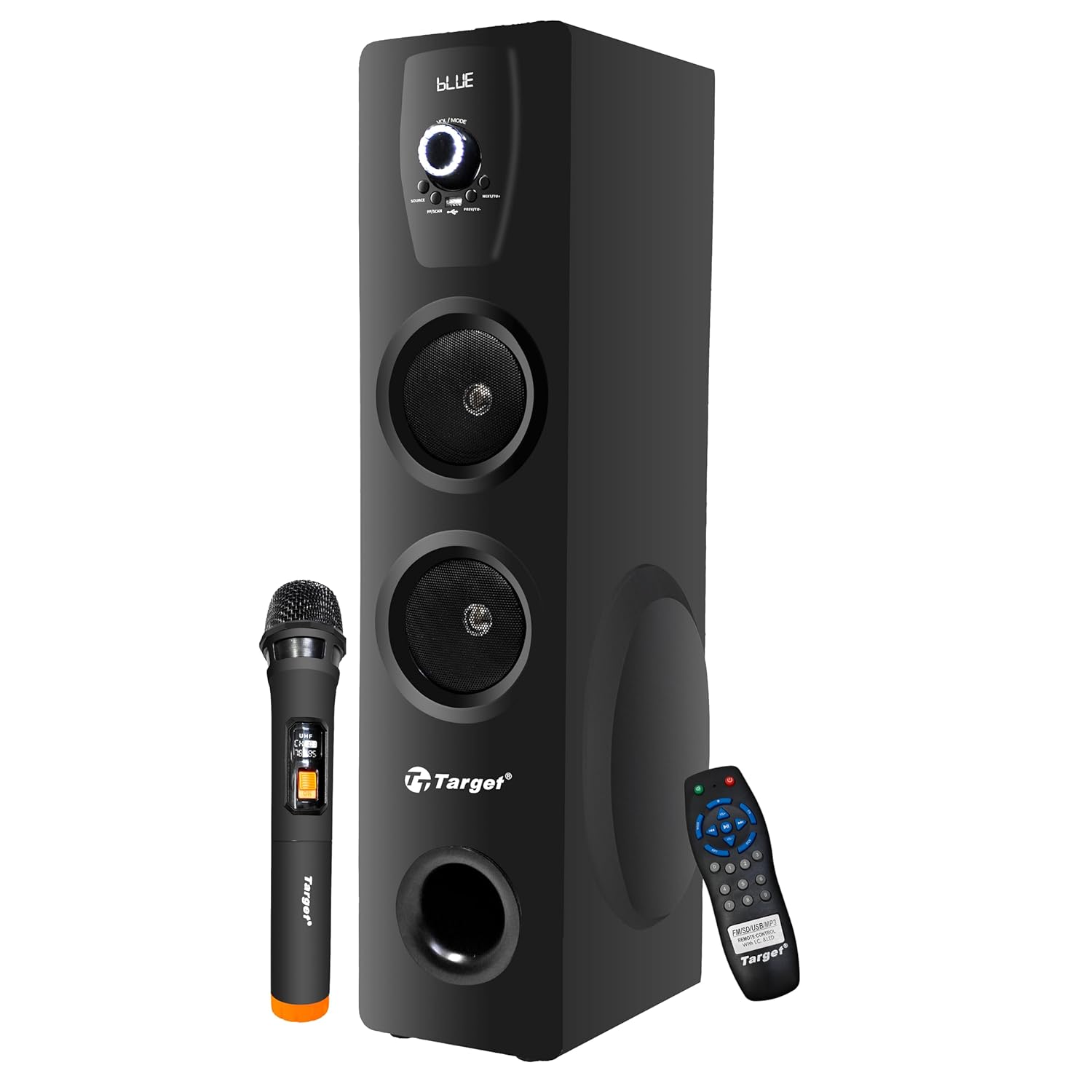
Figure 3.1: Target TT-IK-DST 1130 Tower Speaker with included wireless microphone and remote control.
4. Oloa Ua Ovaview
The Target TT-IK-DST 1130 Tower Speaker is designed for a comprehensive audio experience. It features multiple input options and a user-friendly interface.
4.1 Vaega Autu
- Malosi Leo Sau: 130 Watts RMS with dual drivers and an 8-inch subwoofer for deep bass.
- Feso'ota'iga Tele: Bluetooth for wireless streaming, USB port for media playback, and FM radio.
- Fa'atinoga o le Karaoke: Includes a wireless microphone for vocal performances.
- Fa'amatalaga Fa'amatalaga: LED display for status indication and a full-function remote control.
- Fesootaiga i komepiuta: Plug-and-play setup for direct connection to PCs.

Figure 4.1: Visual representation of the speaker's main features.
4.2 Vaega Pulea
The main controls are located on the front panel of the speaker. These include the master volume knob, input selection buttons, and playback controls.

Ata 4.2: Auiliiliga view of the speaker's control panel.
4.3 Pulea Mamao
The included remote control allows for convenient operation of all speaker functions from a distance.

Figure 4.3: Remote control and key feature icons.
5. Fa'atonu Fa'atonu
5.1 Tulaga
Place the tower speaker on a stable, flat surface. Ensure there is adequate space around the speaker for proper ventilation and optimal sound dispersion. Avoid placing it in enclosed spaces or directly against walls if possible.
5.2 So'oga Malosi
- Connect the power cord to the power input port on the rear of the speaker.
- Fa'afeso'ota'i le isi pito o le uaea eletise i se so'o eletise AC masani.
- Press the power button on the speaker or remote control to turn on the unit. The LED display will illuminate.
5.3 Fa'afeso'ota'i Punaoa Leo
The speaker supports various audio input methods:
- Bluetooth: Mo feso'ota'iga uaealesi i smartphones, tablets, po'o isi masini fa'aoga Bluetooth.
- USB: Mo le taina leo files sa'o mai le USB flash drive.
- AUX/Line-In: For wired connection to devices using a 3.5mm audio cable.
- Leitio FM: Built-in tuner for receiving FM broadcasts.
- HDMI: Mo le feso'ota'iga leo numera mai masini fetaui.
6. Fa'atonuga o Galuega
6.1 Malosi / Malosi
Oomi le MANA button on the control panel or remote control to turn the speaker on or off.
6.2 Filifiliga Faiga
Oomi le TULAGA button on the control panel or remote control to cycle through available input modes: Bluetooth, USB, FM Radio, AUX, HDMI.
6.3 Fa'aoga Bluetooth
- Turn on the speaker and select Bluetooth mode. The LED display will show "BLUE" or a similar indicator.
- Fa'agaoioi le Bluetooth i lau masini feavea'i ma su'e mo masini avanoa.
- Filifili"TT-IK-DST 1130" (or similar name) from the list to pair.
- Once paired, you can play audio from your device through the speaker.
6.4 USB Playback
- Fa'aofi se kiliva USB e iai le leo files i totonu o le uafu USB i luga o le sipika.
- Filifili USB mode. The speaker will automatically detect and begin playing audio files.
- Use the playback controls (Play/Pause, Next, Previous) on the speaker or remote control.
Leitio 6.5 FM
- Filifili FM faiga.
- Oomi le SU'E button (if available) on the remote or speaker to automatically search and save available radio stations.
- Fa'aaoga le MUA/SOSI ki e faʻataʻamilo ai i nofoaga ua sefe.
6.6 Galuega Karaoke
- Ensure the wireless microphone is powered on and within range of the speaker.
- Play your desired background music through any input mode (Bluetooth, USB, AUX, HDMI).
- Adjust the microphone volume using the dedicated control (if available) or the main volume.

Figure 6.1: Using the wireless microphone for karaoke.
7. Tausia ma Tausiga
- Fa'amamaina: Faaaoga se ie vaivai ma mago e faamama ai le pito i fafo o le sipika. Aua le faaaogaina ni vai faamama po o ni vailaau e olo ai le leo.
- Teuina: A le fa'aaogaina mo se taimi umi, teu le sipika i se nofoaga malulu, matutu, mamao ese mai le susulu o le la ma le vevela tele.
- Savili: Ia mautinoa e le o poloka avanoa e fa'afefe ai le ea e puipuia ai le so'ona vevela.
8. Faʻafitauli
Afai e te feagai ma faʻafitauli ma lau failauga, vaʻai i faʻafitauli masani ma fofo:
| Fa'afitauli | Mafuaaga e ono tupu | Fofo |
|---|---|---|
| Leai se mana | Ua le feso'ota'i; Ua le ola le paoa. | Siaki le feso'ota'iga uaea eletise; Su'e se isi fa'atau. |
| Leai se leo | Volume too low; Incorrect input mode selected; Audio cable loose. | Increase volume; Select correct input mode; Reconnect audio cables. |
| Le feso'ota'i le Bluetooth | Speaker not in pairing mode; Device Bluetooth off; Device too far. | Ensure speaker is in Bluetooth mode; Turn on device Bluetooth; Move device closer. |
| Ua le galue le faaleotele leo karaoke | Microphone not powered on; Batteries low; Microphone out of range. | Check microphone power; Replace batteries; Move microphone closer to speaker. |
9. Fa'amatalaga Fa'apitoa
| Fa'aaliga | Fa'amatalaga |
|---|---|
| Fa'ata'ita'iga | TT-IK-DST 1130 |
| Fa'ailoga | Sini |
| Fa'alogo leo | 130 Watts RMS |
| Lapo'a Subwoofer | 8 inisi |
| Feso'ota'i | Bluetooth, USB, FM Radio, AUX, HDMI |
| Tali Faatele | 20 Hz (Lower limit only provided) |
| Fa'alavelave | 8 Ohm |
| Numera o Auala | 2 |
| Mea | Laau Fa'ainisinia |
| Fua o Mea (L x W x H) | 22 x 25 x 90 cm |
| Mea mamafa | 1.5 kilokalama |
| Punavai Malosi | Uaea Eletise |
Manatua: O faʻamatalaga e mafai ona suia e aunoa ma se faʻaaliga muamua.
10. Fa'amaonia ma le Fesoasoani mo Tagata Fa'atau
For warranty information, service, or technical support, please contact your retailer or the manufacturer directly. Keep your purchase receipt as proof of purchase for warranty claims.
Manufacturer: Target
Ask a question about this manual
Ask about setup, troubleshooting, compatibility, parts, safety, or missing instructions. Manuals+ will review the question and use this page’s manual context to help answer it.