
1. Folasaga
This manual provides instructions for the Ceybo EN2D36H ZDA1221216 Replacement Remote Control. This remote is designed to be fully compatible with various Hisense VIDAA Smart TV models, offering a direct replacement without the need for complex programming. Simply insert batteries, and the remote is ready for use.
The remote features dedicated shortcut buttons for popular streaming services, allowing quick access to your favorite entertainment platforms.
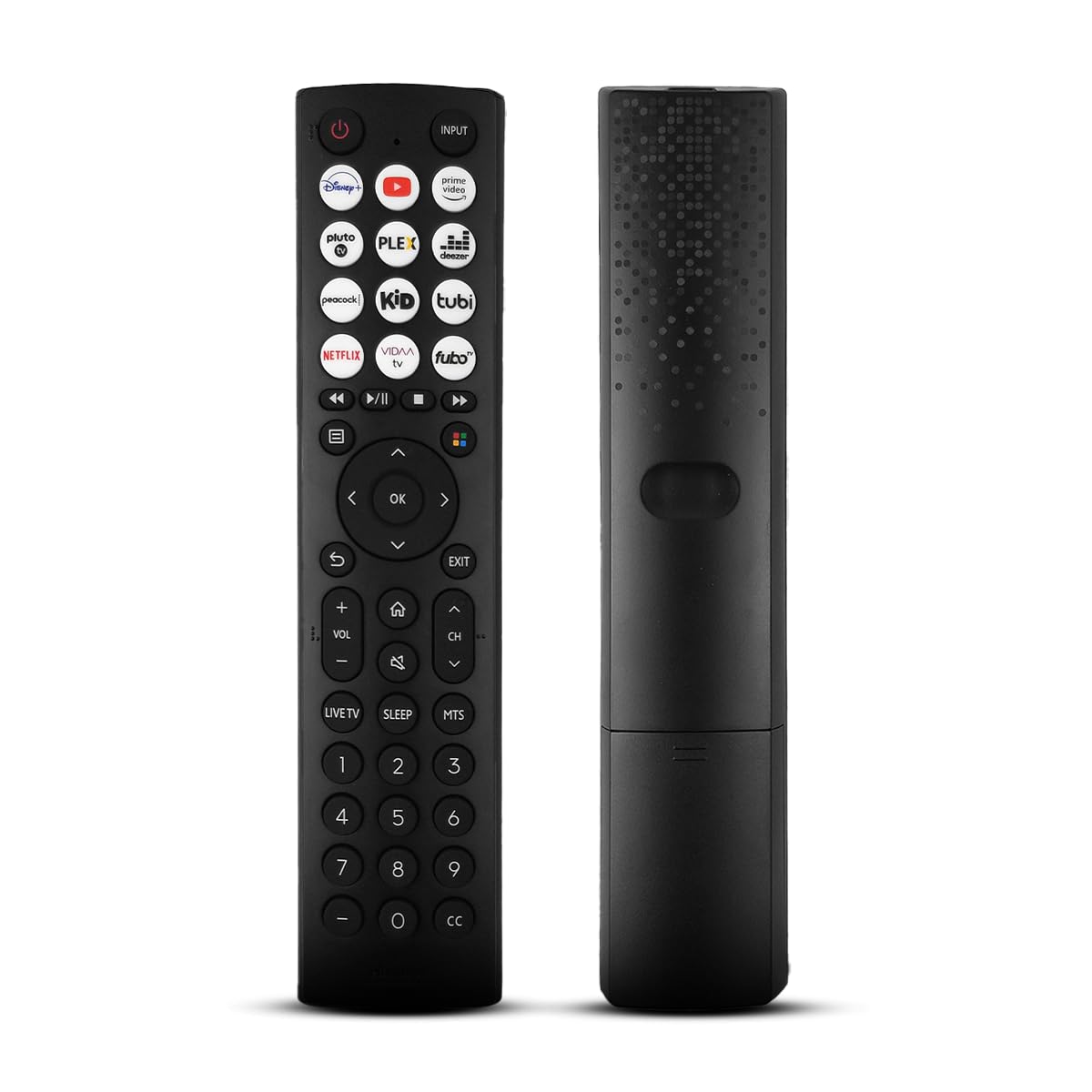
O luma view of the Ceybo EN2D36H ZDA1221216 replacement remote control, designed for Hisense televisions.
2. Vaega
- Feso'ota'iga lautele: Works with Hisense A4 Series UHD TVs and A6 Series UHD Smart TVs, including models such as 32A35HUV, 32A45GV, 40A35HUV, 40A45GV, 43A6GV, 43A35HUV, 43A45GV, 50A6GV, 55A6GV, and 65A6GV.
- Instant Streaming Access: Dedicated shortcut buttons for Disney+, YouTube, Prime Video, Pluto TV, Plex, Deezer, Peacock, Kidoodle, Tubi, Netflix, Vida, and Fubo.
- Galuega Fa'atino o le Plug & Play: No setup or programming required. The remote is ready to use immediately after battery installation.
- Full TV Control: Provides comprehensive control over TV functions including power, volume, input selection, channel navigation, and menu access.
- Fuafuaga Ergonomic: Mama ma mamanuina mo le taulimaina lelei.

This image displays the Ceybo EN2D36H ZDA1221216 remote control alongside several Hisense televisions, illustrating its compatibility with Hisense A4 and A6 Series UHD Smart TVs.
3. Seti
The Ceybo EN2D36H ZDA1221216 remote control is designed for immediate use without any programming steps.
3.1 Fa'apipi'i ma'a
- Su'e le vaega o le maa i tua o le masini mamao.
- Slide the battery cover downwards or press the latch and lift to open.
- Fa'aofiofi maa AAA se lua (2), ia mautinoa le fetaui lelei (+) ma le leaga (-) ma fa'ailoga i totonu o le vaega.
- Toe fa'apipi'i le ufi o le maa e ala i le toe fa'ase'e i lona nofoaga se'ia kiliki lelei.
Once batteries are installed, the remote is ready to operate your compatible Hisense TV.

This image illustrates the battery compartment of the remote control, indicating that it is powered by two AAA batteries for lasting performance.

This image emphasizes the effortless setup of the remote control, stating that it requires no pairing and is ready to use immediately after battery insertion.
4. Fa'atonuga o Galuega
Point the remote control directly at your Hisense TV's infrared receiver for optimal performance.
4.1 Galuega Autu
- Malosi (⏻): Fetaomi e ki le TV pe tape.
- Fa'amau fa'aofi: Press to cycle through available input sources (HDMI, AV, etc.).
- Volume i luga/lalo (VOL +/-): Fetuuna'i le leo o le TV.
- Ala i luga/I lalo (CH +/-): Suia le ala TV.
- Faagogo (🔇): Gūgū pe fa'atala le leo o le TV.
4.2 Navigation and Menu
- Fa'asinomaga Fa'asino (Lua, Lalo, Agavale, Taumatau): E su'e i totonu o lisi ma filifiliga i luga o le lau.
- OK Faʻamau: Fa'amaonia filifiliga pe tatala menus.
- Ki tua (↩): Toe fo'i i le lau muamua po'o le lisi.
- Ki fafo: Tu'u ese mai le lisi o lo'o iai nei po'o le talosaga.
- Ki o le Fale (🏠): Accesses the TV's main smart hub or home screen.
4.3 Streaming Shortcut Buttons
Press any of the dedicated shortcut buttons to directly launch the corresponding streaming application:
- Disney+
- YouTube
- Palemia Vitio
- Pluto TV
- Plex
- Deezer
- Peacock
- Kidoodle
- Tubi
- Netflix
- Vida
- Fubo

The remote control is shown with a magnified view of its dedicated shortcut buttons for popular streaming services like Disney+, YouTube, Prime Video, Pluto TV, Plex, Deezer, Peacock, Kidoodle, Tubi, Netflix, Vida, and Fubo.

The remote control is presented to highlight its user-friendly design, featuring large and clearly labeled buttons for intuitive navigation and access to all functions.
5. Tausiga
5.1 Fa'amamāina
Mo le fa'amamāina o le remote control, fa'aaoga se ie vaivai ma mago. Mo palapala faigata, fa'amamā māmā.ampen the cloth with water. Avoid using harsh chemicals, abrasive cleaners, or solvents, as these can damage the remote's surface or internal components.
5.2 Suiga maa
Replace batteries when the remote's response becomes sluggish or it stops functioning. Always replace both AAA batteries at the same time with new ones. Do not mix old and new batteries, or different types of batteries, as this can lead to leakage or improper operation. Dispose of used batteries according to local regulations.
6. Faʻafitauli
If you experience issues with your Ceybo EN2D36H ZDA1221216 remote control, refer to the following common solutions:
| Fa'afitauli | Mafuaaga e ono tupu | Fofo |
|---|---|---|
| E le o galue mamao. | Pepe pe sese le faaofiina o maa. | Replace batteries with new AAA batteries, ensuring correct polarity (+/-). |
| Le mamao e le tali mai. | Obstruction between remote and TV, or remote is too far. | Ensure a clear line of sight to the TV's IR receiver. Move closer to the TV. |
| Specific buttons are not working. | Dirt or debris under the button, or internal malfunction. | Clean the remote. If the issue persists, the remote may require replacement. |
| TV does not respond to remote. | TV's IR receiver is blocked or malfunctioning. | Check the TV's IR receiver for obstructions. Test with another remote if available to confirm TV functionality. |
7. Fa'amatalaga
- Fa'ailoga: Ceybo
- Igoa Fa'ata'ita'i: EN2D36H ZDA1221216
- Tekinolosi Feso'ota'i: Infrared (IR)
- Pule Ituaiga: Pule Pule
- Meafaigaluega talafeagai: Television (Hisense VIDAA Smart TVs)
- Punavai Malosi: 2 x AAA maa (e le o aofia ai)
- Avanoa aupito maualuga: 30 Futu (pe tusa 9 mita)
- Mea Fa'apitoa: Ergonomic, Lightweight, No Programming Required
- Lanu: Lanu uliuli
8. Fa'amaonia ma Lagolago
For warranty information or technical support, please refer to the product packaging or contact Ceybo customer service through the retailer where the product was purchased. Keep your purchase receipt as proof of purchase.