
1. Fa'amatalaga Saogalemu
Always read and understand all instructions before using the charger. Failure to follow these instructions may result in electric shock, fire, or serious injury.
- Risk of Explosive Gas Mixture: Batteries generate explosive gases during normal operation. Ensure adequate ventilation during charging.
- Prevent Flames and Sparks: Do not smoke or allow sparks or flames in the vicinity of the battery or engine.
- Na'o le fa'aoga i totonu ole fale: Aua le tu'u le uta i le timu po'o le kiona.
- Inspect Cables and Wires: Regularly check for damaged cables or wires. Replace defective cords or wires immediately.
- Aloese mai le Ova Totogi: This smart charger features float-mode monitoring to prevent overcharging, but always ensure proper mode selection.
- Proper Connection/Disconnection: Always connect and disconnect battery leads only when the supply cord is disconnected from the power outlet.

Ata 1: Tua view of the Strongway 4-Bank Smart Charger, highlighting important safety warnings and product specifications.
2. Oloa Ua Ovaview
The Strongway 6/12 Volt 4-Bank Smart Charger is designed for simultaneous charging and maintenance of up to four batteries independently. It features a 9-stage charging process for optimal performance and extended battery life. This charger is compatible with most powersports, car, and marine lead-acid batteries, including STD (Standard), AGM (Absorbed Glass Mat), Gel, and Deep-Cycle types.
Key features include microprocessor-controlled automatic amperage rate adjustment and multi-stage charging for precision and safety. The float-mode monitoring system automatically maintains optimum battery life without overcharging, making it suitable for long-term battery maintenance. The unit comes with waterproof quick connectors, heavy-duty clamps, and O-ring accessories for reliable connections in various environments.

Image 2: Front panel of the Strongway 4-Bank Smart Charger, displaying the four independent charging banks, status indicators, and mode selection buttons.
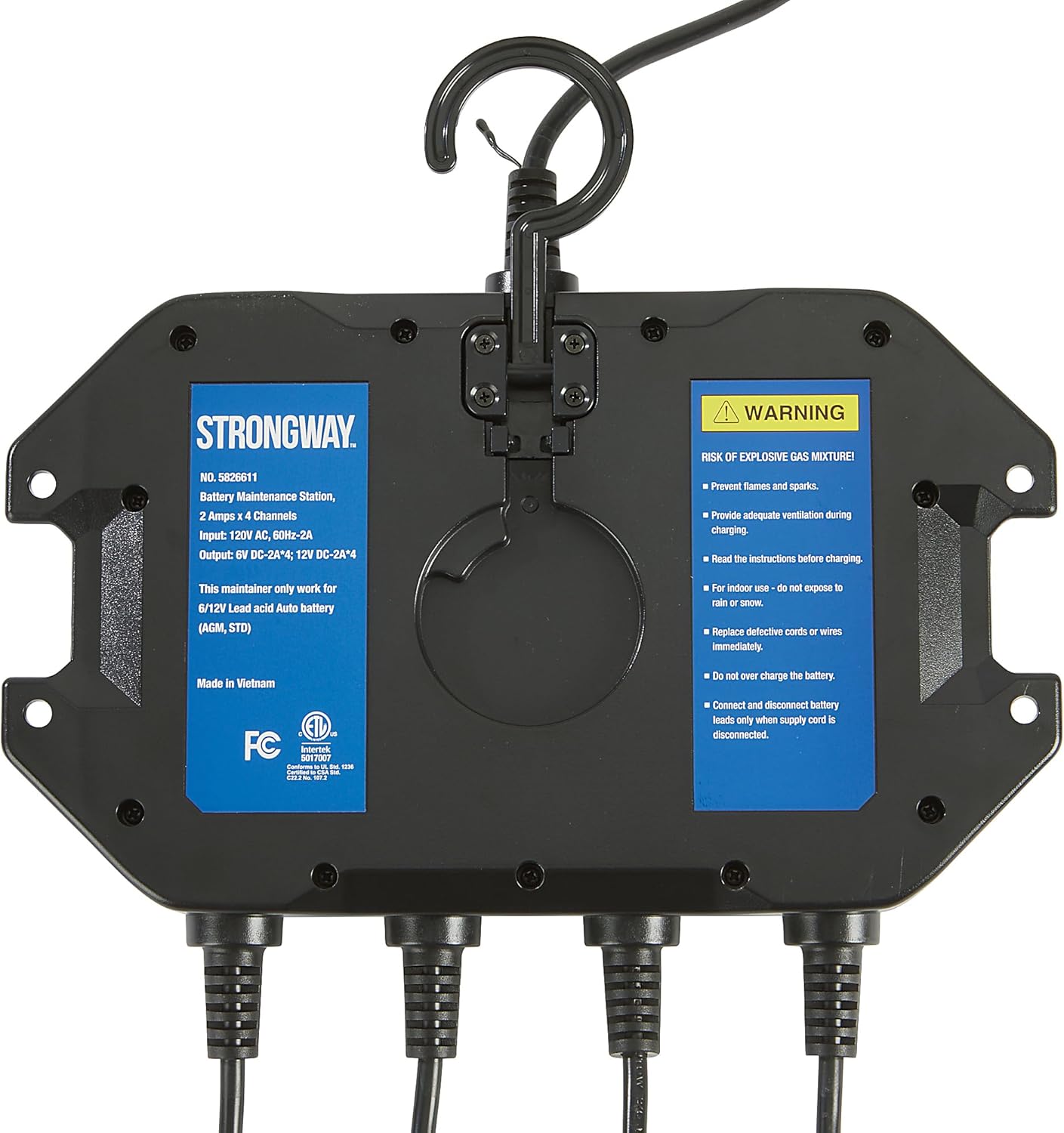
Image 3: The Strongway 4-Bank Smart Charger displayed with its complete set of accessories, including various connection options for different battery types.
3. Seti
- Tatalaina: Carefully remove the charger and all accessories from the packaging. Inspect for any damage.
- Fa'apipi'i (Filifili): The charger can be permanently mounted using the integrated mounting brackets. Ensure the mounting surface is stable and allows for adequate ventilation around the unit.
- Feso'ota'i le Malosi AC: Plug the AC power cord into a standard 120 Volt AC outlet. The charger will power on.
- Connect Battery Leads: Select the appropriate battery leads (heavy-duty clamps or O-ring terminals) for your battery type. Connect the red (+) clamp/terminal to the positive battery post and the black (-) clamp/terminal to the negative battery post. Ensure a secure connection.
- Connect Leads to Charger: Plug the quick connector end of the battery leads into one of the four independent charging banks on the charger. Repeat for additional batteries.

Image 4: The charger is shown mounted and actively charging multiple batteries, demonstrating a typical setup.
4. Fa'atonuga o Galuega
Each of the four charging banks operates independently. Follow these steps for each battery you wish to charge:
- Malosiaga: Ensure the charger is plugged into an AC outlet. The power indicator will illuminate.
- Select Battery Type and Voltage: For each connected battery, press the 'MODE' button on the corresponding bank to cycle through the available charging modes:
- 6V: For 6-volt lead-acid batteries.
- 12V STD: For 12-volt standard lead-acid batteries.
- 12V AGM: For 12-volt Absorbed Glass Mat batteries.
- 12V GEL: For 12-volt Gel Cell batteries.
- 12V LITHIUM: For 12-volt Lithium-Ion batteries.
- Amata Totogi: Once the correct mode is selected, the charger will automatically begin the 9-stage charging process. The charging status indicators will show the progress.
- Mata'ituina Tulaga Tu'uaiga: Each bank has a series of indicator lights:
- Su'e: Indicates reverse polarity connection. Correct the connection immediately.
- Fa'aletonu: Indicates a charging fault or an issue with the battery.
- Leaga: Indicates a severely damaged or unchargeable battery.
- Alualu i luma le totogi: Multiple lights indicate the current charge level.
- Atoa: Indicates the battery is fully charged and the charger has entered float-mode.
- Taofi le Totogi: To stop charging a specific battery, disconnect the battery leads from the battery posts first, then unplug the quick connector from the charger bank.
5. Charging Modes and Technology
The Strongway Smart Charger utilizes advanced technology to ensure efficient and safe charging:
- 9-Stage Precision Charging: This comprehensive charging algorithm optimizes battery performance and extends its lifespan by carefully managing the charging process through various stages, including desulfation, soft start, bulk charge, absorption, equalization, analysis, recondition, float, and maintenance.
- Lua Voltagu Faigofie: Supports both 6V and 12V batteries, providing versatility for different applications.
- Microprocessor-Controlled: The internal microprocessor automatically adjusts the amperage ma voltage based on the battery's condition, ensuring a safe and efficient charge.
- Float-Mode Monitoring: Once a battery reaches full charge, the charger automatically switches to a maintenance mode, providing a small, continuous charge to keep the battery at optimal levels without overcharging. This is ideal for long-term storage.
6. Tausiga
Regular maintenance ensures the longevity and optimal performance of your charger:
- Fa'amamaina: Disconnect the charger from AC power and all batteries before cleaning. Use a dry cloth to wipe down the exterior. Do not use solvents or abrasive cleaners.
- Su'ega uaea: Periodically inspect all charging cables, clamps, and connectors for any signs of wear, cuts, or damage. Replace any damaged components immediately to prevent hazards.
- Teuina: Store the charger in a cool, dry place when not in use. Ensure cables are neatly coiled to prevent tangling or damage.
7. Faʻafitauli
| Fa'afitauli | Mafuaaga e ono tupu | Fofo |
|---|---|---|
| E le o ola le charger | No AC power; Faulty power cord | Check AC outlet; Inspect power cord for damage. |
| Le ma'a e le'o fa'atauina | Incorrect battery connection; Incorrect mode selected; Battery is severely discharged or damaged | Ensure correct polarity (+ to +, - to -); Select appropriate battery type/voltage; Use a repair mode if available (check manual for specific models) or consult a professional for battery assessment. |
| "Reverse" indicator lit | Feso'ota'iga polarity fesuia'i | Disconnect AC power, then disconnect battery leads. Reconnect with correct polarity. |
| "Fault" or "Bad" indicator lit | Internal charger fault; Battery fault/damage | Disconnect and reconnect the battery. If the fault persists, the battery may be damaged or the charger may require service. |
8. Fa'amatalaga
- Fua o Mea: 10 x 7.4 x 4.1 inisi
- Mea mamafa: 5.2 pauna
- Sao Voltage: 120 Volt AC
- Galuega Faatino Voltage: 6V DC, 12V DC
- Fa'ailoga o lo'o iai nei: 2 Amps per bank (4 banks total)
- Ituaiga maa talafeagai: STD (Standard), AGM (Absorbed Glass Mat), Gel, Lithium (Lead-Acid)
- Ua molia Stage: 9-stagu otometi totogi
- Vaega: Microprocessor-controlled, automatic amperage adjustment, multi-stage charging, float-mode monitoring, waterproof quick connectors.
9. Fa'amaonia ma Lagolago
For warranty information or technical support, please refer to the documentation included with your product or contact Strongway customer service directly. Keep your purchase receipt for warranty claims.